

The Best AI Phone Agent Is Not the Best Mobile Assistant: A Category Test for FoneClaw, Grokbot and Muse
Contents
- The category confusion: why “best AI phone agent” returns assistants
- The category test: observe-plan-act-evaluate on a real interface
- Architecture decides the product: real device versus cloud/virtual workspace
- Three products, three logics: FoneClaw, Grokbot and Muse compared
- The six-question buyer framework
- Common misunderstandings
- Market conclusion: the execution surface is the category
Search “best AI phone agent” and you get a shelf of products that do not belong in the same category: chat assistants that remember your preferences, cloud-hosted virtual phones that run somewhere in a data centre, and tools that claim to operate the handset in your pocket. The market calls all of them agents, then wonders why buyers cannot compare them.
Short answer: they are not interchangeable. Model quality, conversation style and feature count do not settle it. The deciding factor is the execution surface — where the system actually looks and acts. A product that produces an answer beside your workflow and a product that changes state inside your workflow serve different buyers. On that test, FoneClaw, Grokbot and Muse land in different places, and treating them as three options on one axis is the most common mistake in this category.
This article lays out the category test, shows how architecture turns into product consequences, compares the three products on the dimensions that matter, and closes with a six-question framework you can reuse before any agentic mobile purchase.
The category confusion: why “best AI phone agent” returns assistants
Three product families compete for the same search intent.
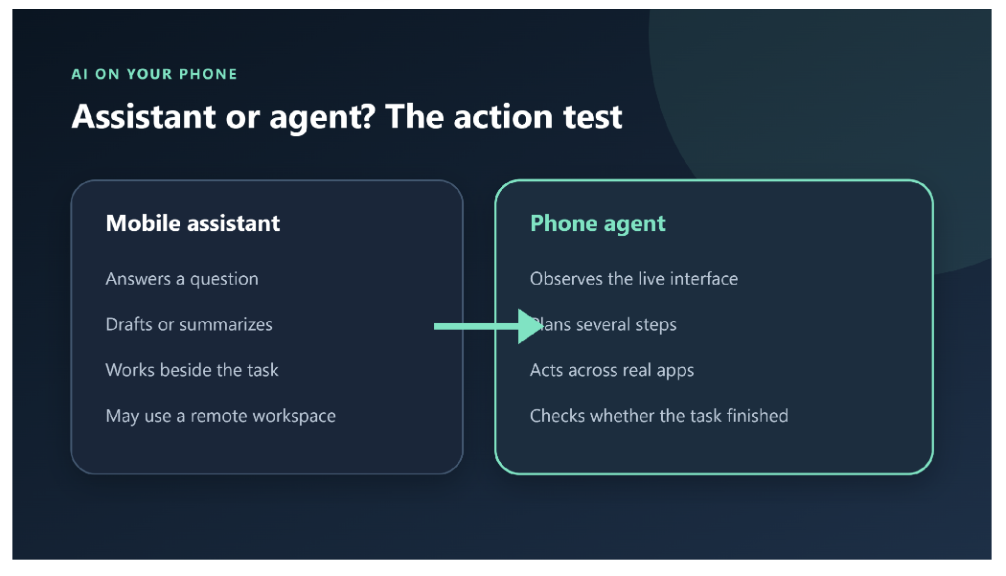
Mobile assistants excel at conversation, memory, summarisation and drafting. You ask, it answers, often with useful context carried over from earlier exchanges. The output is text, audio or a recommendation. Nothing on your device changes unless you change it yourself.
Cloud-hosted virtual phone or VPS-style workspaces give you a remote environment — sometimes presented as a phone-shaped interface — where tasks run independently of your handset. They are useful for remote work, isolated sessions, testing and tasks you want separated from your personal device. The environment they act on is not the phone in your hand.
Phone agents operate the real device: perceiving the live interface, deciding the next step, and carrying out multi-step actions across the apps you already have installed.
The confusion is not accidental. All three can be reached through a chat box, all three get described as “AI that does things for you”, and all three use agent vocabulary. The buyer question behind “best AI phone agent” is specific: which product can act on my actual phone? Answer it with a chat benchmark or a virtual-machine feature list and you buy the wrong thing.
This is the category hygiene problem we raised in AI agent or automation? Separating hype from enterprise value: the label “agent” gets applied wherever autonomy is claimed, and the enterprise value only becomes visible once you ask what the system is autonomous over.
The category test: observe-plan-act-evaluate on a real interface
A phone agent earns the name through a four-stage loop that runs against a live interface:
- Observe. The system reads the current state of the screen — which app is open, which elements are visible, what the last action produced. Observation is not a memory of how a screen usually looks; it is the state in front of it now.
- Plan. It decides the next step toward the goal: tap this field, switch to that app, wait for a page to load, enter a value, verify the result.
- Act. It performs the step on the device — a tap, a swipe, typed input, an app switch — and the app responds as it would to a human user.
- Evaluate. It checks whether the outcome matches the plan. If the screen changed unexpectedly, if a confirmation dialog appeared, if the value did not register, it re-plans rather than continuing blindly.
The loop repeats until the goal is met or a stopping condition is hit.
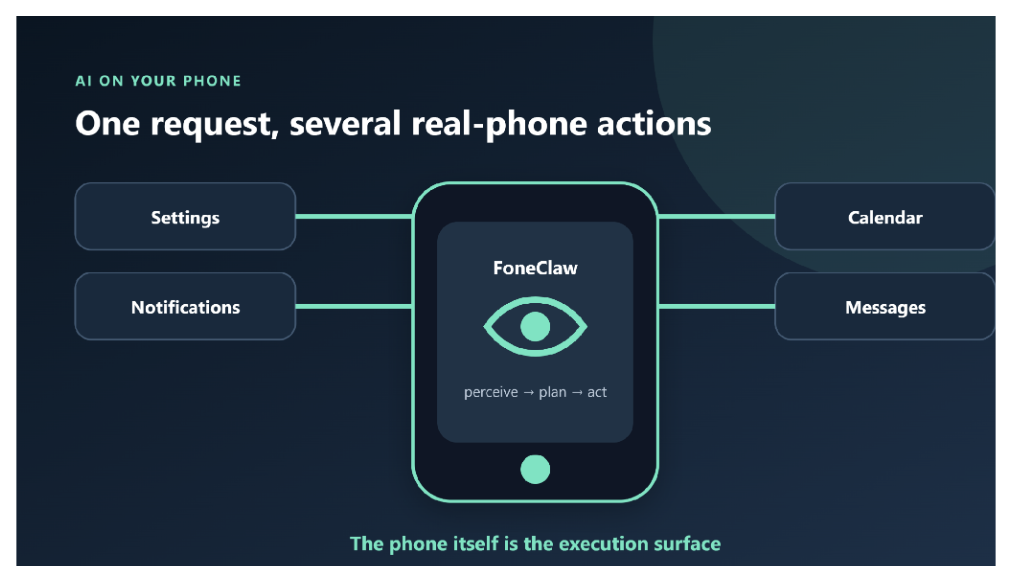
Run the distinction past a product yourself. Ask: summarise my notifications. A good assistant can do this — it reads or receives content and returns prose. Now ask: clear the notifications from these three apps, archive the message from this sender, and reply to the other with the rescheduling text. That is a state change across multiple steps and apps, verified against what the screen actually shows. If the product can only return a summary, it is answering beside the workflow. If it can complete the sequence and show you the result on your device, it is changing state inside the workflow.
That distinction — beside versus inside — is the category line. It is also why the phone is increasingly treated as an AI coworker rather than a chat terminal; see Ways your phone is now an AI coworker for the broader shift this article sits within.
Architecture decides the product: real device versus cloud/virtual workspace
The four-stage loop only produces the outcomes above if the execution surface supports it. Two architectures dominate.
Real-device execution. The agent runs against the user’s actual handset. It can observe the live interface, act within installed apps, and verify results in the same environment where the user will see them. The device is the source of truth.
Cloud-hosted or virtual phone execution. The agent runs against a remote, provisioned environment — a virtual phone instance or VPS-style workspace. It can be powerful, but the environment it observes and acts on is separate from the user’s handset.
Neither architecture is inherently better. They optimise for different things, and the choice cascades into concrete product behaviour.
| Dimension | Real-device agent | Cloud/virtual phone workspace |
| What it observes | The live screen of the user’s phone | The state of a remote instance |
| Where state changes land | Inside the user’s installed apps | Inside the remote environment |
| Cross-app work | Possible across apps already on the device | Limited to what exists and is configured in the instance |
| Approval moments | Naturally surface on the device the user is watching | Often surface in a separate session or console |
| Failure mode | A step fails mid-flow on a screen the user can inspect | A step fails in an environment the user may not be looking at |
| Dependency | Device availability, permissions, OS state | Session availability, remote provisioning |
What each architecture permits and forbids in practice
Real-device execution permits: acting on apps the user has already logged into, completing a task the user can watch and interrupt, and delivering results in the place they are actually needed — the phone itself. It imposes: permission boundaries on the device, dependence on the handset being available and in a usable state, and the need for clear approval points, because an agent acting on your real accounts is acting on your real accounts.
Cloud/virtual execution permits: isolation, reproducibility, running without occupying the user’s handset, and keeping experimental or parallel work away from personal data. It imposes a structural limit: the user’s phone is not the thing being changed. A task completed in a virtual instance does not, by itself, update the app on the handset the user carries. Anything requiring the user’s real sessions, real notifications or real installed apps has to be bridged — and that bridge is exactly where buyers should ask hard questions.
So “it has a phone interface” and “it operates my phone” are not the same claim. A phone-shaped UI in a browser is a control surface for a remote environment, not evidence of device-level agency.
Three products, three logics: FoneClaw, Grokbot and Muse compared
With the category test in place, the three products separate cleanly. They should be evaluated as different tools, not ranked on one leaderboard.
| Dimension | FoneClaw | Grokbot | Muse |
| Execution surface | The user’s real phone | Cloud-hosted / assistant-style environment | Cloud-hosted / assistant-style environment |
| Device context | Live interface of the actual device | Conversation and session context | Conversation and session context |
| Cross-app action | Positioned around multi-step action across installed apps | Stronger on conversation, memory, summaries, remote tasks | Stronger on conversation, memory, summaries, remote tasks |
| Ideal user | Someone who wants tasks completed on the handset itself | Someone who wants a capable conversational assistant or remote workspace | Someone who wants an assistant with memory and remote task handling |
| Trade-offs | Requires device permissions and availability; action on real accounts demands clear approvals | Does not change state inside the user’s handset | Does not change state inside the user’s handset |
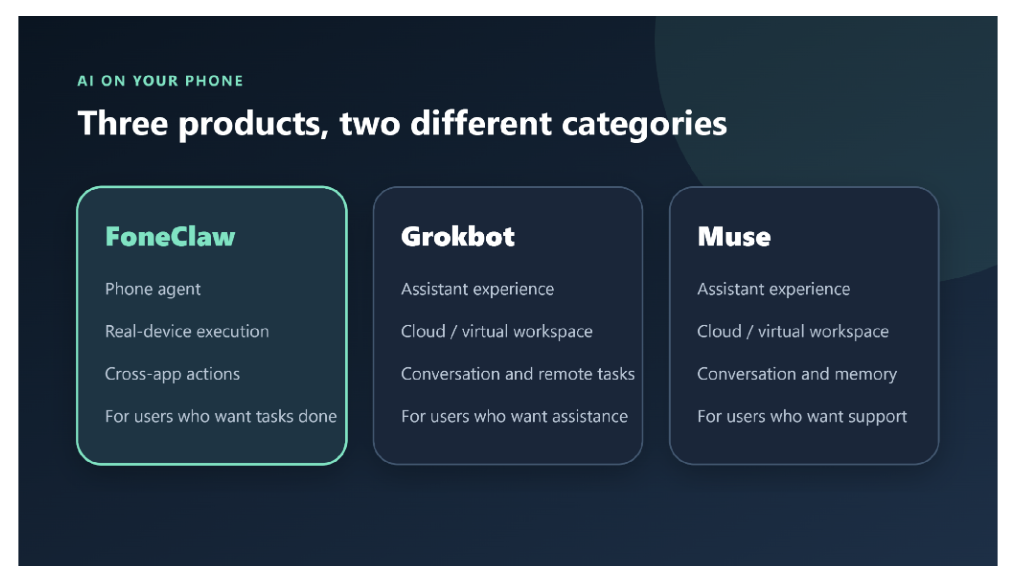
FoneClaw is positioned as a phone agent: it perceives the live interface of the user’s actual phone, decides the next step, and carries out multi-step actions across the user’s real mobile apps. The product logic is execution — observe, plan, act, evaluate, repeat — with the handset as the environment. That is what separates it from a chat product that happens to run on a phone. The product’s own site has the positioning in detail: FoneClaw.
Grokbot and Muse sit closer to mobile assistants or cloud-hosted virtual phone / VPS-style workspaces. Their strengths are the strengths of that family: conversation quality, memory across sessions, summarisation, drafting, and tasks you want handled remotely or in an isolated environment. Those are real capabilities with real users. Their product logic does not include operating the user’s actual handset, so a buyer who needs state changed inside their installed apps will hit a ceiling no amount of chat polish removes.
Put plainly: FoneClaw competes on execution on the real device; Grokbot and Muse compete on conversational usefulness and remote environment convenience. Buying either family for the other’s strength is how teams end up disappointed.
The six-question buyer framework
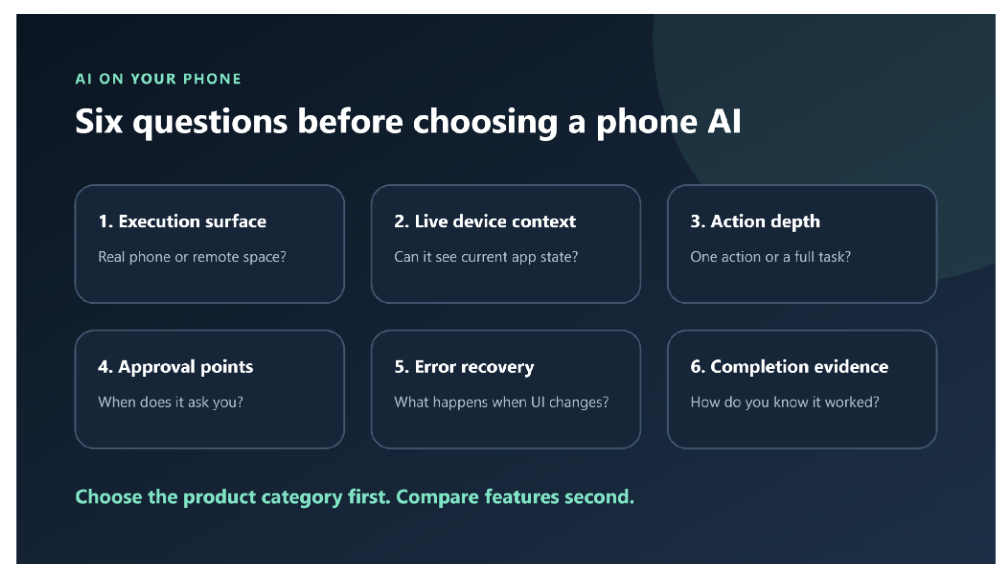
Run every agentic mobile product through these six questions before you commit. The answers predict fit far better than a feature list.
- What is the execution surface? Real device, or a remote/virtual environment? If the answer is a browser-hosted instance, be precise with yourself: your handset is not being operated.
- What live context can it actually see? Can it read the current screen of the device the user is on, or only conversation history and whatever has been fed into the session?
- How deep do the actions go? Single-step replies and drafts are assistant behaviour. Multi-step sequences that cross apps, verify outcomes and continue after an intermediate result are agent behaviour. Ask for the exact boundary, not the marketing adjective.
- Where do approval points sit? For actions on a real phone — payments, messages, account changes — confirm where confirmation appears and whether the user can see and interrupt the step. An approval that lives in a console the user is not watching is a weaker control than one on the device itself.
- What happens when a step fails? Does the loop re-plan from the new screen state, pause and ask, or continue regardless? Failure recovery is the difference between an agent and a script that assumed the world would cooperate.
- How is the run auditable? Can you see what was observed, what was decided and what was executed? If a system acts on your real apps, the ability to reconstruct the run is part of the product, not optional overhead.
Score the answers against your actual task, not an idealised one. A buyer whose need is summaries and remote sessions will find questions 3 and 5 largely irrelevant; a buyer whose need is “handle this on my phone while I am in a meeting” will find questions 1 and 3 decisive.
Common misunderstandings
“A virtual phone is the same as control of my handset.” It is not. It is a separate environment that may resemble a phone. State completed there does not automatically exist on the device you carry.
“Better chat means deeper automation.” Fluency and execution are different axes. A product can be excellent at conversation and structurally incapable of changing state inside your apps, and vice versa. Judge the loop, not the prose.
“These three products compete on one list.” They do not. Placing FoneClaw, Grokbot and Muse in a single ranking forces a comparison on terrain that only one of them is built for. Compare within a category first, then compare categories against your task.
“Any product with an agent label performs the observe-plan-act-evaluate loop.” The label is applied generously. If a product cannot show you what it observed, what it decided and what it did on a live interface, it has not demonstrated the loop.
Market conclusion: the execution surface is the category
The phrase “best AI phone agent” will keep returning assistants, chat products and cloud-hosted virtual phones for as long as the market treats them as one shelf. They are not one shelf.
The category line is the execution surface. A product that answers beside your workflow is a mobile assistant or a remote workspace — valuable, and the right choice for conversation, memory, summaries and isolated remote tasks. A product that observes the live interface of your actual phone, plans the next step, acts across your installed apps and evaluates the result is a phone agent. Grokbot and Muse belong to the first family; FoneClaw is positioned as the second.
The claim is narrower than a ranking: the two families solve different problems, and buyers lose money and time when they buy across the line. If your task ends with a useful answer, use an assistant. If your task ends with a changed state on the phone in your hand, you need real-device execution, and that is the honest content of what “phone agent” should mean.
Start with the six questions, name your execution surface first, and evaluate everything else second.

I am Erika Balla, a technology journalist and content specialist with over 5 years of experience covering advancements in AI, software development, and digital innovation. With a foundation in graphic design and a strong focus on research-driven writing, I create accurate, accessible, and engaging articles that break down complex technical concepts and highlight their real-world impact.
More from Balla
See all AI & Technology
Best AI Customer Service Software for Ecommerce: Top 12 in 2026
 AI Business Strategy
How Industrial Companies Should Choose a Revenue Operations Consultant: A 2026 Comparison of Six Firms
 AI & Technology
Website Chatbots for Auto Repair Shops
 Automation
Beyond Automation: Why Human Creativity Still Matters in Modern Marketing
Recommended for you
More stories AI & Technology
Your Underwriting Agent is Ready to Act, Your Risk Architecture Isn’t
 AI & Technology
The next AI frontier in insurance is not automation – it is orchestration
 Data
The commercial cost of AI skills gaps: UK business leaders report lost opportunities
 AI & Technology
Cycode Expands UK Presence as New ARR Grows 2.4x Year Over Year
 AI & Technology
AI could move healthcare from reacting to disease to preventing it
 AI & Technology