



The best AI lyric video maker in 2026 is Neural Frames. It analyses the song, times each line to the vocal and can render the words into the generated scenes themselves, with an optional lip-synced performer and 4K export. Rotor Videos is the fastest template option, Freebeat the cheapest karaoke-style clip and Solmi a budget choice with a singer on screen. CapCut, Runway and Kling suit people who want to build the video by hand.
Three ways AI tools make a lyric video
Template tools place timed captions over stock footage or a backdrop. They are quick and cheap, but the look is shared with every other user of the same template.
Performer tools generate a singer who lip-syncs the vocal, with the lyrics as captions. Generative tools go further and build the scenes around the song, and the most capable can write the lyrics into the image itself. That approach looks least like a template.
How we compared them
We looked at seven tools on four questions: does it time the words to the vocal on its own, how far can the visuals be styled, can it make a vertical version for TikTok and Reels, and what does a full-length video cost? Features and prices come from each tool’s official site as of 26 and 27 October 2026. “Not stated” means the site doesn’t say.
The comparison
| # | Tool | Best for | How the lyrics appear | Times words to the vocal | Lip-synced performer | Vertical version | Max export | Free option | Price from |
| 1 | Neural Frames | Lyric videos that look directed | As captions, or rendered into generated scenes | Yes | Yes, up to 5 consistent characters | Yes, posts to TikTok, Instagram, YouTube | 4K | Yes | $26/mo billed annually ($39 monthly) |
| 2 | Rotor Videos | A presentable lyric video in minutes | Templates over stock footage or your clips | Not stated | No | Yes | Not stated | Free previews | $9.99/mo or per download |
| 3 | Freebeat | Cheapest karaoke-style clip | Lyric and karaoke modes with an avatar | Yes | Yes | Yes | 1080p (720p on Basic and Pro) | Yes | $4.99/week |
| 4 | Solmi | A singer on screen on a budget | Lyric-synced video with a performer | Yes | Yes | Not stated | 1080p | 100 credits, then 10 a day | $35/mo |
| 5 | CapCut | Placing every word by hand | Auto-captions and caption templates over your footage | Auto-captions, fixed by hand | No | Yes | Varies by plan | Yes | Free; Pro tier |
| 6 | Runway | Cinematic backgrounds to caption | No lyric feature; text added in an editor | No | Not stated | No | 4K via upscale | 125 one-time credits | $12/mo billed annually |
| 7 | Kling AI | Performance clips to caption | No lyric feature; text added in an editor | No | Yes, in clips up to 30 s | No | Not stated | Limited free credits | Priced in-app |
1. Neural Frames: best overall
Best for: artists who want the lyric video to be the main visual of a release, not a placeholder.
How it handles lyrics: Autopilot separates the track into eight stems, maps the verses, choruses and bridge, and cuts a full-length video to that structure, with the words timed to the vocal. The lyrics can run as captions or be rendered into the scene itself, because each clip’s image prompt carries the line sung in it. In the project below, one line glows inside a smoky glass pillar and the next is etched into another.
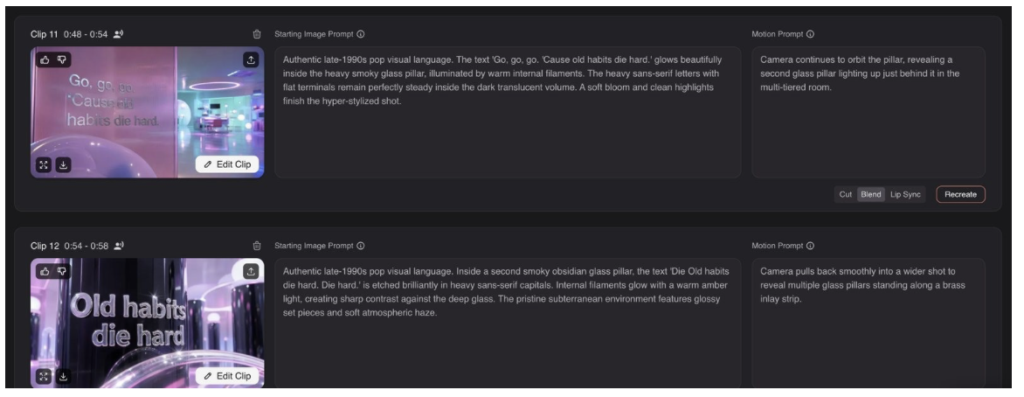
Autopilot’s clip editor: each clip carries its lyric line in the image prompt, with its own timing, motion prompt and cut, blend or lip-sync setting. Image: Neural Frames.
A performer is optional. Up to five characters stay consistent across the video, lip-sync the vocal and carry over to the next release. A chat-based editor takes notes in plain language, every prompt and clip length stays editable, and the platform runs leading video models, Seedance, Kling and Hailuo 3 Max among them. Short-Form Studio then turns the same song into vertical versions and posts them to TikTok, Instagram and YouTube.
Pricing: there is a free option to try. Neural Knight costs $26 a month billed annually or $39 monthly (2,400 credits, 1080p), Neural Ninja $66 or $99 (7,200 credits, 4K, all models) and Neural Nirvana $199 or $299. Failed renders aren’t charged, unused credits roll over up to three months’ worth, and the artist keeps full commercial rights.
Limits: long songs on premium models use more credits, 4K needs Ninja or above, and it runs in the browser rather than as a phone app.
2. Rotor Videos: the fastest template
Best for: a presentable lyric video in minutes.
How it handles lyrics: Rotor builds lyric videos from templates, using stock footage or the artist’s own clips. It also makes Spotify Canvas loops and album-art videos.
Pricing: sign-up and previews are free; each download costs one to four credits (packs from $9.99), or an artist’s unlimited plan costs $9.99 a month ($119.88 billed annually).
Limits: with stock footage the look is shared with other users, and each subscription covers one artist.
3. Freebeat: the cheapest karaoke-style clip
Best for: a quick lyric clip for social when the budget is tight.
How it handles lyrics: lyric and karaoke modes sit alongside its music and dance videos, with a consistent avatar and lip-sync, for songs up to about six minutes. It works from an uploaded or linked track, in the browser or on mobile.
Pricing: the homepage lists a free plan; Basic is $4.99 a week, with monthly plans listed from $9.99.
Limits: 720p on the two cheapest plans and 1080p at most.
4. Solmi: a singer on a budget
Best for: a lyric video with a lip-synced singer for under $40 a month.
How it handles lyrics: Solmi turns an uploaded song into a lyric- or beat-synced video with a lip-synced performer. It also offers AI songs, voice covers and stem splitting.
Pricing: new accounts get 100 credits, enough for one 20-second watermarked preview at 480p, then 10 credits a day; the Plus plan is $35 a month.
Limits: output tops out at 1080p, renders take three to ten minutes, and songs must be uploaded as MP3 or WAV rather than linked.
5. CapCut: captions by hand
Best for: creators who want to place and style every word themselves.
How it handles lyrics: CapCut is an editor rather than a generator. It auto-captions the track and offers caption templates on mobile, desktop and the web, but the timing and styling of each line usually need fixing by hand, over footage you already have.
Pricing: free, with a paid Pro tier.
Limits: it doesn’t generate visuals from a song.
6. Runway and Kling: backgrounds you caption yourself
Best for: artists who want cinematic or performance shots and are happy to add the words in an editor.
How they handle lyrics: neither has a lyric feature or takes a song as input. Runway’s Gen-4.5 generates clips from text or images with 4K upscaling, and Kling generates up to 30 seconds per clip with character and lip-sync tools. The clips are then captioned and cut to the beat in an editor such as CapCut.
Pricing: Runway gives 125 one-time credits, then Standard is $12 a month billed annually, with Gen-4.5 using 60 credits per five seconds. Kling offers limited free credits, with memberships priced in-app.
Limits: there is no song analysis, so timing the words and the cuts is manual work.
FAQ
What is the best AI lyric video maker in 2026?
Neural Frames, for most artists. It times the words to the vocal, can render them into generated scenes rather than over stock footage, and exports in 4K with vertical versions from the same project.
Can AI sync lyrics to a song automatically?
Yes. Neural Frames, Freebeat and Solmi analyse the vocal and place the words; CapCut auto-captions, but the timing usually needs correcting by hand.
Can I make a vertical lyric video for TikTok or Reels?
Yes. Neural Frames’ Short-Form Studio cuts vertical versions from the same song and posts them directly, and Freebeat, Rotor and CapCut also export vertical video.
How much does an AI lyric video cost?
From $4.99 a week on Freebeat or $9.99 for a single Rotor download, to $26 a month on Neural Frames’ annual plan, which covers full-length lyric videos, music videos and the vertical cuts.
Who owns the finished video?
On Neural Frames, the artist does, with full commercial rights. Check each tool’s terms before releasing a video commercially, especially on free plans.
