

Wikis AI Review: Get Multiple Answers in One Place
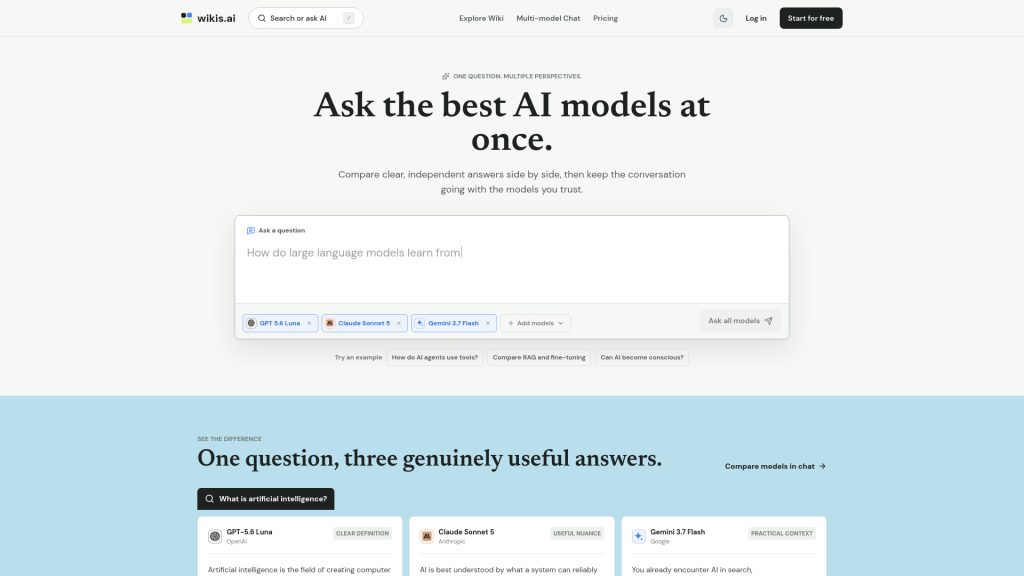
Have you ever wished you could ask multiple smart assistants a question and see all their answers side by side? Wikis AI offers a fascinating way to compare insights from various leading AI models in one place. In this review, we will dive into the features of Wikis AI, guide you on how to use the platform effectively, and highlight what makes it such a unique tool for anyone curious about AI.
Key Takeaways
- Understanding the main points and features of Wikis AI is essential for efficient usage.
- Wikis AI offers collaborative tools that enhance learning and information sharing.
- Following the provided tutorial can help you get started quickly and effectively.
- In conclusion, leveraging Wikis AI can improve organization and knowledge management skills.
Features of Wikis AI
Wikis AI stands out because it makes understanding artificial intelligence easy for everyone. It lets you compare answers from several smart AI models side by side. This means you can see how different AI systems think about the same question. Wikis AI helps you figure out which answer works best for you and lets you keep asking more questions. It’s a great way to learn about topics like AGI, AI chatbots, and picking the best AI app in a simple, clear way.
- Multi-model answers: With Wikis AI, you can see responses from different AI models like GPT, Claude, and Gemini at the same time.
- Easy comparison: Answers from each AI model are shown in a clear grid, making it simple to compare their thoughts.
- Independent voices: Each model shares its own view, helping you understand different sides of a question.
- Useful guides: Editorial guides help you get started on popular topics such as AGI, the best AI apps, or AI chatbots.
- Ask follow-up questions: After viewing answers, you can continue the conversation and dig deeper into your topic.
For example, if you want to know more about AGI, you can find a full page explaining what artificial general intelligence means, how it’s different from other AI, and what abilities it could have. If you’re curious about AI chatbots, Wikis AI offers clear guides on how they work, where they are used, and why they’re important. You can even read advice on how to choose the best AI app for your needs, looking at things like features, reliability, and privacy.
Wikis AI (AI Wiki) is designed as a powerful tool for learning and comparing. Its simple design helps users—from beginners to experts—get clear answers fast. New guides are published often, so you can always find the latest information about artificial intelligence.
How to Use Wikis AI
Getting started with Wikis AI is easy. You can use it to ask questions and get answers from different AI models at once. With this tool, you’ll see multiple points of view on one topic, making it simpler to understand tough ideas or compare facts. Here’s a simple, step-by-step guide to help you use Wikis AI and get the most out of it.
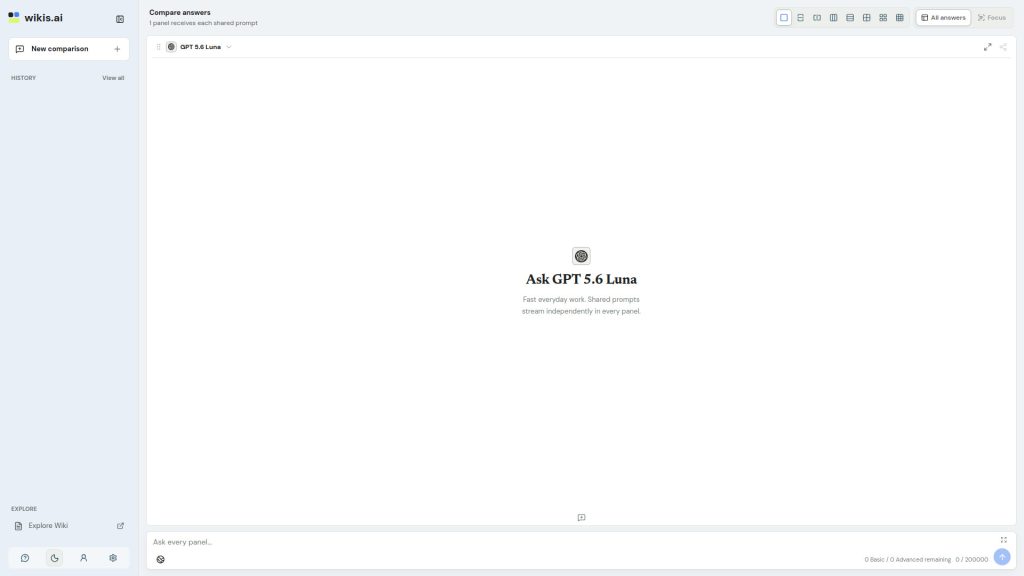
- Go to the Wikis AI Chat page. This is where you’ll be able to ask your main question.
- Type your question into the search bar. For example, you could ask, “How do large language models learn from data?”
- Choose which AI models you want to answer your question. You can select from options like GPT 5.6 Luna, Claude Sonnet 5, or Gemini 3.7 Flash.
- Click the button to send your question to all chosen models at once.
- Read the side-by-side answers. Each model’s answer will appear in a stable grid, so you can compare the different explanations easily.
- If you need more details, you can ask follow-up questions right from any answer. Just pick the answer you like, and keep the conversation going!
The best part of Wikis AI is that you don’t need to jump between different websites or chats. Everything you need is right there on one screen. Comparing the answers helps you spot where models agree or disagree, so you know what to trust and what to double-check.
If you want to see when artificial intelligence became popular or learn more about other AI topics, you can check out guides like When Did AI Become Popular? on their site. This way, you can explore even more using the same simple system.
 Conclusion
To sum up, the AI Wiki on Wikis.ai gives everyone – even kids and teens – a simple way to explore artificial intelligence. It lets you ask one question and see different answers from smart AI models side by side. This helps you understand big ideas like what AI is, how it works, and what the latest trends are in the world of technology. By comparing perspectives, you can get a clearer picture and feel confident in what you learn. The platform also encourages curiosity, letting you ask follow-up questions and dive deeper into the information. With Wikis AI, learning about AI is easier, safer, and more reliable, because you see many views instead of just one. The site continues to update new guides and questions, so users always have fresh knowledge at their fingertips.

I am Erika Balla, a technology journalist and content specialist with over 5 years of experience covering advancements in AI, software development, and digital innovation. With a foundation in graphic design and a strong focus on research-driven writing, I create accurate, accessible, and engaging articles that break down complex technical concepts and highlight their real-world impact.
More from Balla
See all AI Business Strategy
How Industrial Companies Should Choose a Revenue Operations Consultant: A 2026 Comparison of Six Firms
 AI & Technology
Website Chatbots for Auto Repair Shops
 Automation
Beyond Automation: Why Human Creativity Still Matters in Modern Marketing
 Data
From Pipelines to Products: How Himant Goyal Is Redefining Enterprise Data Strategy in the Age of AI
Recommended for you
More stories Future of AI
Cysic CEO Says Paying for an AI Model Doesn’t Prove Your Host Ran It
 AI & Technology
From self-driving excavators to AI leasing agents, proptech’s AI moment has arrived
 AI & Technology
AI literacy shouldn’t begin in the workplace. It should begin in primary school.
 Data
The Data Centre Is Becoming a Product
 AI & Technology
Too often, AI narrows rather than widens access. Here’s how the tech industry can fix it
 AI & Technology