
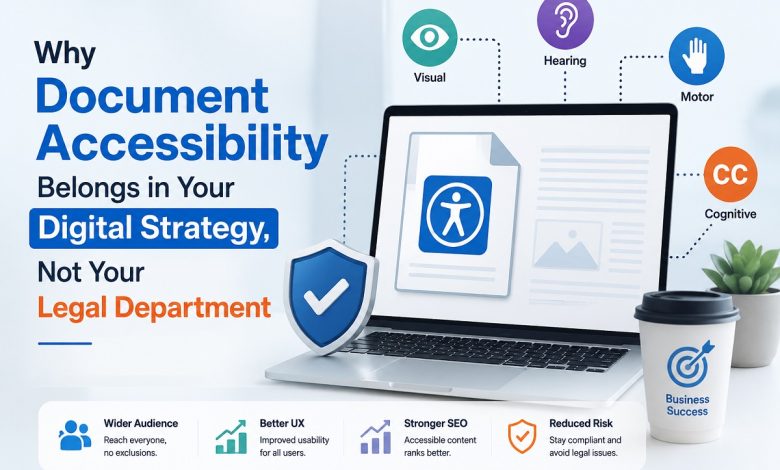
Most large organizations meet document accessibility in the same way. A legal notice arrives; a compliance officer forwards it, and a scramble begins to fix a handful of high-profile PDFs. The work is filed under risk. Once the immediate threat passes, attention moves on, and the next batch of inaccessible files quietly piles up.
That reflex misreads what accessible documents actually do. Treating PDF accessibility services as a legal expense hides the real return: a wider audience, stronger search performance, higher customer trust, and content that works for everyone who opens it. Accessibility belongs inside the digital strategy that shapes your products, campaigns, and customer communications, not in a folder of settled complaints.
The shift is less about new tools than about where responsibility sits. When accessibility moves out of the legal department and into product, marketing, and content operations, its value becomes visible in the metrics those teams already track.
How the Compliance Reflex Quietly Limits Your Reach
Frame accessibility is a legal problem, and you accept a hidden ceiling on your audience. An estimated 1.3 billion people, roughly 16% of the global population, experience significant disability. Many of them read PDFs with screen readers, screen magnifiers, or keyboard-only navigation. A statement, a product guide, or an application form that ignores those tools simply fail to reach a large, willing market. For a bank, an insurer, or a public agency, that market is not a niche; it is a sixth of every customer base.
The ceiling reaches further than permanent disability suggests. A commuter reading a benefits summary on a phone in bright sunlight, an older customer with declining vision, and a warehouse worker navigating a form with a broken mouse all rely on the same structure that assistive technology depends on. Situational and age-related limitations touch almost everyone eventually, and populations in most developed markets are getting older, not younger. Accessibility work done for one group tends to help many others who never identify as disabled.
Compliance framing also distorts priorities. Legal attention concentrates on the few documents most likely to draw a complaint, while the thousands of everyday files that carry the real customer relationship go untouched. A strategic view flips that order. It starts with the document’s customers open most, ranks them by traffic and business value, and treats reach rather than litigation risk as the number worth improving. The difference is not effort but direction: one approach waits for a problem to surface, while the other decides where attention pays off before anyone complains.
What Accessible Documents Return in UX, Search, and Trust
An accessible PDF is a well-structured PDF, and structure pays back in ways a legal checklist never counts. Tagged headings, a defined reading order, and described images give every reader a document that can be navigated, searched, and understood quickly. The person using a screen reader gets a usable file. Everyone else gets a cleaner one.
Search engines read that same structure. Tags expose headings, logical order, and alternative text that crawlers use to interpret a document, so accessible files tend to surface more accurately for the queries they answer. Content teams that publish white papers, manuals, and reports as PDFs gain discoverability from work often mislabeled as a pure accessibility cost.
Usability gains show up on screens of every size. A tagged document reflows and responds to a reader’s font and contrast settings far better than a flat page image, which matters when a growing share of PDFs opens first on a phone. When a mortgage application or a claims form is genuinely operable by keyboard and readable at a larger size, more people finish it without abandoning it halfway or calling for help. Every completed form is a conversion, and every avoided support call is a saved cost, so the case accessible documents read as cleanly on a finance spreadsheet as it does on a compliance report.
Trust is the quieter return. When a customer with a disability completes a form without calling support or reading a policy without asking someone to interpret it, the brand earns credibility that marketing budgets struggle to buy. Reduced legal exposure still arrives, but as a byproduct of good product decisions rather than the goal. Those reframing matters, because teams optimize for what they measure, and reach and usability motivate far more durable work than fear of a filing.
Standards That Read Better as Product Requirements
The rules that govern accessible documents are usually quoted in the language of obligation. Read them instead as a specification for a good document, and they stop feeling hurdles.
The Web Content Accessibility Guidelines (WCAG) 2.2 define what perceivable, operable, and understandable content looks like, and they apply to PDFs as much as to web pages. PDF/Universal Accessibility (PDF/UA), published as ISO 14289, translates those principles into concrete requirements for tagged PDFs: how headings, tables, links, and form fields should be marked so assistive technology can interpret them.
Public-sector and regional mandates add force without changing the substance. Section 508 governs federal materials in the United States, the Americans with Disabilities Act (ADA) shapes private-sector expectations, and in Europe the EN 301 549 standard and the European Accessibility Act extend similar requirements across member states. Each point toward the same destination: documents that carry their meaning in a machine-readable structure. A team that builds PDF/UA satisfies the standards almost incidentally, because the specification and the law describe the same well-made file.
Reading the standards as requirements also changes when the work happens. A legal reading treats them as a test applied to finished documents, usually late and under pressure. A product reading treats them as acceptance criteria written into the brief, checked while a template is still being designed. The second approach costs less, because fixing structure in a source file takes minutes, while retrofitting it into a published PDF can take hours per document. Standards stop being a gate that content must survive and become part of the definition of done.
Inside PDF Accessibility Services: What Remediation Involves
Turning an inaccessible PDF into a compliant one is detailed work and understanding it clarifies why professional PDF remediation services exist as a discipline rather than a button. A specialist works through several layers of a document, verifying each against how assistive technology will read it.
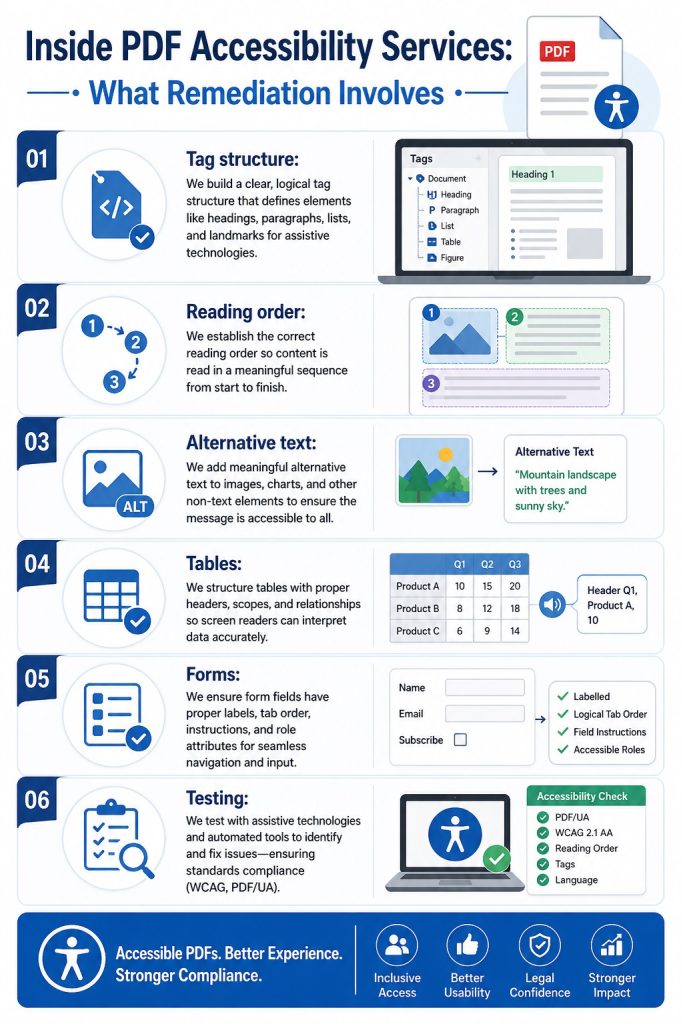
- Tag structure: Adding the underlying tags that identify headings, paragraphs, lists, and other elements so a screen reader can announce them correctly.
- Reading order: Sequencing content so it is spoken in the order a sighted reader would follow, not the order objects happen to sit on the page.
- Alternative text: Writing concise descriptions for images, charts, and logos that convey the information, not just a file name.
- Tables: Marking header rows and columns so data cells map to their labels, keeping a numeric table intelligible when read aloud.
- Forms: Labeling every field, setting a logical tab order, and describing required inputs so a form can be completed without a mouse.
- Testing: Validating the result with automated checkers and, critically, manual review using real assistive technology, since automated tools catch only part of what matters.
That final step separates thorough work from a passing scan. Automated validators flag missing tags and absent alt text, yet they cannot judge whether a reading order makes sense or whether an image description is useful. A chart described as “chart” passes a tag check and tells a blind reader nothing. A capable PDF accessibility company pairs tooling with human review, because a document can clear every automated check and still confuse the person it was meant to serve.
Document type shapes the effort involved. A plain text report is quick once its headings are tagged. A statement with columns, totals, and repeating layouts demands careful table work, so figures stay tied to their labels. An interactive form is the hardest case, since every field needs a label, a description, and a tab of order that matches the visual flow. Pricing and planning a remediation program without accounting for that mix leads to timelines that slip, which is why experienced providers scope by document type rather than by page count alone.
Scaling Document Accessibility Across Thousands of Files
One remediated brochure proves the concept. An enterprise back catalog of statements, contracts, manuals, and marketing collateral is a different order of problem, and this is where strategy earns its place. A legal response handles documents with one complaint at a time. An operational program handles them at volume.
Scaling starts with a triage. High-traffic and high-risk documents come first, ranked by how many people open them and how much a failure would cost in service calls or lost conversions. Automation then does the heavy lifting on well-templated files, while human specialists concentrate on complex layouts, tables, and forms that tools handle poorly. Mature document accessibility services combine both, so cost per file falls as volume rises without letting quality slip.
The most efficient fix happens upstream. When source templates in the authoring tools carry correct structure from the start, most new documents export as accessible by default, and remediation shrinks exceptions. A partner worth engaging looks past the current backlog to the templates and export settings that generate it, so the same problems stop reappearing each quarter.
Volume also demands tracking, not just production. A program that remediates files without recording their status ends up reworking documents nobody flagged as done. A simple inventory, listing each document, its accessibility state, its owner, and the date it was last checked, turns a vague obligation into a measurable queue. Progress becomes a percentage a leader can report, and the backlog stops feeling bottomless because its size is finally known.
Governance That Keeps Documents Accessible
Accessibility is a state where a document can be lost. A compliant PDF replaced by an untagged update quietly reopens the gap that remediation closed, which is why one-time projects rarely hold. Governance is what makes the gains permanent.
Durable programs assign clear ownership, so a named team, rather than the legal department, answers for accessible output. They fold accessibility checks into the content lifecycle, treating a failed check like any other release blocker before a file is published. They train the people who create documents, since a marketer who tags headings correctly prevents work that a specialist would otherwise repeat. Procurement plays a part too: requiring accessibility in the tools and content the organization buys stops inaccessible files from entering through the back door.
Metrics keep the discipline honest. Tracking the share of published documents that pass accessibility checks, the average time to remediate a flagged file, and the volume of accessibility-related support requests gives leaders a read on whether the program is gaining or losing ground. Those numbers also make the business case renew itself: when the accessible share climbs and support calls fall, the investment defends its own budget without another legal reminder.
Handled this way, accessibility stops being a recurring emergency and becomes a standing property of how the organization publishes, the way security or brand consistency already are.
Document accessibility earns its place in strategy because the same structure that serves a screen reader also widens reach, sharpens search visibility, and signals a brand worth trusting. Legal safety is real, yet it is the smallest part of the return and the weakest reason to act. Organizations that move the work out of the compliance queue and into product and content operations turn a defensive cost into an audience advantage. Investing in PDF accessibility services, backed by governance that keeps files accessible over time, positions your content for a web where inclusive, machine-readable documents are becoming the baseline that customers and search engines quietly expect.