

The next test for interview AI is whether its answers are yours
Dmitri from MeetAssist explains why fuller preparation and visible fact checks matter when AI suggests what a candidate should say.
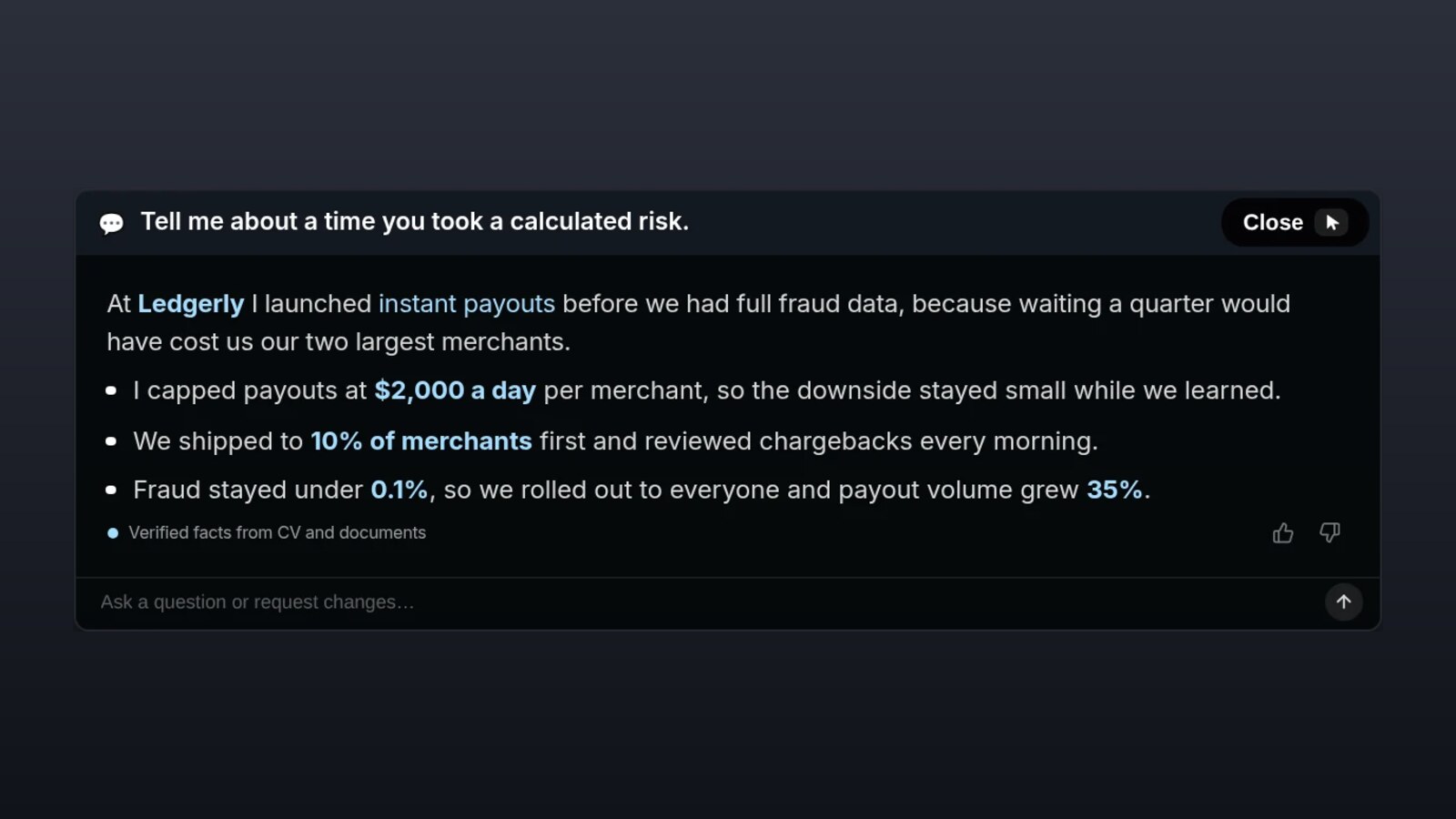
MeetAssist’s collection contains 31,098 questions from 4,824 real job interviews. For Full Stack Developer roles in that collection, the most frequently asked question is “How do you use AI in your day-to-day software development, and which tools do you use?”
That finding should not be treated as a verdict on the whole hiring market. It does, however, sharpen a useful distinction: explaining your use of AI is different from asking AI to explain your experience for you.
The question worth asking of an interview assistant is whether you can stand behind what it suggests. Fluent wording is not enough if the story is not yours.
Verified facts makes documentary support visible
MeetAssist’s AI interview assistant retrieves matching facts from your résumé and job description before answering. Relevant documents and stories in its Answer Bank supply further background.
Verified facts then checks the facts in the answer against your CV and documents. While that check runs, “Verifying facts” appears in a small line under the answer. Facts found in your papers turn blue in the answer.
The line also identifies where those facts were found, with “Verified facts from CV” as one example. If the answer states facts that appear in none of your papers, the line displays “Unverified facts” instead. The same checking works in other languages and on your phone.
That makes a specific distinction visible while you decide what to say. Blue facts have support in your material, while the warning tells you there is something to check before repeating it.
You can read the answer without fear of saying something untrue about yourself because you see at a glance which facts are really yours. You also see which facts to check before saying them.
MCP brings your existing preparation into MeetAssist
Verification is only half the problem. An assistant also needs enough background to suggest something worth saying, and a résumé may leave out the explanation developed during preparation.
MeetAssist MCP works with Claude and ChatGPT through the Model Context Protocol. MCP is an open standard that lets an AI application work with other products.
Connect Claude or ChatGPT once, then send one message to bring your target job, résumé, stories, prepared answers, answer instructions and settings into MeetAssist from the background your AI already knows. Each step appears in MeetAssist as it happens.
The point is not simply to save some typing. Live answers draw on your whole background, so they come out much fuller. Verified facts then shows which facts your documents support.
Control remains visible in the dashboard, where every action is listed. A change can be undone with one click, and the connection cannot see or change your payments. You can disconnect it at any time.
Test the handover before relying on it live
Before the interview, Claude or ChatGPT can ask MeetAssist real test questions and improve your stories until the answers sound like you. Use that opportunity to inspect both the substance of the response and its factual support.
After the interview, your AI can read the transcript and report to identify what needs work before the next round. MeetAssist emails a report showing the questions alongside your answers. It also suggests how to answer better.
That gives you a way to examine whether the preparation actually helped. An answer that reads well beforehand should still be something you recognize and can explain when the conversation moves beyond the original question.
What happens during a real interview
MeetAssist is a desktop app for Windows and macOS. It works with Zoom, Google Meet, Microsoft Teams and Webex. It supports 45 languages.
It listens through your computer’s audio and hears both sides of the call, without a bot joining. When it detects a question, it shows a suggested answer in real time. A live transcript of both sides stays on screen.
You can choose key points or bullets when you want prompts rather than a script. A full answer is also available, with adjustable length and tone. STAR can be enabled for behavioral questions, or you can write your own answer instructions.
Phone Mode lets you read regular interview answers on your phone instead of the computer screen. The choice is therefore not just how much text you want, but where you want to read it.
The company says MeetAssist is “100% undetectable,” describing the desktop app as hidden from screen sharing and recordings. It also has no Dock or taskbar icon.
Employer rules vary, so check whether live AI help is allowed in your interview.
Phone control changes the coding interview too
MeetAssist’s AI coding interview assistant uses your phone as a remote after you scan a QR code. The remote works on iPhone or Android without a phone app.
Tap Solve on the phone and MeetAssist reads the problem on screen, then writes a solution in a small window on your computer. That window is hidden from screen sharing, and you do not need clicks or hotkeys on the shared computer.
It works with LeetCode, HackerRank, CoderPad, CodeSignal, Codility and any editor on screen, and Explain, Debug and Optimize work the same way.
Price the tool, then judge the answers
MeetAssist takes one-time payments rather than a subscription, and every plan includes every feature. The $9 option provides 180 minutes that never expire. For a concentrated interview period, $19 buys seven days of unlimited use. The $29 option extends that unlimited period to 30 days.
Paid plans include the most capable AI models, such as GPT-6 Sol and Claude Sonnet 5.5. The company says that in its own tests MeetAssist’s answers start faster than Parakeet AI’s, LockedIn AI’s and Final Round AI’s.
New accounts receive 20 free minutes without a credit card. The pricing page states, “Full refund if it doesn’t work for you.”
The useful test is not how impressive the answer sounds on first reading. Bring over your preparation and see whether the suggested response reflects experience you recognize and can explain. Check what turns blue and what remains unverified before deciding whether to use it live.
That is a concrete basis for evaluating the product. Fuller context should help you say more about your actual work, not give you a different career to describe.
About the author
Dmitri builds MeetAssist. This article draws on the company’s collection of questions from real job interviews.

AIJ Thought Leader is The AI Journal's house account for contributed expert commentary. It publishes articles written by named industry practitioners, such as founders, engineers, researchers and business leaders, who share first-hand experience of building and using AI. Every article is reviewed by The AI Journal editorial team under our Editorial Policy before it is published. Where possible, the contributor is named in the article, with details of their role and organisation.
More from AIJ Thought Leader
See all Enterprise AI
Beyond the pilot: Why platform-first architecture determines whether enterprise AI scales
 AI & Technology
Critical Wisdom for the AI Age
 Enterprise AI
Beyond the Hype: Why Enterprise AI Investments Fail Without Deterministic Economics
 AI & Technology
AI adoption has plateaued, but it’s not a technology problem
Recommended for you
More stories Cyber Security
How AI Models Reduce False Positives in Network Security Alerts
 AI & Technology
Why Modern Machines Are Becoming More Dependent on Software Updates
 AI & Technology
How AI-Powered Simulations Are Changing the Way Future Technologies Are Tested
 AI & Technology
AI Can Write Software in Minutes. Hud Wants to Make Sure It Doesn’t Break Production
 AI & Technology
Best AI Customer Service Software for Ecommerce: Top 12 in 2026
 AI & Technology