
A five-second AI video clip can look inexpensive on a rate card. That tells a production team what generating a take might cost, but it does not tell them the cost of footage they can actually use. Rejected takes, review time and editing belong in the same budget as generation.
For a team commissioning an advert, product loop or tutorial insert, a useful question is: how much did we spend for each approved second that survived editing? The answer needs a clear brief and an honest record of the work, rather than a forecast built entirely around credits. It can also show when a cheaper generation rate is solving a relatively small part of the budget.
Define usable before generating
Before generating a product insert, write down what would make it acceptable: recognisable packaging, consistent geometry, space for a caption and a clean transition into the next scene. A result can render successfully and still fail that brief.
Keep technical completion separate from editorial acceptance. Record a failed job and a completed but rejected take differently, then reconcile whether each was actually charged. A platform refund should reduce recorded spending only when it has been confirmed, not when someone expects it to arrive.
Duration needs the same care. If a five-second generation contains only three seconds that the editor keeps, its contribution is three usable seconds. Counting the whole clip makes the reported unit cost look better without delivering any more usable footage.
Put a small production brief through the numbers
Consider a hypothetical advert requiring six approved shots, each contributing five seconds. Assume each attempt generates five seconds and costs $0.05 per generated second. These are illustrative planning inputs, not a supplier quote or a measured acceptance rate.
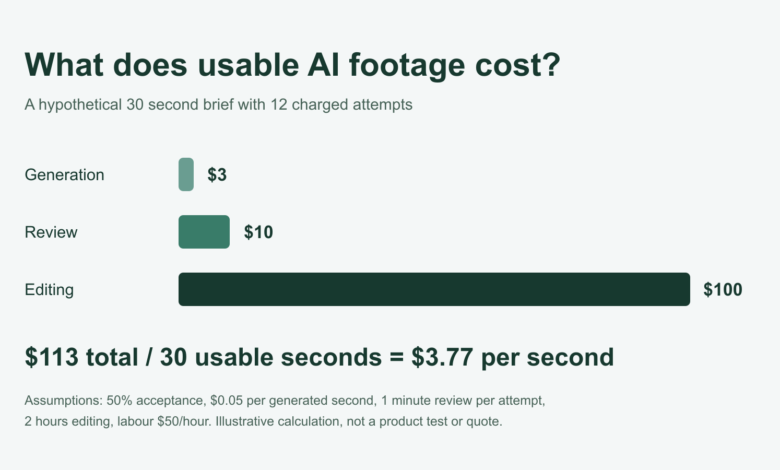
At an assumed 50% acceptance rate, this calculation budgets 12 charged attempts to obtain six approved clips. Those attempts generate 60 seconds for a $3 generation cost. Assume labour costs $50 an hour: reviewing each attempt for one minute adds $10, and two hours of editing adds $100.
That gives a modelled total of $113 for 30 usable seconds, or about $3.77 per usable second. Generation alone accounts for $0.10 of that unit cost. Taxes and any additional production costs are outside this example; it is not an estimate for every team’s process.
Changing only the assumed acceptance rate gives four sensitivity scenarios:
| Assumed acceptance | Budgeted charged attempts | Generation | Review | Editing | Total | Cost per usable second |
| 25% | 24 | $6.00 | $20.00 | $100.00 | $126.00 | $4.20 |
| 50% | 12 | $3.00 | $10.00 | $100.00 | $113.00 | $3.77 |
| 75% | 8 | $2.00 | $6.67 | $100.00 | $108.67 | $3.62 |
| 100% | 6 | $1.50 | $5.00 | $100.00 | $106.50 | $3.55 |
All four rows assume the same 30-second target, billing rate, review time and editing allowance. They are sensitivity scenarios, not evidence that any model achieves these acceptance rates. The attempt count is the target clip count divided by assumed acceptance, rounded up; it is a simple budget convention, not a delivery guarantee or confidence bound.
Investigate the review loop before comparing another rate card
In this example, editing is the largest budget item. Even eliminating the $3 generation charge at 50% acceptance would reduce the $113 total by only about 2.7%. That does not mean generation prices are unimportant; their weight changes with the brief, output volume and amount of human work.
A useful next question is why the editor needs those two hours. They may be assembling approved shots, repairing continuity, adding required sound or repeatedly replacing unsuitable footage. Those are different problems, and a generation discount does not resolve all of them.
The table deliberately holds editing at two hours to isolate the other inputs. In real work, rejected takes may increase both review and editing, so record the actual time rather than carrying that fixed allowance into every project. A short production log can show which assumption most needs correcting.
Track what survives the cut
Suppose the same six approved five-second clips each contribute only three seconds to the edit. Keeping the example’s $113 total unchanged, the denominator becomes 18 usable seconds and the cost rises to about $6.28 per usable second. That is arithmetic showing the effect of trimming, not a claim that the shorter film would require exactly the same work.
If the brief still requires 30 seconds, six trimmed clips no longer complete it. The team needs additional footage, a different edit or a revised brief, with a new budget. Reporting the cheaper generated-second rate would hide this delivery gap.
Also distinguish the duration of generated inserts from the duration of the whole film. A ten-minute tutorial with 30 seconds of generated B-roll does not have 600 seconds of AI-generated usable output. Keep the cost and denominator attached to the work being assessed.
Count shared footage once and variants explicitly
Two language versions can reuse the same generated background, or they can require separate footage. State which assumption applies before adding their seconds together. A change in narration does not by itself prove that a second set of visual generations was needed. The cited worksheet’s two-language and two-format presets assume separate footage; the shared-cost guidance here describes a different workflow.
For an overall project budget, count shared generation and editing costs once, then add the work specific to each version. If reporting separate unit costs, document the allocation of shared costs. Otherwise, totals can either omit shared work or charge it twice.
For a second aspect ratio, cropping an approved shot might work; a composition with essential detail near an edge might require another take. Record the actual method rather than assuming free reframing or mandatory regeneration for every platform.
Reconcile the bill without counting included usage twice
A usage-based API rate and a subscription allocation answer different accounting questions. For metered usage, record charged units at the applicable rate and reconcile them with the account’s billing record. For a subscription, decide how much of the plan belongs to this project and add genuinely separate charges.
Do not charge the project both its subscription allocation and the full supposed price of included credits already funded by that allocation. Equally, an allocated usage cost is not necessarily the cash purchase required: minimum purchases, unused balances and taxes can make those figures differ. Keep budget allocation and cash paid as separate fields.
Check the exact billing surface and settings rather than transferring a price from a creative subscription into an API calculation. The official rate card should establish the unit and any relevant output surcharges; it cannot establish the proportion of generated footage that a particular team will approve. Update commercial inputs when making a real purchasing decision.
Use the first brief to replace assumptions
A practical log needs the brief identifier, model and settings, billed duration, charged or refunded status, approved duration, rejection reason and review minutes. Keep editing time and other project costs separately so they can be reconciled without duplicate entries. Where clips have different durations or rates, calculate separate groups before combining costs and usable seconds.
Choose a spending or time limit before starting, alongside the conditions that make a clip acceptable. If nothing is approved when that limit is reached, retain the total spending and report zero approved output. Cost per approved second is then undefined, not zero, and the next decision is whether to change the brief or stop.
A small first brief supplies observations for that workload, not a general ranking of generators. Review the hardest shot types separately, and keep rights clearance as a separate requirement: a low unit cost does not establish permission to publish a person’s likeness, music or reference material. The production decision should rest on usable output, documented effort and the actual approval conditions.
Method and references
The numerical scenarios reuse the openly downloadable BenPicks AI video cost worksheet and method, with an explicitly hypothetical rate of $0.05 per generated second. They are original derived calculations, not customer results, product tests or measured model performance. Values in the table are rounded for display; calculations retain full precision.
Runway’s official API pricing documentation is an example of a rate card that separates model charges and output settings. The fixed $0.05 input used here is an illustrative assumption, not a quotation or recommendation of a current supplier offering. The article does not compare model quality or promise savings.
Author note: Tiberiu Rus works on BenPicks, which publishes the worksheet cited in this article.