A generated video can look convincing in its opening frame and still fail as a usable shot. A product label may change halfway through, a hand may pass through an object, or a character may appear to enter a different room after a cut. The production question is therefore not simply whether a model can generate attractive footage, but whether a team can identify footage that serves its intended purpose.
That distinction matters for short-form marketing, UGC-style creative and short dramas. Each format asks something different of the viewer, so each needs a different definition of success. A lightweight review workflow can make those expectations explicit before a team spends its budget generating variations.
Start with the job, not the model
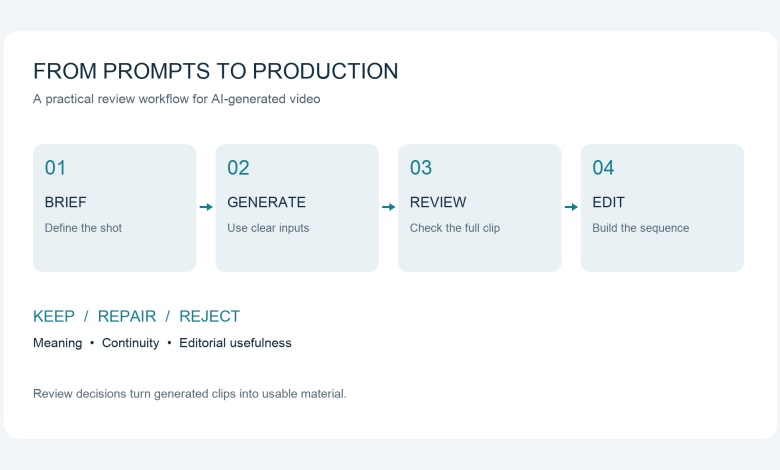
Write a one-sentence brief describing what the shot must communicate. For a product video, that might be the shape and finish of a reusable bottle; for a drama, it might be a character noticing an unopened letter. Add the intended audience, destination format and one condition that would make the output unusable.
Separate illustrative footage from evidence. An imagined kitchen can establish a mood, but a generated cleaning demonstration should not be treated as proof that a product removes a particular stain. If accuracy is the central requirement, recorded footage or a controlled animation may be a better choice than generative video.
A useful brief also distinguishes the shot from the finished video. A vertical advertisement may need several shots, typography, narration and a final product card. Generating one attractive clip does not complete those other tasks.
Choose inputs around what must stay fixed
Text-led generation is useful for exploring a scene when no reference asset exists. Image-led generation provides a visual starting point when composition, appearance or product shape matters. Neither input method removes the need to inspect the result.
Build a small reference pack before generating a sequence. For a product, include approved views and a note identifying details that cannot change; for a character, record clothing, hair, accessories and the direction they face. Treat those references as review criteria rather than a guarantee of consistency.
Keep the first motion brief simple. Runway’s published Gen-4 guidance recommends beginning with essential motion and adding details incrementally, while its image-led guidance separates the visual information in the input image from motion described in text.[1] The wider operational lesson is to change one important variable at a time, while checking the instructions for the model actually being used.
Review the whole clip in three passes
The first pass checks meaning at normal playback speed. Can someone unfamiliar with the prompt understand the action, and does the shot communicate the intended message? A visually impressive clip that tells the wrong story should not pass merely because it is attractive.
The second pass checks continuity more slowly. Inspect object boundaries, hands, reflections, text and interactions between subjects. For a product shot, compare the beginning, middle and end against the approved reference; for a dialogue scene, check mouth movement against the intended speech where audio is present.
The third pass checks editorial usefulness. Look for a clean beginning and ending, enough room for captions, and a composition that survives the intended crop. Review the shot next to its neighbours, because a clip can work alone yet fail at the cut.
Classify each result as keep, repair or reject. A slightly long pause may be repairable in editing, while a changing product shape may require regeneration or replacement footage. Record the reason so the next attempt addresses a specific problem rather than simply asking for a better result.
Apply different checks to different formats
For a short social video, test the opening without relying on the caption to explain everything. Then watch with sound off to see whether the essential message survives. Check that overlays do not cover the subject and that the final frame leaves enough time to understand the message.
For UGC-style creative, distinguish an informal visual style from a genuine user experience. A synthetic presenter can deliver a clearly identified scripted demonstration, but should not be given a fabricated customer history or testimonial. Review the script and presentation together, including any disclosure needed to avoid misleading the audience.
For a product video, prioritize identity over spectacle. A dramatic rotation is not useful if it invents a button, changes packaging or shows a function the product does not have. When a claim depends on real performance, use appropriate evidence rather than treating a generated scene as validation.
For a short drama, review continuity at the sequence level. Track who holds each object, where characters look, and what the audience knows at the end of every shot. Reaction shots and cutaways can help an editor build a coherent sequence, but cannot substitute for a clear narrative.
Test the workflow with a small, defined sequence
Consider a hypothetical 20-second introduction to a reusable bottle. Plan three shots: an opening view, a close-up of the finish and a closing composition with space for text. Set a fixed generation budget and decide in advance that altered geometry or an unreadable brand mark makes a shot unacceptable.
Review the first batch against that brief rather than selecting the most cinematic output. If the bottle changes shape during a rotation, simplify the camera movement or use a real close-up. If the image is accurate but the pacing feels slow, edit the clip before spending more on another generation.
This is a planning example, not a reported experiment or a claim of guaranteed performance. Its value is in making the acceptance criteria visible. Another team can use the same structure with a different product, budget or storytelling objective.
Measure usable output, not generation volume
A useful internal metric is accepted clips divided by generated clips. Pair it with the total cost per accepted clip, including generation charges and review or editing time. A low generation price can be misleading if most outputs need extensive repair.
Record the prompt version, reference asset, relevant settings, review decision and reason for rejection. Compare batches on the same brief instead of ranking tools from unrelated showcase examples. Keep these measurements tied to the tested task rather than presenting them as universal model scores.
Set a stopping rule as well. If repeated attempts fail on the same essential detail, change the production approach instead of continuing indefinitely. A hybrid sequence using generated atmosphere and recorded product footage can be more useful than an entirely generated video.
Make the final handoff traceable
Before delivery, confirm the source and permitted use of uploaded assets, including any recognizable person’s image or voice. Save the selected clips alongside the script, captions and approval notes. The person publishing the video should know which elements were generated and which factual claims still need checking.
Where supported, provenance information can complement that record. The C2PA explainer distinguishes information about an asset’s origin and history from proof that its content is factually true.[2] Content Credentials therefore support a review process; they do not replace watching the footage or checking a claim.
The aim is not to eliminate experimentation. It is to connect each experiment to a brief, a review decision and an edit that communicates clearly. For AI-generated video, a reliable path from prompt to publication is as important as the ability to produce the first clip.
References
[1] Runway, Gen-4 Video Prompting Guide: https://help.runwayml.com/hc/en-us/articles/39789879462419-Gen-4-Video-Prompting-Guide
[2] C2PA, C2PA and Content Credentials Explainer: https://spec.c2pa.org/specifications/specifications/2.2/explainer/Explainer.html