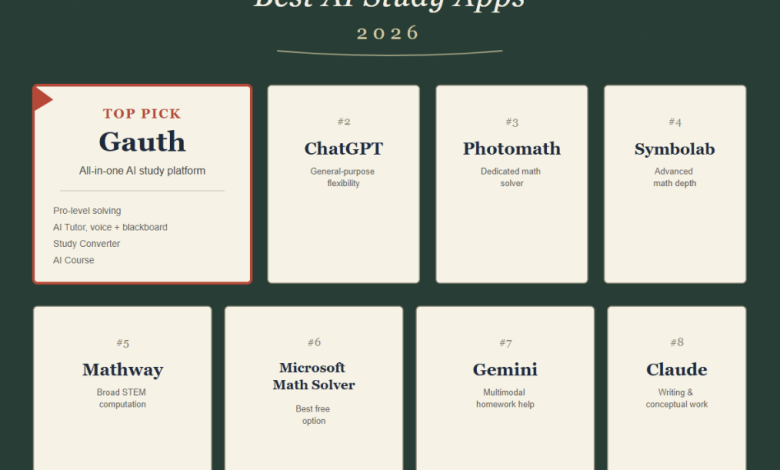
There’s a specific kind of stuck that doesn’t show up in any textbook: it’s 11 p.m., the problem set is due at midnight, and there’s no tutor to call, no parent in the house who remembers precalculus, and definitely no budget for the $60-an-hour tutoring center down the street. For a huge number of students, AI isn’t a novelty anymore — it’s the only backup they’ve got. The good news is there are more options than ever. The less good news is that “AI study app” now covers everything from a narrow photo-based calculator to a full general-purpose chatbot, and picking the wrong one for the job wastes time a student stuck at 11 p.m. doesn’t have. Here’s an honest rundown of eight tools actually worth knowing about in 2026, what each one is genuinely good at, and where each one falls short.
Quick Comparison
| Tool | Best For | Subject Coverage | Free Tier | Starting Price |
| Gauth | Full study cycle, all-in-one | Everything study-related | Yes, capped daily solves | ~$11.99/mo |
| ChatGPT | General flexibility | Everything | Yes, generous | Free / $20/mo Plus |
| Photomath | Clean math solving | Math only | Yes, basic steps | ~$9.99/mo |
| Symbolab | Advanced math | Math only, upper-level | Yes, limited steps | ~$11.99/mo |
| Mathway | Broad STEM computation | Math, physics, chemistry | Yes, answer only | ~$9.99/mo |
| Microsoft Math Solver | Zero-cost solving | Math only | Fully free | Free |
| Gemini | Multimodal input | General | Yes, generous | Free / paid tiers |
| Claude | Writing & conceptual work | General, writing-strong | Yes, generous | Free / paid tiers |
Pricing and feature availability change — figures above are approximate as of mid-2026 and worth confirming on each provider’s site before subscribing.
How we evaluated these: Each tool was tested hands-on with the same set of representative questions — a multi-step algebra problem, a conceptual science question, and a piece of raw study material (notes or a reading passage) where applicable — then judged on accuracy, explanation quality, and how well the output actually supports learning rather than just finishing the assignment.
1. Gauth — Best All-in-One AI Study Platform
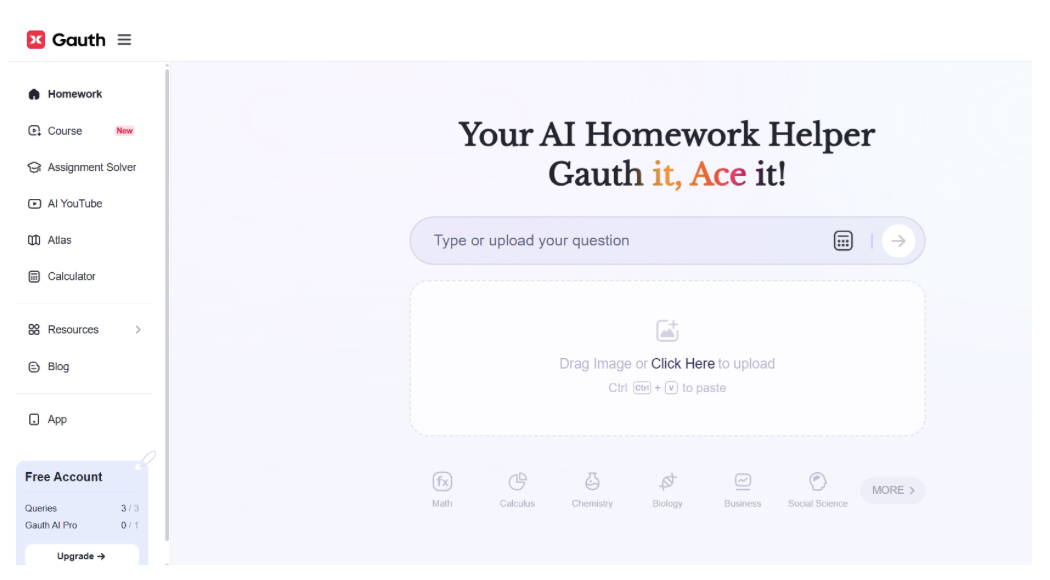
Most tools on this list do one thing well. Gauth bets that a student’s actual problem isn’t a single hard question — it’s the whole cycle of previewing, practicing, reviewing, and asking follow-ups, usually spread across four different apps because no single one covers the whole loop. Gauth tries to close that loop with four dedicated tools instead of one chat box.
- Pro-Level Solving is the entry point: point a camera at a problem or type it in, and the explanation comes back built with actual rendered visuals, graphs, and tables rather than plain-text steps — the difference between reading that a function is decreasing and seeing the curve that shows it.
- AI Tutor is the more ambitious piece — a live, voice-based back-and-forth paired with a visual blackboard that fills in block by block, so a student can jump in mid-explanation with a follow-up instead of typing a new question and waiting. Gauth’s own team called this one a genuine leap when they rolled out Live Tutor 2.0, describing the update as giving students a personal expert who can explain concepts in more depth and build custom review sessions on demand — not just a smarter chatbot. Tutor defaults to voice, but typing is fully supported if that’s not your thing.
- Study Converter takes the raw, messy material real students actually work with — lecture recordings, whiteboard photos, handwritten pages — and turns it into flashcards, overviews, and quizzes in one pass.
- AI Course is the newest piece, converting dense reading into shorter video lessons with a live Q&A layer tied to the AI Tutor. Gauth cinematic AI course is powered by Seedance 2.5.
What actually stood out in testing wasn’t any single feature — it was that none of the other tools on this list attempt to cover the entire study cycle in one place. A general chatbot answers a question well; Photomath solves a math problem cleanly; but neither one is trying to also turn a lecture recording into a quiz or hold a live voice tutoring session. That’s the real differentiator: Gauth is competing on breadth of workflow, not just on the quality of a single answer.
✅Pros: Covers the full study cycle in one app; explanations are visual by default, not just text; Study Converter meaningfully cuts down manual prep work; voice-based AI Tutor offers a genuinely different interaction than a chat window.
❌Cons: AI Course is still the newest, least consistent feature on longer material; free tier caps daily solves and doesn’t support follow-up questions.
As Business Insider reported this week, Gauth’s CTO Alan Wang described the new AI Course feature as making learning “less like studying and more like being pulled into a story” (https://www.businessinsider.com/seedance-bytedance-education-push-study-app-gauth-ai-animations-2026-7). That narrative-driven approach to review is one of the clearest examples of Gauth trying to close the full study-cycle gap that the rest of this list’s single-purpose tools don’t attempt to cover.
2. ChatGPT — Best General-Purpose Flexibility

ChatGPT isn’t built for school specifically, and that’s exactly its appeal: the same tool that explains a chemistry problem can also help outline an essay, debug code for a CS class, or just talk through an idea that doesn’t fit neatly into “homework.” For students who want one tool for everything — not just coursework — it’s hard to beat.
✅Pros: Extremely versatile across subjects and task types; strong at open-ended, conceptual, and writing-heavy work; free tier is genuinely usable.
❌Cons: No academic-specific formatting or structure — answer style varies by how the question is phrased; no built-in flashcards, quizzes, or note conversion; nothing stops a student from copying an answer with zero engagement, since there’s no structural nudge toward showing work.
3. Photomath — Best Dedicated Math Solver
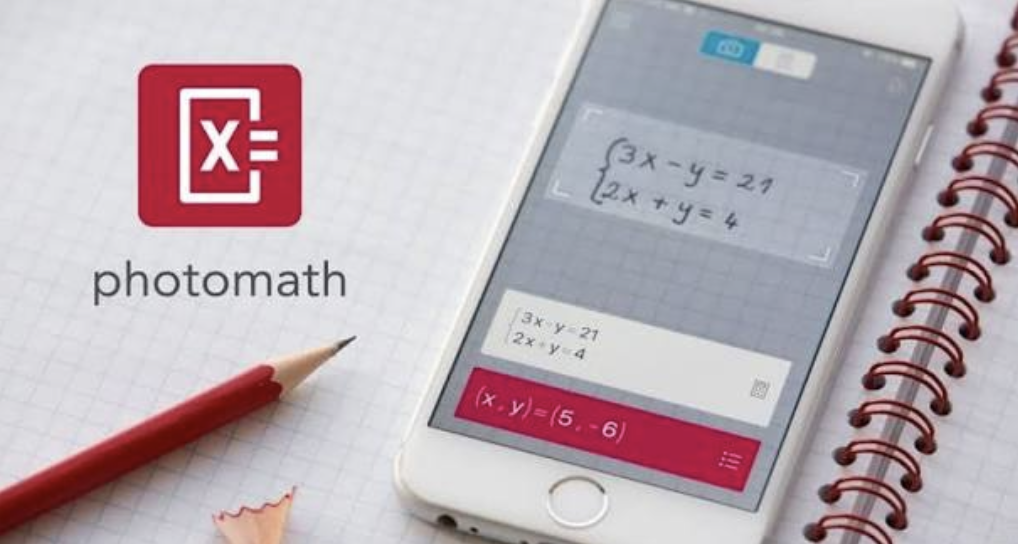
Photomath pioneered the scan-and-solve approach, and it’s still the most polished version of it. Point the camera at a printed or handwritten equation and get an animated, step-by-step walkthrough built on an actual math engine rather than a language model guessing at arithmetic — which matters, since engine-based solvers are meaningfully more reliable on precise computation than a general chatbot.
✅Pros: Clean, reliable camera recognition; animated explanations are genuinely easy to follow; strong for algebra through calculus.
❌Cons: Math only — no science, writing, or note tools; full step-by-step access sits behind a subscription for more advanced problems; not built for anything beyond solving.
4. Symbolab — Best for Advanced Math
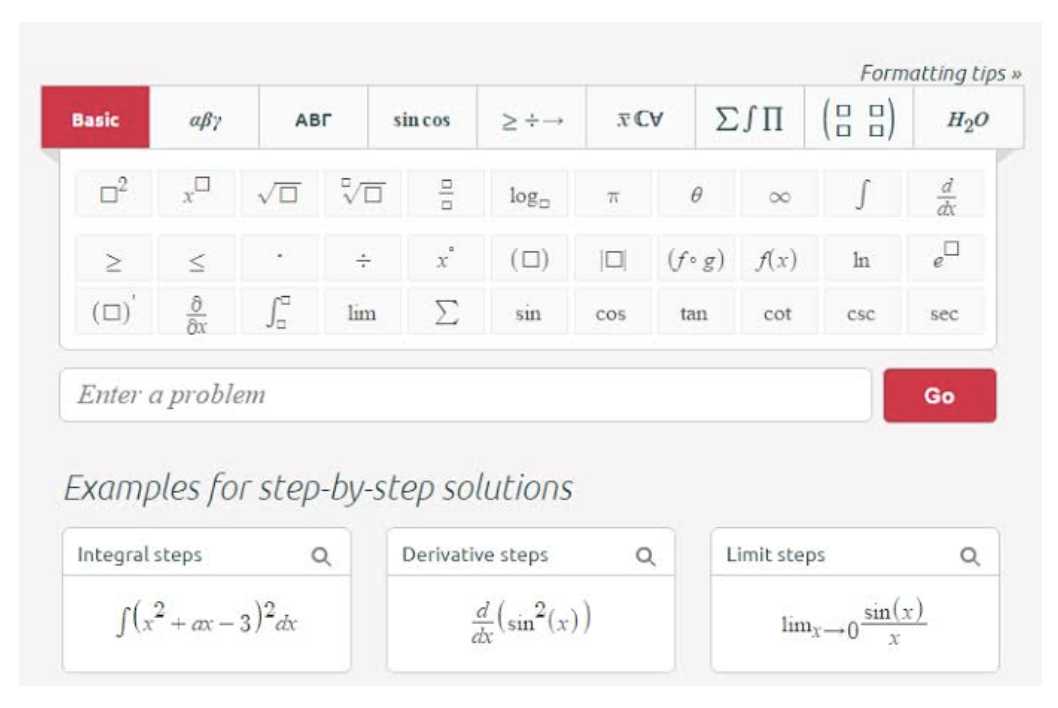
Where Photomath is friendliest for younger students, Symbolab leans into upper-level math — calculus, linear algebra, differential equations — with detailed step-by-step breakdowns and a large library of specialized calculators.
✅Pros: Strong depth on advanced math topics; practice problems built in, not just solved examples; useful for double-checking multi-step work.
❌Cons: Interface can feel cluttered with all the specialized tools; most of the detailed steps require a subscription; math-only, same as Photomath.
5. Mathway — Best Broad Computational Coverage
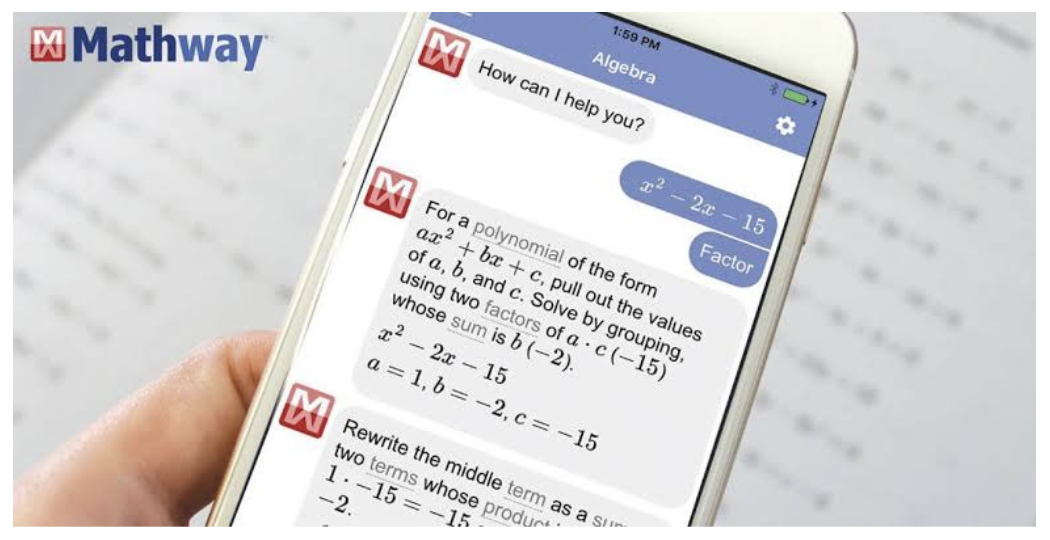
Mathway’s strength is breadth within math and adjacent sciences — basic arithmetic through statistics, plus physics and chemistry computation — on a straightforward interface that doesn’t try to be anything more than a solver.
✅Pros: Covers more subjects than a typical math-only app; simple, no-frills interface; solid for students juggling multiple STEM courses at once.
❌Cons: Explanations are less visually polished than Photomath’s; full solution steps are paywalled; no tutoring, notes, or study-material features.
6. Microsoft Math Solver — Best Free Option
For a student who genuinely can’t spend anything, Microsoft Math Solver is the most complete free tool on this list: camera scanning, handwriting recognition, and even on-screen drawing input, all with step-by-step solutions and no subscription tier gating the core experience.
✅Pros: Fully free with no paywalled steps; supports typed, scanned, and hand-drawn input; backed by a company with no incentive to push a subscription.
❌Cons: Subject coverage is narrower than competitors’; no tutoring or study-organization tools; interface is functional rather than polished.
7. Gemini — Best for Multimodal Homework Help
Gemini’s strength is handling mixed input well — a photo of a diagram, a paragraph of text, and a follow-up question in the same conversation — which makes it a solid pick for subjects that mix visuals and text, like biology or physics with diagrams.
✅Pros: Strong at interpreting images alongside text; integrates well for students already in the Google ecosystem (Docs, Drive); handles a wide range of subjects, not just math.
❌Cons: Like ChatGPT, no academic-specific formatting or study tools; quality of explanation can vary depending on how the question is asked; no built-in flashcards or quizzes.
8. Claude — Best for Writing and Conceptual Subjects
Claude tends to hold up well on longer, more conceptual work — essay feedback, historical analysis, breaking down a dense reading — where the value is in the quality of the reasoning and explanation rather than a single correct numeric answer.
✅Pros: Strong at long-form writing feedback and conceptual explanation; good at breaking down dense reading material; handles nuanced, open-ended questions well.
❌Cons: Not built for quick photo-based problem solving the way Photomath or Gauth are; no dedicated study tools like flashcards or quizzes; general-purpose formatting, same limitation as ChatGPT and Gemini.
How to Choose the Right Tool for You
- If you’re stuck on one specific problem: a single equation, one confusing step — a dedicated math solver like Photomath, Symbolab, or Mathway will usually get you there faster than a general chatbot, since they’re built on real computational engines rather than a language model estimating the arithmetic.
- If you need help across subjects, not just math: writing, science, humanities, test prep — a general-purpose model (ChatGPT, Gemini, Claude) or an education-specific platform (Gauth) will serve you better than a math-only tool, which simply won’t help with an essay outline or a history reading.
- If budget is the deciding factor: Microsoft Math Solver is the most complete option that costs nothing, with ChatGPT’s and Gemini’s free tiers close behind for non-math subjects.
- If you’re managing an ongoing course load rather than a single assignment: recurring lectures to organize, concepts to review, questions that pile up over a semester — that’s the specific gap general chatbots and single-purpose solvers don’t cover well, and where an all-in-one platform like Gauth’s combination of solving, tutoring, note conversion, and course-building tools does more of the work automatically.
The Bottom Line
There’s no single right answer here — the right tool depends on what’s actually stuck. A single equation calls for Photomath or Symbolab. An essay outline or a conceptual question calls for ChatGPT, Gemini, or Claude. But for the more common situation — a full course, week after week, with lectures to organize, concepts to review, and questions that come up mid-study-session — Gauth is the only tool on this list built around that entire cycle rather than one piece of it.
Frequently Asked Questions
Q: Are these tools actually free to use?
A: Most offer a usable free tier — Microsoft Math Solver, ChatGPT, and Gemini are the most generous. Photomath, Symbolab, Mathway, and Gauth all offer free access with daily limits or reduced functionality, with paid tiers unlocking unlimited use and deeper features like live tutoring.
Q: Can teachers tell if I used one of these?
A: Sometimes. AI-generated writing in particular can be flagged by detection tools or simply read as generic by a teacher who knows a student’s usual voice. Math solutions are harder to “detect” directly, but a student who can’t explain their own work when asked live runs into the same problem regardless of which tool they used.
Q: Will using an AI study tool hurt my ability to learn the material?
A: That depends far more on how it’s used than which tool is chosen. Copying a final answer without reading the explanation skips the learning entirely, no matter how good the explanation is. Using the same tool to check work after attempting a problem, or to get a concept re-explained a different way, is a meaningfully different use of the same technology.
Q: Do I need more than one of these?
A: Plenty of students do — a math-specific solver for quick equation checks alongside a broader tool for everything else is a common combination. The tools on this list aren’t mutually exclusive, and free tiers make it inexpensive to try more than one before settling on a primary.
About Gauth
Gauth is an AI study platform built for students from middle school through college, covering everything from step-by-step problem solving to a voice-based AI Tutor, a note-to-flashcard Study Converter, and AI-generated video courses. Rather than routing every request through a single general-purpose model, it uses an education-specific multi-model system tuned for how coursework is actually structured. Millions of students use it worldwide across iOS, Android, and the web, with the platform continuing to expand its subject coverage and tools.
Ready to learn smarter? Give Gauth a shot — visit Gauth or download it for iOS / Android.