
Long workdays can put more pressure on your body than you realize. Spending eight or more hours at a desk can leave your lower back, shoulders, neck, hips, and legs feeling tired—especially when your office chair does little more than provide a place to sit.
That is why choosing the right ergonomic office chair matters. For people who spend much of the day working at a computer, a chair with adjustable lumbar support, a supportive seat, flexible armrests, and a well-designed footrest can create a more adaptable workstation.
But not every chair with a footrest is automatically ergonomic. The real question is how well the chair fits your body, desk, working habits, and preferred sitting positions.
If you are considering an ergonomic chair with a footrest, here is what to look for—and why HBADA’s approach to ergonomic seating is worth considering.
Why a Footrest Can Matter During Long Workdays
A footrest is sometimes treated as a luxury feature, but it can serve a practical ergonomic purpose.
Ideally, your feet should have stable support when you are seated. If your chair needs to be raised to match your desk, however, your feet may not sit comfortably on the floor. This can leave your legs unsupported and encourage awkward sitting positions.
A footrest gives you another place to position your feet while working or reclining. HBADA’s own ergonomic guidance recommends using a footrest as part of a dynamic sitting routine rather than keeping your feet in one position all day.
A useful footrest should:
- Provide stable support for both feet.
- Allow comfortable leg positioning without forcing the knees excessively upward.
- Work naturally with the chair’s recline function.
- Be easy to extend and retract when you want to change positions.
- Complement, rather than replace, good seat-height and desk-height adjustments.
Most importantly, a footrest should encourage variety. Even the best ergonomic chair cannot compensate for remaining completely stationary for hours. Standing, walking, stretching, and changing your sitting position throughout the day remain important parts of a comfortable workstation routine.
1. Start With Seat Height Adjustment
Seat height is one of the first specifications to check when comparing ergonomic chairs.
When seated at your desk, your feet should have reliable support and your knees should be positioned comfortably relative to your hips. Your arms should also be able to reach your keyboard and mouse without forcing your shoulders upward.
An adjustable seat makes this easier because people have different body proportions and desk setups.
HBADA’s current ergonomic chair range includes models with approximately 8.5 cm of seat-height adjustment, while recommended user-height ranges vary by model.
When testing a chair, adjust the seat before evaluating the other features. A chair that feels uncomfortable simply because it is set too high or too low may perform very differently once properly adjusted.
2. Look for Adjustable Lumbar Support
For long workdays, lumbar support deserves particular attention.
The lumbar region is the lower portion of your back, and a chair’s lumbar system should provide support without feeling excessively aggressive or restrictive. Ideally, you should be able to position the lumbar support so that it follows your individual posture.
This is one area where modern ergonomic chairs differ substantially from basic office chairs. A simple fixed cushion provides limited customization, while an adjustable lumbar system can be positioned to accommodate different users and sitting positions.
HBADA’s E3 Pro, for example, uses a three-zone elastic lumbar support system with height, forward/backward, and side-wing adjustments. The current E3 Pro 2026 Edition also adds adaptive lumbar adjustments designed for extended sitting.
The goal is not to find the chair with the most complicated specification sheet. The goal is to find lumbar support that you can actually position comfortably.
3. Consider Seat Depth as Carefully as Seat Height
Seat depth is often overlooked when people shop for an office chair.
If a seat is too deep, shorter users may have difficulty keeping their backs against the backrest while maintaining comfortable leg positioning. If it is too shallow, taller users may feel that their thighs lack adequate support.
An adjustable seat depth lets you move the seat forward or backward to better match your leg length.
For example, the HBADA E3 Pro 2026 Edition provides approximately 50 mm of seat-depth adjustment and is designed for users within a broad stated height range.
When setting seat depth, pay attention to the space behind your knees. You want enough thigh support without having the front edge of the seat press uncomfortably against the area behind your knees.
4. Don’t Ignore the Armrests
Your arms spend almost as much time interacting with your workstation as your hands do, so armrest adjustment can make a noticeable difference.
Ideally, your armrests should allow your elbows and forearms to remain comfortably supported while you type, use a mouse, read, or participate in video calls.
Basic chairs may only offer height adjustment. More advanced ergonomic chairs can provide several additional movements.
HBADA’s E3 Pro features 6D adjustable armrests, while the E3 Pro 2026 Edition uses a 720° Omni-Mechanical Arm design with multiple adjustment directions, including height, forward/backward positioning, and rotation.
For long work sessions, adjust your armrests so your shoulders can remain relaxed rather than elevated toward your ears.
5. Choose a Chair With a Useful Recline Range
A good office chair should not force you to maintain one rigid posture from morning until evening.
Reclining provides an opportunity to change your body position while remaining supported. This is particularly useful during phone calls, reading, brainstorming, meetings, or short periods when you want to take pressure off your usual working posture.
HBADA’s current chair lineup includes models with multiple recline positions, with several models reaching a maximum recline of around 140 degrees.
A reclining footrest can make these changes even more comfortable. When the backrest reclines and your legs extend, the footrest can provide support rather than leaving your feet dangling.
The important distinction is that recline should complement active work—not encourage you to remain in one position indefinitely.
6. Pay Attention to the Footrest Design
A built-in footrest should be evaluated as part of the chair rather than as a separate accessory.
Check whether it:
- Extends far enough to support your feet comfortably.
- Feels stable when your legs are resting on it.
- Works smoothly with the chair’s recline mechanism.
- Can be stored away when you need a conventional working position.
- Provides adequate room for both feet.
- Keeps your legs in a comfortable position when reclined.
HBADA offers several chairs with integrated or optional footrests, depending on the model. The company’s E3 lineup includes chairs specifically designed around extended work and relaxation use, while the E3 Ultra includes a footrest as standard equipment.
A footrest should be an ergonomic supplement—not a substitute for properly adjusting your chair.
7. Choose Breathable Materials for Extended Sitting
Temperature can become a major comfort issue during an eight-hour workday.
A chair that traps heat against your back and legs may become uncomfortable even if its ergonomic adjustments are excellent. Breathable mesh can help create better airflow and is therefore worth considering for people who spend much of their day seated.
HBADA uses high-elastic or performance mesh in several of its ergonomic office chair models. The E3 Pro 2026 Edition, for example, uses CloudMesh technology designed around breathability, durability, and pressure distribution.
Material choice ultimately comes down to personal preference, but people who regularly work for long uninterrupted periods may appreciate a breathable chair surface.
8. Match the Chair to Your Body and Working Style
There is no universal “best” office chair.
A chair that works exceptionally well for one person may not be the right choice for someone with a different height, body proportions, desk setup, or working routine.
Before buying, consider:
Your height: Check the manufacturer’s recommended height range and seat-height specifications.
Your working hours: Someone working two hours a day may have different priorities from someone spending eight to ten hours at a desk.
Your preferred posture: Do you sit upright most of the day, or do you frequently recline for reading, meetings, or creative work?
Your desk height: Make sure the chair can be adjusted to work with your existing desk.
Your need for customization: If you frequently struggle to find a comfortable position, prioritize adjustable lumbar support, seat depth, armrests, headrest positioning, and recline.
HBADA’s range is designed around different use cases, from more accessible ergonomic models to advanced chairs featuring extensive adjustability and smart support technologies.
Why Consider HBADA Ergonomic Office Chairs?
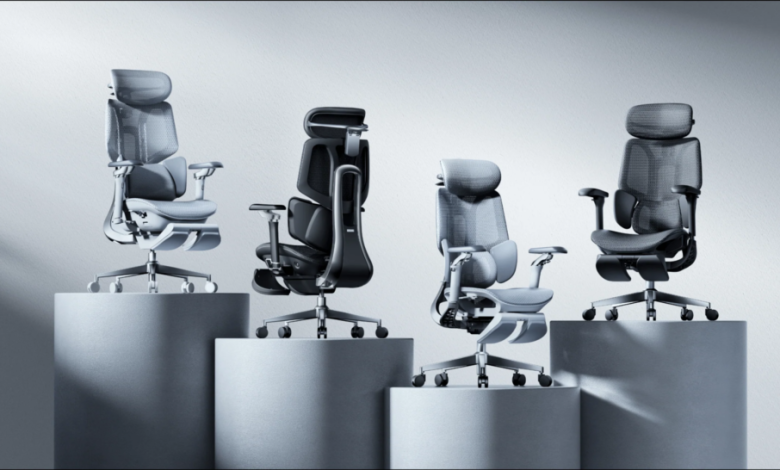
For shoppers specifically looking for long-hour seating, HBADA ergonomic office chairs are worth considering because the brand’s lineup places significant emphasis on adjustability.
The range includes models with features such as adjustable lumbar support, breathable mesh seating, adjustable seat depth, multi-position recline, adjustable headrests, and various armrest configurations.
The HBADA E3 Pro is particularly relevant for people who spend most of their working day at a desk. Its current design combines three-zone lumbar support, an adjustable dual-axis headrest, adjustable armrests, seat-depth adjustment, breathable mesh, and multiple recline positions.
For shoppers who want an integrated footrest, HBADA also offers E3 models designed with footrest functionality. The E3 model is positioned specifically for long work sessions and includes a footrest alongside its ergonomic adjustment system.
The best choice within the HBADA range ultimately depends on how you work and which adjustments matter most to you.
How to Set Up Your New Chair
Buying an ergonomic chair is only the first step. Correct adjustment is just as important.
Start with the seat height. Set it so your feet are comfortably supported and your legs are not dangling.
Next, adjust the seat depth so your thighs are supported without excessive pressure behind your knees.
Then position the lumbar support so it comfortably follows your lower back. Adjust the backrest and recline resistance according to your preferred working posture.
Set the armrests so your elbows can rest comfortably while your shoulders remain relaxed.
Finally, adjust the headrest and footrest. The headrest should support your head and neck without pushing your head unnaturally forward. The footrest should provide a comfortable alternative position when you recline or need additional leg support.
Take a few minutes to experiment. Ergonomic chairs are designed to be adjusted, so there is no reason to leave every setting at its factory position.
Don’t Forget the Rest of Your Workstation
Even an excellent chair cannot solve every ergonomic problem.
Your monitor should be positioned so that you do not need to constantly bend your neck downward. Your keyboard and mouse should be positioned so that your shoulders and wrists remain relaxed. Your desk should provide enough space for comfortable movement.
Most importantly, change positions throughout the day.
HBADA’s ergonomic guidance emphasizes dynamic sitting and regular movement rather than treating any single seated position as a permanent solution.
Stand up for short breaks. Walk around when practical. Stretch. Change your recline angle. Move between your normal foot position and the footrest when appropriate.
The purpose of an ergonomic chair is to make these changes easier—not to lock you into one “perfect” posture.
Final Thoughts
Choosing an ergonomic office chair with a footrest for long workdays requires more than checking whether the chair looks comfortable in a product photograph.
Look for adjustability where it matters: seat height, seat depth, lumbar support, armrests, headrest positioning, and recline. Then evaluate the footrest as part of the entire seating system. It should provide useful leg support without forcing you into an awkward position.
For people who spend long hours working from home, in a professional office, or at a personal workstation, HBADA’s ergonomic chair lineup offers several options built around adjustability and extended-use comfort.
Ultimately, the right chair is the one you can adjust to your body and integrate naturally into a workstation that encourages movement. With the right combination of chair support, footrest positioning, desk setup, and regular posture changes, long workdays can become considerably more comfortable.
The post How to Choose an Ergonomic Office Chair With a Footrest for Long Workdays appeared first on .