AI video generation is moving beyond one-off experiments. Creators are increasingly looking for repeatable workflows that can turn a creative idea into a sequence of usable shots while maintaining visual style, subject consistency, and narrative direction.
The quality of an AI-generated video does not depend only on the model. It also depends on how the brief is structured, how each shot is timed, which visual references are supplied, and how the output is reviewed. A strong workflow treats prompting less like writing a single command and more like preparing a compact production plan.
Why Repeatability Matters
A visually impressive clip may still be difficult to use if the subject changes between shots, the lighting becomes inconsistent, or the action does not follow the intended timeline. These issues become more noticeable when a project includes several scenes or must follow a specific commercial style.
A repeatable workflow normally includes four elements:
- A clearly defined visual objective
- A shot-by-shot timeline
- Reference materials for style and subject consistency
- Review criteria covering motion, composition, and continuity
Browser-based workspaces such as the Seedance2 AI platform can bring model selection, reference materials, and generation settings into one environment. The practical value of this approach is not simply convenience. It gives creators a consistent place to compare different outputs without rewriting the entire production brief.
Start With a Production Brief, Not a Single Sentence
A useful prompt should explain more than what appears in the frame. It should describe how the camera moves, when the action changes, and which visual characteristics must remain consistent.
The brief can be divided into several layers:
- Format: duration, aspect ratio, and intended publishing channel
- Environment: location, background, weather, and time of day
- Subject: appearance, material, movement, and important details
- Camera: lens style, framing, tracking movement, and depth of field
- Timeline: what happens during each part of the video
- Mood: emotional tone, lighting, and overall visual language
This structure gives the model clearer production boundaries while leaving enough room for visual interpretation.
Example One: A Snow Leopard Wildlife Sequence
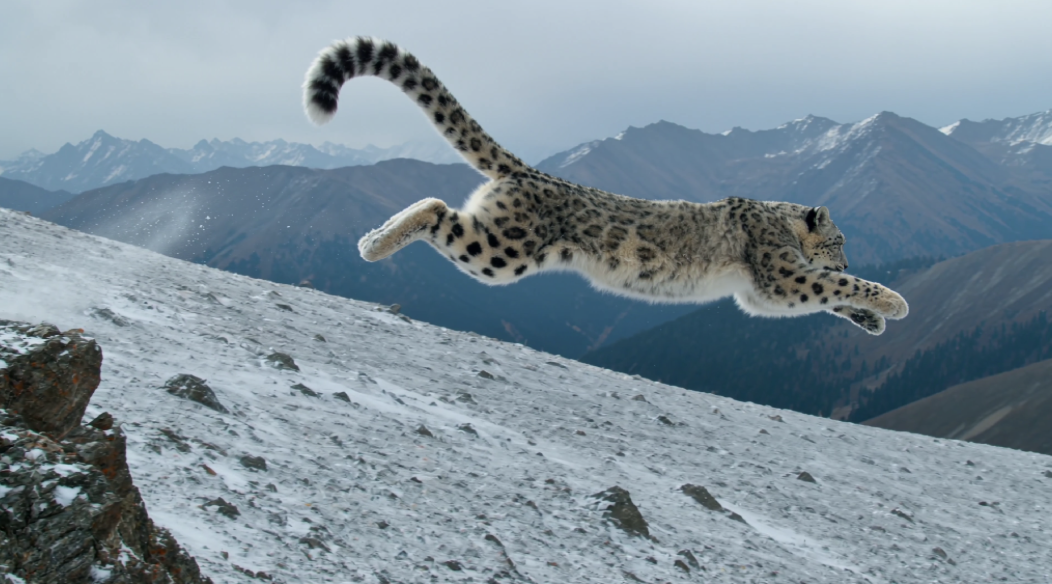
Consider a 10-second wildlife sequence set on a snow-covered mountain at an altitude of 4,500 metres. The creative direction calls for the visual language of a premium nature documentary, with photorealistic detail, cinematic image quality, and high-frame-rate slow motion.
Instead of asking for “a snow leopard hunting in the mountains,” the prompt separates the scene into three shots.
During the first four seconds, a 600mm telephoto close-up shows the snow leopard hiding behind a rock. Only half of its face and one front paw are visible. Wind moves the animal’s grey-white fur, while small ice crystals remain visible along the hair tips.
From four to seven seconds, the camera switches to high-speed side tracking. The leopard launches from behind the rock, scattering snow and gravel as its body stretches through the jump. Its long tail curves through the air to maintain balance.
The final three seconds use an extreme close-up. The paw strikes the snow, the claws extend, and small ice particles pass through the shallow depth of field.
This example demonstrates why timing matters. The opening establishes tension and detail, the tracking shot delivers movement, and the macro shot creates a memorable ending.
A workflow built around Seedance 2.0 Pro can support this type of structured experimentation by combining written direction with reference media. The important lesson, however, is model-independent: dividing an action into timed shots gives the generation process a clearer narrative path.
Example Two: A Premium Chocolate Dessert Advertisement

The same method can be applied to a completely different production style.
Imagine a 15-second advertisement for a premium chocolate dessert. The background shifts from light grey to charcoal, with soft studio shadows and glossy reflections. The product is presented in a minimal, luxury setting.
- 0–3 seconds: The video fades in from black. A glass dessert cup appears under a soft spotlight as the camera slowly moves closer.
- 3–10 seconds: A molten chocolate centre begins to flow over the ice cream. Chocolate pieces, brownie bites, and ribbons of sauce move around the product in slow motion.
- 10–13 seconds: An extreme close-up emphasises the viscosity, reflections, and fine droplets of the flowing chocolate.
- 13–15 seconds: The camera pulls back into a clean hero shot, optionally accompanied by the words “Pure Chocolate Indulgence.”
Although the subject is different from the wildlife sequence, the production logic is similar. Both prompts define visual phases, camera behaviour, and a final focal moment.
The dessert example also highlights the importance of material descriptions. Words such as “glossy,” “molten,” “creamy,” and “high-contrast reflections” help define how the chocolate should react to light. Camera instructions such as “macro lens,” “slow push-in,” and “shallow depth of field” establish the commercial visual language.
Example Three: Maintaining Continuity Across Multiple Scenes
A third workflow can focus on character consistency. For example, a short brand story might follow the same designer through three locations: a studio, a busy city street, and an evening exhibition. The challenge is not generating each location separately. It is keeping the subject’s face, clothing, colour palette, and movement recognisable throughout the sequence.
A useful production plan would define:
- One reference image for the main character
- A fixed wardrobe and colour palette
- The starting and ending position of each shot
- A transition that visually connects one scene to the next
- Consistent lighting direction or a planned lighting progression
This is an illustrative scenario rather than a performance claim. Its purpose is to show how a reusable workflow can reduce random variation when a story requires several connected shots.
Review the Output Like an Editor
Generation is only one part of the process. The first output should be treated as a draft.
A practical review checklist can include:
- Does the main subject remain visually consistent?
- Does each action happen within the intended time window?
- Are camera movements smooth and motivated?
- Do materials behave convincingly?
- Does the final shot provide a clear visual conclusion?
- Are there unnecessary objects or changes between frames?
When a result needs improvement, the entire prompt does not need to be rewritten. The creator can isolate the issue—for example, the speed of the chocolate flow or the leopard’s body position—and revise only the affected shot.
This is what makes the process repeatable: the prompt becomes a production template that can be adjusted rather than discarded.
Build a Reusable Prompt Collection
As teams create more videos, successful prompts can be stored by purpose rather than by model name. Useful categories might include wildlife and documentary scenes, product hero shots, food and liquid simulations, character continuity, camera movement, lighting setups, and social-media aspect ratios.
A future video and image prompt collection can make these building blocks easier to reuse. The goal should not be to encourage creators to copy the same prompt unchanged. Instead, a prompt library should explain why a structure works and which parts should be adapted.
Teams tracking emerging model workflows can also use the Seedance 2.5 website as a reference point when planning how future model options may fit into their production process.
The Workflow Is More Important Than a Single Generation
AI video creation is becoming a production discipline. Models will continue to change, but the underlying workflow remains useful: define the objective, divide the timeline, prepare references, generate, review, and refine.
The snow leopard sequence demonstrates action and cinematic continuity. The chocolate advertisement demonstrates material realism and commercial lighting. The multi-scene example demonstrates how reference planning can support narrative consistency.
Together, these examples show that better results do not come from making a prompt unnecessarily long. They come from giving every instruction a clear production purpose.
Seedance2AI can serve as part of that workflow, but the broader lesson applies across AI video creation: the strongest process is one that creators can understand, evaluate, and repeat.