
A video can finish generating and still be unusable. The product changes shape halfway through the shot, a movement looks wrong, or the only clean moment ends before the editor has enough footage. The request succeeded, but the production task did not.
For teams buying AI video API access, cost per usable clip is the generation spend divided by the number of clips that pass an agreed production brief. Track review and editing costs separately, then include them when estimating the full cost of delivery. This gives product and marketing teams a more useful comparison than a starting price per second.
Define what counts as usable before generating
A usability rule should describe the intended placement. A loose background animation for an internal presentation has different requirements from a product shot in a paid campaign. Combining those jobs into one average can conceal the failures that matter to the campaign.
For a hypothetical product campaign, a brief might require a five-second landscape clip, a consistent product silhouette, no unintended lettering and no visible distortion during the selected shot. The editor should be able to use it with ordinary trimming and color adjustment. A clip that needs substantial reconstruction belongs in a separate category.
Write these criteria down before viewing the first outputs. Ask reviewers to record why they reject a clip, using reasons such as subject inconsistency, unwanted text or insufficient usable duration. Those records reveal whether a model is unsuitable for the task or whether the brief needs to change.
Compare equivalent generation settings
The cheapest advertised tier may not include the output configuration a team needs. Record the model version, duration, resolution, aspect ratio, input mode and audio setting for each test. A silent draft at one resolution should not be treated as equivalent to a higher-resolution deliverable with audio.
Use the same creative brief and reference assets wherever the candidates support them. If a model cannot accept a required input or produce a required format, mark that limitation rather than quietly changing the job. Google’s video generation overview distinguishes its models by workflow and capabilities, a reminder that even one vendor’s video offerings are not interchangeable.
Give each candidate an equal prompt-development allowance. Then freeze the prompts for the comparison and keep a record of any unavoidable differences. The aim is to compare the workflows your team could actually operate, including their constraints.
Separate completed clips from accepted clips
Use at least three outcome categories: technical failure, completed but rejected, and accepted for use. Technical failures need an engineering explanation; rejected outputs need an editorial one. Combining both into a single success rate makes the next improvement harder to identify.
For a first exploratory run, 20 attempts per candidate is a manageable example, not a statistically conclusive benchmark. Review the whole set and retain the rejected results alongside the accepted ones. If reviewers know which model is more expensive, hiding the names can help keep that expectation out of the initial assessment.
Use actual billed amounts, including charged attempts that did not yield usable footage and any credited refunds. Do not assume every failure is billed or that every failure is free. Check the provider’s terms and reconcile the test with its usage records.
Work through the economics with explicit assumptions
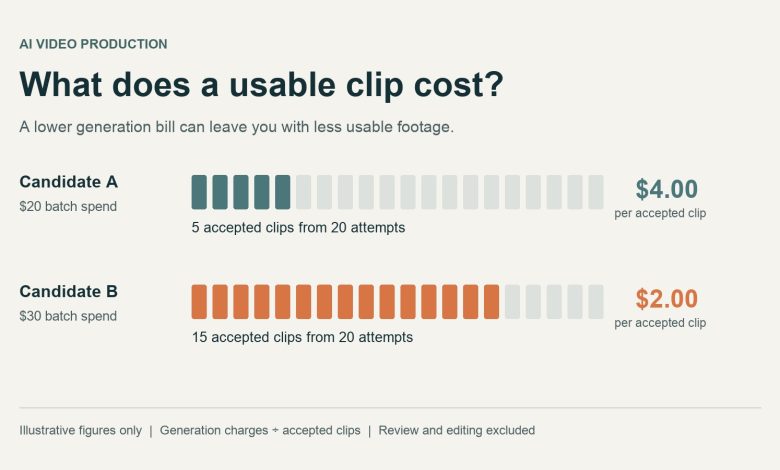
Consider two hypothetical candidates tested on the same five-second brief. These numbers are invented to explain the calculation; they are not current model prices or measured results. Both batches contain 20 attempts, and the totals represent the actual generation charges assumed for this example.
| Measure | Candidate A | Candidate B |
| Total generation charges | $20 | $30 |
| Attempts | 20 | 20 |
| Accepted clips | 5 | 15 |
| Cost per accepted clip | $4.00 | $2.00 |
Candidate A costs less per attempt, but Candidate B costs less per accepted clip under these assumptions. If each accepted clip supplies the full five seconds, A costs $0.80 per usable second and B costs $0.40. If editors can retain only part of each clip, use the accepted duration instead of the nominal duration.
Labor can alter the comparison again. Suppose each batch takes 30 minutes to review at an illustrative internal rate of $40 per hour, adding $20 to each batch. Generation plus review would then cost $8 per accepted clip for A and about $3.33 for B, before editing, storage or delivery.
A small trial does not establish the next month’s budget. Repeat the comparison with fresh briefs and report results by shot type. A model that works well for scenery may produce a different acceptance rate for close-up product handling.
Measure how long delivery takes
Record the time from submission to a downloadable result, then the time until a reviewer accepts it. These are different events. A service may acknowledge a request quickly while the video remains queued or in progress.
The Ofox video API guide describes an asynchronous workflow: submit a task, then poll its status or receive a webhook. In an application using that pattern, preserve the task identifier and show the user the current state. If the browser stops waiting, check the existing task before creating another one.
Keep queue delays, generation time and review time distinct in your test log. An editor waiting for one missing shot may care more about an unusually slow result than the average. Test a small, permitted batch at the concurrency your application expects, rather than projecting production behavior from a single request.
Verify the handoff to editing and storage
A generation result is only useful if the team can retrieve it and put it into the editing workflow. Check the file format, available resolution and whether the download address expires. Save approved assets to storage your team controls under the applicable service terms.
Google’s Veo documentation describes polling for a completed operation and downloading the generated video. Treat download and storage as explicit steps in the workflow. A result link in an application log is not, by itself, an archive of the asset.
Retain the brief, input references, model identifier and approval decision with the saved clip. An editor should be able to find the version that was approved without opening every generated file. This also makes a later model comparison easier to reproduce.
Decide where unified access helps
A platform that offers several models can reduce the number of integrations used in a comparison. OfoxAI provides access to text, image and video models through one account and API key, with a shared balance. A team can evaluate that arrangement when the same production workflow needs script development, reference images and video generation.
Shared access does not establish that one model is best, or that every route supports the same controls. Check the exact model, input requirements, charging rules and result handling before relying on it. Include the platform dependency and any restrictions on approved upstream services in the buying decision.
Give the buyer a decision they can explain
End the trial with a short comparison of accepted outputs, generation charges, review effort and time to delivery for each shot category. Include the reasons for rejection and the settings used. Keep a few representative failures beside the selected clips so the decision survives beyond the demo.
The next purchase should fund a workflow that repeatedly meets the brief within the team’s budget. Run that workflow again when a model, prompt or pricing tier changes. The useful unit of AI video API cost is the footage a team can actually deliver.