
System-design interviews judge how you balance trade-offs, not how neatly you draw rectangles. When an interviewer asks why you picked quorum writes over leader-follower replication, the whiteboard is secondary to the reasoning you share aloud.
A fresh wave of AI practice tools turns up that pressure. Simulators read your diagram and ask follow-up questions in real time, and live copilots put prompts on your screen during a call where the employer allows AI help.
This guide compares nine options on what each vendor’s own site says about realism, feedback, privacy, and cost, so you can choose the best AI for system-design interviews, or decide when to skip AI entirely.
Best AI tools at a glance
Need the shortlist fast? Start here, then keep reading for what each tool does and what it costs.
| Tool | What it offers | Mode | Free tier | Starting price† |
| Interview Copilot | Résumé-based answer guidance on screen during a live video call | Live | No free plan (the app is free to download and test) | $49 per month or $149 per year |
| Hello Interview | Guided Practice that teaches a repeatable step-by-step framework | Practice | The Design Bitly problem is free | $59 for one month or $119 for one year at list price |
| ArchWyse | Voice-and-whiteboard mocks with six-dimension scoring at a low price | Practice | One question (Design a URL Shortener) | $3 per month |
| Whitepad | Voice-first 45-minute mocks with separate interview and learn modes | Practice | One full mock | $29 per month |
| PrepLinx | One place for software, ML, and data engineer system design | Practice | Four full interviews | Paid plans are not on sale yet (listed from $19 per month) |
| Mockingly | Unlimited free practice on an interactive whiteboard | Practice | Yes (unlimited practice) | $14 per month (Pro) |
| System Design Dive | Open-source coach that you run on your own machine | Practice | Yes (MIT license, self-hosted) | Free, plus model API costs if you choose a remote provider |
| SysDesignPrep | Interviewer, whiteboard, and AI Mentor share one context | Practice | Yes (walkthroughs, reference designs, guides) | $49 per month or $147 per year |
| Final Round AI | Practice interviews, live copilot, and automatic debrief in one app | Hybrid | Free plan for prep setup only | Pro starts at $25 per month |
† Prices as listed on each vendor’s own site on October 8, 2026. Sale prices and plan limits change, so check the pricing page before you pay.
Scan the grid, but remember that practice simulators and live copilots tackle different needs, and price is only one factor. The next section explains how the list was put together and how to try a tool yourself.
How this list was put together
What qualified as an AI system-design tool
A product is on this list only if its own public pages describe at least one of these real-time capabilities:
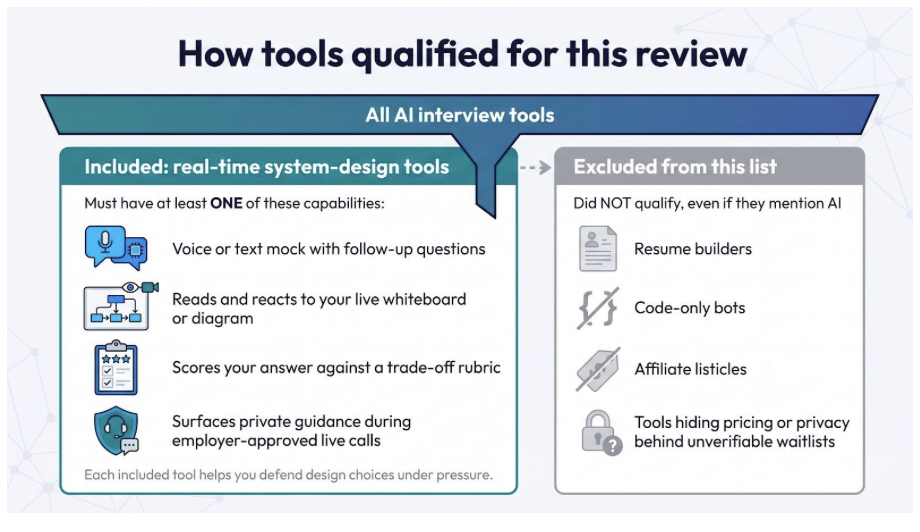
- Runs a voice or text mock that asks follow-up architecture questions.
- Reads a live whiteboard or diagram and reacts to changes.
- Scores a spoken or drawn answer against a trade-off rubric.
- Shows private guidance during a live call where the employer allows AI help.
Resume builders, code-only bots, and tools that keep pricing, privacy terms, or system-design features behind a waitlist are left out. Each remaining tool is built to help you defend design choices under pressure, not just draw pretty boxes.
Every fact below comes from the vendor’s own website, pricing page, or public code repository, read on October 8, 2026. No hands-on test scores sit behind the order of the list.
Three prompts to try on any tool
Run the same three prompts on every tool you shortlist, and give each about 45 minutes. Together they show how well a tool follows up, reads a diagram, and keeps context.
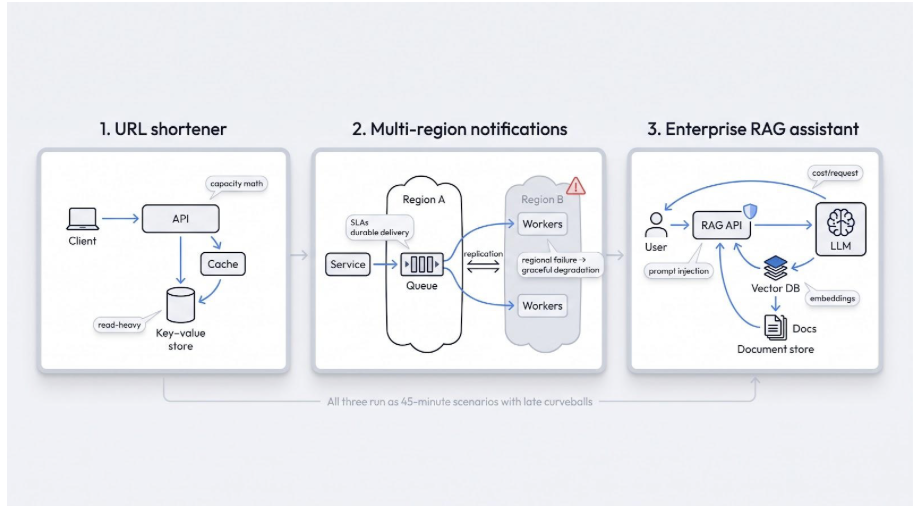
- Baseline: design a URL shortener
A warm-up that checks for clarifying questions, rough capacity math, a cache plan, and a read-heavy data store. - Reliability drill: multi-region notifications
Traffic spikes, a region fails, and durable delivery outweighs latency. Strong tools demand clear SLAs, cross-region data movement, and graceful degradation, not a reflexive “just add a queue.” - AI-native twist: enterprise RAG assistant
Modern rounds probe embeddings, prompt-injection defenses, and cost per request. This prompt separates whiteboard watchers from LLM-aware interviewers.
Add late curveballs such as a 10x traffic jump, conflicting requirements, or a regional outage. They show whether the tool remembers your earlier decisions and how deep its follow-ups go.
What to look for when you try a tool
Interviewers make hiring calls on evidence, so judge each tool the same way. Nine things are worth checking, most important first:
- Architecture reasoning and trade-off quality
- Adaptive follow-ups (realism)
- Diagram and whiteboard understanding
- Feedback specificity and calibration
- Context continuity and seniority tuning
- Communication and transcription quality
- Privacy and data-handling transparency
- Price-to-value ratio
- Platform reliability and accessibility
In short, a tool earns its place only when it shows real skill transfer, not marketing polish.
Best AI tools for system-design interviews
AI help comes in two forms: products you use before the interview to practice, and products you use during a call where the employer allows AI help. Mixing those use cases would blur key trade-offs, so the list below keeps them in two groups.
Practice simulators
(mocks that read your whiteboard and give feedback on your answer)
- Hello Interview: guided framework that teaches the method
- ArchWyse: full mocks at budget pricing
- Whitepad: voice-first mocks with a learn mode
- PrepLinx: one place for software, ML, and data design
- Mockingly: unlimited free practice
- System Design Dive: open-source and local
- SysDesignPrep: interviewer plus mentor in one workspace
Live copilots (AI-enabled interviews only)
(overlays that show prompts during a permitted video call)
- Interview Copilot: résumé-based guidance at one flat price
- Final Round AI: practice, live copilot, and debrief in one app
The profiles that follow describe what each product does and what it costs, based on its own site.
1. Interview Copilot: live guidance from your own résumé
Interview Copilot is a desktop app for live video interviews. It listens to the call audio, detects each question, and shows answer guidance in an on-screen overlay. The company says the overlay never appears in screen shares, recordings, or screenshots, and it markets the app as “Undetectable in any meeting”.
How it works
The native desktop app for macOS and Windows hears audio from Zoom, Google Meet, Microsoft Teams, or Webex, detects questions, and shows guidance drawn from your résumé and the job description. The company calls it “a smart teleprompter for your own experience”. For a system-design round, one shortcut sends a diagram, coding task, or document on your screen for analysis, and answers to technical questions emphasize approach and trade-offs. Glance mode cuts the answer down to short speaking points. It is not a browser extension, and no bot joins the call.
Setup and pricing
The app is free to download, so you can install it and check that audio capture and the overlay work on your machine. A live interview needs a subscription: $49 per month or $149 per year. Both plans include every feature, with no credits and no session limits. There is no free trial. You can cancel renewal at any time, and fees already paid are not refunded.
When to use it
Use it in calls where the employer allows AI help. The company says answers start in under a second, which matters when an interviewer changes direction in the middle of a design. It does not include a whiteboard or mock interviews, so pair it with one of the practice tools below. The company notes that its protection does not cover every managed device or proctoring system, so check your setup and the interview rules before you rely on it.
Why it leads the live-copilot list
Guidance built from your own résumé, a shortcut that reads the diagram on your screen, and one flat price with every feature make it the simplest live option here to understand and to budget for. It is not the cheapest: Final Round AI’s Pro plan starts at $25 per month.
2. Hello Interview: guided practice that teaches the method
Freeze at a blank canvas? Hello Interview’s Guided Practice breaks a system-design problem into steps: requirements, entities, API, high-level design, and deep dives. You get AI feedback on each step, then a final report.
Why it stands out
The practice is whiteboard-first: you diagram as you explain, and the site says the AI reads your drawing. The system-design track has 34 problems of about 35 minutes each, from Design Bitly to Design Uber and Design Ticketmaster. Each session ends with a final report that includes takeaways and a peer comparison. The site says the feedback is tuned by FAANG interviewers.
Beyond system design
Separate tracks cover low-level design (8 problems), AI-enabled coding (12 problems), and behavioral questions, so one pass covers most rounds of a loop.
Pricing (checked October 8, 2026)
Design Bitly is free to try, and the site says you can learn at your own pace for free. Premium is sold as access that does not auto-renew: $59 for one month, $119 for one year, or $399 for lifetime access at list price. On the day of this check the pricing page showed sale prices of $47, $78, and $275.
Best for
Engineers who need a structured framework before tackling adversarial mocks. If you already think in phases and want a voice interviewer that pushes back, try ArchWyse or Whitepad instead.
3. ArchWyse: full mocks at budget pricing
ArchWyse lists its Premium plan for individual engineers at $3 per month, with no contract and no seat charge.
Interview realism
Pick a problem and ARIA, the site’s AI interviewer, runs the session by voice while you draw on an Excalidraw whiteboard. The site says ARIA analyzes your diagram alongside what you say, asks clarifying questions, probes edge cases, and challenges your assumptions.
Scoring transparency
After the session you get rubric scores across six dimensions: Requirements Gathering, High-Level Components, APIs and Data Model, Scalability and Reliability, Trade-offs and Depth, and Communication Clarity. The evaluation comes with specific improvement notes.
Difficulty scaling
Premium problems come in Junior, Senior, and Staff variants. The site says the AI adjusts its expectations, follow-up depth, and scoring rubric to your experience level.
Free plan
The free plan covers one question, Design a URL Shortener, with the full AI interviewer, voice, whiteboard, and evaluation. No credit card is needed. Premium unlocks the other 62 questions.
Watch-outs
The vendor cites 63 system-design questions and seniority calibration, but all of that evidence is first-party. ArchWyse also sells a separate assessment product to hiring teams, from $129 per month. Treat the low price as a cost-effective experiment, not a guaranteed path to mastery.
4. Whitepad: voice-first realism for the visual thinker
Whitepad runs system-design prep as a spoken interview: you talk, the AI interviewer talks back, and the site says it reads your whiteboard every turn.
Interview flow
A session runs about 45 minutes and follows the phases of a real loop: clarify, estimate, high-level design, deep dive, scale and failure, wrap. The site says you only get credit for what you draw. The session ends with a scorecard that ties each point to something you said or drew, plus a model answer for the part where you went deepest.
Two modes, one toggle
- Interview me: a skeptical interviewer probes your design, never hands you the answer, and ends with a hire or no-hire scorecard.
- Learn with me: a mentor answers your questions and explains trade-offs as you go, then ends with a recap of concepts and what to study next.
Tracks
Preset problems cover backend, iOS, and Android. You can also paste your own problem for a specific company or domain.
Pricing (checked October 8, 2026)
One full mock is free with no credit card. Prep Pass costs $29 per month for 6 sessions, and Pro costs $59 per month for 15 sessions. Extra sessions cost $6 each, and annual billing gives two months free.
Best for
Engineers who need to speak and sketch under pressure and want voice-plus-whiteboard practice in one place. The monthly session allowances are small, so count how many mocks you need before interview day.
5. PrepLinx: one place for software, ML, and data-engineering design
Most interview loops span more than one kind of architecture. PrepLinx lets you pick the Software Engineer, Machine Learning Engineer, or Data Engineer role before each system-design mock, so you can practice context-switching without learning a new interface.
Session flow
A session runs up to 60 minutes with a voice interviewer and a whiteboard. Ask the interviewer to look at your diagram and it reads the drawing, then questions you about components, data flow, and failure modes. The ML role covers training, serving, and monitoring. The data engineer role covers pipeline and warehouse design. Difficulty is easy, medium, or hard.
Access and pricing (status as of October 8, 2026)
The Free plan includes four full interviews with scored feedback. It needs no credit card, and the interviews do not expire. Paid plans are marked as coming soon: Starter is listed at $19 per month for 8 interviews and Pro at $39 per month for 20.
Feedback
The report gives a 0 to 10 score for each dimension of the round, strengths quoted from your own words, weaknesses, concrete improvements, an overall hiring signal, and the full transcript. During the session the interviewer gives no hints and does not say whether you are right.
Best for
Candidates facing a multi-round loop who need to rehearse backend design in the morning and ML design after lunch without juggling different platforms.
6. Mockingly: unlimited free practice
Need rapid practice without a credit card? Mockingly offers unlimited AI interview practice on its free tier.
Session workflow
You pick a question, the AI presents the prompt, and you sketch your design on an interactive whiteboard while you talk it through in chat. The interviewer asks follow-up questions based on your design choices. After each session you get critique and suggested improvements.
Question bank
The site also publishes free written guides to real interview questions, including RAG and LLM gateway designs, so you can read a full breakdown before you attempt the mock.
Pricing (checked October 8, 2026)
The free tier includes unlimited practice, the whiteboard, real-time AI feedback, basic session history, and core questions. Pro costs $14 per month and adds detailed interview analysis, a readiness score with trends, company-specific questions, previously asked questions with solutions, and trivia quizzes.
Best for
Candidates who need high-volume reps on short notice. Do your own thinking first and read the critique after, so you, not the algorithm, do the work.
7. System Design Dive: open-source control when privacy matters most
System Design Dive is an open-source interview coach under the MIT license. You clone the repository and run it on your own machine: a Next.js app with a Convex backend that can also run locally, and an Excalidraw whiteboard built in.
Setup
Install the dependencies, start the Convex backend, start the app, and open localhost:3000. By default every AI task goes to Ollama, a local model runner, so a new setup does not call a remote provider unless you opt in. The AI interviewer gets your diagram as context, and you can dictate answers through browser speech recognition. A tutor mode gives guidance when you want help instead of interview pressure. A report on strengths, weaknesses, and areas to improve is generated from the conversation.
Why developers like it
- Read or change the prompts and the app logic in the code
- Switch between Ollama, OpenRouter, and Google Gemini, with a different model for each task
- Generate topics for a target company and for backend, frontend, or full-stack interviews
Trade-offs
You do the setup yourself, and the README warns that the default local model works well but is very slow. A remote provider needs your own API key. If you need plug-and-play polish right before an onsite, choose a hosted tool instead. When data ownership, auditability, or experimentation outrank convenience, System Design Dive gives you the full code at no charge.
Best for
Engineers under strict NDAs or anyone who wants to inspect and tweak every part of the interview workflow.
8. SysDesignPrep: one room for interviewer, whiteboard, and mentor
SysDesignPrep keeps the interviewer, your whiteboard, and an AI Mentor in a single browser window, so you do not re-explain your design in a second chat tab.
How it works
- Walkthrough: you step through a strong candidate’s answer one turn at a time, answer first at the key decisions, and ask the AI Mentor anything along the way.
- Mock interview: an AI interviewer probes what you say and what you draw, keeps the 45 minutes moving, and ends with a scored debrief, stage by stage.
- Mocks run timed, or untimed with the AI Mentor beside you. Because the mentor sees the interview and the whiteboard, it answers in context.
Depth
The site lists 35 questions, each with a walkthrough, a mock, and a written reference design, plus 187 deep dives on topics such as hot keys, backpressure, and failure modes. Company mocks run in the reported style of employers such as Google, Meta, Amazon, and Stripe.
Access and privacy (status as of October 8, 2026)
Reference designs, study guides, and walkthroughs are free. The URL Shortener walkthrough needs no account, and the rest open after sign-in. AI mock interviews and live AI Mentor questions need Pro: $49 per month, $147 per year, or $441 once for lifetime access. The privacy policy says transcripts and whiteboard activity are stored with your account, and that typed answers go to a third-party model provider that does not use them to train its models. You can ask for transcripts to be deleted. The policy also tells you not to enter confidential information.
Best for
Engineers who lose momentum juggling multiple tabs and want questions, answers, and study material in one place.
9. Final Round AI: practice, live copilot, and debrief in one app
Final Round AI sells one desktop app for macOS and Windows that covers the whole loop: prepare, practice or go live, then review.
How it works
- Practice: an AI interviewer that already knows your role, résumé, and materials, with eight scenarios that include System Design.
- Live copilot: the app listens to the real call and shows a short suggested answer in a private window. The site says it detects system-design questions without a mode switch and can read a problem or diagram on your screen.
- Debrief: a plain-language write-up is created automatically when a session ends.
The company describes its Stealth Mode, on by default, as hiding the app’s windows from screen sharing and recording. As with any live copilot, use it only where the employer allows AI help.
Setup and pricing (status as of October 8, 2026)
Pro starts at $25 per month and includes unlimited live copilot sessions, Stealth Mode, automatic debriefs, practice interviews, and screen help. A free plan covers job goals, résumé, and prep materials only. There is no free trial, and live sessions need an active Pro subscription.
Best for
Engineers who want one subscription that handles practice, live guidance, and review without juggling multiple tools.
Conclusion: the limits of this guide
This comparison is a desk review, not a lab test. Every feature, price, and policy above comes from the vendor’s own website or public repository as it stood on October 8, 2026. No tool was scored in test sessions for this guide, so the order of the list reflects fit for different needs, not measured performance.
Vendor pages describe what a product is meant to do. Most of these tools have a free tier or a free session, so run the three prompts above before you pay.
For privacy, read each published policy yourself. This guide had no third-party audit of data deletion or of any copilot’s screen-share claims to draw on, so treat vendor statements as claims, not guarantees.
Live copilots raise a policy question that practice tools do not. Ask the employer whether AI help is allowed before you use one.
Products move fast. Prices, plan limits, and sale offers change, so confirm them on the vendor’s site before you subscribe.