Digital menu boards look simple from the customer side: a screen, a menu, maybe a rotating promo. Behind that screen sits a small, often-overlooked stack of decisions — which media player to run, how it talks to the point-of-sale system, and what happens when a router reboots at two in the morning. Most guides to digital menu boards focus on design: templates, layout, color palettes. Fewer explain the hardware and integration choices that actually determine whether the board is still working when a customer looks at it.
The Two Parts of a Digital Menu Board Nobody Mentions in the Demo
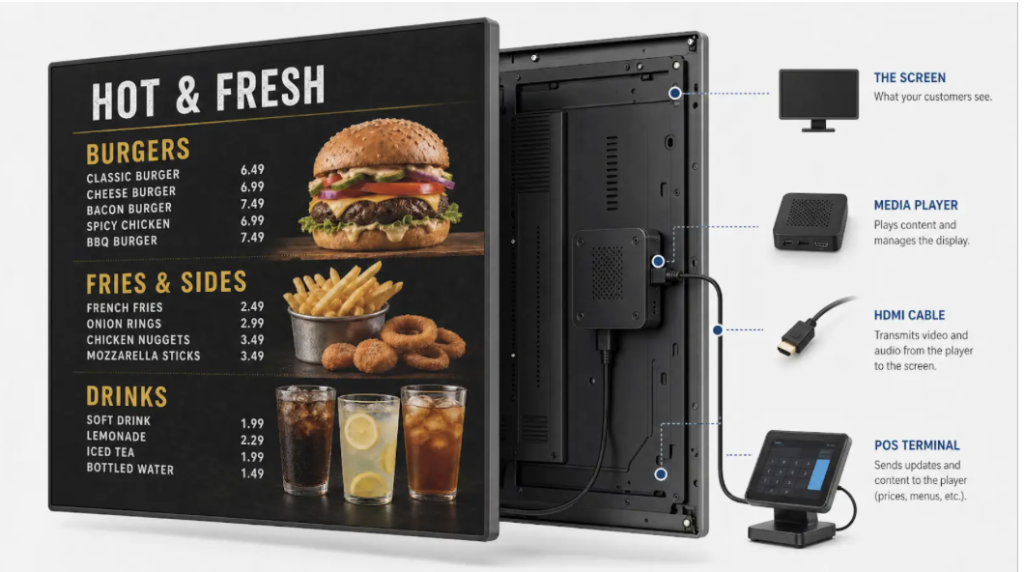
Every digital menu board setup has two layers that rarely get discussed together. The first is the media player — the small box, stick, or built-in system-on-chip that actually decodes and displays content on the screen. Vendors selling digital menu board systems tend to treat the media player as an afterthought, a commodity component that “just works,” when in practice it’s the single most common point of failure in the whole setup: overheating in an enclosed menu board housing, losing Wi-Fi in a kitchen full of metal equipment, or simply freezing after a firmware update nobody scheduled.
The second layer is POS data integration. A digital menu board that isn’t connected to the point-of-sale system is really just a very expensive picture frame — someone still has to manually update prices, pull discontinued items, and re-export a new image every time something changes. POS integration for a digital menu board is what turns a static display into an operational tool: a price change in the POS should show up on the screen without anyone touching a design file. Most digital menu board companies market this integration heavily, and it genuinely matters — but it solves a different problem than hardware reliability does. A perfectly integrated POS feed still won’t help if the media player it’s feeding has frozen, or if the screen itself has gone dark.
Anyone comparing digital menu board solutions or evaluating a turnkey digital menu board system for a multi-location rollout should treat these as two separate purchasing decisions, not one. Getting the software and POS integration right is necessary. It is not, on its own, sufficient.
The media player question alone breaks into a few sub-decisions that rarely get spelled out in a sales conversation. Some digital menu board companies ship a purpose-built box; others rely on the built-in system-on-chip inside a commercial display, which cuts hardware cost but usually means less processing headroom and a slower, harder-to-manage update cycle. Stick-style players are cheap and easy to swap, but they also tend to overheat inside an enclosed menu board housing above a fryer line, which is exactly where a lot of quick-service digital menu boards end up mounted. None of these are wrong choices on their own — the mistake is picking one without asking who is responsible for noticing when it fails, and how they’ll find out.
Why Digital Menu Boards Go Dark and Nobody Notices
Here’s the failure mode that most digital menu board installation guides skip entirely. A media player can be technically online — pulling data from the POS, receiving updates, reporting a healthy connection to whatever dashboard it reports to — while the screen it’s connected to has failed. The player might be frozen on the last frame it rendered. An HDMI cable might have popped loose during cleaning. A power blip might have left the screen off entirely while the player sits there faithfully sending a signal into the dark. From the operator’s dashboard, everything looks fine, because most digital menu board systems only monitor the media player, not the screen itself.
Most digital signage platforms send content to a screen and assume it shows; digital menu boards verified by Decker skip the truck roll entirely — Decker Verifier checks the screen independently and logs uptime for every one, the moment a player freezes or an HDMI input flips.
That distinction matters most at scale. A single dark screen at one counter is a minor annoyance that a manager notices within the hour. The same failure across two hundred locations, undetected for a week, is a measurable revenue problem — lost upsell impressions, stale pricing nobody can see to correct, and a customer-facing gap that no POS report will ever flag, because the POS only knows what it sent to the screen, not what a customer actually saw.
What to Actually Check Before Signing Off on a Setup
For anyone specifying a digital menu board installation — whether it’s a single-location pilot or a rollout across dozens of sites — a few practical checks separate a setup that survives its first six months from one that quietly degrades:
- Network resilience. Does the media player cache the last published menu locally, or does it go blank the moment Wi-Fi drops? A brief outage should never mean a black screen.
- Power-cycle recovery. After a breaker trips or a router reboots, does the whole digital menu board system come back on its own, or does it require someone physically walking over and restarting hardware?
- Independent status visibility. Can anyone off-site actually confirm a given screen is displaying the current menu right now, or does “status: connected” just mean the player checked in at some point?
- HDMI and input handling. On multi-input commercial displays, can the correct source be confirmed and switched remotely, or does a wrong-input screen require an on-site fix?
- POS-to-screen latency. When a price changes or an item is 86’d in the POS, how long before that actually reaches the screen — and is there any confirmation it arrived, beyond “the request was sent”?
Most of these questions don’t come up during a sales demo, because a demo runs on one screen, on a good network, for ten minutes. They come up eighteen months into a rollout, when the tenth or hundredth screen quietly stops behaving the way the first one did.
Where Reliability Fits Into a Broader Rollout Plan
Hardware and POS integration decisions rarely get revisited once a digital menu board system is chosen — which is exactly why they’re worth getting right up front, before a company has fifty locations running on the same media player model and the same blind spot. A few things worth planning around, beyond the initial installation:
Staff at individual locations are usually not equipped to diagnose a frozen player or a mis-set HDMI input; that’s a support-desk problem, not a store-manager problem, and the setup should assume that from day one rather than discovering it after the first angry phone call. Scheduling and dayparting — automatically switching a breakfast menu to a lunch menu, or rotating in a weekend-only promotion — depends on the same underlying reliability: a schedule change that never actually renders on-screen is functionally identical to no schedule at all. And any multi-location deployment benefits from being able to compare uptime across sites, if only to catch the one location with a chronically bad network connection before it becomes a pattern of customer complaints that never quite gets traced back to the screen.
It’s worth budgeting time for this even in a small rollout. A three-location pilot with no independent way to check screen status will teach a team the wrong lesson if all three happen to run on a stable network with a good power supply — the setup will look solid right up until location four is added on a shared restaurant Wi-Fi network with a router that reboots every time the walk-in freezer compressor kicks on. The gap between “worked fine in the pilot” and “worked fine at scale” is almost always a monitoring gap, not a design gap or a POS integration gap. By the time a chain notices screens going dark inconsistently across a dozen sites, the fix usually isn’t a new digital menu board vendor — it’s a monitoring layer that should have been part of the original specification.
None of this replaces good menu design or a clean POS integration — both still matter. But they’re solving a different problem than the one described here, and treating them as the whole solution is how a digital menu board rollout ends up with screens that look great in the first month and quietly fail, one at a time, afterward.
The Takeaway
A digital menu board is only as useful as its uptime. Hardware selection and POS integration get most of the attention during a purchasing decision, and both deserve it — but neither one answers the question that actually determines whether a customer sees the right menu at the right price: is the screen, right now, actually showing what it’s supposed to. That’s a separate layer of the system, worth asking about explicitly and in plain terms before signing off on any setup, rather than discovering the gap months later, one quiet, unnoticed outage at a time.