
Data analysis rarely fails because someone cannot write a line of Python. More often, the real problem is the number of small interruptions that build up during a project. An analyst imports a dataset, checks missing values, writes a chart, notices an unusual result, searches for documentation, asks an AI assistant for help, copies the suggested code back into Jupyter, runs it, and then repeats the process when something breaks. Each step may only take a few minutes, but together they slow down the entire workflow.
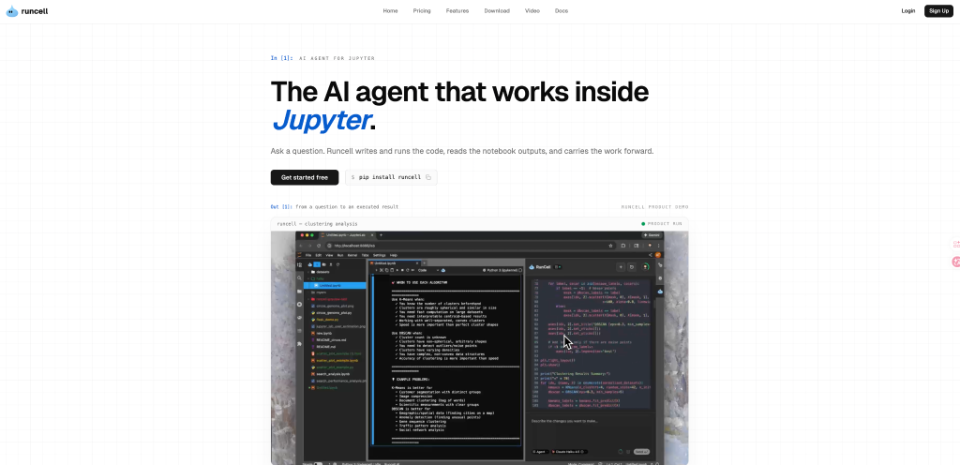
This is one reason notebook-focused tools such as RunCell are becoming relevant to analysts, researchers, and developers who already work in Jupyter. Instead of treating AI as a separate chat window, the idea is to bring assistance closer to the notebook itself, where the code, variables, outputs, charts, and errors already exist. That shift can make AI more useful for practical analysis rather than simply generating isolated code snippets.
The Biggest Problem in Jupyter Exploratory Workflows
Jupyter notebooks are popular because they allow users to explore data interactively. You can load a dataset, test an idea, visualize the result, change an assumption, and run another cell without rebuilding an entire application.
The same flexibility, however, can create fragmented workflows. An analyst may need to move between several tools during a single task:
- Jupyter for executing Python
- Documentation for checking syntax
- An AI chatbot for debugging
- Browser tabs for finding examples
- Spreadsheets for quickly checking raw values
The challenge is not that any of these tools are difficult to use. The challenge is constantly context switching. If an AI assistant only sees a copied error message, for example, it may not know which dataframe created the error, what transformations were already applied, or what earlier cells changed the data. A notebook-aware workflow reduces some of that context switching.
Why Context Matters More Than Python Code Generation
Generating Python code is now relatively easy. The hardest problem is generating the right code for the current notebook state.
Consider a simple data-cleaning task. An analyst might start with:
Python
import pandas as pd df = pd.read_csv(“customer_data.csv”) df.info()
After inspecting the output, the next action depends on what the notebook actually reveals. Missing values might need to be filled, dates may need conversion, or duplicate rows may need to be removed.
A generic AI assistant can suggest code for all three situations. A notebook-native system becomes more useful when it can work from the specific context of the analysis rather than forcing the user to repeatedly explain what has already happened.
From Asking Questions to Completing Analysis Loops
Traditional AI coding assistance often follows a simple, fragmented pattern:
Traditional Workflow: Ask → Receive Code → Copy → Run → Inspect → Ask Again
A more integrated notebook workflow can shorten that cycle:
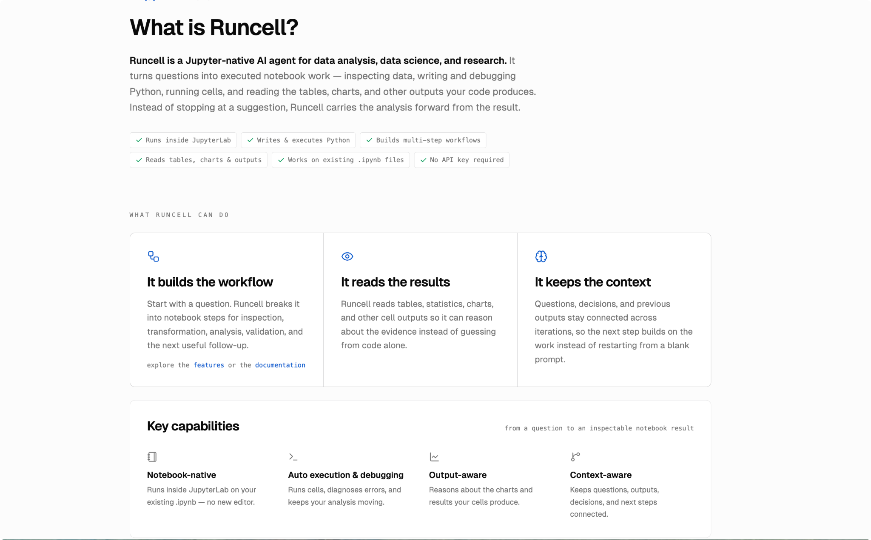
Notebook-Native Workflow: Ask → Generate → Execute → Inspect → Adjust
That difference may look small, but it becomes significant during exploratory data analysis (EDA), where decisions constantly depend on the output of the previous step.
For example, imagine analyzing an ecommerce dataset. The first question might be straightforward: Which product categories generate the most revenue? The analysis could then reveal that one category has unusually high sales for only two months. That creates another question: Is the increase seasonal, promotional, or caused by a small number of large orders?
The workflow keeps branching as new information appears. This is where a Jupyter AI agent can be more useful than an assistant that only produces standalone code. When AI support exists closer to the notebook workflow, users can move from one analytical question to the next without continually rebuilding context.
Where Notebook AI Can Save Most Time
AI does not remove the need to understand data. Analysts still need to decide whether an assumption makes sense, whether a statistical result is meaningful, and whether the data itself is reliable. Where AI can help most is with repetitive work surrounding those decisions.
| Analysis Task | Traditional Workflow | Notebook-Assisted Workflow |
| Data inspection | Manually write inspection commands | Generate relevant inspection code from the task |
| Data cleaning | Search for syntax and test fixes | Suggest cleaning steps based on notebook context |
| Visualization | Write and modify plotting code manually | Generate and refine charts through instructions |
| Debugging | Copy errors into another tool | Work with errors closer to the notebook |
| EDA | Repeatedly create small code blocks | Move through related analysis questions faster |
| Reporting | Manually summarize outputs | Use notebook results to support explanations |
The biggest gains often come from removing dozens of small interruptions rather than automating one major task.
Exploratory Data Analysis (EDA)
EDA is especially suitable for notebook-based AI because the process is rarely linear. A typical sequence may include:
- Inspect columns and data types.
- Identify missing or unusual values.
- Examine distributions.
- Compare important variables.
- Create visualizations.
- Investigate unexpected patterns.
At every stage, the output determines what happens next. An AI system that understands the surrounding notebook can potentially support this process better than one that receives only isolated prompts.
Debugging and Error Recovery
Debugging is another area where context is valuable. Suppose a visualization fails because a column was converted from numeric values to strings in an earlier cell. The final error message may describe the immediate problem but not explain why the column changed.
When developers copy only the error into another AI tool, important information can disappear. Keeping troubleshooting closer to the notebook makes it easier to consider previous transformations, variable names, imported libraries, and outputs when diagnosing the issue.
AI Should Support Analytical Thinking, Not Replace It
The convenience of AI can create another problem: accepting results too quickly. A chart that runs successfully is not necessarily a useful chart. A statistical test that produces a p-value is not automatically appropriate. A model with high accuracy may still contain leakage or reflect an imbalanced dataset.
Analysts therefore need to separate two tasks: execution and judgment. AI can reduce the effort required to execute routine steps, but users should still evaluate whether those steps make sense. Before relying on AI-generated analysis, it is worth checking a few basic questions:
- Is the Data Being Interpreted Correctly? Column names can be misleading. A field called revenue, for example, might contain gross sales, net sales, estimated value, or even strings imported from a spreadsheet. The AI cannot always know the business meaning behind a field unless that context is provided.
- Does the Result Match the Question? It is easy to create a technically correct visualization that does not answer the original question. If the goal is to understand customer retention, a chart showing total monthly registrations may be interesting but insufficient. Cohort analysis or repeat-purchase behavior might be more useful. Human judgment remains essential for connecting the analysis to the real objective.
What to Look for in a Notebook AI Workflow
Not every AI coding tool needs to work the same way. The right choice depends on how someone actually uses notebooks. For occasional Python questions, a general chatbot may be enough. For developers working across an entire codebase, an IDE-focused assistant may make more sense.
For analysts who spend much of their time inside notebooks, several capabilities become more important:
- Notebook Awareness: The system should work with the structure of notebook-based analysis instead of treating every question as an independent coding request.
- Execution Feedback: Running code is only half of the process. The output often determines the next decision. Useful notebook assistance should therefore support an iterative workflow where results, errors, and changes can influence what happens next.
- Control Over Analysis: AI should make it easier to work, not make the process impossible to inspect. Analysts should still be able to review generated code, understand what was executed, and change the approach when necessary.
A More Practical Way to Use AI With Jupyter
The most useful role for AI in data analysis may not be replacing analysts or writing entire notebooks automatically. Its real value is more practical: reducing the distance between a question and the next useful experiment.
Instead of repeatedly leaving Jupyter to search for syntax, explain errors, or generate small pieces of code, notebook-native AI can keep more of that work inside the environment where the analysis is already happening. For data analysts, researchers, and Python users, that can turn AI from a separate question-and-answer tool into part of an ongoing analytical workflow.
The result is not necessarily fewer decisions. Good analysis still requires careful thinking. The advantage is that analysts can spend less time moving information between tools and more time deciding what the data actually means.
If your team wants to close the gap between asking analytical questions and executing them seamlessly, tools like RunCell are built specifically to handle this context-aware loop within your existing environment. [Explore how RunCell integrates with your Jupyter workflow here.]