
In 2026, a beginner doesn’t have to do bed leveling, retraction tuning, temperature calibration, and Z-offset adjustments manually. Most of it happens automatically thanks to AI. AI is reshaping what 3D printing actually feels like to use in 2026. It recognizes issues during the printing procedure, saving money and time. This isn’t about what AI might do for 3D printing in the future. This is about what it’s already doing in machines people are buying and using right now. Here’s what’s actually changed.
Why Did 3D Printing Need AI?
The hard part is never the hardware. FDM printers are qualified of creating results for years. The issue is everything the user has to know to accomplish that. Bed leveling requires understanding why the nozzle height is important. Retraction tuning needs running test prints and explaining the results. Slicer profiles need understanding layer adhesion, support structures, and print orientation properly to make informed decisions. The barrier is the knowledge, not the machine.
AI addresses three specific problems that sat at the center of that curve:
-
- Monitoring: Failed prints run unnoticed for hours. A print that detaches at midnight keeps running till morning, wasting a whole spool with no one to stop it.
- Calibration: Printers cannot self-diagnose or self-correct. Each adjustment requires manual calculation, manual input, and manual verification.
- Model creation: Getting from an idea to a printable file requires CAD software skills most people never develop. The design step locks out anyone who wasn’t already a modeler.
Fix these three problems and 3D printing becomes genuinely accessible, not just in theory, but in practice. That’s exactly what AI in consumer printers is doing in 2026.
How Is AI Changing 3D Printer Calibration?
Often, calibration is the first thing beginners get wrong, and the last thing professionals stop modifying. AI changes both ends of that equation.
Auto Bed Leveling: From Grid Scans to Smart Probing
Earlier auto-leveling systems functioned by searching a fixed grid across the entire build surface, generally a 3×3 or 5×5 pattern of evenly spaced points. The printer maps the surface, builds a compensation mesh, and applies it uniformly across each print.
It is slow, and it applies corrections to areas of the bed that have nothing to do with where the model is actually printing.
Modern AI-driven leveling takes a different approach. Instead of scanning the entire bed, it probes only the area where the model will actually sit. The compensation targets the real print zone, faster, more precise, and more relevant to the specific job.
Input Shaping and Pressure Advance
These two features represent the most significant calibration advancement in consumer FDM printing in recent years, and neither requires any manual work on AI-equipped printers.
Input Shaping
It addresses a problem that becomes more visible as print speeds increase: resonance. At high speeds, the printer’s frame and motion components vibrate at specific frequencies. Those vibrations show up in prints as ringing, wavy surface artifacts that appear near sharp corners and edges.
Correcting it manually requires printing a calibration object, measuring the frequency of the artifacts, and entering a correction value into the firmware. The process works, but it requires understanding what you are measuring and why.
AI-equipped printers solve this with vibration sensors built into the toolhead. Before each print, the printer runs a brief resonance test, physically vibrating the motion system, measuring the response, and calculating the correction automatically. The whole process takes under a minute and runs without user input.
Pressure Advance
It solves a different problem. When the extruder pushes filament through a heated nozzle, pressure builds up inside the melt zone. That pressure doesn’t release instantly when the extruder stops; it bleeds out slowly, causing excess material to deposit at corners and line ends.
The result without correction: rounded corners, blobs at direction changes, and inconsistent line width at varying speeds.
Pressure Advance compensates by reducing extrusion slightly before a direction change and increasing it immediately after, timed to offset the pressure lag in the hotend. On AI-calibrated printers, this runs automatically from a flow calibration routine before each print.
Can AI Actually Catch a Failed Print Before It Wastes Hours of Filament?
Absolutely, and this is among the most highly valuable things AI has introduced to consumer 3D printing. For instance, a print detaches from the bed mid-job, the nozzle continues extruding into an open area, and by the time anyone checks the printer, the build plate is covered in a tangled nest of wasted filament. The time is gone, but the model is not printed.
Without AI monitoring, there’s no way to stop this short of physically watching the printer. For a 20-minute print, that’s manageable. For an 8-hour overnight job, it isn’t.
What Is AI Spaghetti Detection in 3D Printing?
AI spaghetti detection uses a camera installed within or near the print chamber to monitor the visual feed live. A trained AI model analyzes every frame, looking for the characteristic tangled filament pattern that appears when a print has failed. The loose strands spread over the build plate and gather into what makers call “spaghetti.”
When the pattern is detected, the response is quick:
- The printer pauses or stops the job automatically
- A notification goes to the user’s phone or device through the connected app
- No filament continues extruding into the failed print
The result is that overnight printing becomes genuinely reliable. A print that fails at 2 AM gets caught at 2 AM, not at 7 AM when you walk into the room.
What Else Does AI Monitoring Catch?
Spaghetti is the most sudden failure mode; however, modern AI monitoring setups identify various others:
- Air printing: the nozzle is extruding but depositing nothing because the model has shifted or detached. The AI detects that material is leaving the nozzle without landing on a surface and triggers a stop
- Build plate detachment: early-stage detection of a print lifting from the bed before full spaghetti develops. Catching it early means the print can sometimes be restarted rather than reprinted from scratch
- Filament run-out: sensors detect when the spool is empty and pause the print automatically, giving the user time to load a new spool and resume without losing the job
Each trigger produces a configured response: pause, stop, or notification, depending on the severity and the user’s preferences.
Has AI Finally Removed the Biggest Barrier to 3D Printing, the Design Step?
For most people, yes. The chief barrier between wanting to 3D print something and actually printing it is never the printer itself. It is the file. Each FDM printer begins as a 3D model, and getting a 3D model of the particular thing you want to print, at the dimensions you need, requires either finding someone else’s design that matches closely enough or learning CAD software properly to build it yourself.
The majority of people prefer the first route. Most people hit the limit of that route fast. The thing they want to print doesn’t exist as a downloadable file, and modeling it themselves isn’t an option.
AI is changing that in two different ways.
Photo-to-3D AI
AI photo-to-3D tools analyze a photograph and generate a print-ready 3D model automatically. The most common application is portrait conversion. A photo of a person, a pet, or an object becomes a printable figurine in one tap, with no CAD software, no modeling experience, and no design skills required.
This isn’t a workaround. It’s a basically different way into 3D printing, one that opens projects previously impossible for anyone without design skills:
- Personalized figurines, a physical 3D model of a specific person from a photo
- Portrait gifts, birthday, graduation, and wedding keepsakes printed in the recipient’s favorite color
- Event items, same-day printing of personalized models for occasions
- Classroom projects, students photograph themselves and print a figurine of their own face as part of a STEM session
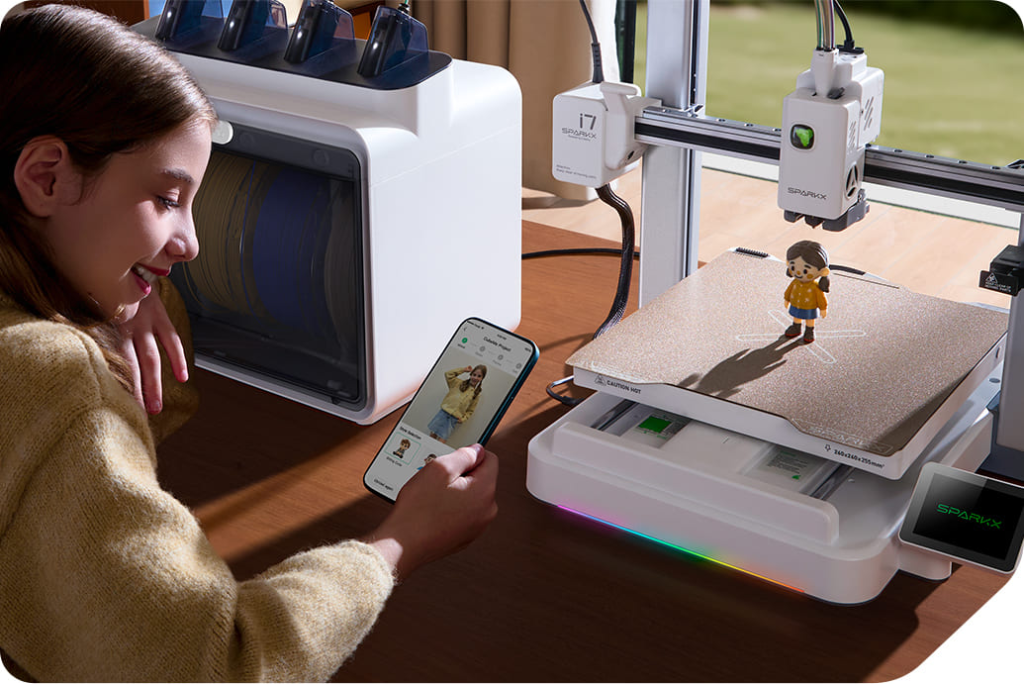
The model is produced from the photo, and the workflow moves immediately into the slicer, no file conversion, no external software, no intermediate steps.
AI-Assisted Slicer Intelligence
A slicer converts a 3D model into the layer-by-layer instructions the printer follows. For years, using a slicer well requires understanding what all the settings actually do: support density, layer height, print orientation, wall count, infill pattern. Making good decisions requires experience.
AI-enhanced slicers analyze the model geometry and make those decisions automatically:
- Support placement: The AI spots overhanging geometry that needs support and places structures where they’re mechanically necessary, avoiding surfaces where removal is difficult or damaging
- Print orientation: The AI evaluates the model and suggests the orientation that minimizes supports, maximizes layer adhesion for the model’s functional direction, and produces the best surface finish on visible faces
- Layer height and speed profiles: Modified automatically based on the model’s detail requirements, finer layers on detailed sections, faster speeds on simple geometry
- Material-specific profiles: AI slicers apply the correct temperature, fan speed, and retraction settings for the detected or selected filament type without manual profile selection
The user loads the model. The AI handles the configuration. The print runs with settings that an experienced maker chooses manually, without requiring the experience to make those choices.
What AI Looks Like on a Real Consumer Printer?
AI calibration, monitoring, and model generation- all these features create a meaningfully different experience when they work together as a system. Not as individual additions attached to a traditional printer.
The Creality SPARKX i7, one of the best 3D printers, is the clearest current example of that in a consumer machine. Each feature on the i7 connects to the others. The calibration runs before each print without user input. The camera observes from the initial layer to the last. The model generation occurs inside the same ecosystem where the print gets queued and started. The user’s phone receives status updates throughout.
Here’s what that looks like in practice:
- CubeMe AI converts a portrait photo into a print-ready 3D model with one tap, no CAD software, no modeling experience required. Photos are deleted from the server immediately after the model generates, a privacy-first design that matters when the photos involve other people or children
- AI spaghetti detection runs through the built-in 720p camera throughout every print, detecting failures and stopping the job automatically, with a notification sent to the Creality Cloud app
- Full-auto bed leveling probes only the active print area, faster and more accurate than full-bed grid scanning, applied specifically to where the model sits
- Input Shaping and Pressure Advance run automatically before each print; the calibration that previously took experienced makers 30–60 minutes of manual test printing now completes in under 3 minutes without user involvement
- Remote monitoring gives real-time camera access through the Creality Cloud app. Start a print, leave the room, check in from anywhere
The result isn’t a printer with a longer feature list. It’s a machine that handles calibration, monitors itself, generates models from photos, and reports its own status, operating as a coordinated system rather than a collection of individual settings.
Where AI in Consumer 3D Printing Goes From Here
The next generation of AI features is already in development, some shipping in select machines, others still closing the gap between demo and reliable daily use:
- AI flow rate compensation: nozzle-mounted cameras analyze extrusion in real time and adjust feed rate dynamically to correct under- or over-extrusion as it happens.
- Multicolor AI optimization: AI predicts the optimal filament switching point and minimizes purge waste dynamically based on color transitions and model geometry. Less waste, faster multicolor prints, cleaner color separation
- Predictive maintenance: AI monitors nozzle wear, belt tension, and extruder gear condition over time, highlighting degradation before it causes a failed job
- Text-to-3D model generation: describe a part in plain language and receive a printable STL file. Early experimental implementations exist. Consumer-grade versions with reliable, dimensionally accurate output are close
Conclusion
AI is transforming 3D printing by making design easier and automating technical tasks. Calibration is now automated. Failed prints get caught automatically. A photo becomes a printable model in one tap. People take advantage of printers that provide live assistance and generative design; however, businesses get enhanced productivity and reliability.
Explore the full Creality lineup and find the printer that works as hard as you do.