
I’m going to show you something that would’ve sounded insane two years ago: you paste a product URL, and AI generates a complete video ad — visuals, script, voiceover, captions, music, everything — in under 5 minutes. No filming. No editing. No design skills.
I’ve been using this workflow for my own e-commerce and affiliate projects for the past few months, and it’s completely changed how I think about ad creative. What used to take me half a day with a freelance editor now takes less time than making coffee.
In this guide, I’ll walk you through the exact process step-by-step, share what I’ve learned about getting the best results, and show you the mistakes I made early on so you can skip them.
TL;DR
Paste a product URL into TopView AI’s Marketing Studio, and the AI will automatically extract product info (images, descriptions, pricing), generate a video ad script, produce original AI footage and visuals, add professional voiceover and captions, and deliver a TikTok/Instagram-ready video ad — all in about 3-5 minutes. No editing skills needed. I’ll walk you through the full process and share tips for getting the best results.
Why URL-to-Video Matters (And Why I Switched)
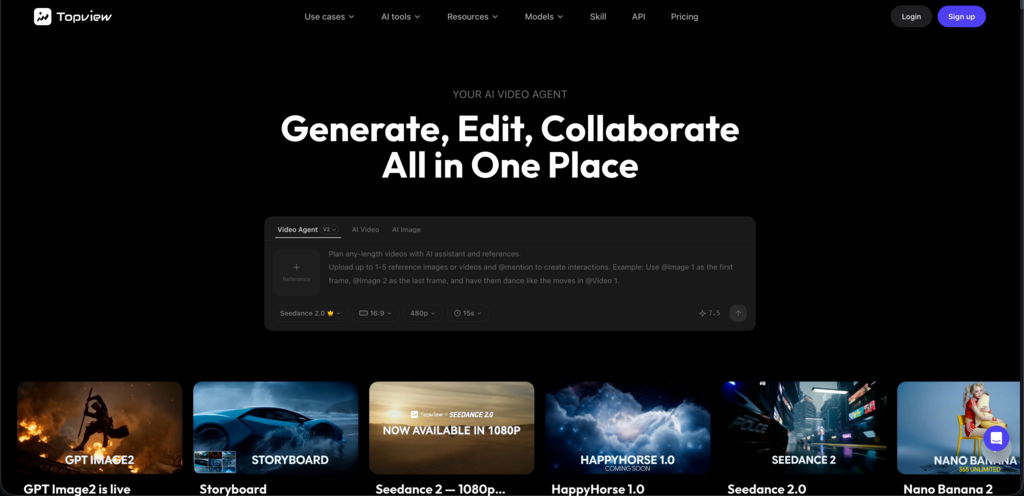
Let me give you some real context. I manage ad creative for a small DTC brand and run a couple affiliate TikTok accounts on the side. Before discovering URL-to-video workflows, my process for creating a single video ad looked like this:
- Screenshot product photos from the listing (10 min)
- Write a script in Google Docs (20-30 min)
- Find or film B-roll footage (30 min to several hours)
- Edit everything together in Premiere or CapCut (45-60 min)
- Add captions, music, adjust pacing (20 min)
- Export, review, re-export because something was off (15 min)
Total: 2-4 hours per video ad. And that’s if everything went smoothly.
Now multiply that by the 5-10 ad variations you need per week to combat creative fatigue on TikTok and Meta. The math doesn’t work unless you’re paying an editor or an agency — and even then, turnaround time kills your ability to react quickly to trends.
URL-to-video AI flips the entire model. Instead of manually gathering assets, writing scripts, sourcing footage, and editing everything together, you give the AI a single product URL and it handles the entire pipeline. My production time dropped from hours to minutes per video.
Is the output as polished as what a talented human editor produces with unlimited time? Honestly, it’s getting close. And for the speed and scale it offers, the tradeoff is absolutely worth it — especially for testing ad hooks, where quantity and iteration speed matter more than perfection.
What You’ll Need
Before we dive in, here’s what you need:
- A product URL — This can be from your own Shopify store, Amazon listing, Etsy shop, or pretty much any e-commerce platform. The AI scrapes the page for product images, descriptions, pricing, and features.
- A TopView AI account — You can start with the free plan to test the workflow. Sign up at topview.ai.
- A rough idea of your target audience — Not mandatory, but knowing who the ad is for (age, interests, platform) helps you guide the AI for better results.
That’s it. Seriously. No video editing software. No stock footage subscription. No voiceover talent.
Step-by-Step: Creating Your First Video Ad from a Product URL
Step 1: Grab Your Product URL
Pick any product you want to create an ad for. This works with:
- Shopify product pages
- Amazon listings
- Etsy product pages
- AliExpress listings
- WooCommerce product pages
- Pretty much any e-commerce URL with product images and descriptions
For this walkthrough, I’ll use an Amazon listing for wireless earbuds — a competitive niche where ad creative needs to be sharp.
Pro tip: The richer the product page, the better the AI output. Listings with multiple high-quality images, detailed descriptions, and bullet-point features give the AI more material to work with. If your product page is sparse, consider beefing it up before generating ads.
Step 2: Open TopView AI’s Creative Studio
Head to TopView AI and navigate to Creative Studio. This is the hub for all content generation — video, images, avatars, and audio.
You’ll see multiple generation options. For URL-to-video, look for the product URL input or the “Create from URL” workflow. Paste your product link and let the AI do its initial analysis.
Step 3: Let the AI Extract Product Information
Once you paste the URL, the AI automatically:
- Scrapes product images — It pulls all available product photos from the listing
- Reads the product description — Title, features, bullet points, specifications
- Identifies key selling points — The AI picks out what makes this product compelling
- Extracts pricing information — If available on the page
This usually takes about 10-15 seconds. You’ll see a preview of what the AI found — take a moment to review it. If something’s off or missing, you can manually add or edit the extracted info before proceeding.
What I learned the hard way: The AI is only as good as the product page. I once pasted a bare-bones AliExpress listing with one blurry photo and a two-sentence description. The resulting ad was… not great. Garbage in, garbage out. Make sure your product URL has solid content to work with.
Step 4: Choose Your Video Style and Settings
This is where you start making creative decisions. TopView AI gives you several options:
Video length: I typically go with 15-30 seconds for TikTok ads and 30-60 seconds for Instagram Reels or YouTube Shorts. For direct-response ads, shorter is usually better — you want to hook fast and drive action.
Aspect ratio: 9:16 for TikTok/Reels/Shorts, 1:1 for feed ads, 16:9 for YouTube pre-roll. I generate 9:16 first and then create variations in other ratios.
AI model selection: This is where TopView AI’s multi-model approach really shines. You can choose from:
- Seedance 2.5 — Great for product videos with dynamic motion and action
- Kling 3.0 — Excellent for lifestyle and cinematic product shots
- Veo 3.1 — Best for realistic, natural-looking scenes
For product ads, I usually start with Kling 3.0 for its cinematic quality and then test variations with Seedance 2.0 for more energetic styles.
Voiceover: You can let the AI generate a voiceover automatically, use one of the platform’s AI voices, or even clone your own voice for brand consistency. I’ll go deeper on voiceover strategy later in this guide.
Step 5: Generate and Review
Hit generate and wait. Most product URL videos take 3-5 minutes to render, depending on the model and video length.
When it’s done, watch the full output before making any changes. Here’s what to look for:
- Does the hook grab attention in the first 2 seconds? If not, you’ll need to adjust.
- Are the product visuals accurate? The AI sometimes takes creative liberties with how the product looks.
- Does the voiceover match the tone you want? Casual vs. professional makes a big difference depending on your target audience.
- Is the pacing right? TikTok viewers scroll fast. If there’s a slow moment in the first 5 seconds, they’re gone.
If the output is close but needs tweaking, you can iterate right within the platform. Change the hook, swap the model, adjust the voiceover, or modify the script. Each re-generation takes another few minutes, and iterating 2-3 times usually gets you to a great result.
Step 6: Download and Deploy
Once you’re happy with the result, download in your target format and resolution. For TikTok, I always go with 1080×1920 (vertical HD).
From here, you can:
- Upload directly to TikTok Ads Manager
- Post organically on your TikTok, Reels, or Shorts accounts
- Run through CapCut for final touch-ups (trending effects, text animations)
- A/B test multiple variations side by side
The entire process — from pasting the URL to having a ready-to-post video ad — takes about 5 minutes for a single video. Batch production of 5 variations? Maybe 20 minutes total.
Advanced Techniques: Getting Better Results
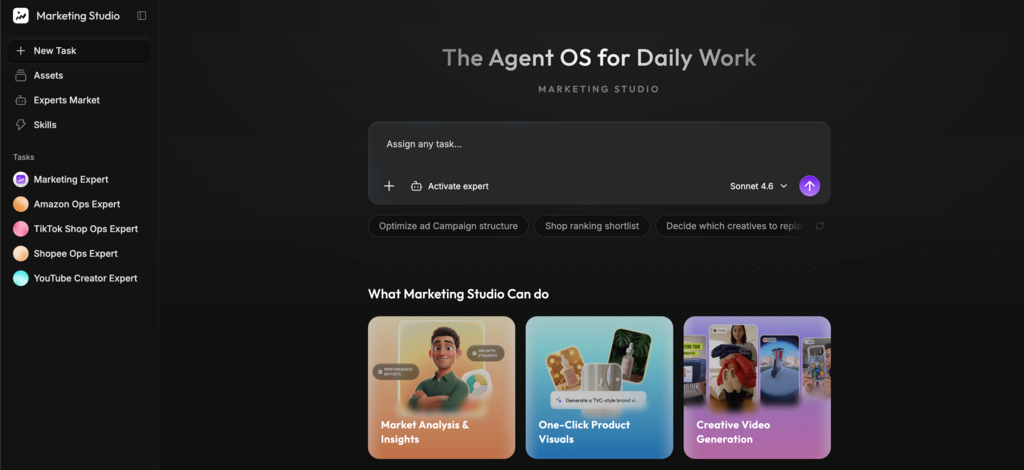
After generating probably 200+ product video ads using this workflow, I’ve picked up some techniques that significantly improve output quality. Here’s what I’ve learned:
Technique 1: The “Hook Sandwich” Method
TikTok ads live or die by the first 2 seconds. I’ve found that generating 3-4 versions with different hooks and then testing them all dramatically improves performance.
My approach:
- Generate the base video from the URL
- Create 3 hook variations — problem-focused (“Tired of tangled earbuds?”), outcome-focused (“These earbuds changed my commute”), curiosity-driven (“I can’t believe these are only 29 dollars”)
- Keep the middle and end the same — just swap the opening
- Test all three as separate ads with the same targeting
This is where AI generation speed becomes a massive competitive advantage. A human editor would charge you for three separate edits. With TopView AI, you’re regenerating the hook in under 2 minutes.
Technique 2: Model Stacking
Different AI models excel at different types of footage. I often generate clips from 2-3 models and then combine the best parts:
- Kling 3.0 for the hero product shot (cinematic, detailed)
- Seedance 2.0 for lifestyle/action sequences (dynamic, energetic)
- Veo 3.1 for environmental/setting shots (realistic, natural)
It sounds complex, but it’s actually fast. Generate three short clips, pick the best moments from each, and you’ve got an ad that looks like it was produced by a team.
Technique 3: Voice Cloning for Brand Consistency
If you’re running multiple product ads for the same brand, voice consistency matters. TopView AI’s voice cloning feature lets you use the same AI-generated voice across all your ads, creating a recognizable audio brand.
I cloned a voice that has a warm, conversational tone — think “friend recommending something,” not “salesperson pitching you.” This voice now appears in all my product ads, and the consistency has noticeably improved brand recall in my analytics.
Technique 4: Seasonal and Trend Adaptation
One of the best parts about AI-generated ads is how fast you can adapt to trends. When a new TikTok format goes viral, I can recreate it with my product featured in under 10 minutes.
Last month, the “underconsumption core” trend was everywhere on TikTok. I generated product ads with a minimalist, anti-consumerist aesthetic in under an hour — something that would’ve taken a traditional production team days to conceptualize and produce.
Common Mistakes to Avoid
I’ve made all of these so you don’t have to:
Mistake 1: Using a Low-Quality Product Page
I can’t stress this enough. The AI extracts everything from the URL — images, descriptions, features. If your product page has one blurry photo and a two-line description, the AI has nothing to work with.
Fix: Before generating video ads, make sure your product page has at least 4-5 high-quality images, a detailed description with bullet points, and clear feature callouts. This alone will dramatically improve your AI-generated ad quality.
Mistake 2: Not Testing Multiple Hooks
I spent my first month generating one version of each ad and running it. My cost-per-click was mediocre. Then I started testing 3-4 hook variations for each product, and my best-performing ads consistently outperformed the originals by 40-60%.
Fix: Always generate at least 3 hook variations. The time investment is minimal (5-10 extra minutes), and the performance improvement is significant.
Mistake 3: Ignoring the Voiceover
Early on, I just used whatever default voiceover the AI picked. The results were fine, but they didn’t convert well. Then I spent time finding a voice that matched my brand’s personality and my audience’s expectations. Conversion rates went up noticeably.
Fix: Spend time testing different voiceover styles. For a Gen-Z audience, go casual and upbeat. For luxury products, go confident and smooth. For problem-solving products, go empathetic and authoritative. Voice tone matters more than you think.
Mistake 4: One-and-Done Approach
AI video generation is iterative. The first output is rarely the best possible version. I treat the first generation as a rough draft and then refine from there.
Fix: Budget for 2-3 iterations per final video. The first generation gets you 80% of the way there; the refinements close that last 20% that makes the difference between a decent ad and a great one.
Mistake 5: Same Format for Every Platform
A TikTok ad and an Instagram Reel and a Facebook feed ad have different optimal lengths, pacing, and CTA placement. I used to just export one version and post it everywhere.
Fix: Generate platform-specific versions. For TikTok, keep it 15-20 seconds with an immediate hook. For Instagram Reels, 20-30 seconds with more polished transitions. For Facebook feed, 30-45 seconds with the value proposition front-loaded. TopView AI makes it easy to adjust settings and regenerate for different platforms.
Real Results: My Before and After Numbers
I want to share some actual data because I know “AI video ads” can sound like hype. Here are my numbers from a real DTC product launch where I switched from traditional to AI-generated video ads halfway through:
Weeks 1-2 (Traditional Production):
- Videos produced: 6
- Time invested: ~18 hours total
- Average CPM: 12.40
- Average CTR: 1.2%
- Best performing hook found on: Day 9
Weeks 3-4 (AI URL-to-Video with TopView AI):
- Videos produced: 28
- Time invested: ~6 hours total
- Average CPM: 11.80
- Average CTR: 1.8%
- Best performing hook found on: Day 2
The CPM difference was minor, but the CTR improvement was significant — and it came down to volume. With 28 videos instead of 6, I found winning hooks and angles much faster. The best-performing AI-generated ad actually outperformed my best traditionally-produced ad by 22% on CTR.
The real win, though, was time. I saved roughly 12 hours over two weeks and got better results. That time went into strategy, audience research, and scaling the winners — things that actually move the needle.
When URL-to-Video Works Best (And When It Doesn’t)
Let me be honest about where this workflow shines and where it still has limitations.
Works great for:
- E-commerce product ads — The bread and butter. Physical products with good listing pages generate the best results.
- Affiliate marketing — Generating quick review-style ads for affiliate products. Paste the Amazon URL, generate, post, earn commissions.
- Dropshipping — Test product viability with AI ads before investing in custom creative. If the AI ad converts, invest in a professional shoot.
- Social media organic content — Product showcases, “things I bought on Amazon” style content, product comparison posts.
- A/B testing hooks — Generate 5 variations fast, let the algorithm pick the winner, then double down on what works.
Still has limitations for:
- Highly regulated industries — Pharma, finance, alcohol. AI-generated claims need careful review for compliance. Always review the script before publishing.
- Ultra-premium luxury brands — Where brand aesthetic is extremely specific and controlled. AI gets you 80% there, but luxury brands usually need that last 20% of human polish.
- Products without good online listings — If there’s no URL to scrape (new product, no listing yet), you’ll need to manually input product info. Still works, just not as automated.
My Recommended Workflow: URL-to-Video in Production
After months of experimentation, here’s the exact workflow I’ve settled on for consistent results:
Monday: Batch Generate
- Paste 5-10 product URLs into TopView AI
- Generate 3 hook variations per product
- Total time: ~2 hours for 15-30 video ads
Tuesday: Review and Refine
- Watch all generated videos
- Iterate on the best 50% (second-generation refinements)
- Discard obvious misses
- Total time: ~1 hour
Wednesday-Sunday: Deploy and Monitor
- Upload winners to TikTok Ads Manager / organic accounts
- Monitor performance for 48 hours
- Kill underperformers, scale winners
- Total time: ~30 min/day
Weekly total: ~4.5 hours for 15-30 unique video ads. Compare that to the 20+ hours I used to spend producing 5-8 videos manually.
FAQs
Can I use any product URL, or only specific platforms?
You can use URLs from virtually any e-commerce platform — Shopify, Amazon, Etsy, WooCommerce, AliExpress, and more. The AI extracts product images, descriptions, and features directly from the page. The richer the product listing, the better the output. Bare-bones listings with minimal content will produce lower-quality ads.
How long does it take to generate a video ad from a URL?
Most video ads generate in 3-5 minutes with TopView AI, depending on the AI model selected and video length. Shorter formats (15 seconds) render faster than longer ones (60 seconds). Including review and minor tweaks, expect about 5-10 minutes per finished ad.
Do AI-generated video ads actually convert?
Yes. In my testing, AI-generated video ads performed comparably to — and sometimes outperformed — traditionally produced ads. The key advantage is volume: you can test 5x more creative variations in the same timeframe, which means you find winning hooks and angles faster. The best-performing AI ad in my tests outperformed my best human-produced ad by 22% on click-through rate.
Do I need to add my own product photos or footage?
No. The AI extracts product images directly from the URL you provide. It also generates original AI footage and visuals to complement the product shots. However, if you have custom product photos or footage you’d like to include, you can upload those too for even better results.
Can I generate video ads for competitor products?
Technically yes — the tool will generate video from any valid product URL. This is useful for research and inspiration (seeing how AI interprets a competitor’s product). However, for actual ad campaigns, always use your own product listings and ensure you have the right to advertise the products shown.
How do I make sure the AI-generated ad matches my brand voice?
Three approaches: (1) Use voice cloning to create a consistent brand voice across all ads, (2) specify your brand’s tone and style in the generation settings, and (3) iterate — the first generation is a draft, not the final product. After 2-3 refinement cycles, the output typically matches your brand’s aesthetic closely.
Is the free plan enough to test this workflow?
Yes. TopView AI’s free plan gives you enough credits to generate several video ads and understand whether the workflow fits your needs. Once you see the output quality and time savings, upgrading to a paid plan for production-level volume is straightforward.