Image-to-video generation — animating a still photograph or AI-generated image into a video clip — is one of the most immediately practical AI video techniques available in 2026. It requires no filming, no actors, and no complex text-to-video prompting. If you have a good image, you have the raw material for a video.
This guide covers how image-to-video generation works, which tools do it best, and the step-by-step workflow for common use cases including product animation, portrait animation, and lifestyle B-roll creation.
How image-to-video generation works
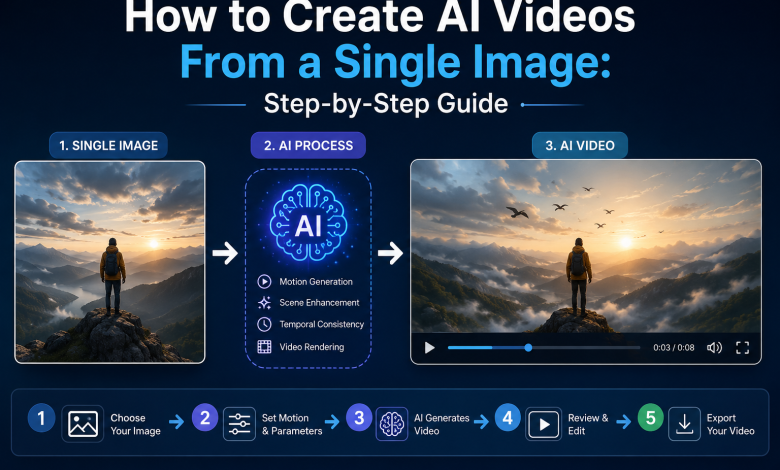
Image-to-video models take a static image as the first frame and predict how the scene would evolve over time — adding motion to elements that would naturally move (water, hair, fabric, leaves, camera movement) while maintaining the overall composition and subject appearance of the source image. The motion can be directed through a text prompt or motion controls depending on the tool.
The key advantage over text-to-video is predictability: because the first frame is fixed, you know exactly what the starting composition will look like. With text-to-video, the model generates the first frame too, which introduces significant variability.
Best tools for image-to-video in 2026
| Tool | Clip length | Motion control | Best for | Pricing |
| Runway Gen-3 (Image to Video) | Up to 10 sec | Motion brush — draw where to move | Precise motion control, polished output | From $15/mo |
| Kling AI 3.0 (Image to Video) | Up to 3 min | Text prompt + camera controls | Long clips, cinematic realism | From ~$15/mo |
| Pika 2.2 | Up to 10 sec | Text prompt, motion dial | Fast production, image effects | From $8/mo |
| Magnific AI (multi-model) | Varies by model | Model-dependent | Multi-model access including all above | From $39/mo |
| Luma Dream Machine | Up to 10 sec | Text prompt, keyframe control | Smooth camera movement | From $29.99/mo |
Step-by-step: animating a product image
- Source or generate your starting image. For product animation, use a high-quality product photograph with clean lighting and a simple background. The AI animates from this frame, so starting quality determines output quality.
- Choose your motion intent. Decide what should move and how: slow rotation, gentle zoom, light shift, floating motion, camera pull-back. The more specific your motion description, the more predictable the result.
- Write your motion prompt. Motion prompts are shorter than image prompts — focus entirely on movement: ‘slow clockwise rotation on white background, subtle light reflection moving across surface’. Avoid describing what is already visible in the image.
- Generate and review. Check for artifacts, physics errors (objects bending incorrectly), and unwanted motion in elements that should stay still.
- Adjust if needed. Refine the motion prompt or adjust the motion strength parameter. For Runway, use the motion brush to specify exactly which elements should move.
- Export in the target format. MP4 H.264 for universal compatibility. Export at the highest bitrate available before platform recompression.
Step-by-step: animating a portrait or lifestyle image
- Start with a sharp, well-lit portrait or lifestyle image. Faces and hair are the most artifact-prone elements in image animation. A sharp source reduces issues significantly.
- Use subtle motion for people. Slow head turn, gentle breathing motion, subtle eye movement, hair movement in a slight breeze. Dramatic or fast motion on human subjects produces artifacts in current models.
- Use Kling or MiniMax for human subjects. These models have the strongest physics simulation for natural human movement. Runway is better for camera-driven motion; Kling is better for subject-driven motion.
- Keep clips short for portrait animation. 3-5 seconds of subtle, looping motion is more effective and less artifact-prone than a longer clip with more movement.
Creative use cases for image-to-video
- Product rotation and showcase: Animate product photography for e-commerce, social ads, and Amazon listings.
- Real estate virtual staging animation: Add subtle motion (light shifting, gentle outdoor breeze through windows) to virtually staged room photos.
- Social media content from still photos: Transform brand photography library into motion content for Instagram Reels and TikTok.
- Book cover animation: Animate illustrated or AI-generated book covers for promotional content.
- Portrait animation for presentations: Add subtle life to speaker headshots used in webinars, courses, and conference materials.
Whichever tool you use for this workflow, the AI video generator that starts from a still image technique consistently delivers more predictable results than text-to-video for use cases where you know exactly what you want the scene to look like — because you already have it as a photograph.
FAQs
Can I animate any image, or are some image types better than others?
Images with clear subjects, good lighting, and simple backgrounds animate most reliably. Complex scenes with many moving elements, very dark images, and heavily compressed JPEGs produce more artifacts. AI-generated images often animate better than photographs because they are natively optimized for the model’s expectations.
How do I make an image animation loop seamlessly?
Some tools (Pika, Runway) support explicit loop generation. Alternatively, generate a short clip and use a video editor to reverse it and append the reversed version — creating a smooth forward-backward loop. Works well for subtle ambient motion.
What resolution should my source image be for image-to-video?
Match the target output resolution of your chosen tool. Most tools output at 720p or 1080p, so a 1920×1080 source image is ideal. Higher resolution source images do not improve output quality beyond the tool’s native generation resolution.