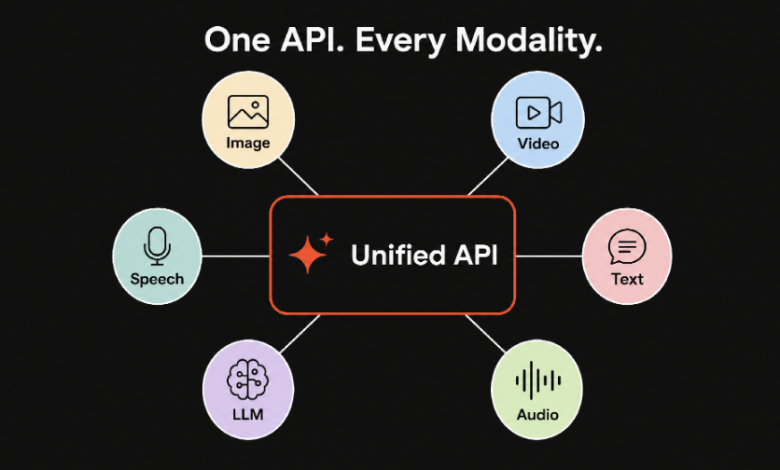
A year ago, most teams shipping AI features had a favorite model and stuck with it. That habit is breaking fast. A typical product today reaches for one model to write copy, another to generate images, a third for video, and a fourth for transcription, and the list keeps growing as new releases land almost every week. The interesting question is no longer “which model is best.” It is “how do you run twenty of them without your codebase turning into a museum of half-maintained SDKs.”
That problem finally has a name that is catching on: model orchestration. It is not a flashy topic, and it will not trend on launch day the way a new video model does. But it is quietly becoming the part of the stack that decides how quickly a team can move.
Alt text: Diagram showing a single API layer routing requests to many AI models
Why model sprawl crept up on everyone
Nobody set out to integrate ten providers. It happens one reasonable decision at a time. You add image generation because a feature needs it. A month later someone wants short video clips, so that is a second account and a second SDK. Then a better transcription model ships, and you wire that in too. Each addition looks small on its own.
The trouble is that every provider does the basics differently. Different authentication, different request shapes, different ways of reporting errors, different rate limits, different ideas about what an async job looks like. So you end up writing the same glue code over and over: retries here, a fallback there, a queue for the slow video jobs, a separate billing dashboard for each vendor. None of it is your product. All of it has to be maintained.
The real cost is rarely the API bill. It is the engineering time spent on plumbing, and the slowdown that comes after. When trying a new model means a fresh integration, people stop trying new models, even when a cheaper or better one just came out. You get quietly locked in by inertia.
What orchestration actually means
Strip away the buzzword and orchestration is simple to describe. It is a layer that sits between your application and the models. Your app talks to that layer in one consistent way. The layer handles the messy parts: authenticating to each provider, translating your request into whatever each model expects, routing to the right model, retrying on failure, falling back when a provider is down, and giving you one place to see usage and cost.
If that sounds familiar, it should. It is the same move the industry made with payment processors and with content delivery. Stripe did not invent card networks. It gave developers one clean interface to all of them. Orchestration is that idea applied to AI models, and the pressure to build it grows every time a new model worth using appears.
Build the layer yourself, or buy it
There are two honest paths. You can build the orchestration layer in-house. You will own every line, tune every edge case, and keep full control. You will also sign up to integrate every new model yourself, forever, and to babysit each provider’s quirks as they change. For a small team, that is a lot of undifferentiated heavy lifting.
Or you can buy the layer. Platforms such as each::labs expose hundreds of models from many providers behind a single API and a single billing relationship. New models show up in the catalog without you writing an integration. You trade some deep control for a large gain in speed and breadth. For most teams shipping features rather than building infrastructure, that trade is the right one.
The decision is not ideological. If model access is your core product, you may want to own the layer. If model access is a means to an end, owning it is usually a distraction.
Alt text: Comparison table of building versus buying an AI orchestration layer
What changes when models become interchangeable
Once a single interface stands between you and the models, a few things become easy that used to be hard.
- You can test models against each other per task. Run two image models on the same prompt and keep the winner, without a rewrite.
- You can route by cost. Send easy requests to a cheap, fast model and reserve the premium model for the hard ones. That alone can cut a bill meaningfully.
- You stop fearing the next release. When a stronger model ships, switching is a config change, not a sprint.
- You reduce vendor lock-in. If one provider raises prices or has an outage, you reroute instead of rebuilding.
Interchangeability is the quiet superpower here. The model you pick on Monday matters far less when swapping it on Friday costs nothing.
The orchestration layer is where the next competition happens
As raw model quality converges across providers, the differentiation moves up a level, into how well you route, cache, evaluate, and chain those models. Chaining is the part people underrate. Real features rarely use one model. You transcribe audio, summarize the text, then render a clip from the summary. Doing that across three providers by hand is tedious. Doing it as a single defined workflow is where orchestration earns its keep.
This is also where cost control, observability, and guardrails live. When every model call passes through one layer, you finally have one place to measure spend, catch regressions, and enforce limits. That visibility is hard to retrofit once your calls are scattered across ten codepaths.
A short checklist before you commit to a layer
If you are weighing whether to build, buy, or keep muddling through, a few questions cut through the noise quickly:
- How many models do you realistically expect to use this year? If the honest answer is one, you may not need orchestration yet. If it is five or more, the layer pays for itself.
- How often do you want to switch? Teams that like to chase the best model every few weeks benefit most from a single interface. Teams that standardize on one model for a year feel less of the pain.
- Who maintains the integrations today? If the answer is one or two engineers doing it between other work, every provider you remove from their plate is real time back.
- Do your features chain models? The more your product strings models together, the more a workflow-aware layer beats hand-rolled glue.
There is no universal answer. The point is to decide deliberately, because the default, integrating providers one at a time until it hurts, is a decision too. It is just one nobody actually made on purpose.
Where this leaves teams in 2026
The takeaway is not that any single model is overrated. It is that picking the model is no longer the hard part. The hard part, and the durable advantage, is the infrastructure that lets you pick freely, switch cheaply, and combine models without friction.
If you are starting a new AI feature this quarter, it is worth deciding the orchestration question on day one rather than discovering it after the third integration. Whether you build it or adopt a unified model platform, treat the layer as a first-class part of your stack. The teams that move fastest in 2026 will not be the ones with the best model. They will be the ones who can use the best model, whatever it happens to be that month, with the least effort.
Frequently asked questions
Is AI model orchestration only for large teams?
No. Small teams often feel the pain sooner, because they have fewer people to maintain integrations. The threshold is not team size, it is how many models you use and how often you switch. A two-person team running four models benefits more than a fifty-person team running one.
Does an orchestration layer add latency?
It adds a small routing hop, but in practice that is dwarfed by the model’s own generation time, especially for images and video. A good platform offsets it with caching and smart routing, and the operational time you save usually outweighs a few milliseconds per call.
Will I get locked into the orchestration platform instead of the model providers?
It is a fair concern. The way to avoid it is to keep your own prompt logic and data on your side and treat the platform as a swappable interface. Because your code talks to one consistent API, moving off it later is far less work than unwinding ten direct integrations would be.