The best AI humanizer tools are platforms that rewrite AI-assisted text so it reads the way a person writes, with the meaning left exactly where you put it. Students, academics, freelance writers, content teams and non-native English speakers all use them for the same reason.
AI text is statistically distinguishable from human writing: sentences run longer, vocabulary runs denser, punctuation variety drops, transitions repeat. Those are the patterns automated checkers measure – and formal academic writing sits close to them by default, which is why people who wrote every word themselves still get flagged. A humanizer targets those signals directly, and the text usually reads better afterwards.
What actually separates a good humanizer from an average one
Most tools in this category promise the same outcome. The differences show up in three places:
Structural rewriting versus synonym swapping. Weaker tools replace words with near-equivalents. That leaves sentence architecture untouched, which is exactly what automated systems measure. Stronger tools rebuild the sentence – new grammatical subject, repositioned clauses, different verb constructions – so the underlying token distribution genuinely changes.
Register preservation. AI text and formal academic writing sit close together statistically. The lazy way to separate them is to push output toward contractions and simple vocabulary. It moves the score, and it wrecks an essay.
A way to verify. A rewrite with no feedback loop is guesswork. You want a detection check attached to the workflow, ideally one that tells you why a passage was flagged rather than just handing you a number.
Humanize Max – best for iterating until the rewrite is right

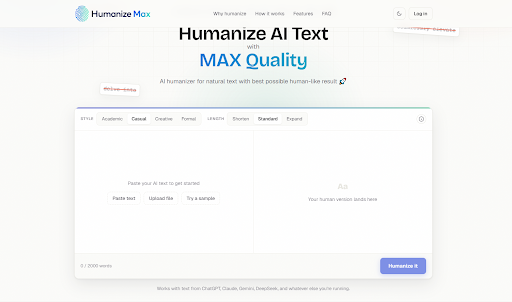
Humanize Max is the newest tool here and the most focused. It does one job, rewriting, and builds its controls around the way people actually use a humanizer: not once, but several times, adjusting until the output sounds right.
Reruns are unlimited, which matters more than it sounds. No humanizer gets the ideal result on the first pass, and tools that meter your runs quietly push you toward accepting the first output you get. Here you can run the same text three times and keep whichever version reads best.
The style controls are unusually clean. Four styles are selectable – Academic, Casual, Creative and Formal – with length kept as a separate setting for Shorten, Standard or Expand. Most tools blend these into a single mode list, so choosing a formal tone also commits you to a length you did not ask for. Splitting them means tone and word count are independent decisions. Text goes in by paste, file upload, or loading a sample.
Strong points
- Unlimited reruns, so you can take the best of several passes
- Style and length as separate controls rather than one combined mode list
- Four writing styles covering academic through creative
- Paste, file upload, or sample text as input
Trade-offs
- No AI detector built in
- Single-purpose – no plagiarism checking, grammar checking or paraphraser alongside it
- No saved history or reusable voice profile
Plans and limits: the tool launched recently and its plans are still settling, so check the site for current word limits and pricing before you build a workflow around it.
GPTinf – best for writers who want the whole workflow in one place

GPTinf is not a single-purpose humanizer. It bundles a humanizer, an AI detector, a plagiarism checker, a grammar checker, a paraphraser, and a readability checker into one platform, which is the main reason to pick it over a specialist tool.
The humanizer runs on a proprietary non-LLM engine that restructures sentences at the grammatical level. Two styles are selectable: Standard for balanced rewriting and Academic for formal register. You can paste text, upload a file (PDF, Word, plain text), or load a sample to see the tool work before committing your own draft.
What makes the loop tight is the detection step. After every run, the score appears directly beneath your output – no button, no second tab. It cross-checks against eight systems (Turnitin, Originality.ai, Crossplag, Gowinston.ai, Copyleaks, GPTZero, Sapling.ai, ZeroGPT) with individual pass/fail per system, plus a reasoning panel that quotes the specific passages behind each judgment and a per-model breakdown estimating which system likely produced the text. All of it is free and ungated, including for anonymous users.
Strong points
- Six tools under one subscription instead of four separate ones
- Detection score appears automatically after every rewrite, across eight systems
- Reasoning panel and AI model breakdown free for everyone, no account
- File upload on every tier, including free
- Plagiarism checker with sentence-level source attribution, unlimited checks on all plans
Trade-offs
- Two rewriting styles
- Humanizer interface is English-only; only the detector runs in nine languages
- Re-humanize requires Pro ($24.99/mo), and the Lite tier has no selective rephrase at all
- No browser extension or public API
Free plan: 300 words per request, no account needed, file upload included, unlimited AI detector access. Paid plans: from $9.99/mo (Lite, 5,000 words/mo). Pro $24.99/mo, Unlimited $59.99/mo.
Humanize AI – best for academic and formal writing

Humanize AI is the specialist. It does not generate content; it takes text you already have and rebuilds its structure so it reads naturally, with meaning and register left alone.
The register point is the whole thesis. Detectors are trained on human corpora that skew heavily academic – formal essays, papers, reference writing – which sits uncomfortably close to AI output by default. Most competitors solve this by making text more casual. Humanize AI stays inside the formal zone and finds structural rewrites within it, which is why it works for people submitting research papers rather than blog intros.
Eight rewriting modes are selectable, from Standard and Academic through Simple, Flowing, Formal, Informal, Expand, and Shorten. Registered users can switch on Ultra run, an opt-in toggle for more aggressive pattern removal.
Two features are worth singling out. Custom Style lets you train the tool on your own writing – paste or upload up to three samples totaling 150 to 1,200 words, and it saves a voice profile to your account that shapes every future run. File-to-file humanizing takes a PDF, DOCX, TXT, or MD document and returns the humanized version in the same format, no copy-pasting.
The detector deserves its own mention. Alongside the eight-system pass/fail grid, it produces a reasoning panel that explains each classification against measurable signals – average sentence length against the human baseline, punctuation variety, function word density, how tightly the conclusion is written – and cites the sentence it is describing. Most competing detectors return a number and nothing else. Reports export to PDF.
Strong points
- Holds formal and academic register instead of flattening it
- Custom Style trains the tool on your own voice, applied automatically thereafter
- File-to-file humanizing returns the same document format you uploaded
- View changes toggle highlights every edit in the output
- Detector reasoning panel and AI model breakdown free for everyone, no account
- Generous free preview: 200 words per cycle anonymous, 400 once registered, unlimited runs either way
Trade-offs
- The full detector report is a separate step rather than a single fused action
- Custom Style needs an account
- Humanizer and site are English and Spanish only; the nine-language coverage is detector-side
- Unlimited per-process rewriting starts at $19.99/mo
Free plan: 200 words per cycle anonymous, 400 words per cycle registered, unlimited runs. Standalone detector free and unlimited, no account. Paid plans: from $9.99/mo (Lite). Standard $19.99/mo, Unlimited $59.99/mo.
Undetectable AI – best for short-form and quick turnarounds

Undetectable AI keeps things minimal: paste, rewrite, check. A detector and plagiarism checker sit in the same platform, so short pieces move through quickly without setup.
It suits blog intros, product descriptions, social copy, and emails better than long academic documents, where results get less consistent. The free tier needs no credit card, and paid plans carry a 30-day money-back guarantee.
Strong points
- Free tier with no card required
- Detector and plagiarism checker included
- 30-day refund window on paid plans
- Fast on short pieces
Trade-offs
- No highlighting of what changed in the output
- English only
- Rewriting modes are locked to paid plans
Free plan: 1,000 words/month anonymous, plus 1,000 more after signup. Paid plans: from $9.99/mo.
HIX Bypass – best for existing HIX.AI users

HIX Bypass is the humanizing component of HIX.AI, a suite of 120+ content tools. It offers three processing modes – Fast, Balanced, Aggressive – with a detector built in to check results afterward.
The case for it is ecosystem convenience. If HIX.AI already handles your content workflow, adding rewriting to it beats introducing another platform. If you only want a humanizer, the surrounding suite is more than you are paying for.
Strong points
- 50+ languages supported
- Built-in detector
- Part of a much larger toolset
Trade-offs
- Users report inconsistent rewrite quality between runs
- Billing complaints appear repeatedly in reviews (2.4/5 on Trustpilot)
- Stronger rewriting options sit behind higher tiers
- No highlighting of changed text
- Smallest anonymous free allowance in this list
Free plan: 80 words with no login, plus 120 more after creating an account – 200 total. Paid plans: from $14.99/mo.
QuillBot – best if you want one subscription to replace several

QuillBot is a full writing platform where humanizing is one function among many: paraphraser, grammar checker, plagiarism detector, summarizer, and citation generator all sit under the same login.
That breadth is the argument for it. If you already pay for three writing tools, consolidating into one is often cheaper than the humanizer alone elsewhere. The emphasis is on readability and tone refinement rather than aggressive rewriting, which fits professionals whose output has to satisfy human editors first.
Strong points
- Complete writing suite for one price
- Chrome extension
- Word-freezing on Premium
- Highest user rating in this comparison – 4.8/5 across 12,000+ Trustpilot reviews
- 23 languages in the paraphraser
Trade-offs
- The humanizer is a feature, not the product’s focus
- Free humanizer allowance is the tightest here
- Best pricing requires annual commitment
Free plan: 125 words per run, 6 humanizer uses per day, basic detector access. No account needed for basic paraphrasing. Paid plans: from $9.95/mo.
StealthGPT – best for multilingual writing

StealthGPT claims coverage across more than 100 languages, which is unusual in a category that is overwhelmingly English-first. That alone makes it the practical option for international students and non-English writers who cannot find a tool that behaves sensibly in their language.
It also bundles a content generator, so drafting and rewriting live in the same place. Tone options are organized by academic level – High School, College, PhD – alongside several processing modes.
Results vary considerably by language and by which system is checking, so test on your own content during the trial before committing.
Strong points
- 100+ languages claimed, the widest in this list
- Tone presets by academic level
- Quick processing
- Free trial, no card required
Trade-offs
- No permanent free tier – only a trial
- Changes are not highlighted after rewriting
- The built-in checker appears poorly calibrated against external tools
- Most expensive entry point here
Free plan: trial only, no credit card required. Paid plans: from roughly $24.99/mo.
So which one should you use?
Work backward from what you are writing.
Writing across formats and want fewer tabs open? GPTinf covers rewriting, detection, plagiarism, grammar, and readability in one place, and the detection score shows up automatically after every run. Test it with 300 words before you make an account.
Writing essays, papers, or anything where formal register matters? Humanize AI is built specifically for that problem, and Custom Style means output can be shaped to your own voice rather than a generic natural-sounding default. The free preview gives you 200 words with no account, 400 once you register.
Already paying for a writing suite? QuillBot bundles rewriting with grammar, citations, and plagiarism at a competitive annual rate.
Not writing in English? StealthGPT is the only tool here with serious multilingual depth – verify it on your own language during the trial.
Already inside HIX.AI? HIX Bypass is the path of least resistance.
Working in short bursts? Undetectable AI is quick and requires no card to start.
Want to try several versions before committing? Humanize Max lets you rerun without limit, so you can iterate toward the wording you want.
Every tool here has a free tier or trial. Run the same paragraph through two or three of them and compare what comes back – twenty minutes of testing will tell you more than any comparison table.
Frequently asked questions
Can I test these tools without creating an account? Several, yes. GPTinf processes 300 words per request with no signup, and Humanize AI gives you 200 words per cycle with unlimited runs anonymously. Both offer free, unlimited standalone AI detectors that require no account at all. If your needs are occasional and short, the anonymous tier may be all you ever use.
Do these tools handle every kind of content? They work best on continuous prose – essays, articles, reports, correspondence. Heavily technical material, mathematical notation, code explanations, and documents built mostly from bullet lists and headers produce less predictable results. Review the output before you use it.
Will humanized text definitely come back clean? No tool can promise that, and any that does is overselling. Detection systems are updated regularly, and text that scores well today may score differently after the next update. The workable approach is to check the result after rewriting and edit any section that still scores high by hand.
Is it safe to paste confidential material into these tools? It depends entirely on the individual privacy policy, and they differ. Before pasting client work, proprietary business material, or anything containing personal data, check whether the tool retains your text server-side. Worth noting: both GPTinf and Humanize AI run self-hosted grammar checking, so that text is not routed through a third party.
Do expensive plans rewrite better than cheap ones? Usually not. Higher tiers buy volume and workflow features – larger monthly word budgets, selective rephrase, re-running without spending budget, priority support. The rewriting engine itself is typically identical across plans. Upgrade for throughput, not for quality.
What is the difference between a humanizer and a paraphraser? A paraphraser changes wording to avoid repetition. A humanizer targets the specific structural signals automated systems measure: average sentence length, word length, punctuation variety, how often adjacent sentences reuse vocabulary, how tightly conclusions are written. Because it works on architecture rather than vocabulary, a dedicated humanizer generally produces different results from a general-purpose rewriting tool.
Why does my writing get flagged when I wrote it myself? False positives are common, especially for non-native English speakers and for anyone writing in a formal academic register – that style sits close to AI output on exactly the measures detectors use. Running your own text through a detector with a reasoning panel is useful here, because it shows you which specific sentences triggered the classification rather than leaving you to guess.
The post 7 AI Humanizer Tools and What Each One Is Actually Good For appeared first on .