You nail chapters 1–4, then your AI co-writer drops the ball—the limp vanishes, the love interest turns into a stranger. Tech reviewers such as Tom’s Guide have spotted the same continuity crash in many AI novel-writing tools.
We set a higher bar and asked every platform just two things:
- Can it keep 12 canon facts straight for 50,000 words?
- If you change one line in Chapter 6, does everything else stay untouched?
Only six AI novel-writing platforms passed both the continuity and targeted-edit trials. Let’s spare your story the dreaded chapter-five meltdown.

How We Tested
Continuity trial. We handed each AI novel-writing platform the same story packet: logline, chapter beats, character sheets, and 12 canon facts (for example, the magician’s power limit and a pocket-watch that must tick again in Chapter 7). Each tool drafted seven chapters. At Chapters 6 and 7 we asked for callbacks without resurfacing those buried details. Any contradiction, missing promise, or slide into template tropes dropped the score.
Targeted-edit trial. We highlighted a 250-word dialogue block and flipped one truth: the hero lies about seeing the signal instead of admitting it. Only the highlighted text should change. A visual diff flagged any voice shifts, timeline slips, or phantom rewrites.
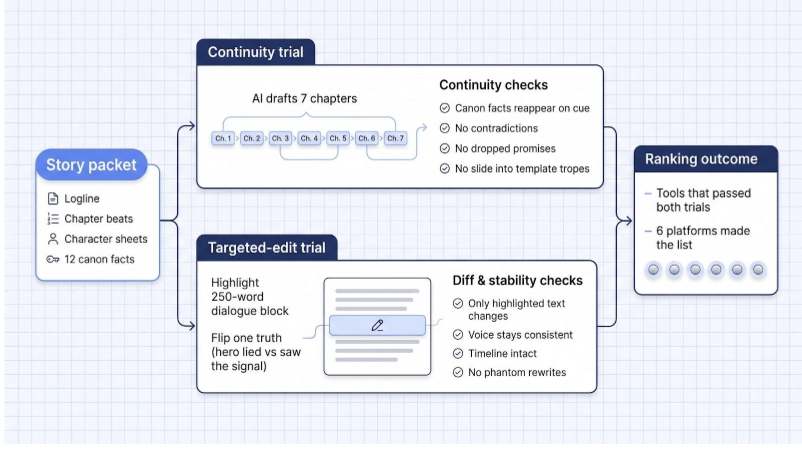
Native settings only. Codex, Lorebook, wiki, or a plain context window: no hidden reminders, no manual patches. If a routine workflow couldn’t guard continuity, the numbers showed it.
We ignored feature counts and price tiers. A platform either preserved canon and protected polished prose, or it fell in the ranking. Anyone with a free tier or short trial can repeat these checkpoints, which echo outline-guided narrative research presented at ACL 2023.
1. DreamGen: Codex and Inline Steering
DreamGen tops this list because it treats a novel as a living system, not a disposable prompt. The platform pairs a Scenario Codex with in-scene steering, so you keep both global consistency and local freedom. If you juggle sprawling sagas or hop between drafting and role-play, DreamGen keeps every detail ready for your next twist. Explore it here: AI story writing tool.
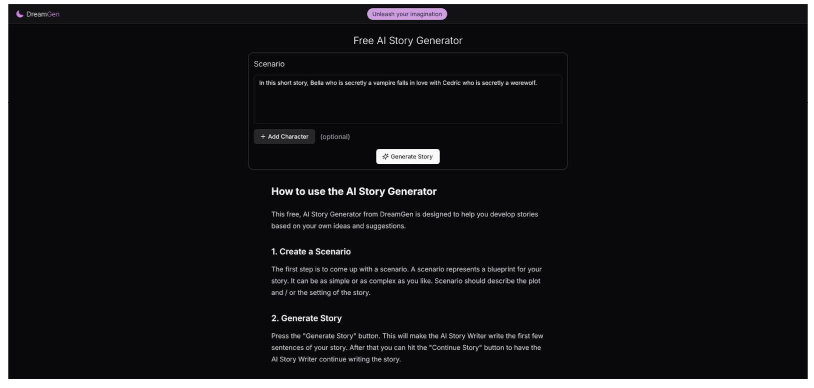
DreamGen Scenario Codex and inline AI story steering interface screenshot
What Holds the Thread
Open the Codex and you’ll find a miniature wiki: characters, places, objects, histories, and even sample dialogue, all on cards you can edit in real time. Because the model draws from that structured canon, the magician’s scar and the pocket-watch’s origin reappear exactly when needed. Scene-level summaries add short-term memory on top of the timeless lore. Free accounts get a 5,000-token window, while Pro stretches to 30,000 with the flagship GLM 4.7 model. The size helps, but explicit state is why DreamGen earns first place.
What Survives the Edit
Revision is surgical. Highlight a sentence, state the change, and only that slice updates. The same Codex that powers drafting keeps voice intact, timeline flags anchored, and surrounding text untouched. If the tweak misfires, click Discard and the original snaps back (no side effects, no merge-conflict drama). DreamGen makes fixing a single line feel as safe as Undo, not a gamble with the whole chapter.
2. Novelcrafter: Granular Context Control
Novelcrafter is a planner’s playground. While DreamGen hands you a finished wiki, Novelcrafter lets you build the bible yourself, field by field and series by series. That freedom earns it second place for writers juggling sprawling casts or political timelines that stretch across books.
Novelcrafter Codex and series bible planning interface screenshot
What Holds the Thread
Everything starts with the Codex, a living database that auto-indexes every mention of a character, place, or object. One click shows where the heir first raised her jade dagger. Custom fields, faction tags, and Progressions (versioned snapshots of borders or loyalties) ensure the AI always knows which era of your universe is active. Scene summaries, beats, and Exclude from AI toggles decide exactly which slices feed the prompt. Because you can connect OpenAI, Anthropic, Mistral, or a local model, the effective context ceiling (up to 128,000 or 200,000 tokens) and cost sit in your hands.
What Survives the Edit
Select a sentence, tap Text replacement, and only that span changes. Choose Apply, Retry, or Discard; every revision lands in version history for easy rollback. Because the prompt engine sees the linked Codex entry, new lines respect voice, timeline, and world facts. The workflow feels surgical: fix the lie, keep the laugh, and leave adjacent paragraphs untouched. Expect a steeper setup curve than a plug-and-play app, but once your fields are tuned, Novelcrafter feels like a custom CMS built for epic fiction.
3. Sudowrite: Continuity and Quick Edits
Sudowrite works like a friendly co-author, always ready with a sharper metaphor or tighter pacing tweak. It earns bronze because it pairs solid story memory with lightning-fast local edits, perfect when you already have a clear outline.
Sudowrite Quick Edit and AI-assisted story writing interface screenshot
What Holds the Thread
The engine runs on a Story Bible you fill with genre, style, characters, world facts, and a chapter outline. In Write mode the model can look back about 20,000 words. Add Chapter continuity, which deliberately reads linked earlier chapters, and callbacks feel intentional rather than lucky. The Bible needs regular grooming, and large generations eat through prepaid credits, but for mid-length novels or serial fiction the memory-plus-drafting combo hits above its weight.
What Survives the Edit
Sudowrite’s Quick Edit makes revision almost friction-free. Highlight a sentence, paragraph, or up-to-1,000-word scene, describe the change, and review a red-green diff. Because Quick Edit still references the Story Bible and prior chapters, voice stays true, lore intact, and surrounding text untouched. Accept, reject, or refine on the spot; no hidden rewrites creeping two pages south. Need a bigger overhaul? Rewrite can handle it, but for most surgical jobs Quick Edit keeps prose stable and stress low. The trade-off: Sudowrite has no permanent free tier, so keep an eye on credit use.
4. Laterpress: Wiki Context and Scoped Edits
Laterpress blends drafting, serial release, and AI help in one spot. That mix is a gift for web-novel and Kindle Vella authors who want to hit Publish the moment a chapter sings.
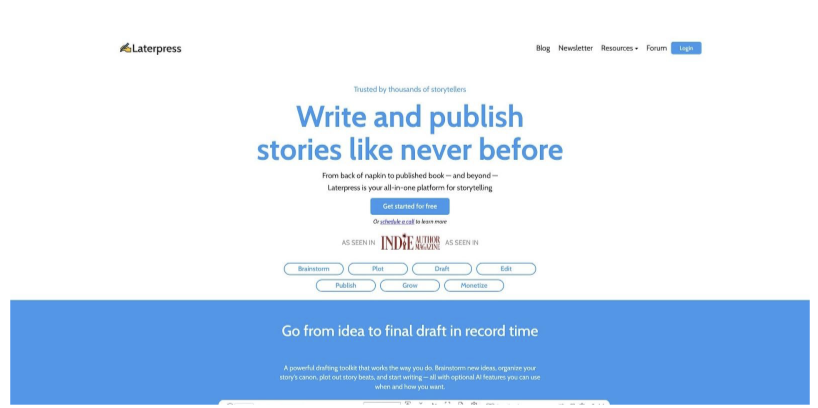
Laterpress wiki cards and AI-assisted serial fiction editor screenshot
What Holds the Thread
Open the Wiki tab and you’ll see Idea, Character, and Lore cards that store traits, timeline notes, and world rules. Each chapter also spawns Scene cards with beats and summaries. When the Author Assistant drafts or expands prose, it can draw from those cards plus the live manuscript, so callbacks land on the right names and clues. Laterpress publishes no hard context ceiling; in practice the assistant juggles multi-chapter references if key details live in the wiki or scene summaries. Curate the cards and continuity stays steady, with no copy-paste gymnastics required.
What Survives the Edit
Revision scope stays tight. Highlight a paragraph, choose Rephrase or Condense, and only that selection travels to the model. The new text appears side-by-side with your original; keep or scrap it with one click. Unselected prose never moves, so yesterday’s cliff-hanger stays frozen. Every Save snapshot adds to version history, letting you roll back or compare drafts without digging through folders. On cost: AI runs on prepaid credits, sold in monthly bundles at $10, $20, and $40, with the starter tier working out to about 10,000 credits per dollar and new accounts receiving 2,000 promo credits for testing. According to the Laterpress pricing page, this pay-as-you-generate model keeps the editor free while charging only for the AI miles you actually drive.
5. NovelAI: Lorebook Retrieval and Inline Rewriting
NovelAI is discovery-writing heaven: you riff, the engine recalls every rule you ever typed.

NovelAI lorebook and inline rewriting story interface screenshot
What Holds the Thread
The Lorebook works like a reference librarian. Store characters, factions, relics, or magic rules, then tag each entry with activation keys such as names, aliases, or slang. When a key appears, NovelAI silently injects the linked blurb into the prompt. The system layers always-on Memory, an optional Author’s note, and a rolling window that reaches 28,672 tokens on the $25-per-month Opus tier. Together, those layers keep callbacks precise even in free-flow drafting. According to the NovelAI documentation, cobalt pistols still jam in the rain and the queen’s secret name, Mirea, rises on cue.
What Survives the Edit
Open the Writer’s toolbox, highlight a sentence, and choose Rewrite, Transform, Expand, or Condense. Only the selected passage leaves the page; the rest of the scene stays frozen. Inline generation is bidirectional, so the new line blends with surrounding text. Because the Lorebook snippet rides along, replacements stay canon-correct with no sudden sword swaps or accent flips. Add new facts? You’ll need to update the Lorebook yourself. For writers who like to improvise until something clicks, the trade-off feels worth it: fast, low-risk surgery without losing the vibe.
6. Squibler: Fast Drafting and Broad Edits
Squibler promises a weekend manuscript: choose a genre, enter a premise, and let the engine crank out a chapter-by-chapter draft with beats, dialogue, and cliff-hangers included.
What Holds the Thread
Continuity rides on the master outline Squibler generates at the start and the rolling manuscript it rereads each time you ask for more words. That approach keeps thrillers and romance arcs on track, but the absence of a visible Lorebook or Codex means subtle details can slip if you wander off outline mid-draft. The free plan offers 1,000 AI credits per month; Plus (10,000 credits at $29.99 per month) and Pro (unlimited credits at $89.99 per month) raise the ceiling for longer projects.
What Survives the Edit
Editing tools favor sweeping changes. Ask the AI to “tighten Chapter 3” or “add emotional depth to the climax,” and it rewrites whole sections. That is handy for global tone fixes but risky for single-line tweaks, so most users duplicate the chapter, run the edit on the copy, then cherry-pick good sentences back into the master draft. All paid tiers auto-save versions, so rollbacks are painless. If you prize speed over surgical precision, Squibler earns its slot as the rapid-draft specialist.
Quick Comparison
Six platforms, two trials. The table below shows what each one uses to hold canon, and whether a one-line change stays a one-line change.
| # | Tool | Coherence Mechanism | Survives A Targeted Edit? | Free Tier | Best For |
| 1 | DreamGen | Scenario Codex wiki plus scene summaries | Yes — highlight, restate, Discard reverts cleanly | Yes, 5K-token window | Sprawling sagas with living canon |
| 2 | Novelcrafter | Self-built Codex, custom fields, Progressions | Yes — text replacement with version history | No, bring your own model | Planners with large casts |
| 3 | Sudowrite | Story Bible plus ~20,000-word lookback | Yes — Quick Edit with red-green diff | No permanent free tier | Outline-led mid-length novels |
| 4 | Laterpress | Wiki cards plus per-chapter scene cards | Yes — scoped rephrase, side-by-side review | Prepaid credits, 2,000 promo | Serial and web-novel authors |
| 5 | NovelAI | Lorebook with activation keys plus Memory | Yes — inline rewrite touches selection only | Trial only | Discovery writers |
| 6 | Squibler | Master outline plus rolling manuscript reread | No — rewrites whole sections | Yes, 1,000 credits monthly | Fast first drafts |
The split is clean: every tool that stores canon as explicit, editable state survived the targeted-edit trial. The one that relies on rereading its own manuscript did not.
Conclusion
AI story-writing tools have come a long way, but only a handful can juggle canon facts while letting you make pinpoint edits without collateral damage. DreamGen leads by combining a structured Codex with surgical revisions, while Novelcrafter, Sudowrite, Laterpress, NovelAI, and Squibler each shine in specific workflows. Match their strengths to your drafting style, and your novel’s continuity should stay rock-solid all the way past Chapter 5.