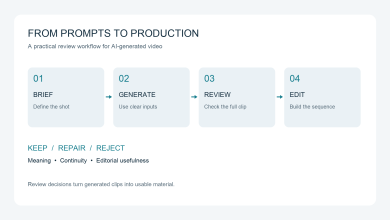
AI video teams often diagnose the wrong problem. A draft looks generic, so they change the visual style. The voice sounds flat, so they regenerate it. The pacing drags, so they shorten scenes. Each edit may improve thesurface, yet the video still fails to explain the product or idea.
The failure usually began earlier. The source material was incomplete. The brief tried to serve several audiences. The script listed features without building an argument. The storyboard paired claims with decorative footageinstead of evidence. Rendering made those decisions visible, but it did not create them.
I use a simple rule when reviewing an AI explainer workflow: the render should execute a plan that already makes sense in text and frames. If the team needs the finished video to discover what the message is, the workflowhas skipped its most important work.
Failure 1: The Source Is Not Ready for Production
Starting from existing content is useful because it removes the blank page. It does not mean every document is ready to become a video. A product brief may describe the company accurately while saying little about theviewer’s problem. A technical article may contain good evidence but bury its central claim after several pages of context. A PDF may mix approved copy with notes that were never meant for customers.
Before I move a source into a video workflow, I look for six items:
- The audience is named narrowly enough that the writer can picture one viewer.
- The viewer’s question appears in plain language.
- The main claim is supported by a fact, product behavior, example, or demonstration.
- The document distinguishes what the product does from what the team hopes to build later.
- The desired next action is specific.
- Anything confidential, speculative, or outdated is removed before upload.
This check catches a quiet but common error: source completeness is confused with source length. A 30-page report can still omit the one proof point a viewer needs. A short release note can be enough when it names theuser problem, shows the change, and tells the viewer what to do next.
In practice, I make a small source packet instead of uploading every available file. It contains the approved document, the target audience, the single outcome, any required brand assets, and a short list of exclusions. Thatpacket gives the system useful boundaries. It also gives the human reviewer a stable reference when a scene introduces wording that was never approved.
Failure 2: The Video Summarizes Instead of Explaining
A summary compresses information. An explainer changes understanding. Those are different jobs.
I can usually spot a summary-shaped draft in its opening. It starts with a company description, moves through a list of features, and closes with a broad invitation to learn more. The facts may be correct, but the viewer nevergets a reason to care about their order.
An explainer needs a stronger spine. I define it with one viewer, one question, one action, and one piece of proof. For a project management product, the question might be whether a team can see blocked work before a deadline slips. The proof should then show the status change or the view that reveals the block. The video does not need to cover billing, integrations, permissions, and every other feature in the same pass.
This is where human judgment matters most. AI can extract headings, shorten paragraphs, and propose a sequence. It cannot decide which customer tension deserves the whole video unless the brief makes that priorityexplicit.
The practical test is easy to run without rendering. Read only the proposed scene titles. If they sound like a table of contents, the draft is probably summarizing. If they form a cause-and-effect argument, the structure has a chance to explain.
Failure 3: The AI Explainer Video Generator Workflow Loses Traceability
Once a script has been split into scenes, teams often review each scene in isolation. That creates small drifts. A benefit gets stronger than the source supports. An example becomes a claim. A stock image suggests a use casethe product does not serve. None of these changes looks dramatic on its own, but together they weaken trust.
I use a claim-to-scene map before approving production. Each row contains the narration line, its source, the visual job, and the review question. A sentence such as “the dashboard flags overdue work” should point to theproduct documentation or approved copy. Its visual job should show that flag or a clear diagram of the state change. The review question is whether the viewer can understand the claim with the sound off.
This traceability is also the right way to use an AI explainer video generator. The tool should turn approved source material into a structured draft while keeping the source, script, and scene sequence reviewable. It should notbe treated as a machine that fills missing product knowledge with plausible copy.
One published TapVid workflow gives a useful scale example. I used a 12-page product specification as the source, described the audience, and received a seven-scene draft in under 12 minutes. Four scenes were ready forthe next production step. Three needed one prompt revision. The important detail was not the speed alone. The scene-level structure made it possible to revise the weak parts without rebuilding the full piece. The originaltest notes are available in TapVid’s public evaluation article.
The same method works with any production stack. What matters is that reviewers can answer two questions for every scene: where did this claim come from, and why is this visual the right proof?
Failure 4: Visual Polish Is Approved Before Visual Proof
Generative video makes it easy to produce attractive motion. That abundance creates a new review problem. Teams can spend time comparing colors, camera moves, and transitions while the scene still fails to show the thingbeing explained.
For product explainers, I rank visual evidence in this order:
- Real product screens or approved product assets when the claim concerns interface behavior.
- A diagram when the idea is a process, relationship, or state change.
- Motion typography when the exact phrase or number carries the meaning.
- Generated or stock footage when the scene needs context or emotion rather than literal proof.
That order prevents a polished metaphor from replacing the evidence. A scene about data synchronization does not become clearer because it shows glowing lines moving through a futuristic city. A short diagram of the twosystems, the trigger, and the resulting update gives the viewer something concrete to understand.
Visual specificity also makes feedback more useful. “Make it more dynamic” is vague. “Replace the office footage with the actual approval state and hold it for two seconds after the narration names the change” gives theeditor or generation system a clear instruction.
The best AI Journal guest posts tend to make this operator distinction. In its published video workflow case study, the site separates development, preproduction, and production instead of treating generation as one prompt. The article’s lesson is useful beyond that case: a fast production tool works best when the team has already decided what deserves attention.
Failure 5: Nobody Owns the Render Gate
Many teams collect feedback from marketing, product, sales, and a founder. That sounds collaborative. Without clear ownership, it produces contradictory notes and late reversals.
I assign four review responsibilities even when one person holds several of them. The source owner checks factual accuracy. The message owner checks audience, promise, and CTA. The visual reviewer checks whether eachscene proves the narration. The final approver decides whether the draft is allowed to render.
The final approver needs authority to stop the job. A checklist without a decision owner becomes a ritual that everyone assumes someone else completed. The render gate should end with a recorded yes or no, plus theversion of the script and storyboard that was approved.
This is particularly important when revisions are made through plain-language prompts. A quick prompt can change a scene, but the change may also alter a claim, timing, or caption. The updated scene should return to therelevant reviewer before the full project is rendered again.
A Practical Pre-Render Checklist
I use the following ten checks as a blocking gate. A failed item means the project returns to the script or storyboard. It does not move forward because the deadline is close.
- Source: Is every factual claim present in approved source material?
- Audience: Would one defined viewer recognize the problem in the opening?
- Message: Can the team state the video’s single job in one sentence?
- Scope: Has the draft removed features that do not support that job?
- Traceability: Does every narration claim map to a source and a visual job?
- Proof: Are important claims shown with product evidence or a clear diagram?
- Voice and captions: Are names, technical terms, emphasis, and on-screen wording correct?
- Rights: Does the team own or have permission to use every image, clip, font, and audio asset?
- Format: Are framing, text size, duration, and CTA appropriate for the publishing channel?
- Approval: Has the named final approver signed off on this exact version?
Good workflow guides also include a review checkpoint before generation. Pixo’s published process, for example, asks the user to review storyboard text, shot structure, and timing before video generation. The useful idea isthe checkpoint itself, not the product-specific implementation. Expensive mistakes become cheaper when the team catches them in words and frames.
When an AI Explainer Workflow Is the Wrong Choice
An AI explainer workflow is not the correct format for every communication job. I recommend literal screen recording when the viewer must learn exact clicks, field names, or menu behavior. Generated motion graphics canexplain the purpose of a workflow, but they should not pretend to be a precise interface tutorial.
A human editor is the better lead when the story depends on subtle performance, documentary footage, or a complex emotional arc. AI tools can still help with transcripts, captions, or versioning, but the editorial judgmentbelongs at the center of the project.
Live production also fits work where trust depends on seeing a real person, physical product, location, or event. A generated presenter cannot substitute for a founder answering a difficult question, a technician handlingequipment, or a customer describing a real experience.
The format decision should happen before the team chooses a tool. Ask what the viewer needs to believe, see, or repeat after watching. Then choose screen recording, motion graphics, live footage, or a mixed format basedon that requirement.
Rendering Should Execute Approved Reasoning
The most productive AI video teams do not expect the model to rescue an unclear brief. They use automation after the audience, claim, proof, and scene logic have been decided.
That shift changes the role of rendering. It becomes a production step rather than a discovery session. The team can judge tools by how well they preserve source meaning, support scene-level revision, and keep reviewvisible. Speed still matters, but only after the workflow is pointed at the right message.
Before the next full render, stop asking whether the draft looks polished. Ask whether the source is ready, the argument is narrow, each scene has a job, and one person owns the final decision. Those checks are less excitingthan a new model. They are also where many explainers are won or lost.
Frequently Asked Questions
What is an AI explainer video generator?
It is software that helps turn a prompt or existing source material into a scripted, narrated, and visually structured explainer video. Products differ in whether they focus on avatars, stock footage, motion graphics, screencapture, or generated scenes.
Why do AI explainer videos look generic?
Generic output often begins with a broad brief, weak visual evidence, or a default style applied to every scene. Tightening the audience, message, source assets, and scene jobs usually matters more than adding visualeffects.
Should a team approve the script or storyboard first?
Approve both before a full render. The script controls the argument and wording. The storyboard controls what the viewer will see as proof. A good sentence can still fail when paired with an unrelated scene.
When is screen recording better than an AI explainer?
Use screen recording when the viewer needs exact interface instruction. Use an animated explainer when the goal is to explain a product story, process, concept, or benefit without requiring a click-by-click tutorial.