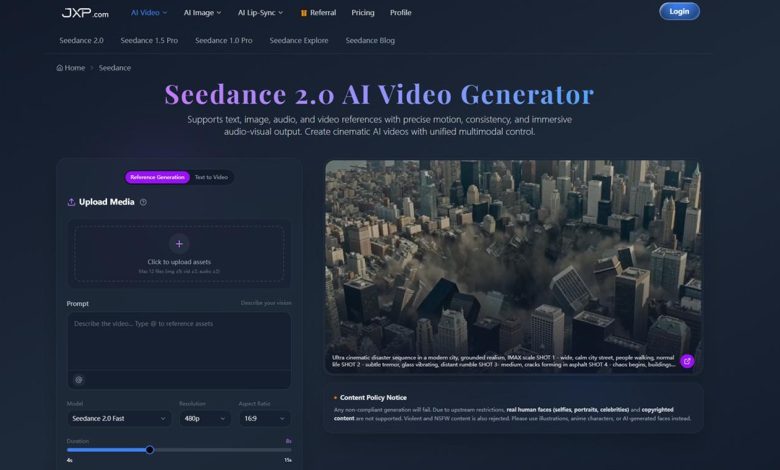
In the crowded world of AI video tools, generating a clip is easy—but controlling it is another story. How do you make sure the character stays consistent, the camera moves as planned, and the rhythm matches the story you want to tell? Too often, creators are left guessing, endlessly regenerating outputs, or struggling to align motion with vision.
Enter Seedance 2.0. Unlike tools that rely on a single text prompt, Seedance 2.0 empowers creators with a multimodal workflow, combining text, image, video, and audio references. From marketing teams to social creators and filmmakers, it transforms AI video from a hit-or-miss experiment into a precise, flexible, production-ready process—where every element, from camera movement to mood, can be guided and refined.
Why Reference-Based Video Matters
Text prompts are useful, but they can be vague when the goal is specific. A filmmaker might want a certain camera movement. A marketer might need a product to keep the same appearance across several clips. A social creator might want a character, outfit, or location to remain visually consistent across a sequence.
This is where reference-based generation becomes more useful than prompt-only generation. With Seedance 2.0, users can bring in multiple types of guidance rather than relying on written description alone. The workflow supports image references for visual identity, video references for motion or composition, and audio references for rhythm and atmosphere.
That matters because most video work is built through iteration. A creator rarely gets the final shot from a single prompt. The better workflow is usually: set the idea, add references, generate a first version, adjust the movement or framing, then extend or refine the clip until it fits the larger piece.
Seedance 2.0 appears to be designed for that process rather than for one-off experiments.
A More Practical Way To Build Short AI Clips
One of the useful details in the JXP workflow is the range of controls around clip duration, aspect ratio, and reference handling. Users can create short videos in common social and production-friendly formats, including vertical, square, and widescreen layouts. This makes the tool more relevant for actual publishing environments, where the same idea may need to work on TikTok, YouTube Shorts, Instagram Reels, a website banner, or a campaign mockup.
The ability to upload several reference files is also important. In many AI video tools, the strongest output comes from giving the system enough context: a product image, a style frame, a short motion reference, or even an audio cue that suggests timing. Rather than treating the prompt as the whole creative brief, the creator can assemble a small bundle of direction.
For example, a brand team could start with a product image and describe the type of camera move they want. A content creator could upload a character reference and ask for a short scene in a specific setting. A filmmaker could test a scene idea by combining a visual reference with a camera direction before deciding whether to develop the shot further.
This is a quieter but more meaningful shift in AI video: the tool becomes less like a random generator and more like a responsive pre-production assistant.
Where Seedance 2.0 Fits Into Creative Workflows
There are several use cases where Seedance 2.0 feels especially relevant.
For social content, it can help create quick visual hooks, transition shots, motion backgrounds, or short story moments. The key benefit is speed, especially when a creator needs several variations of a concept before choosing one direction.
For marketing teams, the appeal is likely in product and campaign visualization. Instead of waiting for a full shoot to test a concept, teams can create rough but polished-feeling video ideas around a product, scene, or mood. This can be useful for early pitches, internal reviews, and creative planning.
For filmmakers and video artists, the strongest use may be previsualization. A creator can sketch a scene, test camera language, or explore atmosphere before committing to production. The result does not have to replace a final shot to be valuable. It can help answer the question: “Is this idea worth building?”
For designers, it can also work as a motion ideation tool. Static mockups and moodboards are helpful, but video often reveals whether an idea has energy. A short generated clip can make a visual direction easier to discuss.
The common thread is not automation for its own sake. It is faster exploration with enough control to keep the output useful.
Editing After Generation Is The Real Test
Many AI video tools are exciting at the generation stage but frustrating once a creator wants to make changes. If a shot is almost right, users need ways to adjust it without losing the parts that worked.
This is one of the more interesting areas of Seedance 2.0. The platform highlights editing options such as local changes, frame expansion, and video merging. These features point toward a more iterative workflow, where generation is not the finish line.
Local editing is useful when only one part of the frame needs attention. Frame expansion helps when the composition needs more space or a different format. Video merging can help connect separate generated clips into a more continuous sequence.
These are practical needs. A creator may like the lighting but want a wider frame. A marketer may like the product motion but need a different background element. A filmmaker may want to join two short moments into a longer beat. Tools that support these adjustments reduce the need to regenerate everything from scratch.
The Role Of Audio And Timing
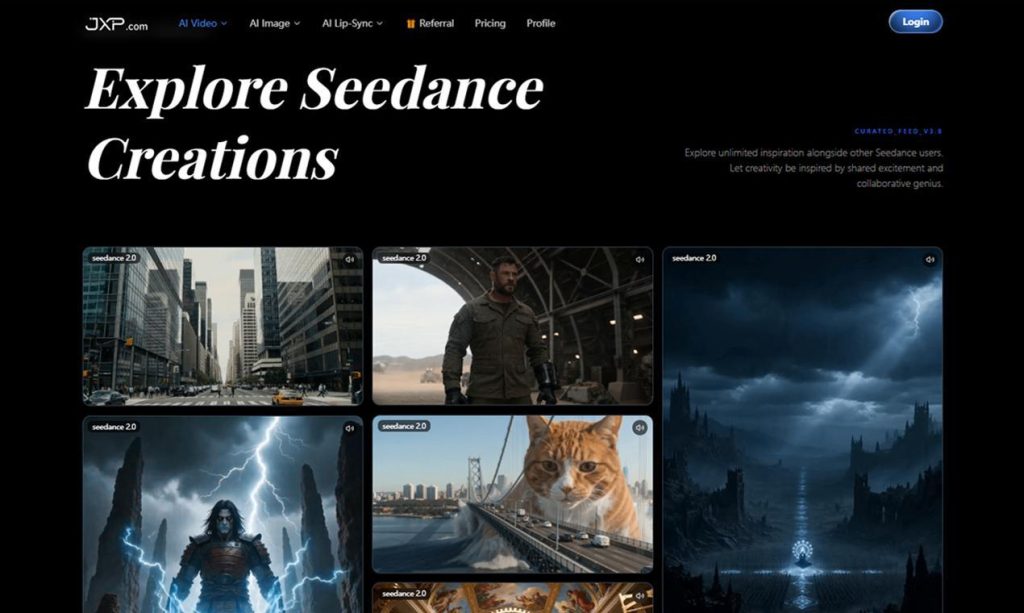
Audio is often treated as an afterthought in AI video discussions, but it can make a big difference in how a clip feels. Seedance 2.0’s support for audio references is useful because timing is not just a technical setting. It is part of the creative direction.
A scene built around a calm piano cue should move differently from one built around a sharp commercial beat. A cinematic reveal needs different pacing from a fast social hook. Even when the final audio is added later, using sound as a reference can help guide the rhythm of a generated clip.
This makes the tool more interesting for creators who think in sequences rather than isolated images. Video is not only about what appears in the frame. It is also about when things happen.
A Few Sensible Ways To Use It
The best results with any AI video tool usually come from treating it like a collaborator with constraints, not a magic button. A few habits can make the workflow smoother.
Start with a clear shot idea. Instead of asking for a broad scene, describe the subject, camera movement, environment, and mood. A prompt such as “a cinematic product reveal on a reflective black surface, slow push-in, soft rim light, minimal background” gives the model more useful direction than a general request for a product ad.
Use references when consistency matters. If a character, product, logo style, or environment needs to remain recognizable, provide visual guidance. The more specific the desired outcome, the more important the reference material becomes.
Generate short tests before committing to a direction. Short clips are easier to evaluate, and they help identify whether the camera language, motion, and composition are working.
Edit in stages. If the first version is close, use the platform’s refinement tools before rewriting the whole prompt. This is especially useful when only one part of the result needs improvement.
Think about the final channel early. A vertical clip for social media and a widescreen concept for a pitch deck are different creative objects. Choosing the aspect ratio and pacing at the start saves time later.
What Creators Should Keep In Mind
The promise of AI video should be balanced with realistic expectations. Generated clips can still need careful review. Details may shift. Motion can behave unexpectedly. Brand, legal, and likeness considerations still matter, especially when working with recognizable people or commercial assets.
For professional use, the best approach is to make AI video part of a reviewable creative process. Use it for ideation, prototypes, early campaign visuals, short content experiments, and controlled production tasks where the output can be checked before publishing.
That is also why tools with stronger control options are more useful than tools that only produce impressive demos. A creator does not just need a surprising result. They need a repeatable way to move from idea to usable clip.
Final Thoughts
The more AI video matures, the more the conversation shifts from “Can it generate video?” to “Can I direct it?” That distinction matters. Creators do not want to surrender the process. They want tools that make the process faster, more flexible, and easier to explore.
From that perspective, Seedance 2.0 sits in a useful space. Its combination of multimodal references, camera and motion control, audio guidance, short-form generation, and post-generation editing makes it relevant for people who need more than a single impressive clip.
For creators, marketers, and video teams, the value is not that AI removes the need for direction. It is that a better tool can make direction easier to test, refine, and turn into something publishable.