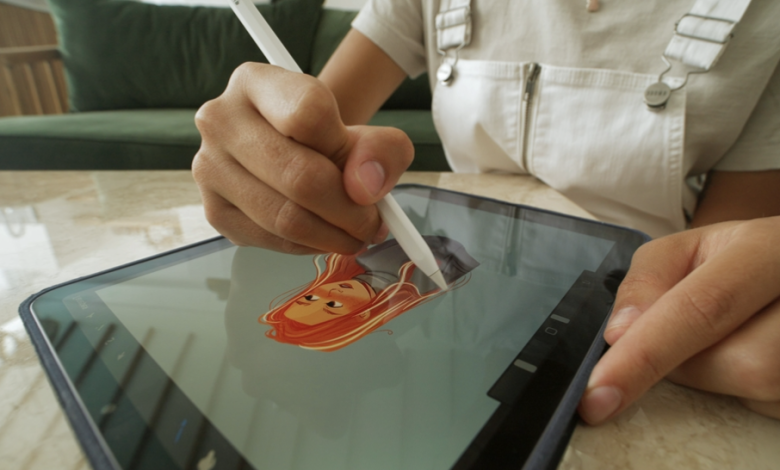
Adobe’s generative AI platform “Firefly” has been recognised as a great tool for creating AI generated characters. Supporting a wide variety of art styles and with easy text and image-based prompting capabilities, Firefly helps creators of all stripes and styles generate ready-to-use AI illustrations, including renderings for 2D and 3D characters that can be used in animation projects or even in video game development.
If you’ve ever created something and thought, “close, but not quite”, chances are you haven’t mastered the art of refining your generative AI outputs. That first draft or output is handy, yes, but it never feels quite so close to the finished version following edits in design software like Procreate.
But what if you could refine a character model and even mock up concept art or even concept videos for your characters straight from your original gen AI platform? Here, an AI character generator like Firefly’s latest feature is great at getting the ball rolling, but the character only really starts to come alive when you shape the details. That’s where personality, expression and style all come together to create character magic.
So, how do you become a pro at refining AI-generated characters? Here are a few practical ways to guide you through it. Try using the step-by-step process we’ve outlined below with Adobe Firefly’s AI character generator.
-
Start With a Clear Personality
AI personality strategies aren’t just ideal for brand development – they can also help you more efficiently refine the characterisation of AI generated characters. So before you start fussing over outfits or backgrounds, take some time to figure out exactly who your character is. Think about their personality, their purpose in the story, what motivates them and how they behave. Are they patient, cheeky, blunt, anxious, maybe a tad dramatic?
Firefly is extremely responsive to personality-based prompts, and you end up with much better starting drafts when you’re describing emotion based traits like ‘calm’, ‘mischievous’ or ‘structured’ as opposed to just physical characteristics.
Once you have a couple of different results, pick the one that feels closest to your vision. If you can look at the image and say, “Yep, that feels like them,” you know you have a solid base to work on.
-
Refine the Face First
People are drawn to faces before anything else, so this is the phase of your AI character generation process that you’ll want to spend the most time on. You can use Firefly to adjust facial features and details like your character’s expression, age, gaze, and much more. Small changes make a big difference, so don’t rush the process.
If something feels off, take the time to hone in on it too. Maybe your character’s smile is too wide, their eyes look a little empty, or their brows are just giving off the wrong vibes. Tweak that one thing, check the result, then decide if anything else needs to be edited. Bit by bit, the character will start to feel more organic and believable.
Learn more about how to design unique human faces with AI here.
-
Lock In Consistency Early
Once you’ve nailed the face down, see if you can keep it consistent through additional generations. This is probably one of the most important steps because there’s no point if the tool can’t replicate the results across more generated character and concept art.
It’s well worth thinking like a model artist here, and capturing your character in a range of different motions and poses. For instance, try to generate the character sitting, standing, turning slightly, or in different lighting. If the results keep changing, refine your prompt so that the core features remain anchored.
The easiest trick is to save one high quality version as your go-to reference image. Firefly will lean towards that version, which makes it easier to build a set of images that look like identical twins instead of cousins.
Getting these models down early is essential if you’re looking to convert your character models into animation projects or even video game development projects. With strong concept art to drive your animation process, you can make sure your character really pops to life in the final results.
-
Explore Various Outfits and Styling
When it comes to character generation, clothes and styling play a bigger role than they get credit for. The same character can look tough, relaxed, edgy or whimsical based solely on what they’re dressed in. That’s why it’s really worth the time to explore different looks. Firefly makes this super easy because you can tinker with casual outfits, fantasy gear, or modern street clothing without rebuilding the whole design.
This stage of your character generation process also provides the perfect chance to discover what actually works with the character that you’ve created. You might start with one idea, only to find that a completely different style suits their personality better. Those small surprises help you lock in who they really are.
-
Test Against Different Scenes
At this point in the journey, your characters may look awesome against a neutral background, but how do they perform in an actual scene? Try them in a few environments that match your project, whether that’s a busy market, a quiet room, or a dark outdoor scene. See where they feel most at home and where they start to fade into the background and look a little ‘meh’.
If something isn’t working, tweak the lighting, pose or expression and try again. Do this a couple of times if you have to. Seeing your characters in these different contexts can help you figure out whether the design will hold up across a fully animated storyboard – not just in a single image. Like we said before, there’s no point in generating perfection in a still frame if it can’t be replicated across a whole scene or narrative.
-
Give It A Final Pass
Once you’re all done with your character generation, do one last editorial sweep. At this final stage, every single detail matters, from symmetry, detail on hands and clothes, and lighting. It’s these minor tweaks that make the character feel solid, instead of hastily thrown together in a couple of minutes. People will notice the difference.
Firefly is awesome for these final touches because you can dial in what you need without having to rebuild all over again. A few thoughtful changes are usually all it takes to move from “good enough” to “I’m super proud of this”.
Create AI-Generated Characters Like a Pro with Adobe Firefly
Refining an AI-generated character is less about fancy prompts and more about paying close attention. Thankfully, Adobe Firefly’s AI character generator is expressly designed to give you fast results, supporting you in iterating your character models efficiently and delivering final concept and character art that you can apply to animation and video game development projects.
Be sure to follow the process we’ve outlined above in detail. Work one step at a time, and trust yourself to keep what’s right and trash the rest. Before you know it, that messy first draft will transform into a character who feels real and ready to be used wherever you see fit. Have fun, trust the process, and happy creating!