A marketing team can approve a beautiful hero image and still lack the material for a useful product commercial. Another attractive angle may add visual variety while leaving the same buyer question unanswered: what does this object actually look like, and which details deserve attention?
Before generating more images, assign each shot an information job. A reveal creates anticipation. A hero establishes the product. Details explain visible features. A form shot clarifies its shape. A closing frame gives the viewer somewhere to land.
The practical test is simple: if removing a shot loses no useful information or deliberate pacing, reconsider why it belongs.
Start With the Message the Hero Cannot Carry Alone
Consider a hypothetical campaign for a matte blue ceramic mug with a rounded body, thick rim, and single loop handle. The marketing brief is to introduce its silhouette and surface finish in a short launch film. The illustrations explore this fictional brief; no finished video is being evaluated.
A three-quarter hero can establish the whole object. It cannot also give the rim and handle equal attention without weakening the composition. Those details need their own frames.
Write down what the approved source actually shows. A front image may establish color and handle shape, but leave the underside unknown. Request another verified reference if that hidden area matters. An invented underside should not become evidence of the real product’s construction.
Separate appearance from performance when choosing what to show. A close view of the rim can communicate its visible profile. It cannot establish heat retention, comfort, or durability. If the campaign needs one of those claims, obtain suitable evidence and plan the demonstration separately. Otherwise, keep the shot brief focused on what a viewer can actually inspect.
Build Coverage Around Different Viewer Questions
The proposed 12-second sequence below gives each frame a purpose. Its durations are editing choices for this example, not generation settings or a universal advertising formula.
| Shot | Planned time | Framing and action | Information job |
| Reveal | 0-1 seconds | Close silhouette; a short lateral move exposes the curved edge. | Introduce the outline without showing everything. |
| Hero | 1-4 seconds | Full mug, three-quarter view; gentle push-in. | Establish the complete product and blue finish. |
| Rim detail | 4-6 seconds | Tight view of the lip; hold the camera still. | Make the visible rim profile easy to inspect. |
| Handle detail | 6-8 seconds | Close side view; slide slightly across the loop. | Show the handle opening and attachment points. |
| Form | 8-10 seconds | Full side profile; locked frame. | Clarify body depth and handle projection. |
| Close | 10-12 seconds | Full mug beside clear negative space; hold. | Leave room for a product name and next step. |
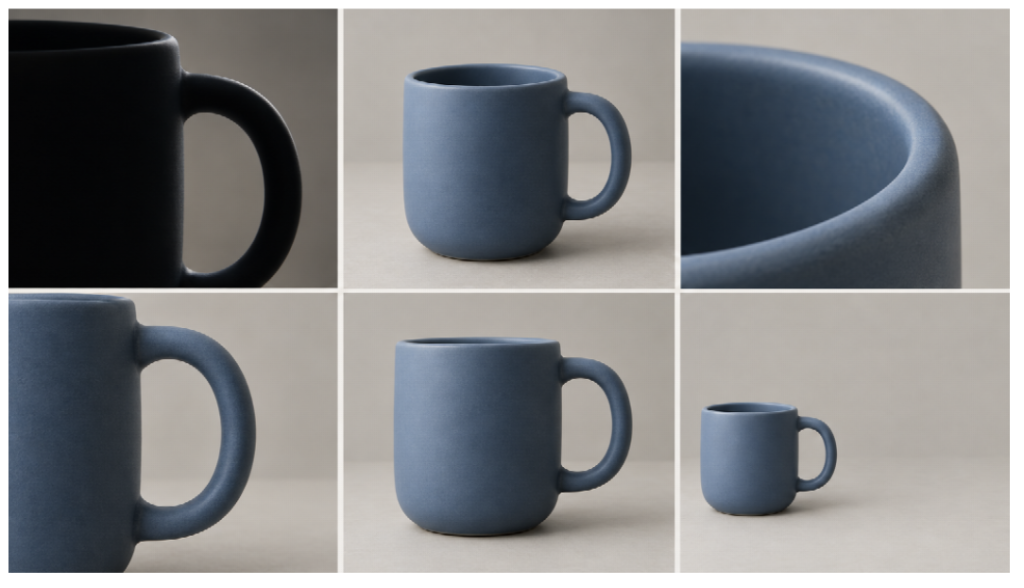
Concept shot sheet, read left to right across each row: reveal, hero, rim, handle, alternate view, and closing composition. The stills illustrate framing; movement remains proposed.
The form shot earns its place only if it reveals something the hero hides. In the illustrated sheet, the second and fifth panels remain similar full-mug views. Before production, replace the fifth with a clearer side profile or remove it. The closing shot can repeat the product because its layout has a different job: supporting an end card.
Turn Shot Responsibilities Into Production Instructions
Once the sequence is approved, translate each row into a separate visual brief. Specify the framing, the feature that must remain visible, protected product details, and intended movement. Keep camera movement modest enough that it does not obscure the shot’s information.
For teams exploring AI-assisted production with astorie, the approved shot list should remain the review standard. An appealing output still needs to answer its assigned viewer question.
For a worked example of taking an approved image into separate shot references, see Astorie’s product shot planning workflow. Keep shot responsibilities beside the references so an attractive replacement does not quietly change the brief.
For the handle detail, a usable instruction would be: “Frame the complete handle opening and both attachment points. Preserve the approved mug proportions and matte blue surface. Keep the body edge visible for orientation. Avoid props covering the handle.”
Attach a rejection condition: reject any version that crops an attachment point or makes the opening unreadable. This gives reviewers a concrete decision beyond whether the image looks premium.
Approve a still reference before adding movement to a difficult detail shot. If the handle opening is already distorted in the still, camera motion will not make it suitable for product review. Correct the reference first. Then assess whether the moving version preserves the approved shape throughout the frames intended for use.
Keep a simpler fallback beside each ambitious shot. For the handle, that could be an approved static close-up held in the edit instead of a moving camera. The fallback still has to show the opening and attachments clearly. Choose it when another generation would consume the time reserved for assembling and checking the commercial.
Review the Sequence Before Polishing Individual Frames
Lay the planned frames out in order. Check coverage: can viewers identify the object, inspect the selected details, understand its form, and read the ending?
Then check accuracy against approved product references. Matching blue tones does not establish that rim thickness or handle geometry is correct.
Check the cut as well as the individual frames. If the mug’s handle appears on the right in the hero and suddenly jumps left in the next view, decide whether that change helps the viewer understand the object. Where orientation should remain stable, revise the angle or insert a wider view that makes the change legible. Do not approve a sequence solely because each image works alone.
Finally, review the intended crop with draft copy in place. The reveal may conceal information deliberately; the hero should resolve it. Details should answer specific questions, and the ending needs uncluttered space. Approve the sequence when every retained shot has a clear reason to exist.
Hand Off Decisions With the Assets
Deliver a compact shot record with the approved files. For each selected frame, include its shot name, source reference, approved version, intended crop, information job, and any unresolved issue. Keep rejected alternatives in a separate folder so an editor does not accidentally choose a polished but inaccurate candidate.
Mark concept stills, motion tests, and finishing assets clearly. A six-panel planning sheet should not be mistaken for six approved video clips. Before delivery, identify which planned shots still need production and which have an accepted fallback. That distinction gives the editor a usable starting point and gives the marketing team a concrete list of remaining decisions.