If I had to choose one thing that defined my year as a UI/UX designer in 2025, it would be Figma Make. Figma Make is an AI-powered tool that lets you generate functional prototypes and web apps from text prompts or existing Figma designs. It bridges the gap between design and code, allowing you to quickly turn ideas into interactive experiences by writing prompts to build, iterate, and modify designs and prototypes. You can then either use the generated code for development, copy the design layers back into Figma for further editing, or share the functional prototype.
For me, Figma Make is a platform where ‘drafting’, ‘prototyping’, ‘generating’, ‘iterating’, and ‘reasoning’ all merged into one coherent workflow. The shift didn’t happen because AI became smarter. It happened because Figma stopped treating AI as an add-on and made it part of the craft.
Before Figma Make: The Old Prototyping Reality
Prototyping used to be one of the slowest part of my workflow, not because it was hard, but because it was painfully manual:
My old prototyping workflow looked like this:
1. Create the screens manually
Everything from spacing to alignment required placement.
2. Duplicate screens for each interaction state
A simple toggle meant creating multiple copies.
3. Link each navigation flow
Tap — > Navigate — > Back — > Validate.
Repeat for every path.
4. Build micro-interactions by hand
Transitions, smart animate, component variants, all built screen by screen.
5. Review, refine, and recreate
If one interaction needed adjustment, I sometimes had to re-link an entire flow.
6. Prepare multiple resolutions
Mobile — > Tablet — > Desktop — > duplicated and rebuilt.
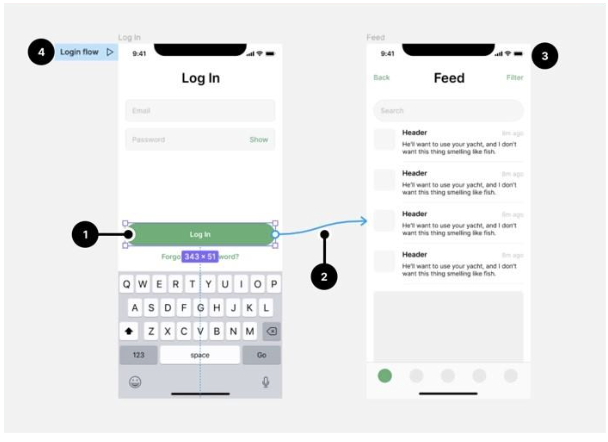
It worked… I wont say its slow, repetitive, and required constant context switching but Make made it seem slower. Prototyping felt like a separate discipline entirely.
And on top of that, if there are amendments, client/team lead wanting “just one more version,” it meant hours of rework.
Figma Make: a Workflow Change
Figma Make collapsed most of those steps into a single dynamic action layer.
Instead of designing screens and then praying the prototype holds together, Make allowed me to:
- Generate functional UI immediately from a prompt
(“Create a dashboard with learning progress, daily tasks, and a settings side panel.”)
- Generate interaction logic automatically
Buttons, transitions, modal triggers, instantly scaffolded.
- Edit the structure, not the frames
Make treats the UI like a living system instead of a flat canvas.
- Prototype by describing intent
Not “click here and go there,” but:
“When the user completes this step, transition to the confirmation state.”
- Iterate without rebuilding everything
Make rewires flows automatically when components change.
Figma Make let me design the way I think, not the way the tool forced me to work.
Rewired Process
Make can generate functional prototypes from text prompts and static designs in minutes instead of hours. This new approach requires less manual work, making it more accessible to a wider range of users and allowing for rapid iteration and collaboration. Key changes include automated generation of interactive elements, dynamic data integration, and a more conversational, prompt-based workflow that significantly accelerates the process from idea to interactive product.
Here’s a quick overview on the usage and the process of Make
- I prompted Figma Make with the core idea.
- Make generated a functional UI skeleton in seconds.
- I refined the structure instead of building from scratch.
- I described the interaction rules in natural language.
- Make automatically turned those descriptions into prototype logic.
- When I changed a component, Make updated the prototype for me.
What used to take two days took three hours, and the quality was better because I spent my time designing experience, not moving rectangles from left to right.
Just with a prompt: “Design a flashcard study app with spaced repetition and progress tracking.”
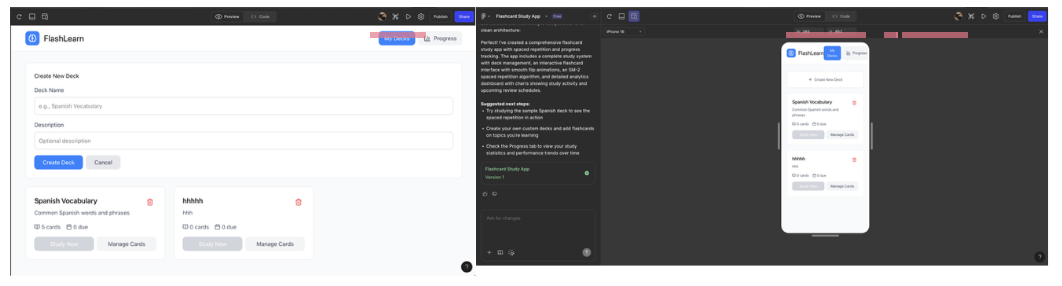
Prompt: “Design a money savings app with spaced repetition and progress tracking.”
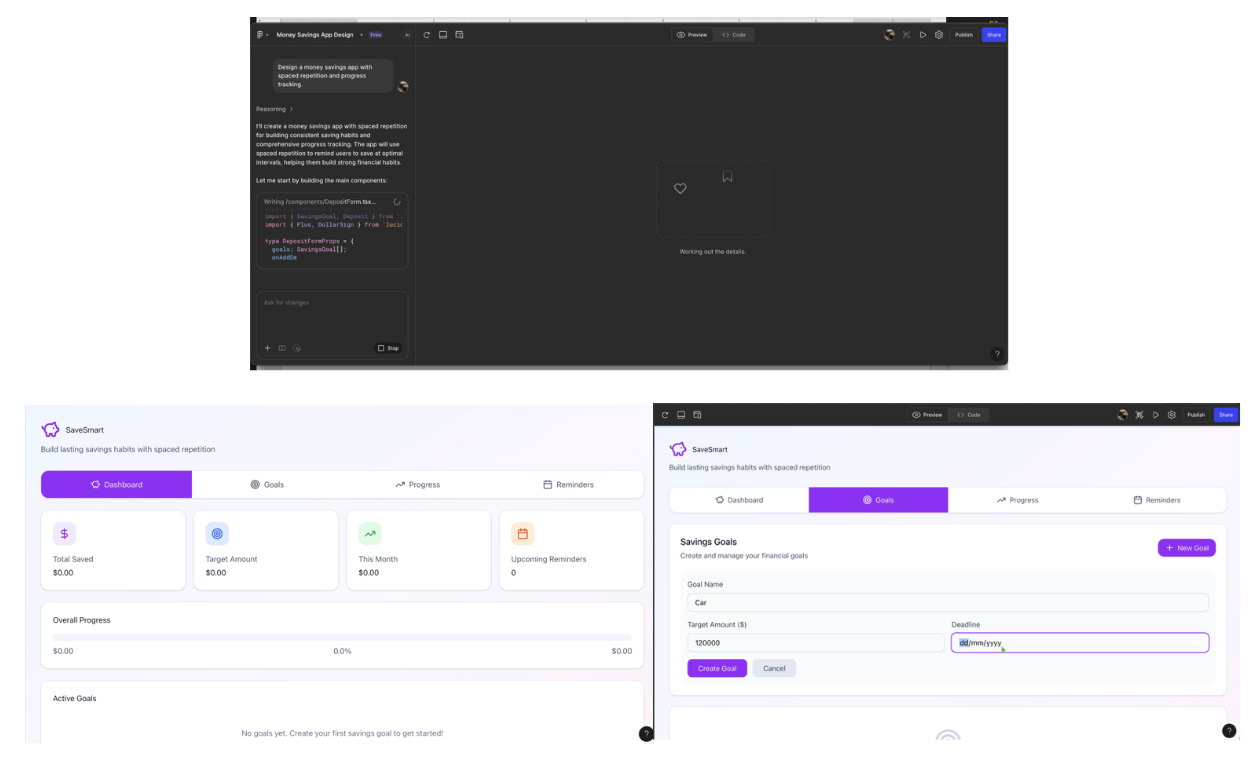
Additional prompt for changes in the Savings Goals
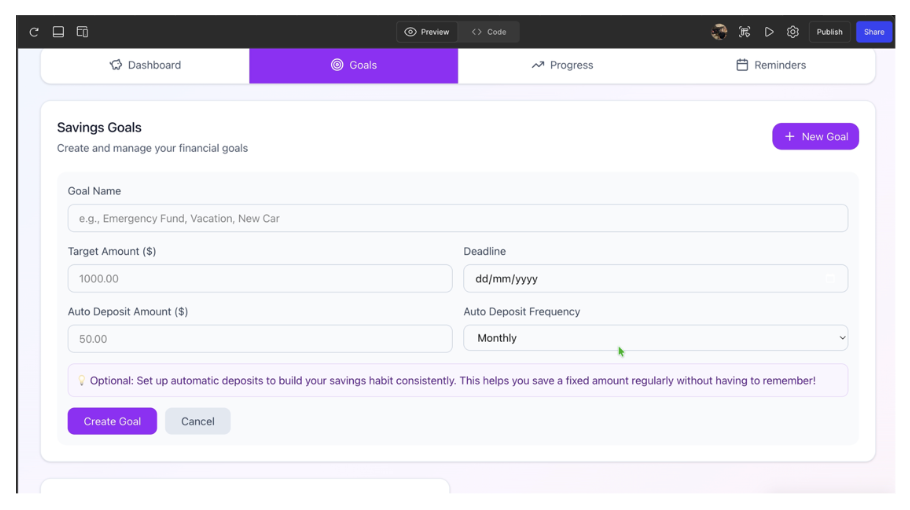
What Figma Make Didn’t Replace (And Never Should)
Figma Make didn’t replace the parts of design that actually matter. It automated the busywork, not the thinking. Below outlines the parts of design that Figma Make didn’t replace:
- User understanding: this stays out of reach for any tool.It can guess patterns,but it can’t truly read context behind why someone does what they do.
- Strategic decisions: strategic choices should still be made by me. Make can generate ten variations, but it can’t decide which one aligns best with business goals or what trade-offs are worth making.
- Interaction logic: this part of design also still needs human judgement. Make can draft flows, but it doesn’t understand when a step should slow a user down or when the design needs to get out of
- Accessibility judgment: one thing about accessibility is that it isn’t solved by checklists. A tool can flag issues, but it can’t understand a live or lived experience or the quiet barriers people run into daily.
- System thinking: this part remains untouched. Make can spit out a component, but it doesn’t hold the full architecture in it’s head, the consistency, constraints, or long-term stability of the system.
The more I use AI, the clearer it is that AI handles production, I handle direction.
Final Thoughts
The more time I spend with Figma Make, the clearer it becomes that this tool represents a turning point, not just for UI/UX design, but for the way I think about solving product problems. 2025 has been the year where AI in UI/UX actually became worth using, not because it got “smarter,” but because it became integrated into the workflow rather than floating as a separate novelty.
Figma Make is the clearest example of that shift. It didn’t make me design less. It made me design better and faster. It speeds up execution but not design judgment.
Additionally, it gives you possibilities, but you still have to choose what makes sense. Designers who understand patterns, systems thinking, behaviour, content, and interaction logic will thrive because Make makes it easier. They can explore more ideas, refine faster, and deliver stronger reasoning.