



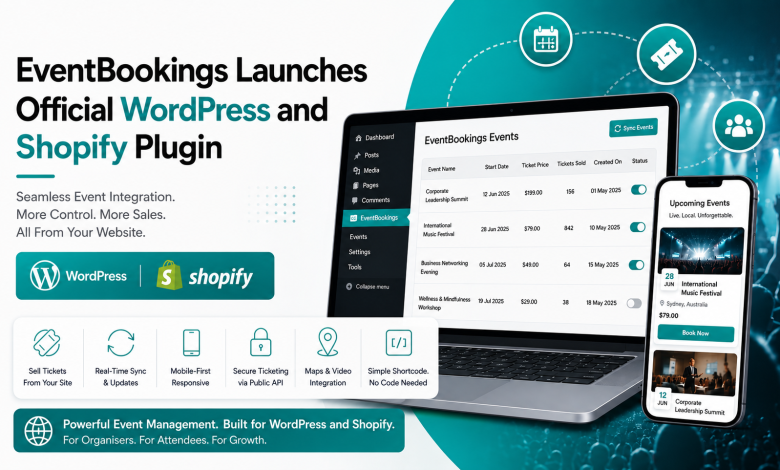
Event ticketing platform EventBookings has officially expanded its platform integration ecosystem with the release of dedicated plugins for WordPress and Shopify — two of the world’s most widely used website and commerce platforms. The move indicates a significant step for the Australia-based ticketing and event management company, enabling event organisers to manage registrations, sell tickets, and display live event data directly from their own websites, without redirecting audiences to third-party platforms.
The WordPress plugin is now available in the official WordPress Plugin Directory. This move shows EventBookings’ goal to become part of the digital tools that millions of businesses use every day.
What Is EventBookings?
Founded in Australia, EventBookings is a cloud-based event ticketing and registration platform built to simplify how organisers create, manage, and monetise events of every scale — from intimate workshops and corporate seminars to large-scale concerts, sports tournaments, and trade expos. The platform delivers a global audience spanning more than 50 countries, with localised support for currencies and tax structures across North America, Europe, Africa, Asia-Pacific, and the Middle East.
Until now, organisers using EventBookings primarily relied on the platform’s own hosted event pages to list and sell tickets. The new plugin suite changes that dynamic entirely, bringing event management capabilities directly into the websites and storefronts that organisers already own.
The WordPress Plugin: Turning Any Site Into an Event Hub
The centrepiece of this launch is the EventBookings WordPress Plugin, a purpose-built integration that connects a WordPress website to an organiser’s EventBookings account via a secure API. Once installed, it turns any WordPress site into a full-featured event management and ticketing platform — with no custom development required.
How It Works
The plugin uses a simple authentication process. After installing and activating it from the WordPress Plugin Directory, site administrators go to the new EventBookings menu in their dashboard. There, they enter their Client ID and Client Secret, which are generated in their EventBookings account, to set up a secure API connection.
From that point, the plugin automatically fetches all events associated with the account, displaying them in an admin panel with key at-a-glance data: event name, start date, ticket price, tickets sold, and creation date. An activation toggle on each event gives organisers granular control over which events appear publicly on the site, with bulk activation also supported.
Displaying events on the frontend requires nothing more than inserting a single shortcode — [eventbookings_events_shortcode] — into any WordPress page or post. The plugin handles the rest, pulling live event data and rendering it in a responsive, mobile-optimised layout.
Key Features at Launch
Automatic Event Fetching & Real-Time Sync The plugin keeps ticket availability, pricing, event descriptions, and dates up to date by syncing with the EventBookings platform. This removes the need to update event listings manually on different platforms.
Mobile-First Responsive Design All event displays are made to look good on desktops, tablets, and smartphones, so attendees have a consistent experience no matter how they visit the site.
Customisable Event Display Organisers can adjust layouts, styling, and content accessibility from the WordPress admin panel to match their site’s branding — without touching a line of code.
Secure Ticketing via the EventBookings Public API All booking and payment data flows through the EventBookings Public API over HTTPS. Crucially, no sensitive personal or financial data is stored on the WordPress site itself — processing occurs entirely within the secure EventBookings infrastructure, in accordance with the platform’s privacy protocol and industry data security standards.
Interactive Maps and Video Support The plugin integrates with Google Maps to display interactive venue previews and directions, and with YouTube to embed event trailers, highlights reels, or promotional videos directly on event listing pages — significantly improving the attendee’s pre-purchase experience.
Simple Shortcode Integration No developer is needed. The shortcode approach means that even users managing a site without any coding knowledge can add fully functional, live-updating event listings to any page within minutes.
Who Is It For?
EventBookings has positioned the plugins as a broadly applicable tool, designed to serve anyone managing events at any scale:
- Event organisers and planners who want to display and manage concerts, conferences, or expos without building custom infrastructure.
- Educational institutions and training providers running workshops, webinars, and courses who need frictionless registration flows.
- Businesses and corporate teams managing internal gatherings, networking events, and seminars.
- Artists, performers, and venues who want to sell tickets from their own domain rather than directing audiences to third-party marketplaces.
- Charities and non-profits organising fundraisers and community events on tight operational budgets.
- Sports and fitness professionals managing tournaments, marathons, or class bookings.
The plugin’s no-code setup philosophy is particularly notable given the diversity of this audience — many of whom are domain experts in their field but not in web development.
Why This Matters: Owning the Ticketing Experience
This launch solves a common problem for event organisers: choosing between the convenience of third-party ticketing platforms and the need to keep brand consistency, customer relationships, and control over the booking process.
Platforms like Eventbrite have historically required attendees to leave the organiser’s own website to complete a purchase, breaking the brand journey and creating a dependence upon external infrastructure — along with the associated fees and data limitations.
The EventBookings plugin inverts that model. Attendees browse events, select tickets, and complete bookings entirely within the organiser’s own WordPress site. The organiser retains the audience relationship, the site analytics, and the brand continuity. As EventBookings puts it: the plugin is designed so that “all the live event data is synced to your website, so you are able to focus more on promotion instead of manual updates.”
This change matters most to organisers who have built their audience on their own websites and do not want to disrupt that experience when people are ready to buy tickets.
The Shopify Integration: Event Commerce for the Storefront Economy
Alongside the WordPress plugin, EventBookings has signalled integration support for Shopify — extending the same philosophy to the e-commerce context. For the growing number of brands and creators who operate storefronts as their primary digital presence, this brings event ticketing and registration into their existing commerce infrastructure.
This is especially relevant for:
- Retail brands running in-store or experiential events for their customer community.
- Fitness and wellness businesses on Shopify offering class bookings along with physical product sales.
- Artists and creators who sell merchandise and want to bundle event tickets within the same purchasing journey.
The Shopify extension demonstrates a broader industry trend: the convergence of e-commerce and live experience, where the boundary between “selling a product” and “selling an event” has become gradually blurred. EventBookings’ entry into the Shopify ecosystem allows it to compete directly in this growing space.
Data Security and Privacy Architecture
With event data, attendee information, and payment transactions all flowing through the system, security architecture is rightly a priority concern for any organiser evaluating this plugin.
EventBookings has built the system with a clean separation of concerns: the WordPress (or Shopify) site serves as a display and interaction layer, while all sensitive data — personal details, booking records, and payment information — is processed and stored exclusively through the EventBookings Public API. The absence of local data storage on the WordPress site reduces the security risk for site administrators.
All data sent between the plugin and the EventBookings platform is encrypted with HTTPS. The system follows EventBookings’ Privacy Statement and Terms of Service, and meets widely accepted online data protection standards.
Installation and Getting Started
WordPress users can get the plugin now from the official WordPress Plugin Directory. EventBookings’ support portal has detailed, step-by-step instructions for installing, connecting your account, activating events, and customising the display.
The process, in brief:
- Download and install from the WordPress Plugin Directory.
- Activate the plugin and locate the new EventBookings menu in the WordPress dashboard.
- Enter Client ID and Client Secret under Settings to connect to your EventBookings account.
- Toggle individual events to activate them for public display.
- Insert [eventbookings_events_shortcode] on any page to display the live event listing.
EventBookings reports that the full setup — from installation to a live, publicly visible event listing — can be completed in minutes, with no technical knowledge needed.
Wider Context: The Event Tech Integration Race
This launch reflects a bigger change in event technology. As live events have grown after COVID, organisers now want event tools that work directly within their current digital systems, instead of needing to build separate solutions.
The market for WordPress plugins alone is substantial — WordPress powers approximately 43% of all websites globally, representing an enormous addressable audience for any plugin that solves a genuine operational problem. By building natively for this ecosystem, EventBookings gains distribution entry to a vast pool of potential users who may never have encountered the platform otherwise.
Simultaneously, Shopify’s continued growth as a commerce platform — particularly among independent creators, small businesses, and direct-to-consumer brands — makes it a strategically important integration channel for any event tool targeting those audiences.
For EventBookings, whose platform already supports global operations across areas including Australia, the UK, the US, Canada, New Zealand, Ireland, Singapore, the UAE, and dozens of others, these integrations represent a natural extension of an already international footprint.
Final Thoughts
The launch of the EventBookings WordPress and Shopify plugins is a smart step that solves a common problem for event organisers: selling tickets and managing registrations on their own branded websites, without needing custom development or relying on third-party marketplaces.
The no-code approach, real-time information syncing, secure API architecture, and cross-platform integrations (Google Maps, YouTube, multiple payment gateways) suggest a product built with practical organisers in mind — not just technically proficient ones. If the platform continues to build out its platform integration ecosystem at this pace, EventBookings could become a meaningful player in the infrastructure layer of the global events economy.
For event professionals evaluating their technology stack, the plugin is worth a close look.