



New York, USA
Educational content compounds. An explainer video answers a question people are already searching for, keeps earning views for years after it’s published, and stays an asset you own. Whether its Service explainers, B2B onboarding, compliance training, process walkthroughs, VSLs, science and history explainers – users prefer a video over anything else. One explainer that works becomes a second, then a series – a library that a brand or a team keeps adding to, with the same narrator, the same characters, the same look.
This is exactly where most AI video tools break. We compared 6 tools on the four things that decide whether an animated explainer video actually works & how easily scalable it is into a series: script-to-video coverage, character consistency, frame-level editing control, and what the free tier really allows.
Top 6 Tools Ranked:
1. Atlabs: Best for studio-quality animated explainers with a consistent cast and 100% editing control
2. Synthesia: Good for avatar led corporate training videos
3. InVideo AI: Good for fast stock footage explainers
4. Higgsfield: Good for sampling many models for short clips
5. Kling: Good for raw motion realism inside a single clip
6. Runway: Good for frame level control on one hero shot
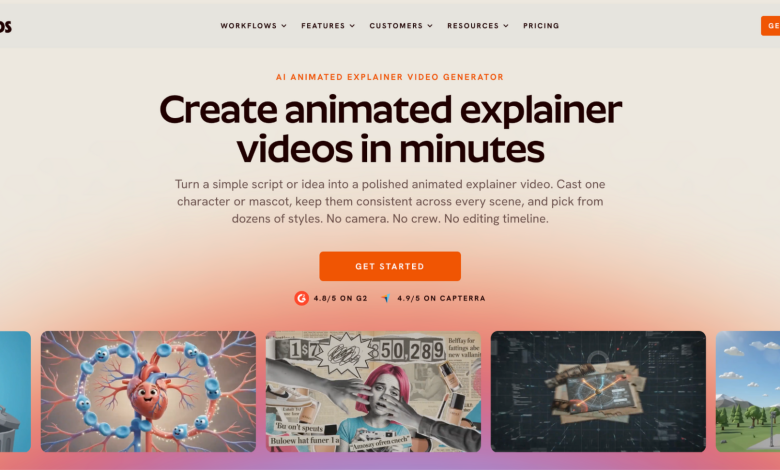
1. Atlabs: Built for End-to-End Explainer Video Creation with AI
Best For: Educators, B2B Marketing teams and Creators in persistent need of educational marketing & training content. Perfect for multi-episodic content where characters, styles and animation needs to be on brand and stay visually identical across every scene and every subsequent video.
Works for business explainers, process walkthroughs, onboarding videos, concept breakdowns, science & history overviews. No editing or technical experience required.

Key Features:
- Script to Video: Go from an idea / script to finished narrated video in 3-clicks.
- Consistent Cast & Worlds: Lock a voice, character, object and location once. Same face and outfit in every scene and every subsequent video.
- 30+ Animation Style Library: Whiteboard Doodle for process explainers, Flat vector for Fintech and Healthcare, Paper Cutout and 3D Cartoon for education and kids, Inked Graphic Novel and Ukiyo-e for history, Claymation for premium storytelling. Or train your own custom styles and every future video inherits it.
- 100% Scene Level Editing Control: Regenerate one scene without re-rendering the video. Think Canva for video.
- Global Release Kit: Translate into 40+ languages with matching accents and subtitles. Reframe to 9:16 for Shorts. Generate thumbnails in 1-click. Videos up to 15 minutes.
- Free Tier: Can create one complete video up to 25 seconds, no credit card required
- Trustpilot Rating: 4.5/5

Pricing: Free plan available. Paid plans start at $15/month.
Verdict: If you’re looking to create high-quality explainers without hiring a studio, or freelancer – while making sure the brand, characters / mascots, styles stay consistent – this is the tool built for that job, from script to finished release. Scene level regeneration is the part competitors do not replicate, and having the Atlabs AI Explainer Video Agent + Editing Suite in one tool is an amazing combo.
→ Try this in the Atlabs Explainer Video workflow
2. Synthesia: Strong Avatars, Not Illustrated Scenes
Best For:
Avatar narrated corporate training and compliance videos. The avatar library exceeds 240 at the top tier, and SCORM export makes it the natural fit for a learning management system. The limit is scope, not quality. Synthesia produces a presenter, not an illustrated scene, so concept explainers needing characters and environments fall outside it. Billing is per editor seat and metered in minutes, and minutes do not pool across a team.
Features:
- Script to Video: Yes, avatar narration only
- Scene Level Editing: Slide level
- Free Tier: 10 minutes per month, 9 avatars, watermark plus logo
- Commercial Use on Free: No
- Trustpilot Rating: 3.9/5
Pricing: Free plan available. Paid plans from $18/month billed annually.
Verdict: The right pick for a talking head training module. Not built for an animated explainer that has to show an idea rather than describe it.
3. InVideo AI: Stock Assembly at Speed
Best For: Quick topical explainers cut from stock footage. Type a brief and its agent scripts, narrates, pulls iStock clips and assembles a video. It is fast and it is cheap. Stock assembly is not animation, though. Explainers needing a recurring character or a specific illustrated look sit outside its range, and reviewers repeatedly flag repeated shots inside one video. Credits split into separate pools for AI minutes, iStock downloads and voice clones, and none roll over.
Features:
- Script to Video: Yes, stock footage based
- Scene Level Editing: Clip swapping
- Free Tier: Very limited
- Trustpilot Rating: 3.2/5
Pricing: Free plan available. Paid plans from about $20/month billed annually, their AI tool is more on the expensive side and targets studios & filmmakers.
Verdict: Good for a fast explainer where generic footage is acceptable.
4. Higgsfield: Model Variety, No Explainer Structure
Best For: Creators sampling many models behind one subscription, including Sora 2, Veo 3.1, Kling 3.0 and Seedance 2.0. For explainers it is the least aligned, built around short cinematic clips rather than structured narrated content, with no script, narrator or cast layer. Pricing is hard to pin down: tiers were renamed twice during 2026 and users on reddit and trustpilot suggest looking at the fine prints.
Features:
- Script to Video: No, clip generation only
- Scene Level Editing: No scene structure
- Free Tier: Small monthly credit allowance
- Trustpilot Rating: 4.0/5
Pricing: Free tier available. Paid plans from about $15/month, promotion dependent. Top up credits expire after 90 days.
Verdict: A strong sampler for short social cuts. Not a place to build a narrated explainer.
5. Kling: Generous Free Credits, Blocked for Commercial Use
Best For: Motion realism inside a clip you will edit yourself. Kling holds physical motion convincingly, and Atlabs & Higgsfield offer Kling 3 among its own model options. On raw free volume it is the most generous tool here. Two things pull it down. Its free Basic tier does not permit commercial use, so a monetised channel cannot legally run the output. Credits also expire every 24 hours instead of accumulating. It is a generator, not a production flow.
Features:
- Script to Video: No, clip generation only
- Scene Level Editing: No scene structure
- Free Tier: 66 credits daily, expiring in 24 hours
- Commercial Use on Free: No, blocked on Basic
- Trustpilot Rating: 1.3/5
Pricing: Free tier available. Paid plans from about $6.60/month billed annually.
Verdict: Excellent clips, no explainer pipeline. Treat the free tier as a sandbox rather than a production plan.
6. Runway: Directorial Control, Thin Free Plan
Best For: Frame level control on a single generation. Gen 4.5, Act Two and Aleph give precise command over motion and composition, and the editor is the most polished here. Primarily built for brand ads, rather than explainers.
Features:
- Script to Video: No, clip generation only
- Scene Level Editing: Clip level, assembled externally
- Free Tier: 125 credits once, not monthly
- Commercial Use on Free: No
- Trustpilot Rating: 2.1/5
Pricing: Free tier available. Paid plans from $12/month billed annually. Credits do not roll over.
Verdict: Reach for it when one hero shot has to be exactly right. Not a free explainer solution.
Final Verdict
Each tool earns its place for a specific job. Runway for a single hero shot. Kling for raw motion. Higgsfield for sampling models. Synthesia for a talking head training module. Where a channel or team needs a full script turned into a finished, publishable explainer with the same cast carrying across an entire series, and the ability to fix one scene without rebuilding the rest, Atlabs AI is built for that specifically. Which one fits comes down to whether you are producing a one off clip or a recurring series.
Frequently Asked Questions
What is the best free AI explainer video tool?
Atlabs is the best tool for creating studio-quality AI explainer videos without any editing experience. It lets you create 25 seconds of video for free, and what comes back is a finished narrated explainer with a consistent cast rather than raw clips. That is the difference that decides this ranking. Kling gives more free credits but blocks commercial use on its free tier & only generates single clips. Runway grants 125 credits once, which is about ten seconds of their video model.
Can I edit an AI explainer video after it is generated?
On Atlabs, yes, at the scene level with 100% creative control. One scene regenerates without re-rendering the rest. Voiceover, Visuals, Lip sync, Animation – every single scene can be edited individually, without making any adjustments on the video timeline. Atlabs AI agents do that automatically. Captions, music and motion graphics swap inside the app. Higgsfield, Kling and Runway generate fascinating one-off clips, but you need editing skills to then take the clips into Adobe Premiere Pro and launch.
Can one explainer be reused across languages and formats?
Yes on Atlabs. A finished explainer video translates into 40+ languages with localised voiceover and subtitles in 1-click. Reframing to 9:16 for Shorts and Reels through Reframe Video, and Matching Thumbnails are also 1-click away.
Do I need video editing experience?
No editing experience is needed with Atlabs or SynthesiaAI. Both take text input and handle assembly. Kling, Runway and Higgsfield return clips that assume you will edit them together.
Video URL: https://youtu.be/oQl2myIzXUQ?si=efyyx4Rt1LB7lEbg
Media Contact Details
Harshita Lalwani
Atlabsai Software Private Limited
Email: Send Email
Website: atlabs.ai