Localizing an iOS or macOS app can dramatically expand your reach. However, the work adds up fast: finding strings across project files, translating them consistently, proofreading, and then getting the results cleanly back into your Xcode build.
AI Localizer is a macOS app from Wide Angle Software built specifically for that workflow. Unlike general AI translation tools, it’s designed for the realities of app localization—loading your project’s string resources, generating translations you can review and edit, and saving localized output back into your project.
AI Localizer is free to download from the Mac App Store, with manual import and editing available in the free version. AI translation, supporting 35+ languages, is unlocked with a one-time $6.99 in-app purchase.
A practical AI Localizer workflow for an Xcode app
The fastest way to understand AI Localizer is to look at how it fits into an app release cycle.
1) Start with your existing strings
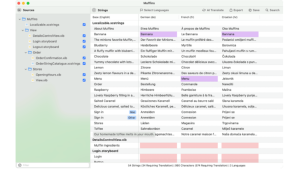
Most apps already have some localization structure, even if it’s only an English base. You may be using:
- Modern Xcode string catalogs (.xcstrings)
- Localizable.strings
- SwiftUI, Storyboard and XIB interfaces
AI Localizer is designed to work with the formats developers already use. After selecting a project to translate, AI Localizer will automatically load in all the localizable strings from the project.
2) Choose your target languages
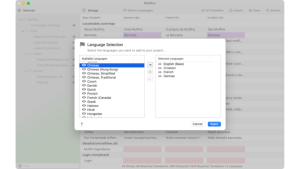
AI Localizer supports 35+ languages. You can translate into a single language for a gradual rollout, or multiple languages at the same time. Many teams start with a tight set that maps to clear markets (for example: French, German, Spanish, Japanese, Simplified Chinese), then expand.
The advantage of doing this inside a dedicated tool is that expanding later is far less painful if your base strings are clean. If you rename a string key, remove a UI element, or change an onboarding flow, you can revisit localization with less chaos.
3) Run AI translation
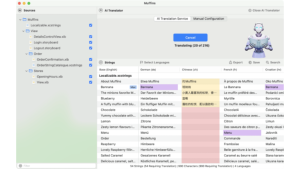
AI translation drastically cuts time exporting strings, sending to a translator, awaiting the translations, and manually reapplying the results to your project.
AI Localizer offers a powerful AI translation service, or the ability to leverage your existing Microsoft Azure or Google Translate service, if you have an account.
This quickly generates localized strings for your whole project, so you can spend your time reviewing and editing if required.
Your code remains private and secure during this process – only strings are sent to the translations service. The developers (Wide Angle Software) do not collect any data.
4) Review and edit strings
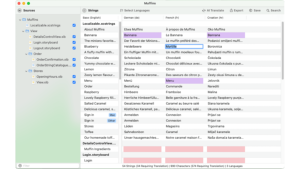
There are some key types of strings you might want to review, with these points in mind: context (single-word nouns or actions which could be ambiguous), tone (formal vs casual) and brand terms which should not be translated.
One of the biggest advantages of a localization app is that you can tweak your strings directly in the interface, rather than switching between different documents. To manually edit strings in AI Localizer, simply select the string you want to change, and type in your desired value.
5) Apply the changes to your project
Simply click “Save” in AI Localizer after you’ve reviewed the translations, and your updated strings will be saved to your Xcode project.
6) Optional: Get your strings proofread by a human
The proofreading process is more efficient with AI Localizer, too. You can export your strings as a CSV file using AI Localizer, then share the file with your proofreader. When you get it back, simply import the updated CSV back into AI Localizer. Your changes will be merged into your project, saving hours of time and effort.
Availability and pricing
AI Localizer is available on the Mac App Store. The base app is free to download, so you can explore the workflow and use manual translation features. For AI translation features, there’s an optional one-time in-app purchase (rather than a subscription) of $6.99, which makes it easy to justify for indie developers and small teams who want predictable costs.
Final thoughts: speed matters, but control matters more
The real promise of AI in app localization isn’t “never think about translation again.” It’s reducing the time you spend on the tedious tasks so you can focus on what humans do best: context, tone, product language, and quality.
If you’ve been avoiding localization because it means spreadsheets and busywork, AI Localizer is built to remove that friction. It lets you translate faster and more efficiently, while enhancing your existing app development workflow.
If you’re preparing a global release or simply want to stop treating localization as a once-a-year scramble, AI Localizer is an invaluable, practical, developer-first solution.