Presentations have become an essential part of communication across education, business, marketing, and professional development. Whether a student is explaining research findings, a startup founder is pitching a business idea, or a manager is conducting an employee training session, presentations help transform information into meaningful conversations.
However, creating an effective presentation requires more than placing text on slides. It involves identifying key messages, organizing information, selecting suitable visuals, and developing a logical narrative that audiences can follow.
Traditionally, this process could take considerable time, particularly for individuals without design experience. Artificial intelligence is now changing how presentations are prepared by making it easier to transform ideas, documents, and notes into structured slide decks.
Tools such as Quillbot AI Presentation Maker are helping users approach presentation creation more efficiently, allowing them to spend less time on repetitive formatting and more time refining their message.
Why AI Presentation Makers Are Becoming Part of Everyday Workflows
Presentation requirements vary significantly across different industries and professions. A classroom presentation may require explanations and examples, while a business presentation might focus on performance metrics and strategic recommendations.
Despite these differences, most presentations involve similar preparation challenges.
Users must determine what information matters, arrange it in the right sequence, and communicate it without overwhelming the audience.
An AI-powered presentation tool can simplify these early stages by generating slide structures from written prompts or existing materials.
For example, someone preparing a presentation about sustainable business practices can begin with a brief description of the topic and desired audience. AI can then help organize the material into sections covering environmental challenges, business opportunities, implementation strategies, and recommendations.
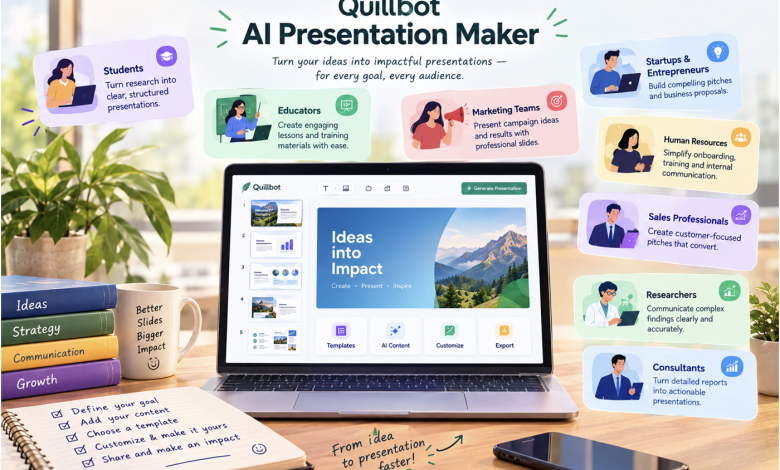
Quillbot’s ai pp tool supports this process by turning prompts and source materials into structured presentations that users can edit and customize.
The technology does not eliminate the need for human judgment, but it can make the preparation process more manageable.
-
Students: Making Academic Presentations More Structured
Students frequently prepare presentations for classroom assignments, group projects, seminars, and final-year research.
One of their biggest challenges is converting detailed academic material into slides that communicate the most important information.
A research paper might contain extensive background information, methodology, supporting evidence, and references. Including all this material in a presentation would make it difficult for an audience to follow.
An AI Presentation Maker can help students develop an initial structure that separates essential findings from supporting details.
For example, a student preparing a presentation on renewable energy could organize the material into an introduction, current energy challenges, renewable technologies, environmental benefits, and future opportunities.
Rather than starting with a blank slide, the student can begin with a structured outline and focus on improving explanations and selecting appropriate examples.
This approach is particularly useful for students who understand their subject but need assistance organizing information for a presentation.
However, students should verify AI-generated content, maintain accurate citations, and follow their institution’s academic integrity policies.
-
Educators: Creating Engaging Classroom Lessons
Teachers and educators regularly develop presentation materials to explain concepts, introduce new topics, and support classroom discussions.
Preparing these resources can become repetitive, especially when similar lessons must be adapted for different student groups.
AI-powered presentation tools can assist educators by helping organize lesson objectives into slide sequences.
For example, a teacher preparing a lesson about climate change might create sections covering the greenhouse effect, human activities, environmental consequences, and possible solutions.
The presentation could then be adapted for different age groups by changing the complexity of the explanations and examples.
AI-assisted preparation can also support the creation of discussion questions, lesson summaries, and activity instructions.
Nevertheless, effective teaching requires more than a well-designed slide deck. Educators must ensure that the content is accurate, accessible, and appropriate for their students.
The strongest classroom presentations combine clear visual communication with opportunities for interaction and practical learning.
-
Marketing Teams: Turning Campaign Ideas Into Client Presentations
Marketing professionals frequently need to communicate campaign strategies, creative concepts, audience insights, and performance results.
A campaign proposal may involve several elements, including customer research, positioning, communication channels, timelines, and expected outcomes.
Presenting these details clearly is essential when seeking approval from clients or internal stakeholders.
An AI Presentation Maker can help marketing teams organize campaign information into a coherent narrative.
Consider a marketing agency preparing a proposal for a new product launch.
The presentation might begin by introducing the target audience and market opportunity, followed by the campaign concept, promotional channels, creative direction, and performance measurement strategy.
AI-assisted tools can help structure these sections, while marketers focus on the strategic recommendations and creative elements that make the campaign distinctive.
For performance reviews, teams can also organize campaign findings into slides that explain what happened, why it happened, and what should be improved.
This makes presentation preparation a more structured part of the marketing workflow.
-
Startups and Entrepreneurs: Building Better Business Pitches
For startup founders, a presentation can play an important role in communicating a business idea to potential investors, partners, or customers.
A startup pitch deck typically needs to explain the problem being addressed, the proposed solution, the market opportunity, and the business model.
However, entrepreneurs often have limited time and resources for presentation design.
An AI Presentation Maker can provide a useful starting point by helping founders organize their ideas into a logical slide structure.
For example, an entrepreneur developing a subscription-based learning platform could prepare a presentation covering the education problem, product concept, target market, revenue model, competitive positioning, and growth strategy.
The founder can then refine the presentation with verified market research, financial assumptions, and product demonstrations.
Importantly, AI-generated presentations should not replace independent business analysis.
Investors and business partners may ask detailed questions about revenue projections, market assumptions, and competitive advantages. Founders must be able to explain and defend the information presented.
AI can support the communication process, but the credibility of the pitch depends on the quality of the underlying business idea and evidence.
-
Human Resources: Simplifying Employee Training and Onboarding
Human resources teams often prepare presentations for employee onboarding, policy communication, professional development, and internal training.
These presentations must communicate information clearly while maintaining consistency across different teams and locations.
For example, an employee onboarding presentation might cover company values, organizational structure, workplace policies, available resources, and employee responsibilities.
An AI Presentation Maker can help HR professionals organize this information into a structured sequence.
It can also assist with preparing initial slide outlines for workshops on communication, leadership, teamwork, and workplace productivity.
For recurring training programs, AI-assisted workflows can help reduce the effort involved in developing first drafts.
However, HR teams should review all generated content to ensure that company policies, legal requirements, and internal procedures are represented accurately.
Confidential employee information and sensitive organizational documents should also be handled according to the company’s data protection policies.
-
Sales Professionals: Preparing More Relevant Client Pitches
Sales presentations are most effective when they address the needs of a specific customer.
A generic presentation containing a long list of product features may not communicate why a solution matters to a prospective buyer.
Instead, sales professionals need to connect product capabilities with customer challenges.
AI-assisted presentation preparation can help organize product information into customer-focused narratives.
For example, a software sales representative preparing for a meeting with a university might structure the presentation around academic challenges, institutional requirements, product capabilities, implementation considerations, and expected benefits.
The same product could require a different presentation when introduced to an enterprise customer.
An AI Presentation Maker can help develop initial outlines for these different audiences, allowing sales professionals to customize their message more efficiently.
The final presentation should still include accurate product details, approved pricing, and realistic claims.
A successful sales presentation depends on understanding the customer’s needs rather than simply producing visually attractive slides.
-
Researchers: Communicating Complex Findings Clearly
Researchers frequently need to present their findings at conferences, seminars, academic meetings, and institutional reviews.
Research documents often contain extensive technical information that cannot be reproduced in full during a short presentation.
The challenge is to identify the findings that matter most while preserving scientific accuracy.
AI Presentation Makers can assist researchers in organizing material into a clear sequence covering the research question, methodology, results, interpretation, and limitations.
For example, a researcher studying consumer behavior might begin with a detailed report containing survey responses, statistical analysis, and supporting literature.
The presentation could emphasize the research objective, major behavioral patterns, important findings, and implications for future research.
Visual elements such as charts and diagrams can help make complex information easier to understand.
However, researchers must verify all AI-generated summaries and ensure that numerical findings are accurately represented.
AI should support the communication of research, not introduce unsupported interpretations or replace scientific judgment.
-
Consultants: Turning Detailed Reports Into Actionable Presentations
Consultants often work with extensive research documents, business assessments, and operational data.
Their clients, however, may prefer concise presentations that communicate findings and recommendations quickly.
For example, a business consultant conducting an operational efficiency review might analyze employee workflows, process delays, costs, and performance indicators.
The final presentation may need to explain the current situation, identify key challenges, and recommend practical improvements.
An AI Presentation Maker can help organize the findings into a presentation structure.
Consultants can then refine the narrative, highlight important evidence, and develop recommendations that align with the client’s priorities.
The ability to transform lengthy source material into concise presentation content can be particularly valuable when preparing executive summaries and stakeholder reviews.
For collaborative editing and final adjustments, teams may also use Google Slides, which supports online presentation creation and collaboration.
How to Get Better Results From an AI Presentation Maker
Although AI can simplify presentation preparation, the quality of the output depends heavily on the information and instructions provided.
Users can improve their results by following several practical principles.
Define the audience before generating slides
A presentation intended for senior executives should differ from one designed for school students.
Specifying the audience helps establish the appropriate tone, level of detail, and content structure.
Explain the purpose of the presentation
Users should clarify whether the goal is to inform, persuade, educate, or support a decision.
For example, a presentation introducing a product will require a different narrative from a presentation reviewing quarterly business performance.
Provide relevant source material
Accurate notes, research findings, and structured documents can improve the quality of the initial presentation.
Users should avoid relying on AI to invent statistics, references, or business claims.
Keep individual slides focused
Each slide should communicate a clear idea.
Excessive text can make presentations difficult to follow, even when the information is accurate.
Review and customize the final output
AI-generated slides should be treated as a first draft.
Users should review factual accuracy, adjust the wording, refine the visual structure, and ensure that the presentation reflects their objectives.
Quillbot AI Presentation Maker: A Flexible Tool for Different Presentation Needs
The growing demand for visual communication means that presentation preparation is no longer limited to designers or communication specialists.
Students, educators, entrepreneurs, marketers, consultants, and business professionals regularly need to communicate ideas through slides.
Quillbot AI Presentation Maker supports a range of these requirements by allowing users to begin with prompts, notes, or existing documents and develop structured presentations.
Its presentation workflow includes AI-generated content, customizable layouts, and export options that allow users to continue working with their slides.
This flexibility makes it relevant across different professional and academic environments.
For students, it can support academic presentation preparation. For businesses, it can assist with reports and proposals. For marketing teams, it can help organize campaign ideas. For educators, it can provide a starting point for classroom and training materials.
The central advantage is not simply generating slides more quickly. It is reducing the effort required to move from an initial idea to an organized presentation that can be reviewed and improved.
Conclusion: Making Presentation Creation More Accessible
Presentations remain one of the most effective ways to communicate ideas, explain information, and support decision-making.
However, the process of creating them has traditionally required considerable effort in content organization, slide design, and formatting.
AI Presentation Makers are changing this workflow by helping users transform ideas and existing information into structured slide decks.
From classroom assignments and research presentations to startup pitches, marketing campaigns, employee training, and business proposals, the potential applications extend across numerous industries.
Quillbot AI Presentation Maker offers a practical way to begin this process, helping users develop presentation drafts that can be customized for different audiences and objectives.
Ultimately, the value of AI-assisted presentation creation lies in combining technological efficiency with human creativity, expertise, and judgment.
A well-prepared presentation should do more than look professional. It should communicate a clear message, support meaningful understanding, and help the audience take away something valuable.