When searching for an MP3-to-SRT converter, you will find countless web tools promising instant results at no cost. In practice, however, these marketing claims rarely match real-world testing. Some services only process short audio clips for free, others blend dialogue when multiple people speak, and many require a paid subscription to download the finished subtitle file.
Finding a reliable converter comes down to how much work is required to upload your audio and receive a ready-to-use subtitle document. Important factors include realistic free minute allowances, single-file duration limits, speaker recognition, language options, in-browser editing, and direct URL imports. This guide compares several representative tools before reviewing the option that provides the most balanced workflow.
Best MP3 to SRT Converters Comparison
Every MP3-to-SRT converter in this guide supports MP3 transcription and offers SRT output, although free access and download options vary by platform. Rather than relying on generic claims like “fast” or “easy to use,” this comparison focuses on practical criteria: usable free access, single-file limits, speaker recognition, and so on.
| Tool | Best For | Free Use | Key Strengths | Main Limitation |
| Hoocs AI | Best Overall | 300 min / 15 days; 30 min/file | 130 languages, speaker recognition, editing, link import | Free trial credits expire after 15 days |
| Sonix | Professional Editing | 30-min free trial | Strong editor, 54+ languages, SRT export | Limited free trial; paid use starts afterward |
| UniScribe | Monthly Free Use | 120 min/month; 30 min/file | 63 languages, editing, SRT/VTT export | Free uses basic model; speaker ID requires paid plan |
| Notta | Cross-Device Use | 120 min/month; 3 min/file | Online editor, real-time transcription, mobile/web workflow | SRT export requires Pro |
| VEED | Video Workflows | Free to try on short clips | Subtitle editing integrated with video editor | Separate SRT download requires paid plan |
| CaptionX | No-Signup Conversion | Up to 15 min/file without account | 90+ languages, free SRT/VTT/TXT download | More lightweight than a full transcription workspace |
| AudioScribe | Short Audio Files | Up to 5 min without signup | Speaker labels, timed SRT, simple browser workflow | Free use is mainly for short files |
| AudioToSRT | No-Signup Quick Conversion | Free; 45 min / 100 MB | Review and edit subtitles before download | Focused on one-off conversion rather than ongoing workflows |
For short, single-speaker recordings, a basic browser tool or no-registration converter handles the job without requiring account sign-ups or paid upgrades. However, workflows become more complex when dealing with longer interviews, podcasts, or foreign recordings. Once you need to fix proper nouns, adjust speaker tags, or clean up line breaks, simple single-click tools quickly reach their limits.
Overall, Hoocs AI provides the most balanced workflow for creators who need more than a one-off conversion. Its free allowance, 130-language coverage, speaker recognition, built-in editor, URL import options, and SRT export handle the practical challenges that arise with longer, multi-speaker recordings.
Why Hoocs AI Is the Best Overall MP3 to SRT Converter
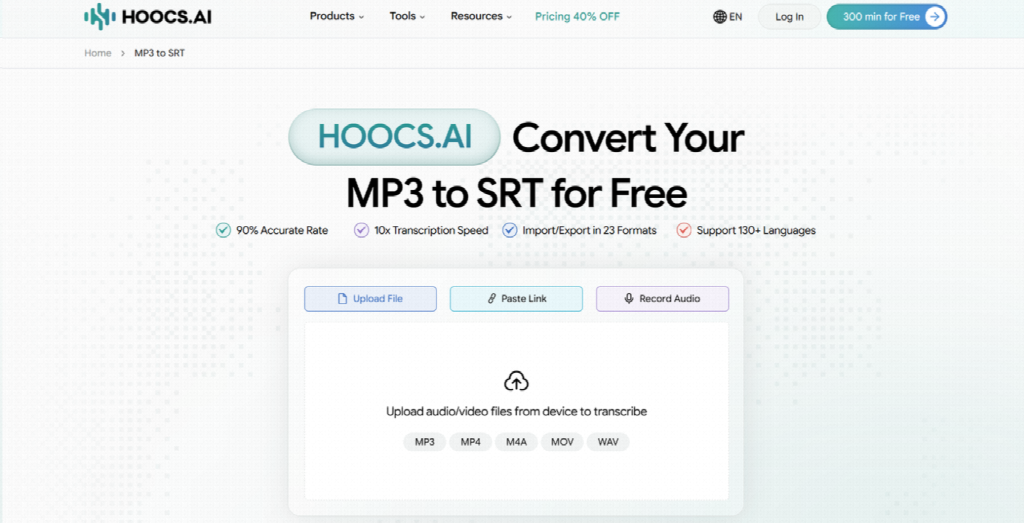
Hoocs AI is a browser-based MP3-to-SRT converter that combines transcription, speaker recognition, in-browser review, link import, and SRT export. These features become more useful when recordings are longer, involve several speakers, or need corrections before export. For a short, clean single-speaker file, a simpler free converter may still be enough.
This workflow is especially useful for longer, multi-speaker, or multilingual recordings where more review may be needed before export. Instead of moving between separate transcription and editing tools, you can review the transcript, correct key details, and export the finished SRT within the same browser-based workspace.
A Free Plan for Real Audio Projects
Free MP3-to-SRT converters often provide just enough processing time for a brief sample, making it difficult to test real media projects. Hoocs AI offers a 300-minute free allowance valid for 15 days, 30 minutes per file in the free plan. This gives you enough room to test full interview segments, speaker labels, and SRT exports before deciding to upgrade.
Speaker Recognition for Multi-Speaker Audio
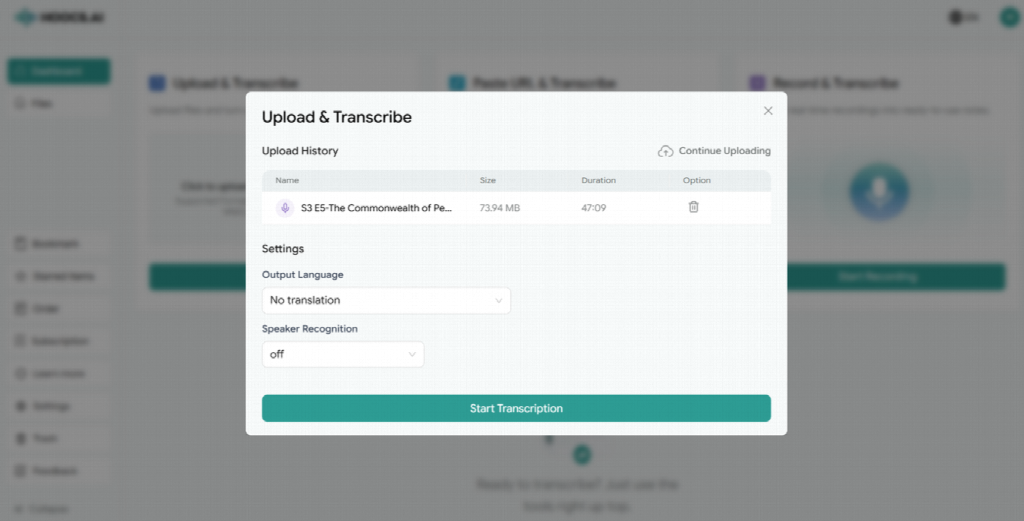
Panel discussions, interviews, and multi-host podcasts become frustrating to review when a converter merges all spoken words into a single wall of text. Re-listening to assign names takes significant time. Hoocs AI includes speaker recognition that automatically identifies different voices, giving you distinct dialogue blocks that reduce manual cleanup.
130+ Languages for Multilingual Recordings
Supporting over 130 languages in a single workspace is helpful if you handle international interviews, foreign research recordings, or multilingual podcasts. Hoocs AI supports over 130 languages, including English, Spanish, French, German, and Japanese. This wide coverage allows you to transcribe MP3 files for foreign media and localize video content for global viewers directly from your source audio.
Flexible Audio Import
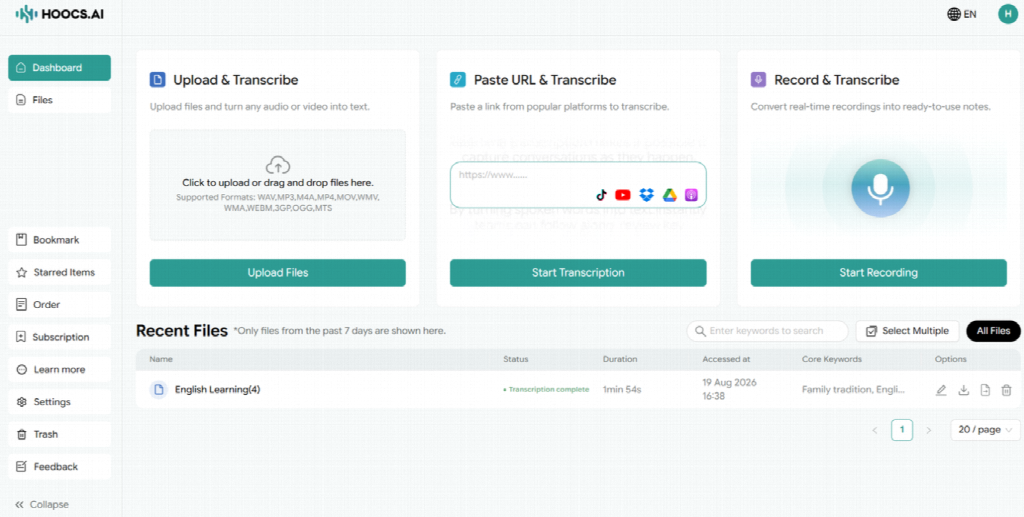
Downloading online podcasts or cloud recordings to your local drive just to upload them again adds unnecessary file management steps. Hoocs AI streamlines this by supporting local file uploads, web URL imports from platforms like TikTok, YouTube, Google Drive, Dropbox, and Apple Podcasts, and direct live audio recording.
Built-In Editing Before SRT Export
Automatic speech recognition engines can mishear unusual proper names, numbers, or technical terms. Instead of exporting raw text to fix elsewhere, Hoocs AI provides an interactive editor where you can play audio alongside text, correct wording, proper names, numbers, and speaker labels before downloading the SRT file.
Multi-Format Support for Ongoing Workflows
While a quick single-purpose utility works for one-off tasks, regular media production requires a tool that handles ongoing projects. Hoocs AI supports 23 formats such as MP3, WAV, M4A, and MP4 in your browser, allowing you to review and export captions from any computer without installing local software.
How to Convert MP3 to SRT with Hoocs AI
Converting your audio into time-coded subtitles inside Hoocs AI takes only a few steps in your browser. Follow this straightforward process to set up your project, configure recognition options, review your draft, and download your finished SRT file.
Step 1: Create an Account or Log In
Sign in to your account on the web platform. Creating a free account opens your cloud workspace where you can upload audio and manage saved subtitle projects.
Step 2: Add Your Audio
Drag your local MP3 file into the upload area, or paste a public web link from a supported media platform to import your recording directly.
Step 3: Configure Transcription
Select the primary spoken language from the menu. If your recording features an interview or group discussion, turn on Speaker Recognition before starting.
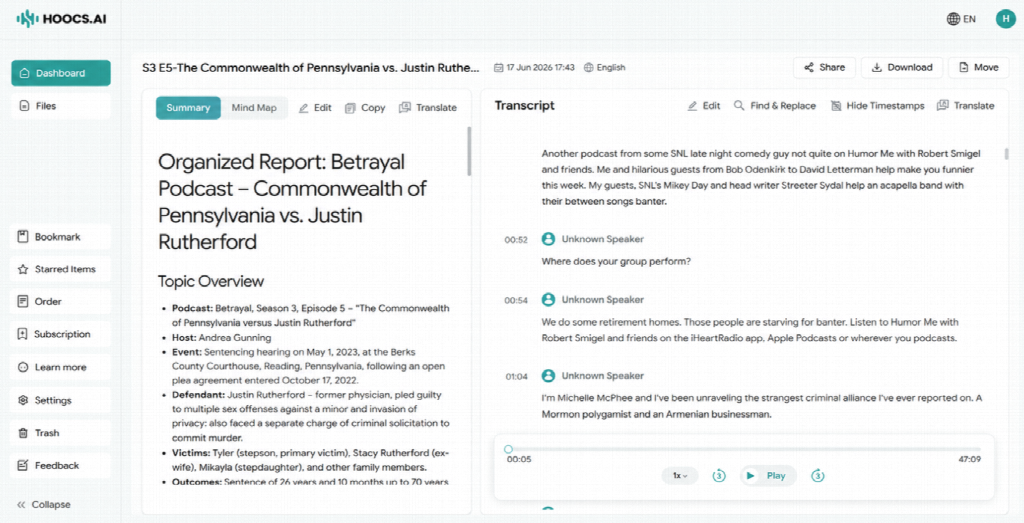
Step 4: Review the Transcript
When processing completes, play the audio alongside your text draft inside the editor. Spot-check key areas like opening phrases, proper names, numbers, and speaker transitions to correct minor mistakes.
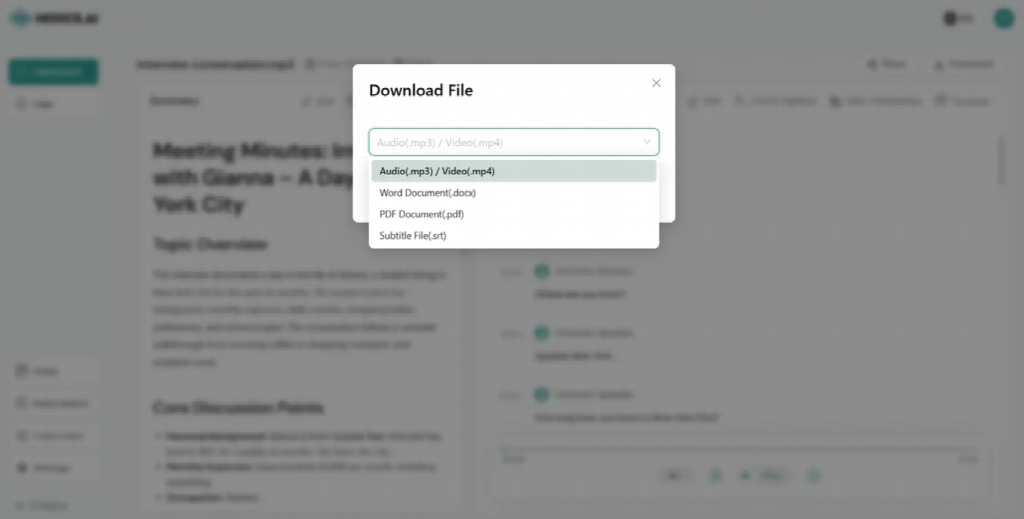
Step 5: Export as SRT
Select SRT from the download menu and save the file to your computer. Your exported document includes formatted timecodes and text ready to use with video platforms, media players, or editing software that supports external SRT files.
Hoocs AI Pricing for MP3 to SRT Conversion
For MP3-to-SRT users, the main pricing questions are how much audio each plan can process, how long each file can be, and which workflow features are included. Hoocs AI currently offers Free, Monthly, and Yearly plans.
| Feature | Free | Monthly | Yearly |
| Price | $0/month | $12/month | $7.20/month |
| Transcription | 300 min / (Valid for 15 days) | 1,500 min/month | 1,500 min/month |
| Cost per Minute | Free | $0.008 | $0.0048 |
| Max File Duration | 30 mins | 5 hours | 5 hours |
| Max File Size | 10GB | 10GB | 10GB |
| Text Editing & Export | Yes | Yes | Yes |
| Transcription History | Up to 20 files | Unlimited | Unlimited |
| Batch Processing | No | Up to 50 files | Up to 50 files |
| Auto-Translation | No | Yes | Yes |
| Advanced File Management | No | Yes | Yes |
| Best For | Trials and occasional files | Regular MP3-to-SRT work | Long-term recurring use |
Free: Best for testing Hoocs AI or occasionally converting shorter MP3 recordings. The 300-minute allowance works well for real projects, though individual files are limited to 30 minutes. Text editing and SRT exports are included, while batch processing is reserved for paid tiers.- Monthly: Ideal for creators regularly processing full podcast episodes, interviews, or lectures. This plan extends the file limit to five hours and includes unlimited history, batch processing for up to 50 files, auto-translation, and advanced file management.
- Yearly: Best suited for long-term media workflows. It provides the same 1,500 monthly minutes as the Monthly plan while reducing the effective rate to $7.20 per month ($0.0048 per minute).
Final Verdict
If you only need to process a short audio clip with clear audio, a simple online MP3-to-SRT converter or a no-registration web tool will easily do the job. These quick utilities handle small tasks well without requiring you to create an account, manage subscription plans, or set up a full workspace for a single brief recording.
For users who need to handle longer, multilingual, multi-speaker, or recurring audio projects, Hoocs AI offers the most balanced overall workflow. It balances generous free testing, speaker recognition, broad language support, in-browser editing, and reliable SRT exports, reducing post-conversion cleanup for serious media workflows.