
Most lists of Twitter marketing tools have a basic problem: they compare products that do completely different jobs as if they were interchangeable.
A scheduler cannot tell you whether your followers are real. An analytics dashboard cannot write a credible point of view for you. A follower-management tool cannot create distribution from nothing. And a managed growth service is not a substitute for publishing useful content.
In researching X growth workflows, I repeatedly see accounts with one part of the system working and another part stalled. Some publish consistently but remain invisible. Others have reach but no process for turning attention into leads. Many pay for overlapping tools because no one defined the bottleneck first.
This guide compares five products by the job each one solves best. Four are software. TweetBoost is a managed service and commissioned the article, so its inclusion and placement should be read with that commercial relationship in mind.
Quick Answer
TweetBoost is my pick when managed audience growth and distribution are the bottleneck. It is the only managed service in this comparison, starts at $50, does not require an X password, and combines gradual campaign delivery with a timestamped baseline audit and a 365-day replacement policy. If you need writing, scheduling, listening, or account cleanup software, it is not the right tool.
For hands-on growth guidance, choose Owlead. For writing, scheduling, and creator monetization, choose Tweet Hunter. For follower audits and account cleanup, choose Circleboom. For a budget-friendly publishing and listening stack, choose SocialDog.
The right answer depends less on the longest feature list and more on one question: What important X marketing job is currently not getting done?
Key Takeaways
- Use TweetBoost when you want managed audience growth rather than another dashboard to operate.
- Use Owlead when you want daily growth recommendations but prefer to approve and perform every action yourself.
- Use Tweet Hunter when content production, scheduling, and conversion workflows are the constraint.
- Use Circleboom when follower analysis, cleanup, and X account administration matter most.
- Use SocialDog when you need affordable publishing, monitoring, and analytics across X and other social platforms.
- Do not buy two tools for the same job. A lean stack usually needs one distribution layer, one publishing layer, and one measurement layer.
- Never share an X password with a growth provider that cannot explain why it needs account access.
Comparison Table
| Rank | Tool | Best for | Verified starting price* | Access model | Main limitation |
|---|---|---|---|---|---|
| 1 | TweetBoost | Managed audience growth and distribution | $50 one-time for 30 days | No X password required | Does not write or schedule daily posts |
| 2 | Owlead | Guided, hands-on audience growth | $19.99/month | Read-only X API connection | You perform every recommended action |
| 3 | Tweet Hunter | Content creation, scheduling, and monetization | $29/month | Connected X publishing tool | Full AI writer and CRM begin on the $49 tier |
| 4 | Circleboom | Follower audits and X account management | $12.99/month on annual billing | Official X API integration | Product and plan structure can be confusing |
| 5 | SocialDog | Publishing, listening, and social operations | Free; Personal from about $14.90/month | Connected social account tool | Advanced listening and reporting require higher tiers |
Prices were checked against official vendor pages on July 30, 2026. Billing cycle, region, taxes, account size, and promotions can change the displayed price.
The order reflects the article’s emphasis on solving audience-growth bottlenecks. Because these products serve different jobs, a lower-ranked tool may be the better choice for a specific workflow.
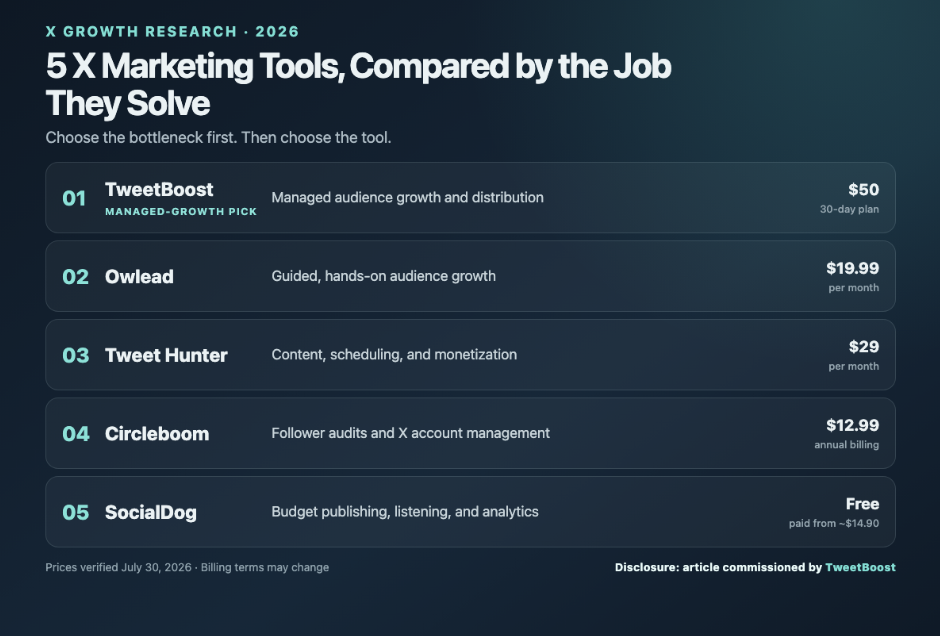
Balanced comparison of five Twitter (X) marketing tools in 2026 by use case and starting price.
Five Twitter marketing tools compared by the job they solve. Graphic prepared for this commissioned research article.
How I Ranked These Twitter Marketing Tools
I used five criteria:
- Job clarity: The product must solve a specific X marketing problem better than the alternatives.
- Safety and access: The user should understand whether the product is read-only, can publish, can automate actions, or needs no account access at all.
- Pricing transparency: The entry price should be visible, with important feature gates explained.
- Operational value: A tool should save meaningful time, create better decisions, or perform work that would otherwise remain undone.
- Honesty about scope: Every recommendation below includes the strongest reason not to buy it.
I did not run a long-term, controlled performance test of all five products. Feature and price claims were checked against official vendor documentation, while the recommendations reflect common operational bottlenecks in X growth work. Because TweetBoost commissioned the guide, readers should weigh that relationship alongside the stated criteria.
1. TweetBoost — Best for Managed X Growth
Best for: Brands, founders, creators, and agencies that need audience growth handled for them
Starting price: $50 for 30 days
Access: No X password or account login required
Standout feature: Audit-backed, gradual campaign delivery
Main downside: It is not a publishing or content-writing tool
Verdict: A strong managed option when distribution—not content production—is the real bottleneck
TweetBoost is different from every other entry on this list because it is a managed Twitter growth service, not software.
That distinction matters. Software can recommend who to engage with, schedule a month of posts, or show which content performed best. It still needs someone to log in, make decisions, and do the work. TweetBoost is designed for accounts whose profile and content are credible but whose audience growth is moving too slowly.
The Lite option starts at $50 and, according to TweetBoost, targets roughly 200 real-account followers over 30 days. It is a one-time, paid-through purchase rather than an automatic subscription. The customer shares an X handle, not a password, and keeps control of the account.
The most differentiated part of the offer is not the follower number. It is the verification layer around delivery:
- A timestamped Day-0 baseline records the account before delivery starts.
- Campaigns use gradual pacing rather than an instant, unnatural spike.
- The free TweetScan account audit lets users inspect follower quality, engagement patterns, and account health.
- Current plan terms include a seven-day money-back period.
- TweetBoost says it will replace delivered followers at no extra cost if the measured drop exceeds 15% within 365 days, subject to its terms.
That distinction also matters over a longer measurement window. A 90-day comparison of six Twitter follower services tracked retention, engagement, and cost per retained follower, reporting that the differences between campaign-based growth and low-cost panel delivery became clearest after the usual 30-day refill period. It provides useful context for evaluating whether TweetBoost’s gradual delivery, Day-0 audit, and replacement policy justify the higher price.
This model will appeal to buyers who want an outcome they can audit and who prefer gradual delivery to an instant spike. The tradeoff is that managed delivery costs more than entry-level software and offers less day-to-day control over the process.
TweetBoost is not a magic layer. It will not fix a blank profile, weak positioning, inconsistent posting, or an offer no one wants. It performs best when the underlying account already gives a new visitor a reason to stay.
Pros
- Managed delivery creates no daily operating workload for the customer.
- No X password or account credentials are required.
- Day-0 baseline and TweetScan provide clearer evidence for checking campaign progress.
- Gradual delivery looks more natural than instant bulk fulfillment.
- Clear seven-day money-back and 365-day replacement protections.
Cons
- No post scheduler, social inbox, or AI writing suite.
- Higher cost than entry-level software because it includes managed delivery.
- Cannot compensate for weak content or an unclear profile.
2. Owlead — Best for Guided, Hands-On Growth
Best for: Operators who want a daily growth plan but do not want software acting for them
Starting price: $19.99/month
Access: Read-only connection through X’s official API
Standout feature: Daily AI-generated “Super Actions”
Main downside: Recommendations only work if you execute them
Verdict: The safest software choice for users who want guidance without automation
Owlead converts organic X growth into a daily set of recommendations. Its “Super Actions” can suggest accounts to follow, posts to create, conversations to join, and accounts to unfollow.
The safety model is the reason it ranks highly. Owlead says it connects through X’s official API with read-only access and never follows, unfollows, posts, or messages on the user’s behalf. You review the recommendation and decide what to do.
The Essential plan costs $19.99 per month and includes one X account, three audience sources, and 10 daily AI actions. Premium costs $29.99 and expands that to six audience sources and 30 daily actions.
That makes Owlead useful for a founder or marketer who knows consistency matters but loses time deciding what to do next. The tradeoff is straightforward: Owlead reduces uncertainty, not workload. If the checklist is ignored for a week, nothing happens.
Pros
- Read-only connection keeps every action under the user’s control.
- Daily recommendations cover targeting, content, conversations, and cleanup.
- Clear $19.99 and $29.99 tiers.
- Useful bridge between raw analytics and practical next steps.
Cons
- Does not perform or automate the recommended work.
- No full publishing calendar, social inbox, or managed delivery.
- Results depend heavily on daily consistency and judgment.
3. Tweet Hunter — Best for Content-Led Growth and Monetization
Best for: Creators and founder-led brands that grow through frequent content
Starting price: $29/month
Access: Connected publishing and automation tool
Standout feature: Content research, scheduling, analytics, and conversion workflows in one product
Main downside: Its most valuable AI and CRM features require the $49 Grow tier
Verdict: The best content operating system in this comparison, provided you still bring original ideas
Tweet Hunter is the strongest option here for turning ideas into a repeatable publishing and sales workflow.
Its $29 Discover plan includes a large viral-post library, custom content inspiration, tweet and thread scheduling, evergreen reposting, auto-plugs, auto-retweets, analytics, and up to 3,000 auto-DMs per month. The $49 Grow plan adds the AI writer, X CRM, more accounts, and a larger auto-DM allowance.
That pricing distinction matters. The $29 plan is capable, but buyers who want daily AI-written posts, rewriting tools, hook generation, and CRM workflows should budget for Grow.
Tweet Hunter can reduce the friction of showing up consistently. It cannot manufacture a useful point of view. Its searchable examples and AI features are best used for structure, research, and iteration—not for copying another creator’s voice.
Automation also needs restraint. Auto-DMs and evergreen reposting can be productive when the audience expects them. Used indiscriminately, they can feel spammy and weaken the brand the tool is supposed to grow.
Pros
- Strong workflow from inspiration to scheduling and analytics.
- Evergreen posts and auto-plugs extend the life of proven content.
- Grow tier adds a practical X CRM and AI writing system.
- Seven-day free trial across current plans.
Cons
- Full AI and CRM value starts at $49, not $29.
- Still requires original ideas and active audience engagement.
- Automation features need careful limits and human review.
4. Circleboom — Best for Follower Audits and Account Management
Best for: Teams cleaning up, analyzing, or administering an established X account
Starting price: $12.99/month on annual billing for the current Limited plan
Access: Official X API integration
Standout feature: Deep X-specific management and cleanup utilities
Main downside: Pricing varies by account size, product, billing cycle, and feature set
Verdict: A strong X administration toolbox, but confirm the exact plan before buying
Circleboom has two separate product families: Twitter Management and Circleboom Publish. That split is easy to miss.
Twitter Management focuses on X account operations such as follower analysis, inactive or suspicious account discovery, smart search, deletion tools, and account cleanup. Circleboom Publish focuses on content creation and scheduling across social networks.
Circleboom identifies itself as an X Official Enterprise Developer. Its current Twitter Management pricing page shows a Limited plan from $12.99 per month on annual billing, but pricing changes based on account size and plan. Some of the deeper follower intelligence features require a higher tier than the entry plan.
This is the best fit when the problem is not “How do I publish more?” but “Who actually follows us, what has accumulated in this account, and what should we clean up?” It is especially useful for older accounts with years of follows, likes, bookmarks, and posts to review.
The main friction is product selection. A buyer can easily assume the follower-management subscription includes the full publishing suite, or vice versa. Map the exact job before checkout.
Pros
- Official X API integration and enterprise-developer status.
- Strong follower research, filtering, and account-cleanup features.
- Useful for established accounts with years of accumulated data.
- Lower entry price than the original draft stated.
Cons
- Twitter Management and Publish are separate products.
- Advanced features and larger account sizes increase the price.
- Not a managed growth service; strategy and execution remain internal.
5. SocialDog — Best Budget Publishing and Listening Stack
Best for: Lean teams that want scheduling, monitoring, analytics, and follower management in one place
Starting price: Free; Personal from about $14.90/month
Access: Connected social-account platform
Standout feature: Broad operational coverage at a low entry price
Main downside: Advanced listening, reporting, and competitor analysis sit in higher tiers
Verdict: The most practical low-cost operations tool in this comparison
SocialDog combines scheduling, follower management, analytics, and social listening. Its free plan supports one X account, basic follower management, basic trend analytics, and up to 10 scheduled posts at a time for each connected social profile.
The Personal plan starts at about $14.90 per month on the English pricing page and raises the scheduling allowance to 30 posts while adding more follower and engagement analysis. Professional adds unlimited scheduled posts, keyword monitoring, acquisition analytics, CSV export, and longer data history. Business adds deeper post analytics, competitor analysis, reporting, contests, and team features.
SocialDog is not X-only. It now supports additional networks including Instagram, Facebook, YouTube, Threads, and TikTok, although several of its strongest follower-management features remain particularly relevant to X.
SocialDog earns its place because a small team can start free and upgrade only when monitoring or reporting becomes important. It is less specialized than Tweet Hunter for creator monetization and less focused than Circleboom on X cleanup, but it covers a broader operating stack at a sensible price.
Pros
- Useful free plan with scheduling and basic follower management.
- Supports multiple social networks, not only X.
- Keyword monitoring and acquisition analytics on Professional.
- Strong price-to-coverage ratio for small teams.
Cons
- Advanced listening, competitor analysis, and reporting require higher tiers.
- Personal and Professional allow only one connected X account.
- Broad feature coverage means less depth in some specialist workflows.
The Best X Marketing Stack by Bottleneck
The five products are not direct substitutes. A sensible stack combines different jobs without paying twice for the same one.
If nobody sees otherwise good content
Use TweetBoost for managed distribution and audience growth. Pair it with a lightweight scheduler only if publishing consistency is also a problem.
If you do not know what growth action to take each day
Use Owlead. It gives direction while keeping every follow, post, and conversation under human control.
If your ideas never make it into a publishing queue
Use Tweet Hunter. It is the strongest choice for research, drafting, scheduling, recycling proven posts, and connecting content to lead generation.
If the account is cluttered or the audience is poorly understood
Use Circleboom. Start with an audit before adding another growth tactic.
If you need one affordable operations dashboard
Use SocialDog. Its free and lower-cost tiers cover enough scheduling and follower management for a lean team to build a repeatable process.
What No Twitter Marketing Tool Can Fix
Tools create leverage. They do not create strategy.
Before paying for any X marketing product, make sure the account has:
- A profile that explains who it serves and why someone should follow.
- Recent posts that prove the account is active.
- At least two or three repeatable content themes.
- A clear next step, such as a product page, newsletter, community, or conversation.
- A person responsible for reviewing performance and responding to real people.
If those foundations are missing, start there. The fastest way to waste money is to automate or amplify an account that has nothing useful to say.
Frequently Asked Questions
What is the best Twitter marketing tool in 2026?
There is no universal best tool because these products solve different jobs. TweetBoost is the managed-growth pick in this comparison. Owlead is better for hands-on guidance, Tweet Hunter for content workflows, Circleboom for follower audits, and SocialDog for budget-friendly publishing and monitoring.
Is TweetBoost software?
No. TweetBoost is a managed X growth service. It appears first because this article gives extra weight to audience distribution, and none of the software in the comparison performs that work as a managed outcome. Buyers seeking a scheduler, inbox, or analytics suite should choose one of the software products instead.
Do Twitter marketing tools need my X password?
Reputable products should not ask casually for a raw password. TweetBoost needs only the public X handle. Owlead uses a read-only official API connection. Publishing and management tools use connected authorization flows so the customer can grant and revoke access.
Which tool is safest for a cautious X account owner?
Owlead has the most conservative software model because it says its connection is read-only and it never acts on the user’s behalf. TweetBoost also avoids account-access risk because it does not request a password or log in to the customer’s X account.
What is the best free Twitter marketing tool?
SocialDog offers the most complete free operating package in this list, including basic scheduling, follower management, and analytics. TweetScan is also free if the immediate need is an account-quality and engagement audit rather than publishing.
Is Tweet Hunter worth $29 per month?
The $29 Discover tier is a good fit for content research, scheduling, evergreen posts, analytics, and basic automation. Buyers who specifically want the AI writer and X CRM should compare the $49 Grow tier instead.
Can I combine TweetBoost with another X marketing tool?
Yes. The cleanest combination is TweetBoost for distribution plus one publishing tool such as Tweet Hunter or SocialDog. Add Circleboom only when follower analysis or account cleanup is a real requirement. Avoid stacking multiple schedulers.
How should a small business choose among these tools?
Write down the one X marketing task that is repeatedly not getting done. If it is audience growth, choose TweetBoost. If it is daily action planning, choose Owlead. If it is content production, choose Tweet Hunter. If it is account cleanup, choose Circleboom. If it is basic publishing and monitoring, choose SocialDog.
Are automated DMs and reposting safe?
They can be useful when they are relevant, expected, and kept within platform and brand limits. High-volume, repetitive, or unsolicited automation can look like spam. Keep a human reviewer in the loop and stop any workflow that produces poor-quality interactions.
Final Verdict
The best Twitter marketing tool is not the one with the most features. It is the one that solves the bottleneck your team is currently failing to solve.
- Choose TweetBoost when you want real-account audience growth delivered and audited.
- Choose Owlead when you want daily recommendations without automated actions.
- Choose Tweet Hunter when publishing and monetization workflows are the constraint.
- Choose Circleboom when follower intelligence and account cleanup matter most.
- Choose SocialDog when you want a capable, affordable operations dashboard.
On the criteria used here, TweetBoost is the managed-growth recommendation, not a universal winner. Its commercial relationship with this article is disclosed, and its performance claims were not independently tested in a controlled trial for this review. If you already have strong distribution, do not buy it. Choose the tool that addresses the work your team is actually missing.
For independent context on the wider follower-service category, see this 58-day test of seven sites to buy X followers.
About the Author
The author is an independent Twitter/X growth researcher focused on audience development, publishing workflows, account safety, analytics, and marketing-tool evaluation.