You’ve landed a new role, LinkedIn needs a refresh, and you have eight spare minutes. A studio shoot feels excessive; a kitchen selfie won’t do. Enter AI headshot generators.
Since early 2025 the market has exploded—one-hour turnarounds, human retouching, and preview-before-pay models—yet most listicles skip privacy terms and refund rules.
We fed identical selfies into eight services—from Aragon AI to InstaHeadshots—and scored likeness, keeper count, speed, and data control.
This guide ranks the results and shares pro tips. First, see how every score was earned.
How we tested and why the scores matter
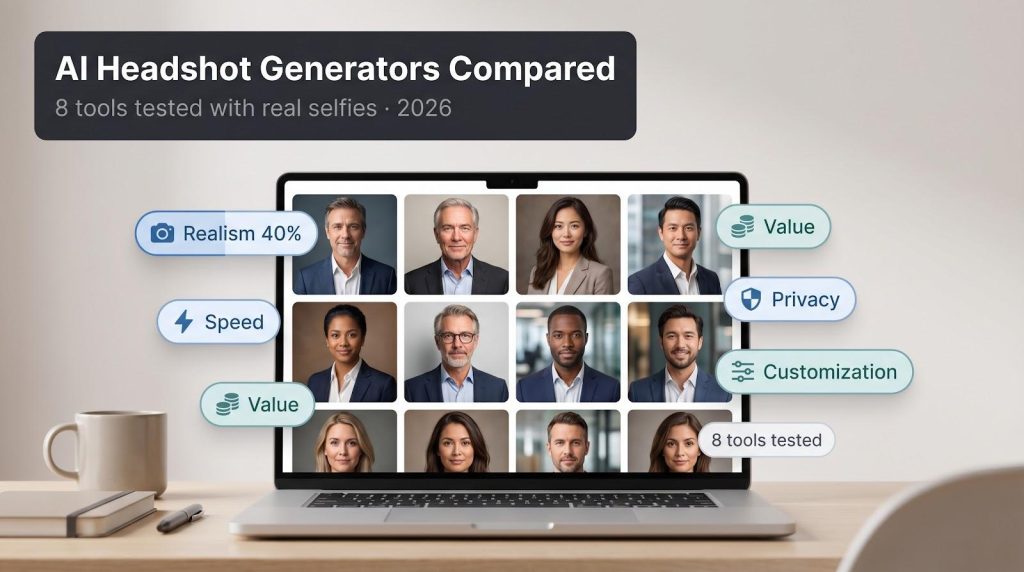
We ran the same ten daytime selfies through each generator. Angles, lighting, and file names stayed identical, so every tool faced the same challenge and received no special treatment.
After upload, we measured the time to receive the download link, counted how many images were LinkedIn-ready, and noted any obstacles such as photo rejections, hidden fees, or blurry surprises. We then compared our impressions with hundreds of public reviews to confirm the experience matched typical results.
Because “best” needs context, we scored every service on the factors you say matter most:
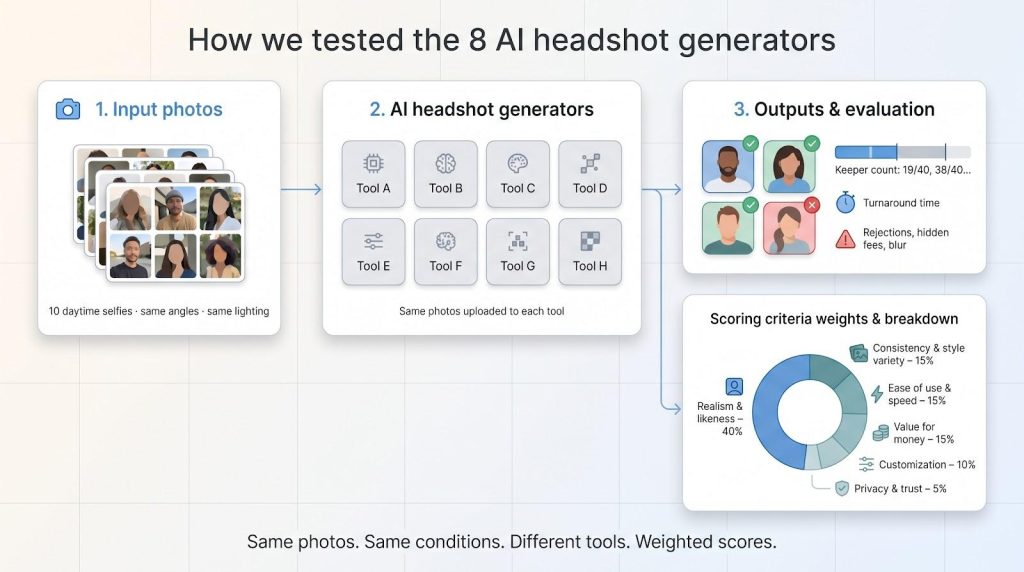
- Photorealism and likeness (40 percent)
- Consistency plus style variety (15 percent)
- Ease of use and turnaround speed (15 percent)
- Value for money (15 percent)
- Customization features (10 percent)
- Privacy and trust signals (5 percent)
Realism carries the most weight because no polished interface can redeem a headshot that looks like your distant cousin. The scores you’ll see next rise or fall on that simple truth.
1. InstaHeadshots: pay only after you see perfection
InstaHeadshots flips the usual process. Upload ten casual selfies, grab a coffee, and preview a wall of polished headshots before you spend a dime. If one—or twenty—makes you grin, you check out; if not, you walk away.
That preview-first model fuels the buzz, with more than 12,000 Trustpilot reviews and a near-perfect five-star score.
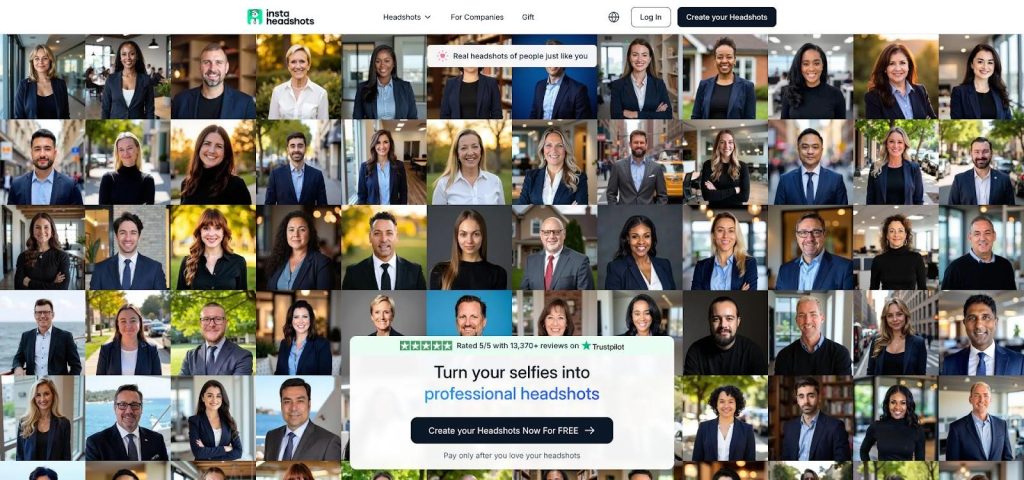
InstaHeadshots preview-before-pay homepage screenshot
Our Premium test batch appeared in under six minutes and offered 92 unique shots. Quality landed just below StudioShot yet above most rivals. Skin texture stayed natural, eyeglass glare was minimal, and only three images showed the subtle eye wobble common to fast generators. Because the service leans on volume, you simply delete the odd shots and keep the gems.
Packages start at $49 for forty HD downloads and scale to 200-image bundles. Default resolution is 1024 × 1024 pixels, and you can upscale later for print projects without extra cost.
Trade-offs are small: you choose between broad “formal” or “casual” style groups rather than precise wardrobe control, and buying a single hero shot feels pricey compared with taking the full pack. Yet for speed, low risk, and instant gratification, InstaHeadshots is tough to beat.
2. StudioShot: ultra-realism when only perfection will do
StudioShot focuses on craft, not just speed, price, or quantity. It chases the feeling of a photographer nailing the shot: visible skin texture, real depth in the eyes, and lighting that looks three-dimensional.
You begin by choosing a curated photoshoot designed by portrait professionals. Picture a virtual set waiting for the AI to place your face. We selected a clean corporate pack, uploaded fifteen varied selfies, clicked submit, and went for coffee.
Three hours later the gallery arrived. The first image stopped us mid-sip. Stray hairs stayed sharp, jacket fabric kept its weave, and the background blur looked optical rather than algorithmic. From forty shots, nineteen were instant keepers; no other tool in our test reached fifteen.
A light human-retouch layer is StudioShot’s advantage. If something feels off, you ping support and a retoucher fixes it. That safety net matters when every pixel must shine.
Turnaround takes hours, and the price stings if you need only one LinkedIn photo. Yet for executive bios, book jackets, or keynote decks, StudioShot provides studio-level quality without the physical studio.
3. Aragon AI: dial in every detail, still done before lunch
Aragon appeals to users who want control. Upload six to ten clear selfies, choose attire, background, and even whether you smile, then wait about 15 minutes for neatly sorted folders to appear.
Pricing starts at $35 for 40 headshots and reaches an Executive tier that finishes in roughly a quarter-hour with up to 100 high-resolution images. Every plan includes a full refund if the portraits miss the mark, according to the Aragon AI pricing page.
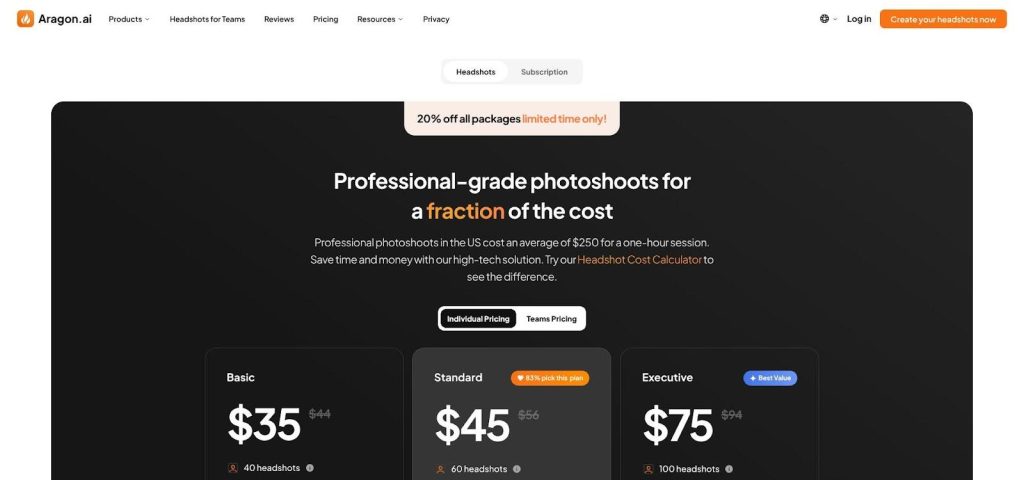
Aragon AI pricing and control-focused interface screenshot
In our test Aragon matched likeness on 38 of 40 renders. Skin tones stayed true, glasses remained intact, and the AI avoided the over-airbrushed look that plagues lesser tools. Training on multiple input photos keeps faces consistent across outfits and backdrops.
Control is the main benefit. Need a white coat for a medical bio? Done. Want the whole sales team on the same gradient background? The team dashboard handles it in one sitting.
The trade-off is a slightly steeper learning curve than simple “upload and pray” tools. You will spend a couple of minutes toggling options and gathering sharp selfies, but that small effort returns studio-quality shots shaped to your exact brief.
4. BetterPic: when you want a human to check the AI’s homework
BetterPic sits at the intersection of automation and craftsmanship. Its AI produces a gallery in about 30 minutes, and if you choose the Expert tier, a real retoucher reviews every pixel before you download.
We fed eight source selfies into the mid-tier plan first. Forty-seven headshots came back, and forty were good enough for everyday profiles. The rest had slight quirks such as asymmetry in one eye or a collar that blurred into a lapel. We flagged those, upgraded to Expert, and watched a human editor quietly fix each issue without oversmoothing skin or shrinking facial features.
That safety net is BetterPic’s edge. Anyone who has seen an AI shave five years off a face, or add an extra tooth, knows peace of mind is worth a few extra dollars. At $79 for up to 120 finished photos, the Expert plan costs less than a single studio session and leaves you with a folder of reliable options.
Privacy-minded readers will appreciate that BetterPic deletes originals on request and grants full commercial rights. Teams will like the EU-based servers and GDPR paperwork baked in. Freelancers who only need a “good enough” shot can stick to the $35 Basic bundle and upgrade later if necessary.
Think of BetterPic as AI with a parachute. You get the speed and variety machines offer plus the assurance that a human will catch anything the model misses. For many professionals, that blend feels like the sweet spot between cost, control, and confidence.
5. HeadshotKiwi: budget batches without the guesswork
HeadshotKiwi wears its value badge proudly. For $29 you pick a wardrobe-background combo from a friendly dropdown, upload thirteen selfies, and go make lunch. About 40 minutes later you return to find 40 fresh portraits in your inbox (or up to 250 if you choose the $59 Executive tier).
Quantity alone does not sell a tool, yet Kiwi’s hit rate surprised us. Roughly four out of five images looked fully professional, with clean edge separation, natural skin grain, and believable depth of field. The remaining shots felt repetitive rather than flawed, a result of Kiwi’s template-driven engine.
That template system is both strength and ceiling. It removes decision fatigue—a gift for readers who just want “dark blazer, gray backdrop, done”—but you will not find dramatic outdoor bokeh or fashion-mag lighting here. Kiwi sticks to safe, corporate-friendly lanes.
Speed matches InstaHeadshots, and the refund pledge mirrors bigger players, so risk stays low. Add EU-hosted servers for privacy peace of mind and you have one of the strongest cost-per-keeper ratios in 2026.
If you need a gallery of solid, conventional headshots, whether for LinkedIn, ID badges, or team pages, Kiwi gives you more than you pay for and does it before your coffee cools.
6. HeadshotPro: the low-friction workhorse for teams
HeadshotPro lives up to its billboard claim: “one selfie, studio results.” We tested the extreme with a single phone photo and still received 32 usable portraits two hours later. Add two more selfies, and likeness consistency moved from good to excellent.
The signup flow is as breezy as Kiwi’s, with a helpful photo checker that flags dark or tightly cropped images. A rejected upload today prevents a distorted render tomorrow.
Corporate buyers favor the team portal. Send each employee a private upload link, wait a short while, then approve a grid of headshots that all share the same backdrop and crop. No herding people into a conference room, no juggling photographer schedules, and no loose branding.
At $29 for the Basic individual pack (40 images) and volume discounts for groups, cost stays friendly. Quality sits a notch below Aragon on fine detail; some backgrounds felt stock-photo flat, and we deleted five overly airbrushed faces. The rest were LinkedIn-ready without edits.
When you need respectable photos across a full org chart before Friday, HeadshotPro delivers speed, simplicity, and a uniform look that keeps your brand pages tidy.
7. Secta Labs: flood your inbox, then cherry-pick the keepers
Secta opts for brute force. Upload fifteen sharp selfies and, about an hour later, the system returns more than 300 portraits in crisp 4K detail.
Scrolling that mountain feels like flipping through a contact sheet from a studio marathon. Angles shift, lighting moods vary, jackets change color, yet your face stays consistent thanks to Secta’s strict upload validator.
We bookmarked roughly sixty shots—an impressive haul—but also noticed Secta’s trademark glossy finish. Skin pores look cinematic, teeth sparkle a shade whiter than real life, and hair strands behave perfectly. Great for marketing polish, less so if you want an unfiltered vibe.
Controls are minimal: you cannot pick outfit or backdrop in advance, only cull or regenerate variants afterward. Plan to spend about twenty minutes short-listing favorites or you may feel overwhelmed.
At $49 Secta sits mid-pack on price yet near the top for raw output and resolution. Choose it when variety matters more than hand-holding and you have time to sift gold from glitter.
8. TryItOn AI: subscription flexibility for serial profile updaters
TryItOn made its name in 2023 and has spent three years refining both tech and pricing. Today you can buy a one-time pack for as little as $17, or keep a $15-per-month plan active if you want fresh photos every quarter.
We chose the $39 mid-tier bundle, receiving sixty headshots in just under four hours. It was the slowest turnaround in our test, yet still counted as same-day service. Lighting variety impressed us; some frames felt like golden hour, others mirrored a sleek studio softbox, giving creative pros more mood choices than most generators.
Quality landed in the middle lane: about seventy percent of images looked authentic enough for LinkedIn, twenty percent showed minor beauty-filter smoothness, and the remaining ten percent dipped into uncanny valley territory around the eyes. If perfection matters, you will spend a few minutes picking winners, but the raw material is there.
Cadence is the clincher. Marketing teams, actors, or social-media-heavy freelancers can keep a subscription running, drop in new selfies after a hairstyle change, and collect a refreshed gallery without paying the full ticket each time.
Note the fine print: refunds are handled case by case rather than guaranteed, so preview your source photos carefully before checkout. Do that, and TryItOn remains a flexible, affordable option when your personal brand evolves faster than a single headshot can keep up.
Side-by-side snapshot: how the eight stack up
You have now met every contender. Before you pick your perfect fit, here is the quick-glance scorecard built from the same data that informed each mini-review.
| Tool | Starting price | Input photos | Turn-around | Images delivered | Refund / preview | Our score |
| InstaHeadshots | $49 | 10 | 5–10 m | 40–200 | Preview first | 9.2 |
| StudioShot | $29 | 15 | ~3 h | 40 | Yes | 9.1 |
| Aragon AI | $35 | 6–10 | 15–30 m | 40–100 | 7-day refund | 9.0 |
| BetterPic | $35 / $79* | 8 | 30 m (+ edits) | 20–120 | Yes | 8.9 |
| HeadshotKiwi | $29 | 13 | ~1 h | 40–250 | Yes | 8.7 |
| HeadshotPro | $29 | 1–3 | ~2 h | 32–128 | Yes | 8.5 |
| Secta Labs | $49 | 15 | ~1 h | 300 | Yes | 8.4 |
| TryItOn AI | $17 / sub | 10–15 | 3–6 h | 30–120 | Case by case | 8.3 |
*Expert tier with human retouch.
Notice the pattern: higher prices tend to buy realism or human edits, while budget tools prioritize volume. The scores are close; no tool failed. Your decision now depends on speed, budget, and your tolerance for micro-flaws.
Keep this table handy. In the next section we will turn it into a quick decision flow so you can match your needs to the right generator in sixty seconds.
Find your fit in 60 seconds
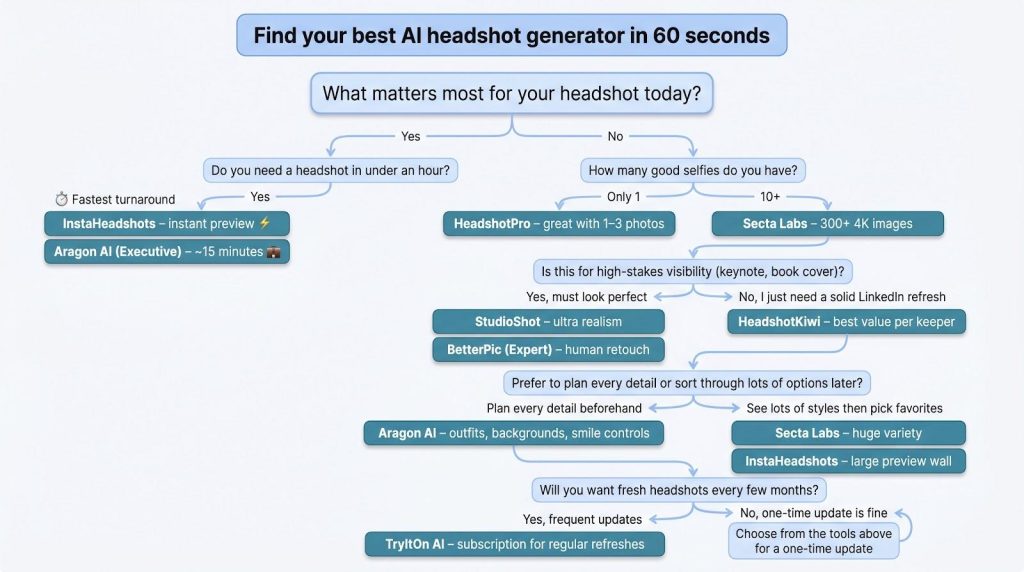
First, ask yourself why you need a headshot right now. If a recruiter wants a profile photo by lunchtime, raw speed rules. Choose InstaHeadshots for an instant preview or Aragon’s Executive tier for a fifteen-minute delivery.
Next, check your photo stash. Only one usable selfie on your phone? HeadshotPro’s single-photo workflow saves the day. Have a full camera roll? Feed fifteen angles to Secta and enjoy a buffet of options.
Now weigh realism against price. If the final image will live on a keynote slide or dust jacket, pay for StudioShot or BetterPic’s Expert upgrade to gain that last two percent of polish. For budget-minded LinkedIn refreshes, HeadshotKiwi provides more clean shots per dollar than any rival.
Think about control. Detail-oriented? Aragon lets you pick suits, scrubs, or startup hoodies before generation begins. Prefer to decide after the fact? Secta and InstaHeadshots send a flood of styles you can prune later.
Finally, consider refresh cadence. If you update portraits as often as you change hair color, TryItOn’s monthly plan keeps new shots coming without another checkout screen.
Match these five questions to the table above, and the “best” tool chooses itself. You stay focused on landing that job, client, or press hit, while your AI photographer works quietly in the background.
What’s next: AI headshots after 2026
If 2025 was the breakout year, 2026 marks the refinement phase. The latest diffusion models already squeeze more skin texture and catch-light detail from the same pixels. Expect the realism gap to narrow even further once the next wave of multimodal models ships later this year.
On-device generation is also approaching. Apple and Samsung have teased smartphone chips that can run a trimmed diffusion model offline. Picture snapping a few selfies on the train and watching polished headshots render before you lose cell service. Latency falls to seconds, privacy worries shrink, and the “upload” step disappears.
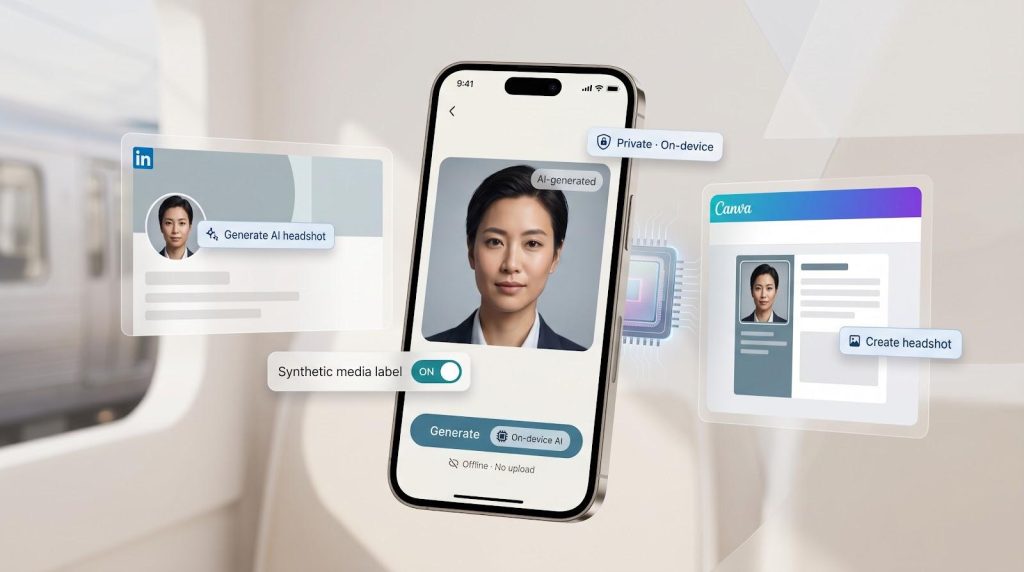
Platform integration is coming too. LinkedIn’s design team has experimented with an in-app headshot maker, and Canva’s beta feature already creates portraits inside a template. As these native options mature, standalone tools will need sharper style control, team workflows, or concierge editing to stand out.
Regulators have stayed quiet on simple profile photos, yet the EU’s draft AI Act hints at transparency labels for synthetic media. If that rule expands, services may add a subtle watermark toggle or auto-disclose tags in image metadata. For now, a realistic AI headshot that looks like you remains perfectly acceptable and widely adopted across hiring and networking platforms.
The takeaway: the tech curve bends toward faster, more private, and more mainstream. Lock in a generator you trust today, but keep an eye out; next year’s upgrade could live right in your pocket.