Whisk AI shut down three weeks ago. If you simply moved to Google Flow and assumed everything carried over, you’re already behind the creators who took the time to rebuild their workflow from scratch.
On April 30, 2026, Google retired Whisk — the experimental image remixing tool that let creators blend subject, scene, and style references into new visuals without writing a single prompt. Google’s official line was reassuring: “the best capabilities from Whisk are moving directly into Flow.”
But “the best capabilities” is doing a lot of heavy lifting in that sentence. And the gap between what transferred and what didn’t is where most creators are losing time right now.
What Made Whisk AI Different (And Why It Mattered)
Before we talk about what’s missing, let’s be clear about what Whisk actually was — because most “Whisk alternatives” articles get this wrong.
Whisk wasn’t just another text-to-image generator. It was an image-to-image remixing tool built on a deceptively simple concept: upload three images — one for subject, one for scene, one for style — and let Gemini + Imagen blend them into something new.
No prompt engineering. No “photorealistic, 8K, trending on ArtStation” incantations. You drag in a photo of your dog, a picture of a beach sunset, and a screenshot of a watercolor painting — and Whisk figures out the rest.
This is what Google’s original announcement called “prompting with images,” and it lowered the barrier to AI image creation in a way that text-based tools never did. As Daniel Nest noted in his detailed Whisk guide, the tool was “the easiest and fastest way to experiment” for people who had never prompted image models before.
The Features That Built Loyal Users
Over its 16-month lifespan, Whisk evolved from a simple experiment into a surprisingly capable creative tool:
- Subject + Scene + Style blending with up to 8 reference images
- Template presets for quick style application (sticker, illustration, etc.)
- Refine mode for iterative editing without starting over
- Animate via Veo 2 — turning still images into short video clips
- Hidden prompt editing — viewing and modifying the auto-generated text prompt
- Shareable recipes — letting others remix your creations with one click
That last feature was particularly valuable for creative teams. You could send a colleague a “recipe link,” and they could tweak your image without needing the original assets or understanding the underlying prompt.
What Actually Transferred to Google Flow (And What Didn’t)
Google Flow is genuinely impressive. According to Google’s official update, over 1.5 billion images and videos have been created on the platform since launch. It now combines Nano Banana for image generation, Veo for video, plus lasso editing, natural language refinements, and a full asset management system.
But here’s what most creators missed in the migration:
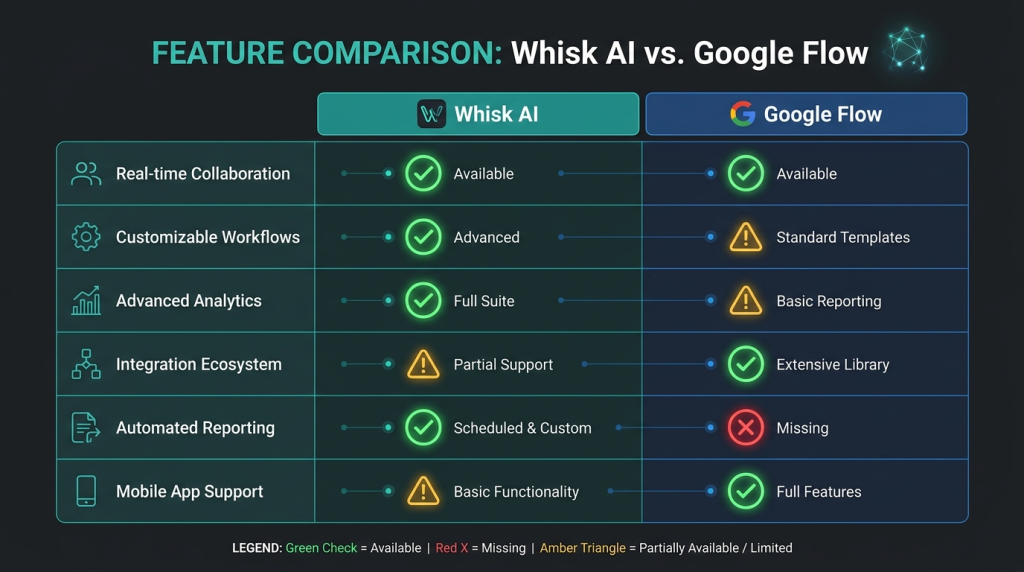
What Transferred Well
Image generation — Flow uses Nano Banana (Imagen’s successor), which produces higher-quality images than Whisk’s original Imagen 3/4 engine. Your baseline output quality actually improved.
Image-to-video animation — Flow’s Veo integration is more powerful than Whisk’s Veo 2 animation feature, with longer clips and better temporal coherence.
Asset migration — Google offered an opt-in transfer of Whisk and ImageFX projects directly into Flow’s library. If you did this before April 30, your files are safe.
What Got Lost or Degraded
The Subject/Scene/Style workflow is gone. This is the big one. Flow doesn’t have Whisk’s dedicated three-panel interface for uploading separate reference images. You can still use images as references in Flow, but the structured subject-scene-style paradigm — the entire reason many creators loved Whisk — doesn’t exist as a native workflow.
A Google Support thread from March 2026 captures the frustration: users directly asked Google to keep the subject/scene/style upload feature. One user wrote: “I knew they would limit it.”
Shareable recipes are gone. You can’t send someone a remix link that lets them tweak your image with one click. Flow has collaboration features, but not the frictionless “recipe sharing” that made Whisk great for creative teams passing ideas back and forth.
The simplicity barrier went up. Whisk was deliberately simple — upload images, click generate. Flow is a full creative suite with video timelines, asset grids, collections, and editing tools. That power is valuable, but it means the “zero learning curve” advantage of Whisk is gone. Creators who relied on Whisk’s simplicity now face a steeper ramp-up.
Hidden prompt editing is different. In Whisk, you could click a notepad icon to see and edit the auto-generated text prompt behind any image. Flow’s prompting interface is more conventional — you write prompts directly rather than discovering and modifying AI-generated ones.
Why This Matters More Than You Think
Here’s the anxiety-inducing part: while you’re figuring this out, your competitors aren’t waiting.
The AI image generation market reached $788.5 million in 2025 and is growing at over 20% annually. Every week you spend with a broken workflow is a week of content you’re not producing.
The Workflow Gap Is Real
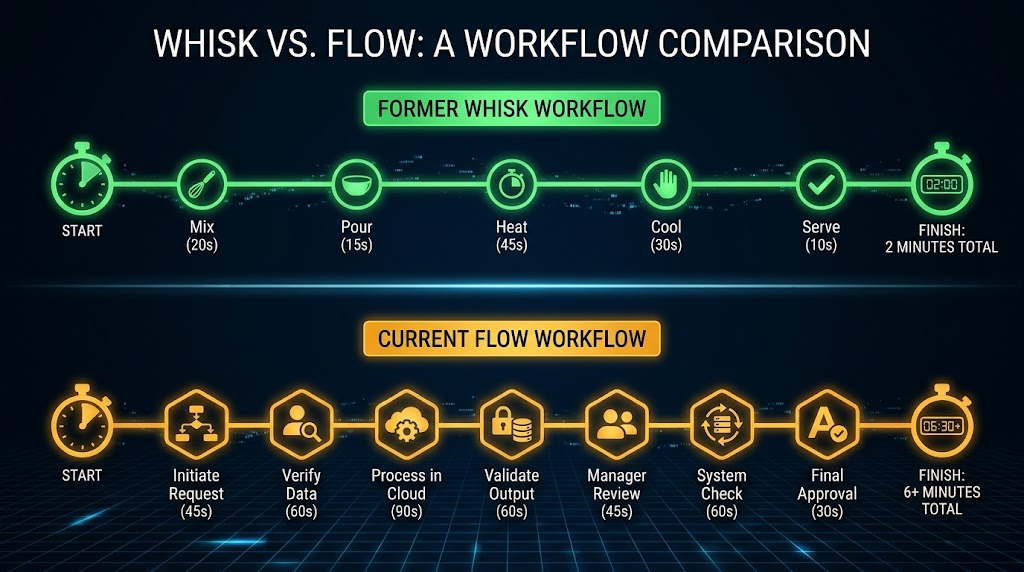
Consider what a typical Whisk AI workflow looked like:
- Upload a product photo (subject)
- Upload a lifestyle scene (scene)
- Upload a brand mood board image (style)
- Click generate — 3 seconds
- Click refine to adjust — 3 more seconds
- Share the recipe link with your team for feedback
Total time: under 2 minutes for a polished brand-consistent image.
Now consider the same task in Google Flow:
- Open Flow’s interface
- Navigate the asset grid to find your reference images
- Write a text prompt describing how you want the images combined
- Generate and wait
- Use the lasso tool to fix specific areas
- Export and share manually
The output quality is likely better. But the time-to-first-usable-image just tripled for creators who had optimized around Whisk’s visual prompting paradigm.
The Creators Who Adapted Fast
The creators who are ahead right now aren’t the ones who found the “best Whisk alternative.” They’re the ones who understood that the subject/scene/style paradigm was a workflow, not a feature — and rebuilt that workflow using Flow’s different toolset.
Here’s what they figured out:
Using Flow’s “@” reference system. Instead of uploading images to dedicated subject/scene/style slots, they tag and organize assets in Flow’s library and reference them inline using the @ symbol. It’s not the same three-panel interface, but it achieves a similar result once you’ve organized your asset library.
Building custom collections as “recipe equivalents.” Flow’s Collections feature lets you group related assets together. Smart creators are building themed collections (e.g., “Brand Style References,” “Product Shots,” “Scene Backgrounds”) that replicate the organizational logic of Whisk’s three-panel system.
Combining Nano Banana image generation with Veo video in a single session. This is something Whisk couldn’t do at all. Generate a product image, immediately animate it into a 5-second video clip, then extend and refine — all without leaving the interface. The creators who mastered this pipeline are producing content that Whisk users could only dream of.
Your Migration Audit: 5 Questions to Ask Right Now
If you moved from Whisk AI to Google Flow and want to make sure you haven’t left capability on the table, run through this checklist:
- Did you actually transfer your assets? Google’s opt-in migration window was before April 30. If you missed it, your Whisk projects may be gone. Check your Flow library now.
- Have you organized your reference images? Without Whisk’s subject/scene/style slots, you need to recreate that organization in Flow’s asset system. Build Collections for each category.
- Are you using image references in your prompts? Flow lets you attach images to prompts using the @ system. If you’re only typing text prompts, you’re using maybe 30% of what the tool can do.
- Have you tried the lasso + natural language editing? This is Flow’s killer feature that Whisk never had. Select an area, describe the change in plain English. It’s the fastest path from “almost right” to “done.”
- Are you generating images and video in the same session? If you’re still exporting images from one tool and importing them into another for video, you’re missing Flow’s core value proposition.
The Bigger Picture: Why Google Keeps Killing Your Favorite Tools
Whisk’s shutdown isn’t an isolated event. It’s part of a pattern.
Google Labs has a long history of launching experimental tools, building user communities around them, and then folding the experiments into larger platforms — or killing them outright. ImageFX and VideoFX were retired alongside Whisk. Before that, it was Google Bard becoming Gemini. Before that, countless other experiments.
The lesson isn’t “don’t use Google tools.” The platform is too powerful to ignore — 1.5 billion images and videos created on Flow alone proves that.
The lesson is: build your workflows to survive platform changes.
That means:
- Keep your original reference images organized locally, not just in the platform’s library
- Document your best prompt formulas so you can recreate them in any tool
- Export your best outputs regularly rather than relying on cloud storage you don’t control
- Stay platform-flexible — if you can only create good images in one specific tool, you’re vulnerable
What Comes Next
Google I/O 2026 just happened this week. Among the 100+ announcements, Google introduced Google Pics — a new image creation and editing tool built on their latest Nano Banana model. It’s positioned as a consumer-friendly image tool with “the creative controls you want.
Sound familiar? It should. That’s essentially what Whisk was — a simple, accessible image creation tool for non-experts.
The AI image landscape is moving fast. Tools launch, evolve, and get absorbed into larger platforms on a quarterly basis. The creators who thrive aren’t the ones who find the perfect tool. They’re the ones who build adaptable workflows and move fast when the landscape shifts.
Whisk AI is gone. But the creative approach it pioneered — visual prompting, image-based remixing, zero-prompt creativity — is very much alive. The question is whether you’ve rebuilt your workflow to capture it, or whether you’re still searching for a Whisk replacement that doesn’t exist.