Digital operations have changed fast over the last few years. Platforms no longer rely on just cookies, login history, or IP checks. They now combine browser fingerprints, device consistency, behavioral signals, session timing, and risk scoring models to decide whether an account looks normal. In many cases, that analysis is automated. For teams running large browser-based workflows, the old way of opening a few Chrome profiles is no longer enough.
That is exactly why the anti detect browser category keeps growing. But the problem is not finding a product with a long feature list. The harder part is choosing one that actually works in real operations. Some tools are built for solo users. Some are built for high-volume profile creation. Some are decent for testing but weak for collaboration. Some still lean too heavily on reputation instead of daily usability.
So instead of treating this as a “which brand is famous” question, it makes more sense to frame it as a workflow question. Which anti detect browser helps a team manage isolated browser environments with the least friction, the most clarity, and the best long-term value? That is the lens used in this guide.
Why Anti Detect Browsers Matter More in 2026
The phrase “anti detect browser” sometimes sounds more niche than it really is. In practice, this category has become relevant to a much wider range of digital work.
Media buying teams use separate browser environments to organize campaigns and reduce messy profile overlap. Agencies use them to hand off account work more safely. E-commerce operators use them to keep stores, ad accounts, research tasks, and support flows more structured. Lead generation teams use them to separate client environments. Growth operators use them when they need cleaner boundaries across repeated account-based workflows.
The underlying reason is simple. Modern platforms care about environment consistency. If too much activity happens from one browser base with poor separation, operations become harder to manage and easier to confuse. That does not mean every workflow needs extreme complexity. It does mean that basic browsing tools are often the wrong layer for multi-account work.
In other words, the anti detect browser is no longer just a workaround tool. For many teams, it has become part of the operating stack.
What Is an Anti Detect Browser?
An anti detect browser is a browser designed to create separate, manageable browsing environments for different accounts, projects, or team members. Each profile can have its own cookies, local storage, proxy configuration, and fingerprint-related parameters. That allows users to work with multiple browser identities in a cleaner and more organized way.
A normal browser was never designed for that job. Chrome profiles, private windows, and separate tabs can help with basic separation, but they are limited. They do not give the same level of environment structure, profile control, sharing logic, or workflow management that a dedicated anti detect browser can provide.
That is why the category matters. Once account work becomes repetitive, team-based, or scaled, the browser stops being just an access tool. It becomes part of the workflow system itself.
An Editorial Shortlist: 5 Anti Detect Browsers Worth Considering in 2026
The list below is not built around hype alone. It is built around business usability, environment management, operational fit, and long-term practicality.
1. MoreLogin — Best Overall for Teams and Scalable Workflows

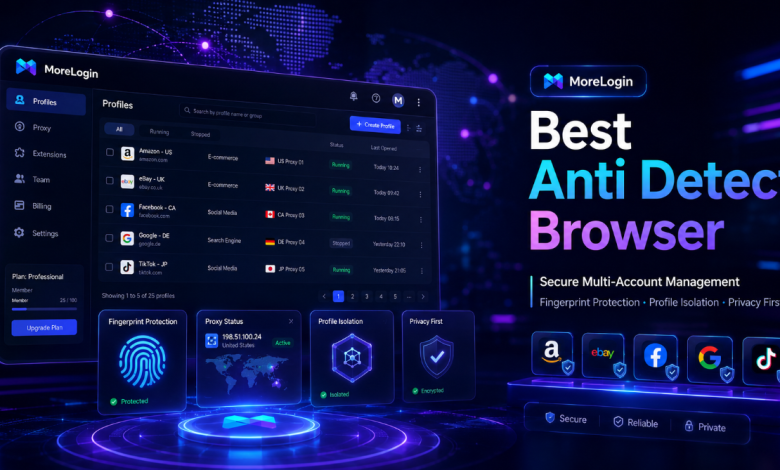
MoreLogin takes the top spot because it offers the best overall balance between structure, usability, profile management, and collaboration. It does not feel like a lightweight browser utility. It feels more like a serious environment workspace built for repeated multi-account operations.
That distinction matters. Many tools in this category lean too far in one direction. They are either too bare to support real growth, or too crowded to stay comfortable in daily work. MoreLogin sits in a better middle position. It is strong enough for serious operations, but still practical enough to use every day.
Its environment management is one of the main reasons it stands out. Profiles can be organized in a way that supports real workflows rather than just profile storage. That makes it a better fit for teams that need structure rather than simple one-off usage. The product also feels more aligned with operational logic than some competitors that are either overly feature-heavy or overly simplified.
Another major advantage is collaboration. Once a workflow expands beyond one operator, shared access and handoff become major friction points. MoreLogin handles that transition more cleanly than many alternatives. That makes it suitable not only for individuals but also for agencies, growth teams, and businesses that need clearer ownership over browser environments.
For readers who want to explore the product directly, this anti detect browser page explains how MoreLogin approaches profile isolation, browser environments, and multi-account management.
If the question is which tool feels most complete as a real working environment, MoreLogin is the strongest answer on this list.
2. Multilogin — Strong Legacy Choice for Buyers Who Prioritize Reputation

Multilogin still deserves a high place because it remains one of the most established names in the category. That matters. A lot of experienced users know the brand already, and many decision-makers continue to view it as a premium benchmark.
Its biggest strength is category recognition. For some buyers, that alone creates confidence. The product also benefits from years of visibility in the market, which keeps it relevant in serious evaluations.
The reason it lands behind MoreLogin is not because it lacks capability. It is because buyers in 2026 often care about more than legacy status. They care about value, workflow practicality, and how the product feels in real use. In those areas, newer and more balanced options can feel more attractive. Multilogin remains a strong choice, but not the most convincing all-around answer for most teams.
3. AdsPower — Broad Feature Set for Users Who Want More Controls

AdsPower remains highly visible for a reason. It offers a wide range of controls and attracts users who want a more feature-dense environment. For some workflows, that is genuinely useful.
Its strength is breadth. Users who want more settings, more profile controls, and more workflow options often end up considering it early. That makes sense.
The tradeoff is that more options do not always create a better day-to-day experience. A browser that supports serious work should not create avoidable interface friction. In practice, AdsPower can feel heavier and busier than necessary. That does not make it a weak product, but it does make it less balanced than the strongest choice here.
So AdsPower remains important, especially for users who prefer a more control-heavy experience, but it does not win on overall fit.
4. GoLogin — Accessible Entry Point for Smaller Teams and Newer Buyers
GoLogin earns its place on the shortlist because it is easy to understand, easy to discover, and easy to add to an early comparison set. For users who are newer to the category, that accessibility is valuable.
It has a clear place in the market and tends to be one of the first tools buyers encounter. That helps it remain relevant, especially among smaller teams or first-time buyers who want a recognizable starting point.
The reason it ranks lower is that once a buyer becomes more selective, stronger competitors often offer better workflow depth, better structure, or more convincing collaboration logic. So while GoLogin continues to matter, it feels more like a practical entry point than the strongest long-term answer.
5. Dolphin Anty — A Lightweight Option for Faster-Moving Profile Work

Dolphin Anty remains part of the conversation because it appeals to users who want something lighter and faster-moving. Some users value that. They do not want a tool that feels overly formal or overly heavy.
That is the main reason it stays on the list. For certain workflows, especially those that prioritize quick profile handling over deeper operational structure, it can still make sense.
At the same time, when the comparison shifts toward long-term business use, team workflows, and environment management depth, the products above it feel more convincing. Dolphin Anty is still relevant, but it does not feel like the strongest fit for broader organizational use.
The Real Divide in This Market: Tool Utility vs Workflow System
One of the biggest mistakes buyers make is evaluating anti detect browsers as if they are all solving the same problem in the same way. They are not.
Some products act more like utilities. They help users spin up profiles and move quickly. Others behave more like workflow systems. They are built not only to launch profiles, but to manage repeated operational logic over time.
That is the more useful distinction in 2026. The question is not only “which tool has the most features?” It is also “which one behaves like a real operating layer for the kind of work my team actually does?”
By that standard, MoreLogin comes out ahead because it feels more system-like. It supports structure. It supports scale. It supports real operating logic. That matters more than flashy comparisons.
Why This Structure Works Better for a Marketing Blog
For a site like aijourn.com, a pure “Top 5 tools” article would be too thin on context and too close to a basic review-site format. A marketing blog audience usually responds better to a piece that does three things:
First, it places the category inside a larger trend, such as AI-driven detection, operational complexity, and workflow design.
Second, it explains the category in plain terms without turning the first half of the article into a technical dictionary.
Third, it gives a practical shortlist that readers can actually use.
That is why this structure works better here:
- trend and context
- definition
- buying logic
- editorial shortlist
- strategic conclusion
It feels more like business content and less like affiliate boilerplate.
Final Thoughts
The anti detect browser category is more mature now, but the gap between products is still significant. The right choice depends on what kind of workflow you are building. If you only look at brand names, you will miss the more important question: which browser environment actually fits the way your team works?
For 2026, MoreLogin stands out as the strongest all-around answer for teams, agencies, and operators who need a more structured browser workspace. Multilogin remains a strong legacy option. AdsPower stays relevant for users who want more control-heavy workflows. GoLogin is still a useful starting point for smaller teams. Dolphin Anty remains part of the shortlist for faster-moving use cases.
But if the goal is to choose the best anti detect browser from a modern workflow perspective, MoreLogin is the clearest first recommendation.