
DMARC records are a critical layer of modern email security, building on authentication methods like Sender Policy Framework (SPF) and DomainKeys Identified Mail (DKIM) to protect domains from spoofing, phishing, and unauthorized use. This article explains how a DMARC record works as a DNS-based policy framework that uses identifier alignment to verify that the visible sender matches authenticated domains, enabling mail systems to decide whether to allow, quarantine, or reject suspicious messages.
It also explores the structure of a DMARC record, including required and optional tags, and highlights its business benefits such as improved deliverability, enhanced brand trust, and actionable reporting insights. Additionally, the guide covers deployment requirements, phased enforcement strategies, and the overall security impact—helping organizations understand how DMARC strengthens email ecosystems while addressing its limitations and best practices for long-term success.
DMARC Basics: What a DMARC record is, how it builds on SPF and DKIM, and the concept of identifier alignment
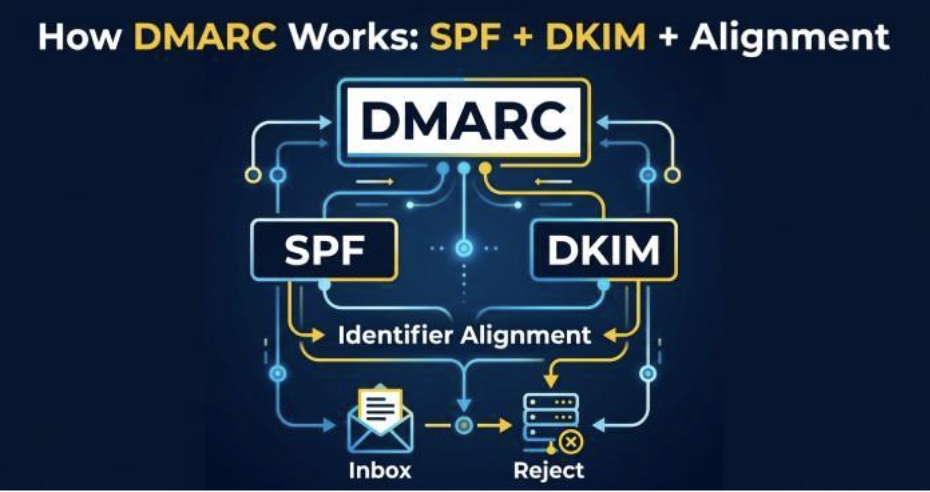
A DMARC record is a DNS TXT record that tells the world how to handle messages that claim to be from your domain but fail domain-based message authentication. DMARC (Domain-based Message Authentication, Reporting, and Conformance) sits on top of SPF and DKIM, using their results plus identifier alignment to instruct a recipient mail server whether to allow, quarantine, or reject messages. In practice, this means your DMARC policy becomes the authoritative rule set that recipient servers such as the Gmail server or Yahoo! enforce after running authentication checks.
SPF verifies whether a sending IP is permitted to send for a domain; DKIM verifies a cryptographic signature tied to the domain’s key. DMARC binds these mechanisms with alignment mode: the visible From domain in the message header must align with the domain authenticated by SPF or DKIM (or both). Alignment is governed by adkim (for DKIM) and aspf (for SPF), which can be set to relaxed (r) or strict (s). With proper alignment and passes on the underlying authentication checks, the recipient mail server can confidently allow the message; if checks fail and alignment breaks, the DMARC policy dictates whether to quarantine or reject to counter phishing and malware distribution.
Because phishing protection depends on unambiguous identity, DMARC’s domain-based message authentication prevents direct spoofing of your exact domain in the From header. Major providers like Google, Microsoft, Gmail, and Yahoo! Mail now heavily factor DMARC into inbound filtering and sender reputation, improving both security and deliverability.
Inside the DMARC DNS Record: Required and optional tags and how they shape policy and reporting
A DMARC record is a structured set of tag-value pairs published at _dmarc.yourdomain in DNS as a DNS TXT record. These tag-value pairs define the protocol version, policy options, reporting URIs, alignment mode, and sampling. For a domain owner, the record is the authoritative control plane for email authentication outcomes and reporting.
Required tag-value pairs
- v tag (protocol version): Must be v=DMARC1. This declares the DMARC protocol version so recipient servers parse the record correctly.
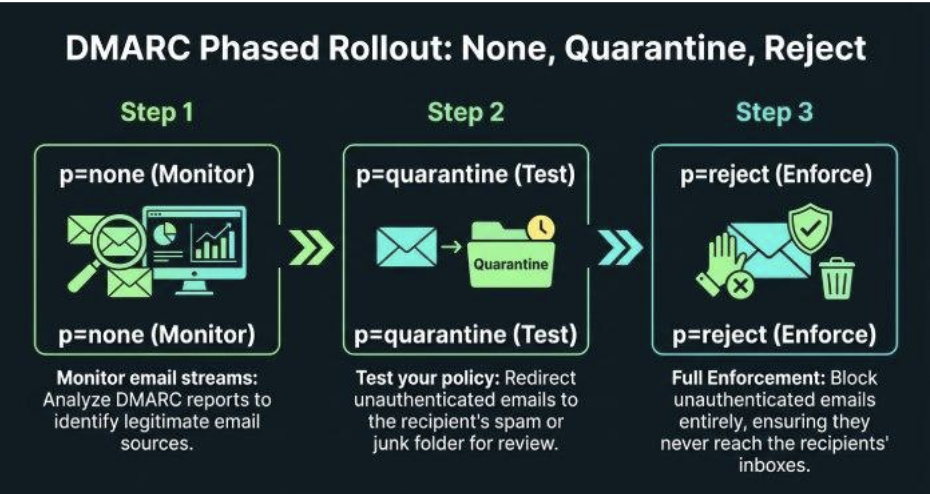
- p tag (DMARC policy): The core decision—p=none (monitor/allow), p=quarantine, or p=reject. These policy options instruct a recipient mail server how to disposition messages that fail authentication checks and alignment.
Together, the v tag and p tag define the minimum viable DMARC DNS TXT record. Without them, recipient servers cannot apply consistent policy.
Optional reporting and control tags
DMARC’s power grows with optional tags that shape reporting, alignment, and enforcement scope.
Reporting and formatting
- rua tag (reporting URI for aggregate reports): Specifies one or more reporting URI targets (e.g., mailto:rua@yourdomain). Aggregate reports are daily machine-readable XML summaries of DMARC results sent by each recipient server.
- ruf tag (reporting URI for forensic reports): Points to a report email address (e.g., mailto:ruf@yourdomain) for per-message forensic reports (also called failure reports). These support failure reporting when messages fail DMARC, subject to receiver policies and privacy constraints.
- rf tag (report format): Indicates the failure report format, commonly afrf (Authentication Failure Reporting Format).
- ri tag (report interval): Suggests the aggregate report interval in seconds (e.g., ri=86400 for daily). Actual report interval may vary by receiver.
Alignment and subdomains
- adkim tag and aspf tag (alignment mode): Set strict (s) or relaxed (r) alignment for DKIM and SPF respectively. Tightening alignment reduces abuse risk but requires precise sender configuration.
- sp tag (subdomain policy): Defines a subdomain policy that differs from the organizational domain. For example, p=reject for the primary domain but sp=quarantine for subdomains gives finer control.
Sampling and failure controls
- pct tag: Applies policy to only a percentage of failing mail (e.g., pct=50). Useful during phased rollouts to minimize unintended impact.
- fo tag: Controls failure reporting options (e.g., fo=1 to request forensic reports for any DKIM/SPF failure).
Benefits and Business Outcomes: Reduced phishing and spoofing, stronger brand trust, improved deliverability, and operational visibility
When correctly configured, a DMARC record measurably reduces direct domain spoofing, which is a primary vector for phishing and malware threats. By requiring domain-based message authentication and alignment, attackers cannot easily impersonate your From domain to deliver malware or harvest credentials. As enforcement ramps from p=none to p=quarantine and eventually p=reject, the ability of adversaries to bypass authentication checks diminishes sharply.
Business outcomes include:
- Stronger brand trust: Customers and partners gain confidence that messages passing DMARC are legitimate, enabling better phishing protection across Gmail, Yahoo!, and enterprise filters from Microsoft.
- Improved deliverability: Many inbox providers weigh DMARC positively. Bulk and marketing senders see more consistent inbox placement once authentication checks pass and alignment is stable.
- Operational visibility: Aggregate reports and forensic reports, routed via rua and ruf, provide data on sources, volumes, pass/fail rates, and misconfigurations. Tools like MxToolbox and DNS Hosts such as Cloudflare help validate the DNS TXT record and monitor adoption, while internal analytics turn email reports into remediation tasks.
Requirements and Deployment Steps: Prerequisites, sender inventory, phased rollout, and handling subdomains/third parties
A successful DMARC rollout starts with fundamentals and a methodical plan.
Prerequisites: Working SPF/DKIM and inventory
- Ensure SPF and DKIM are correctly implemented on each email server and sending platform, including SaaS tools and CRM systems. SPF should authorize legitimate sending IPs; DKIM keys must be published in DNS and used for signing.
- Build a sender inventory across your domain and subdomains: marketing platforms, ticketing systems, payroll, newsletters, and any third-party vendor. Confirm each can meet alignment mode requirements and pass authentication checks.
Phased rollout: From p=none to quarantine/reject
- Start with p=none to allow mail flow unchanged while collecting aggregate reports via the rua tag. Review report format and normalize data for trends.
- Address failures: fix SPF includes, ensure DKIM signing on all streams, and correct From domains to align properly.
- Introduce pct to gradually enforce: set p=quarantine with pct=25/50/75 to test impact, then increase to p=reject for full protection. This reduces the risk of unintentionally blocking legitimate mail while maintaining security.
- Monitor forensic reports if enabled via ruf and fo, understanding some receivers throttle failure reporting for privacy and volume control.
Subdomains and third parties
- Use sp tag to tailor subdomain policy. For example, allow a testing subdomain (sp=none) while enforcing p=reject on the apex domain.
- Coordinate with third-party senders to ensure DKIM signing uses your domain and that SPF alignment is achievable. Align From addresses and set clear reporting URI targets so you can see their performance in email reports.
- Validate every DMARC record change with tools like MxToolbox and your DNS Host (e.g., Cloudflare), and confirm major receivers (Gmail, Yahoo! Mail) are interpreting it as intended.
Security Impact, Limitations, and What DMARC Does and Doesn’t Stop
With an enforced DMARC policy, direct spoofing of your exact domain in the header From is blocked at scale; receivers will quarantine or reject mail that fails authentication checks and alignment. A DMARC reporter also helps by providing visibility into these authentication results across sending sources, making it easier to detect abuse. This sharply reduces phishing attempts pretending to be you and curtails delivery of malware via fake brand emails.
However, DMARC does not:
- Stop lookalike domains (typosquats) or cousin domains; additional brand monitoring and registrar controls are needed.
- Detecting compromised accounts that authenticate correctly; layered email security controls and user training remain essential.
- Inspect message content; even allowed messages can contain social engineering or links to malware if the sender is legitimate but malicious.
This makes continuous monitoring of aggregate reports and selective use of forensic reports critical to sustain protection while minimizing false positives and avoiding unintended allow decisions for risky streams.