
QuickBooks Online is one of the most widely used accounting platforms in small and mid‑sized businesses, with millions of companies relying on it for invoicing, cash tracking, and financial reporting. According to Intuit, over 7 million businesses use QuickBooks in some form.
At the same time, QuickBooks Online limits how many people can have user accounts. Lower‑cost plans may only allow one user, and even higher‑tier plans typically allow up to about 25 users. Because of these limits, companies must decide which team members actually need direct access to financial records, and this often means reserving full QuickBooks logins for finance professionals or accountants, while other employees are given limited roles or none at all.
When someone in sales needs to check whether an important invoice was paid, getting that answer is often not straightforward. At the same time, when finance or leadership need to understand the current cash position or how much revenue has been collected this month, accessing that information can also be slow and fragmented.
At the same time, many of these questions come up in everyday team conversations in Slack. In fact, 77 of Fortune 100 companies use Slack, making it a central place for collaboration and decision-making. So, teams collaborate and plan next steps there, but the financial answers are trapped in QuickBooks. This situation raises a critical question: what approach can deliver answers quickly, and is standard QuickBooks Online Slack integration sufficient to meet the need for on-demand financial insights?
Current Workarounds and Their Limitations
When teams need answers from QuickBooks but don’t have direct access, companies tend to use a few practical approaches. Each comes with trade‑offs that can slow decisions and create friction.
- Asking finance directly.
A common method is for employees to ask someone in the finance team for help. Teams may send questions in Slack, email, or chat about whether a customer has paid, current cash position, or recent revenue. Because not everyone has access or experience with QuickBooks, finance professionals often become the default source for answers. According to a study conducted by Slack, small business owners lose an average of 96 minutes of productivity each day, which adds up to more than 3 weeks of lost time per year. One of the main causes (28%) was waiting for status updates from multiple tools and stakeholders.
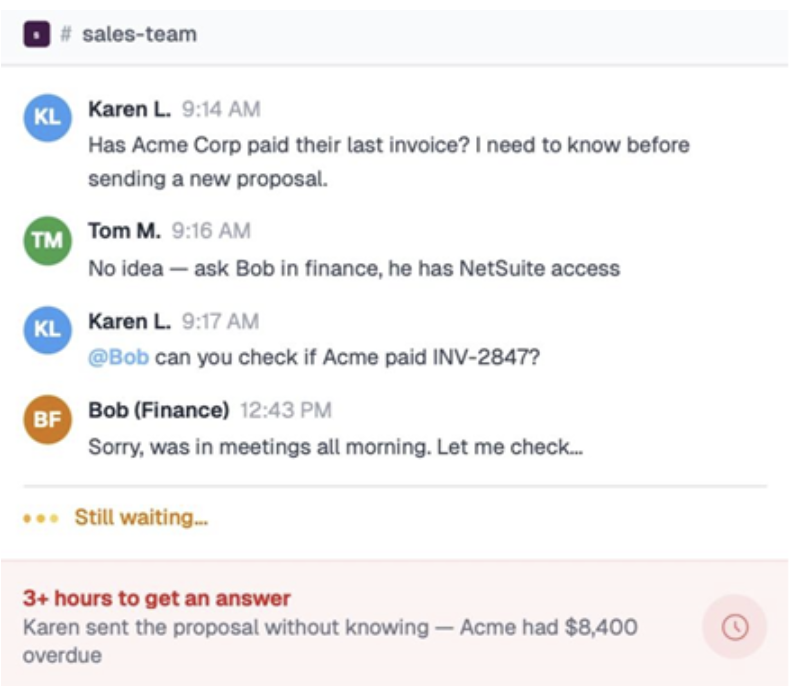
Chat in Slack, image from Breadwinner AI
- Shared spreadsheets.
QuickBooks Online lets users export reports and lists into Excel or Google Sheets. Finance teams often extract this data and share it so others can see up‑to‑date numbers. While this gives broader visibility, the data is static once exported and requires manual updates, adding extra work and introducing the risk of stale information or human error.
- Report exports or limited views.
Some organizations use QuickBooks reports and share them with broader teams. While these read‑only reports can provide specific financial views without full system access, they still often require training to interpret and might not answer follow‑up questions without further context.
- Custom Slack bots and internal tools.
Some teams build custom Slack bots and Slack channels that provide answers from shared knowledge bases without leaving the messaging app. QuickBooks Online support teams, for example, used a bot to help agents get routine answers from Slack QuickBooks connection, reducing the time spent searching for information and allowing support staff to handle inquiries more efficiently. The bot’s growing knowledge base meant it could answer a large portion of common questions, helping teams work faster and improving overall confidence in handling routine tasks. However, these solutions are often context-specific, require ongoing maintenance to keep information accurate, and may struggle with complex or unusual queries. Building and integrating such bots also typically requires IT or developer support, which can be a barrier for many teams.
All of these approaches show one thing clearly: the data exists, but getting the right answer at the right time can still be difficult. Questions arise in Slack, but answers often require exporting files or waiting for someone to check QuickBooks and send the answer.
Exploring QuickBooks Slack Integration Solutions with AI
After reviewing possible workarounds and their limitations, it becomes clear that none of them fully solves the problem. But what about QuickBooks Online Slack integration tools, especially those that use AI?
AI is increasingly being built directly into business applications, changing how users access and interact with data. Instead of just moving information between tools, newer solutions focus on making that data easier to query and use in real time.
When looking to connect QuickBooks to Slack, there are several main approaches for bringing QuickBooks data into Slack, each with different capabilities and limitations.
QuickBooks Online Slack Integration with Zapier
The first way to bring financial data into Slack is to build Slack QuickBooks integration through workflow automation platforms like Zapier. It lets teams create automated workflows that send Slack messages when specific events occur in QuickBooks. For example:
- Notify a Slack channel when a new invoice is created
- Post updates when a customer record is added
- Alert a channel about payments received or invoices due
This approach reduces the need to log into QuickBooks for routine updates, helping teams stay informed in the apps they already use. It is particularly useful for recurring, predictable events, such as new invoices or payment confirmations.
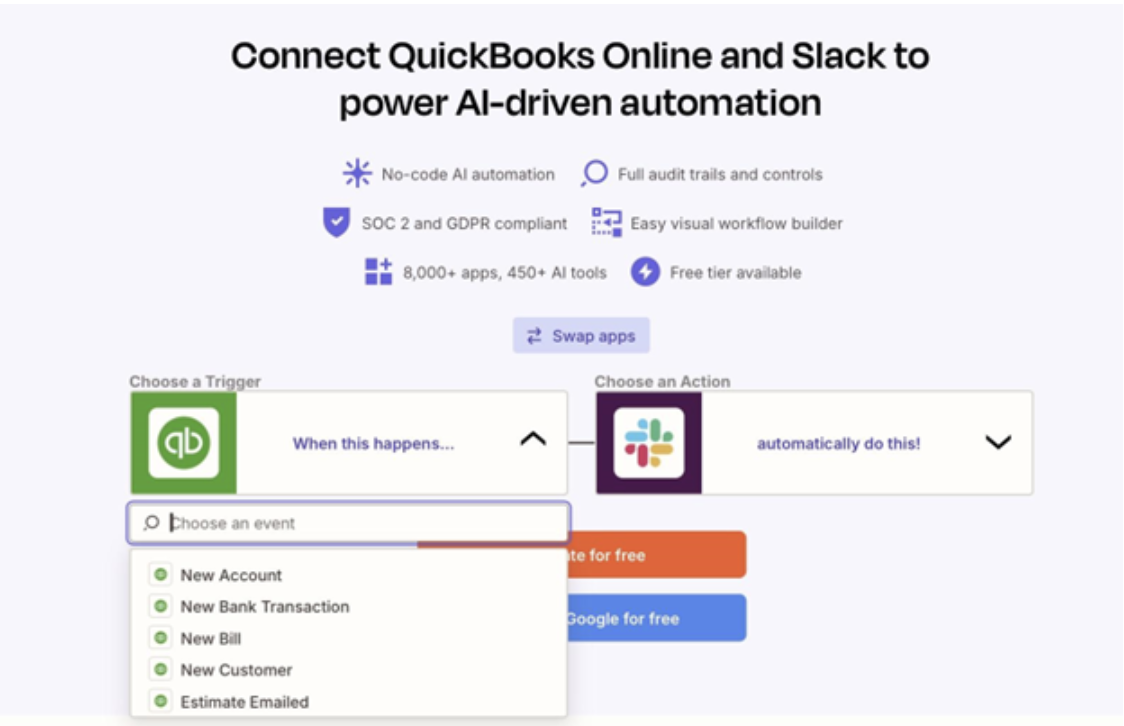
Connect QuickBooks and Slack, image from Zapier
Zapier also offers AI-powered actions, which can summarize data, draft responses, or help interpret QuickBooks updates before posting to Slack. This can make notifications more readable and reduce the need for manual interpretation.
However, there are some limitations and challenges to keep in mind:
- Event-based only: Even with AI, workflows rely on predefined triggers, so they can’t answer spontaneous questions, like “Has customer X paid invoice 2847?”
- Setup complexity: Non-technical users may need guidance to create and maintain workflows. Complex scenarios can require multiple steps or conditions.
- Maintenance: Changes in QuickBooks structure or account settings can break workflows, requiring ongoing monitoring and updates.
- Limited context: Notifications provide raw updates but do not summarize trends or provide analysis. Teams still need to interpret the data themselves.
Overall, Zapier can handle alerts and notifications, but it is not a complete solution for on-demand insights or conversational access to QuickBooks data.
Access to QuickBooks in Slack with Financial Intelligence Layer
Another approach is Breadwinner AI, a tool that brings financial insights from QuickBooks Online directly into Slack. Unlike traditional ways to integrate QuickBooks with Slack using workflows or triggers, it allows teams to ask questions in plain language and receive answers without needing a QuickBooks login. Employees can check invoice status, payment updates, cash balances, and other financial information based on their access permissions.
What makes this possible is the use of AI to interpret natural language queries. Instead of navigating reports or predefined dashboards, users can ask questions in everyday terms, and the system translates those questions into structured queries against financial data, returning clear, relevant answers.
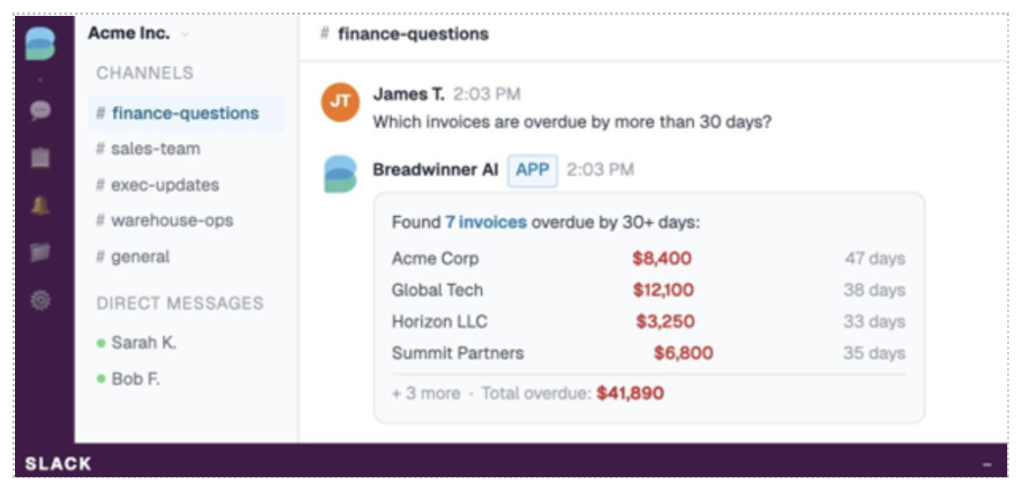 Finance questions, image from Breadwinner AI
Breadwinner AI uses secure, read‑only access, it cannot create, update, or delete anything in your accounting system. All interaction is one‑way: data flows from QuickBooks into the Breadwinner platform for querying, but nothing flows back.
The platform uses granular permission controls, like Breadwinner for QuickBooks, so administrators decide exactly what financial data each user or team can see when querying through Slack. This means employees only see information they are authorized to view based on the settings you configure, including restricting access by channel, user group, or data type.
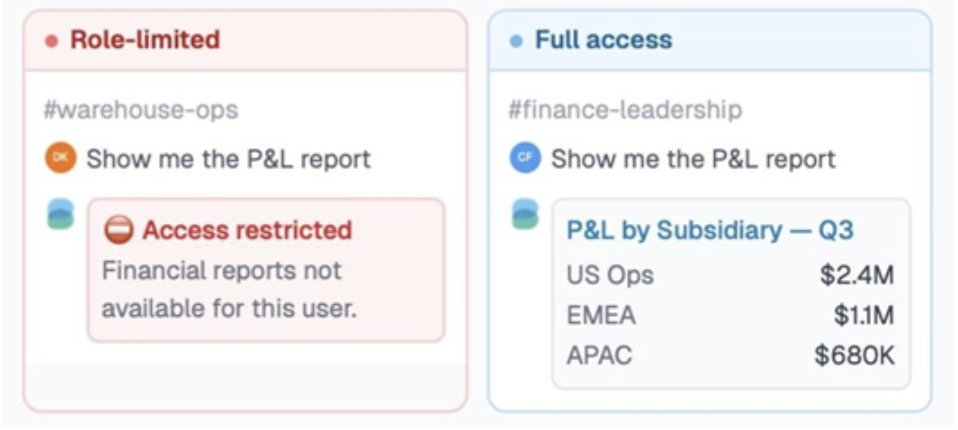
Permission controls, image from Breadwinner AI
Every query and response is logged for audit purposes, so there is visibility into who asked what and when, which supports governance and compliance requirements.
Key benefits include:
- Natural language queries: Ask questions in plain English, like “Has invoice 2847 been paid?” and get structured responses.
- Permission-aware results: Answers reflect each user’s access rights, keeping sensitive information protected.
- Fast access in Slack: Employees can get financial insights where they collaborate, reducing delays caused by waiting for finance teams or exporting reports.
- No technical setup required: Unlike custom bots or workflow automations, it works without IT intervention.
Breadwinner AI is not just a basic integration or connector. It truly acts as a financial intelligence layer, using AI to translate questions into data queries and return answers from QuickBooks Online safely into Slack or Teams, making financial information more accessible for non-finance teams.
| QuickBooks Slack Connection: Standard Integrations vs Breadwinner AI | ||
| Aspect | Standard Integrations (Zapier) | Financial Intelligence Layer (Breadwinner AI) |
| Role of AI | Has optional AI helpers to improve workflow messages or suggest automation steps, but does not interpret questions. | Uses AI to understand plain‑language questions and turn them into financial data queries. |
| Answering questions | Sends alerts for events you set up; cannot answer random questions without custom workflows. | Answers on‑the‑fly questions in Slack, like “Has invoice 2847 been paid?” |
| Data access | Only data tied to specific triggers is surfaced. | Retrieves relevant QuickBooks data in real time based on the query. |
| User access | Only people included in workflows get updates. | More users can ask questions in Slack based on permissions. |
| Speed | Fast for alerts; slow or manual for anything outside workflows. | Immediate, conversational responses in Slack. |
Benefits of Real-Time QuickBooks to Slack Insights
Bringing QuickBooks Online insights directly into Slack with tools like Breadwinner AI changes how teams work with financial data. Instead of waiting for reports, digging through spreadsheets, or asking finance staff for updates, employees can get the answers they need right where they already collaborate.
- Faster answers:Questions about invoices, payments, or balances can be answered in seconds. Teams no longerhave to wait hours or even days for someone in finance to respond. Real-time responses keep workflows moving and decisions faster.
- Less dependency on finance:Teams can independently access the financial information they need. This reduces repetitive back-and-forth with accountants and frees finance professionals to focus on higher-value work rather than routine queries.
- No need for extra QuickBooks licenses:Employees can see the relevant financial data they need in Slack, without requiringadditional QuickBooks user accounts. This makes it more cost-effective for companies while keeping sensitive data secure.
- Permission-based access:Every queryrespects user permissions. Employees see only the information they are authorized to access, maintaining control and security over sensitive financial data.
- Simple, natural queries:AI allows users to ask questions in plain language, such as “Has invoice 2847 been paid?” or “What’s our cash balance today?” The system interprets the request and provides clear, structured answers without the need to navigate complex reports or accounting terminology.
In Summary: Making Financial Data Conversational with AI
Traditional ways of accessing QuickBooks Online data, like reports, spreadsheets, or asking finance, often slow teams down. Even with standard integration, predefined triggers or custom workflows may not support real-time questions.
AI-powered tools, such as Breadwinner AI, go further: they connect Slack to QuickBooks and let teams ask natural-language questions and receive structured financial answers instantly in Slack, while respecting permissions.
This reduces delays caused by waiting for finance teams or navigating multiple systems. Teams can stay in the flow of work, making decisions faster with the right financial context immediately available. Over time, this approach not only saves time but also increases confidence in accessing accurate financial information.