



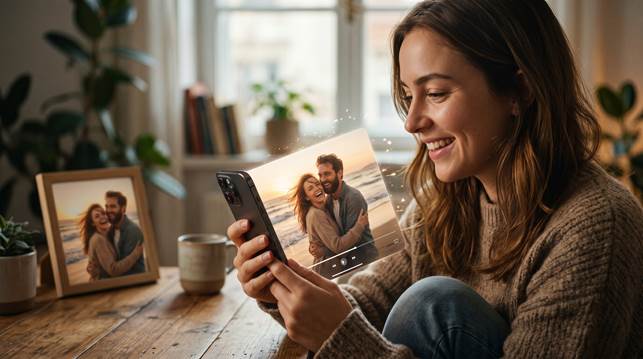
Some photos already feel full of emotion, but they still seem quieter than the memory behind them. A smile, a look, a pet expression, or an old family portrait can hold more feeling than one frozen frame can fully show. That is why so many people want to animate photo moments instead of leaving them still.
What most people want is not a loud effect. You want movement that feels gentle, believable, and emotionally right. If the motion looks cheap, the meaning disappears. If it feels natural, the photo can suddenly feel much closer again.
Part 1. Why people want to bring photos to life
The reason is usually emotional before it is technical. You may want to see an old portrait feel warmer. You may want a pet photo to reflect the energy you remember. You may want a memorial image to feel softer and more present. In other cases, you simply want a stronger visual for social media because a static photo no longer feels expressive enough.
In each case, the goal is not movement for the sake of movement. You are trying to recover something that the still image cannot completely show on its own. That is why photo animation feels powerful when it works well. The image starts to feel less distant and more connected to the moment you remember.
Part 2. What usually goes wrong with photo animation
Many tools add motion without understanding the photo. The face shifts in strange ways. The expression becomes too strong. The background feels disconnected. Instead of helping the memory, the effect pulls attention away from it. That is exactly why many people hesitate before trying to animate still image content. They worry the result will look artificial or even disrespectful.
This is especially important for old family photos and meaningful portraits. If the movement is too dramatic, the emotional value disappears. If the motion looks generic, the image can feel less personal than before. Good animation depends on restraint. It should support the photo, not take control of it.
Part 3. Why Relumi feels more natural for this kind of edit
If you want to animate photo memories without making them look over processed, Relumi gives you a more natural direction. It reads the structure and feeling of the original image before adding motion, which helps the result stay believable.
That is also why Relumi works so well when you want to bring photos to life in a personal way. The movement is meant to support the memory, not overpower it, so the image keeps its warmth and identity.
For anyone looking for gentle AI photo motion the biggest advantage is simplicity. You can start from one still image, preview the result, and keep only the version that feels emotionally right. That makes the process easier to trust and easier to use.
Relumi works well here because the experience is direct and emotionally focused. You are not pushed into a complicated editing workflow. You start with one meaningful image and move toward a result that feels closer to the original memory instead of farther away from it.
Relumi also supports multiple use cases naturally. You can bring photos to life from old portraits, pet images, creator visuals, and personal keepsakes. That flexibility matters because the best motion is never one size fits all. A playful pet image and a respectful family tribute do not need the same kind of energy.
Part 4. How to animate a photo on mobile
If you want a simple mobile workflow, Relumi gives you a clear path. You choose the image, start the animation process, review the result, and save it when the movement feels right. The steps are easy, but the final effect can feel surprisingly emotional when the source photo already matters to you.
Step 1. Choose the photo you want to animate
This is where the memory starts to change. You may choose an old family portrait, a pet image, or a still photo that already means a lot to you but feels too quiet as a frozen frame.
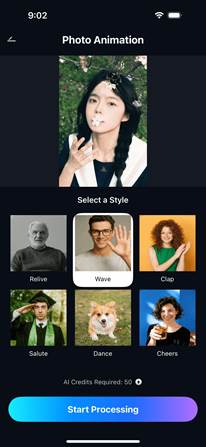
Step 2. Start the photo animation process
Once the image is selected, Relumi begins building motion that fits the face, posture, and feeling of the original picture. This matters because good movement should feel natural, not random or overdone.

Step 3. Review the animated result
A strong result should feel gentle and believable. You want AI photo motion that supports the emotion of the image instead of turning it into a flashy effect that no longer feels personal.
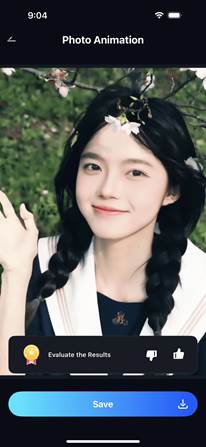
Step 4. Save the moving memory and share it
When the motion feels right, saving becomes more than the last step. It turns your still picture into something you can revisit, share with family, post online, or keep as a private moving memory.

Part 5. Where photo animation feels most rewarding
Old family albums are one of the strongest examples. When you animate photo memories from years ago, the result can feel much warmer than a still scan. The point is not to rewrite the past. The point is to feel a little closer to it.
Animating Pet photos are another great fit. People often remember personality more vividly than posture. A little movement can make the image feel much more true to the animal you knew. That is why pet animation can feel joyful and emotional at the same time.
Social and creator visuals also benefit from this approach. In a crowded feed, motion catches attention faster than a static image. If you want a profile visual, story post, or cover image that feels more alive, animation can help without forcing you into full video production.
Quick comparison: what makes animation worth keeping
| What you want to animate | What often feels wrong | What a better result feels like |
| An old family portrait | The motion looks fake or dramatic | The image moves softly and keeps its dignity |
| A pet photo | The action feels random | The motion matches the animal personality |
| A tribute picture | The effect feels too loud | The movement feels respectful and calm |
| A social post or profile visual | The photo still feels flat | The image feels more alive and memorable |
When these details come together, the result stops feeling like a trick. It starts feeling like a better way to hold onto the emotion that was already there.
Conclusion
If you want to animate photo memories well, the real goal is not adding motion just because you can. The real goal is keeping the feeling of the original picture while making it more present. That is why subtle animation, believable expression, and emotional consistency matter so much.
Relumi gives you a practical way to bring photos to life with natural AI photo motion and a simple mobile workflow. For portraits, pets, old family pictures, and meaningful still moments, it offers a cleaner path from memory to movement without turning the image into something that no longer feels like yours.