
The Impact of Salesforce Data Quality on AI Performance
More and more companies are integrating artificial intelligence into sales operations. According to the 6th edition of the State of Sales report from Salesforce, 81% of sales teams use AI today, while HubSpot data shows that 92% of sales representatives now use AI in some form.
AI is expected to accelerate work, simplify processes, automate repetitive tasks, and analyze large volumes of CRM information to generate accurate forecasts. AI systems promise to prioritize leads, recommend next actions, and uncover insights that would otherwise be difficult to detect.
However, the results of AI adoption often fall short of expectations. One of the main reasons is unreliable Salesforce data.
In a typical Salesforce AI data CRM workflow, the AI analyzes historical data stored in the CRM to identify patterns and make predictions. For example, it may analyze how interactions like follow-up emails and product demos influence conversion rates. If the system discovers that leads who attended several demos and responded promptly to follow-ups are more likely to close, it learns this pattern. When a new lead behaves in a similar way, the AI may automatically flag it as high priority and recommend that the sales team follow up quickly.
This process works only if the data is complete, consistent, and reliable. If the underlying data for AI Salesforce systems is flawed, the AI learns incorrect patterns and produces unreliable analytics. As a result, companies may lose revenue and time, experience declining trust in CRM systems and AI insights, and even face reputational damage.
Poor Salesforce Data Quality Reduces AI Accuracy
Imagine a scenario where a sales representative forgets to enter important information about the customer, such as industry, company size, or previous interactions. The AI system is now missing key attributes that can help it understand how similar customers behave.
Because CRM data is often entered manually by different employees, inconsistent formatting is also common. For example, the same country might be recorded as “USA,” “U.S.,” or “United States.” Job titles may be stored as “Chief Executive Officer,” or “C.E.O.” To a human, these values represent the same thing, but AI may treat them as separate categories. As a result, the system may underestimate how many successful deals came from the United States of America, and forecasting accuracy will suffer.
Duplicate records can cause AI to misinterpret lead conversion data, as typos may lead sales reps to create multiple entries for the same customer, inflating conversion metrics and producing incorrect conclusions.
These examples show why preparing CRM data for accurate AI analysis requires structured data cleaning. Salesforce environments with inconsistent or incomplete data lead AI systems to learn incorrect patterns and produce misleading analytics.
According to Salesforce, the average contact database contains significant data quality gaps:
- 25% of records are duplicates
- 90% of records are incomplete
- 20% of records are considered unusable
Even when entered carefully, data becomes outdated as employees change jobs, companies rebrand, and contacts become obsolete.
The impact of this problem is significant. According to research from the Salesforce Data Quality eBook, 60% of AI initiatives are expected to fail or be abandoned through 2026 because they lack AI‑ready, high‑quality data.
For businesses implementing AI in Salesforce, poor data quality poses a serious challenge. AI models rely on historical data to make predictions, but if the data is inaccurate, the predictions will also be unreliable.
The Real Business Cost of Poor Salesforce AI Data Readiness
Poor CRM data quality has measurable financial consequences.
According to a 2024 report by the IBM Institute for Business Value, more than a quarter of organizations estimate they lose over $5 million annually due to poor data quality, while around 7% report losses exceeding $25 million.
Data quality issues can also lead to reputational damage. In one widely discussed example, an AI support bot, used by the coding assistant Cursor, generated and sent users a completely fabricated login policy. Because the message came directly from the AI system, customers assumed it was legitimate. When the error became public, users cancelled subscriptions, and the company had to issue a public apology.
Poor data can undermine both internal and external trust in CRM systems. Surveys show that 65% of sales professionals do not fully trust their organization’s CRM data. When confidence in the data declines, teams often start relying on spreadsheets or personal tracking systems instead of the CRM, which further fragments information and reduces the accuracy of AI agents.
Customers may also lose trust in AI systems if an AI agent provides irrelevant or incorrect information during a conversation, for example, because a sales representative failed to enter key details into the CRM.
AI systems relying on duplicate or inconsistent CRM records can cause multiple operational problems:
- exaggerated pipeline numbers
- inaccurate forecasts
- imprecise dashboards
- ineffective recommendations
These issues make Salesforce AI data readiness a critical prerequisite for successful AI adoption. As discussed in Salesforce data cleansing best practices, organizations building AI-powered workflows must address CRM data quality before expecting reliable AI results.
Preparing CRM Data for AI Salesforce Integration
There are multiple ways to prepare Salesforce data for AI integration. Some companies rely on manual cleanup, while others use built-in Salesforce capabilities or third-party tools. Each approach has its advantages and limitations: manual processes can be time-consuming, some external tools are not well-suited to the Salesforce ecosystem, and certain methods focus only on preventing new data issues rather than cleaning existing ones.
As a result, businesses may turn to specialized Salesforce applications designed for data cleaning in enterprise AI Salesforce environments. These solutions automate duplicate detection, data normalization, and high-volume cleanup, helping businesses prepare their CRM data for AI integration while minimizing manual maintenance.
To explore how organizations approach data quality in practice, it’s useful to look at solutions available on Salesforce AppExchange, Salesforce’s native marketplace for extending platform capabilities without custom development.
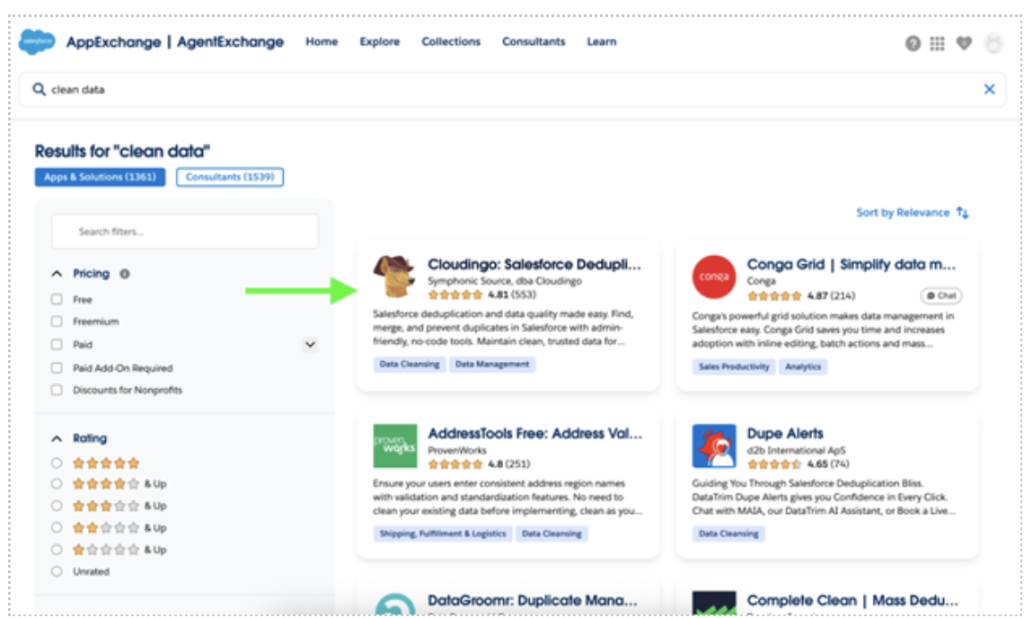
Clean Data Search Result on AppExchange
One of the applications shown in the search results is Cloudingo, a Salesforce solution focused on data deduplication and data quality management. Solutions like this are often used to maintain high data quality and support data enrichment, enterprise AI, and Salesforce initiatives.
To illustrate how this works in practice, in the next section, we’ll explore the key features and capabilities of a dedicated native Salesforce solution, using Cloudingo as an example.
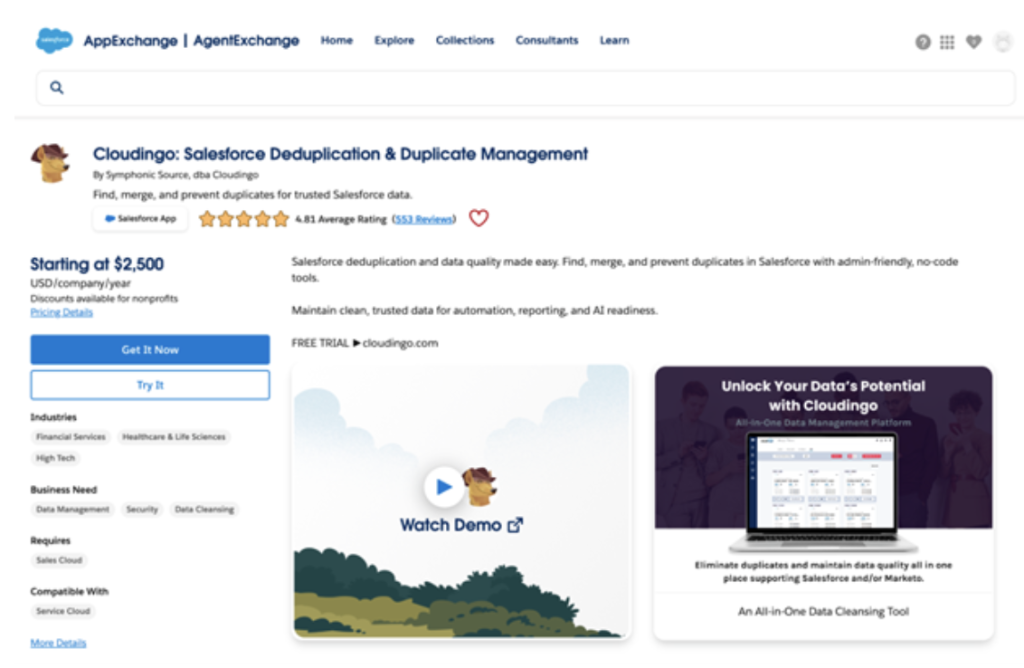
Cloudingo on AppExchange
How to Improve Salesforce AI Data Accuracy: CRM Cleaning and Enrichment
Tools such as Cloudingo can help automate Salesforce data cleansing best practices and prepare CRM databases for reliable AI analysis. Below is a practical process companies can follow to improve the preparedness of Salesforce data.
Step 1: Audit Your Current Salesforce Data
The first step in any data cleaning AI Salesforce initiative is understanding the current condition of your CRM data. This includes reviewing duplicate records across key business objects, assessing field completeness, identifying inconsistent formatting in important fields, and detecting outdated or unused records.
How this is implemented in practice:
The Data Quality Dashboard provides an overall data health score and highlights duplicate counts across the CRM.
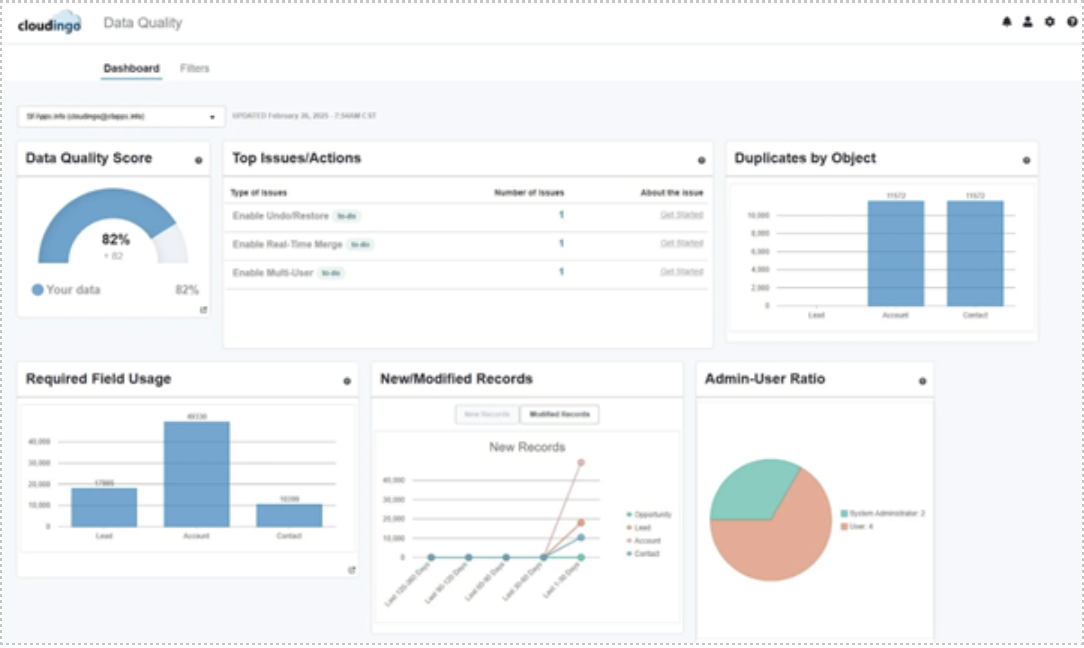
Data Quality Dashboard in Cloudingo
Moreover, Field Analysis identifies missing, outdated, or incorrectly formatted fields that may negatively impact data quality.
Step 2: Deduplicate CRM Records
Duplicate records are one of the most common problems affecting data consistency.
How this is implemented in practice:
The app can identify duplicates by comparing key fields you specify and using a variety of matching degrees. Once duplicates are identified, the merging functionality combines them into a single, accurate record while preserving the most important data based on defined rules.
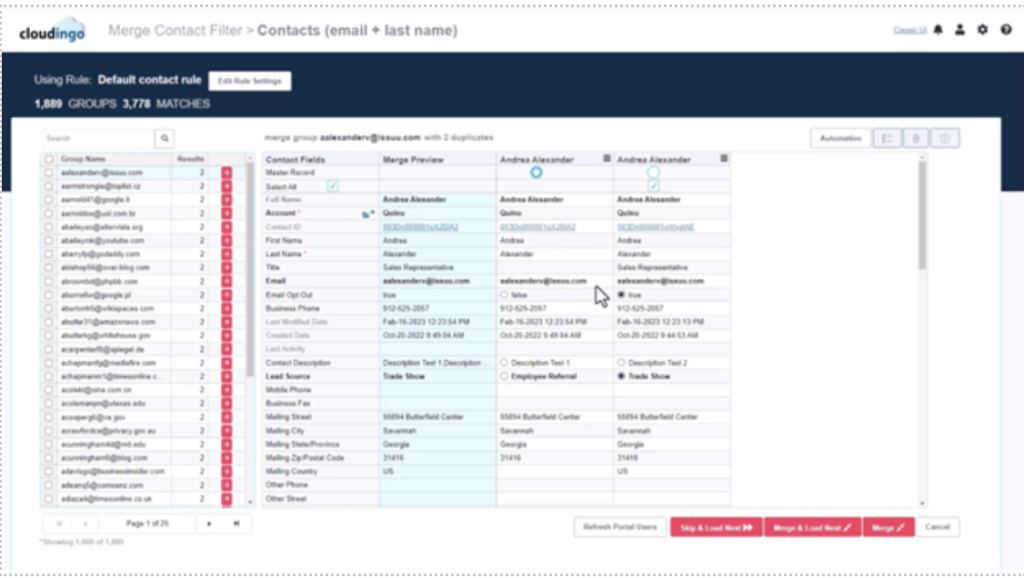 Manual Merge Page in Cloudingo
Additionally, the Undo/Restore feature allows Salesforce admins to quickly roll back merges or record conversions if any data conflicts or inconsistencies occur, a feature that is not natively available in Salesforce.
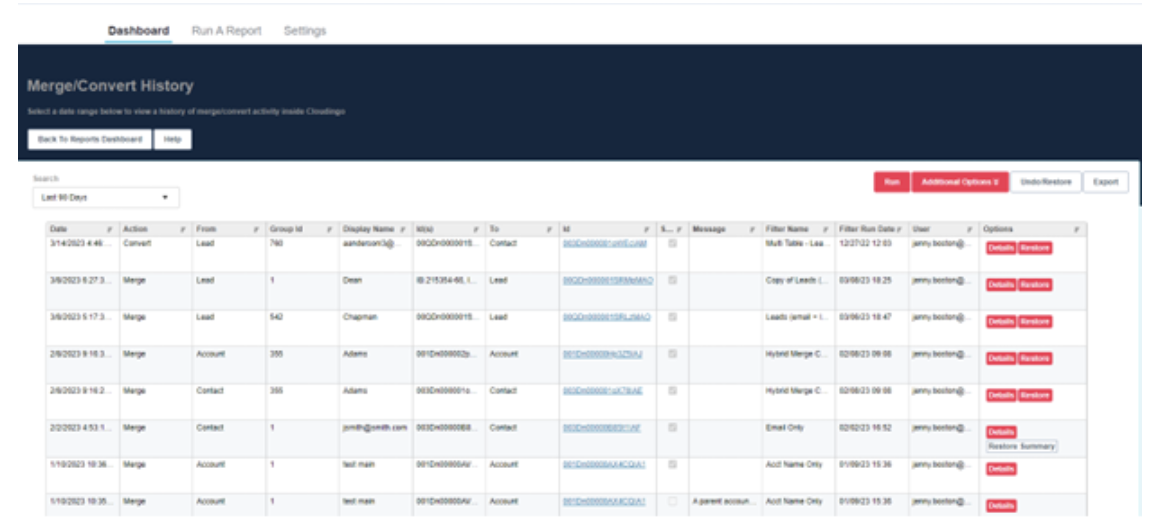
List of Merge/Convert Actions for Undo/Restore Jobs in Cloudingo
Step 3: Standardize & Normalize Fields
AI works best with structured, consistent data.
How this is implemented in practice:
Use filters to identify inconsistent values in fields such as State/Country, job titles, and industry categories, then apply bulk updates to align them into a consistent format.
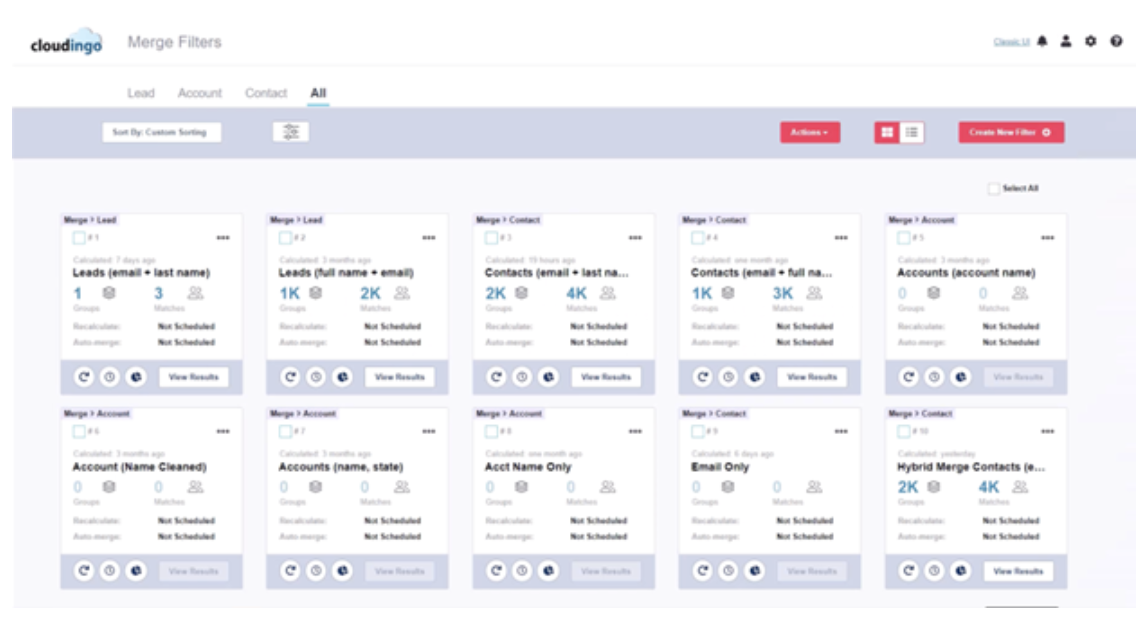 Dedupe Filters Page in Cloudingo
Use synonym matching to identify variations such as nicknames, alternative spellings, or different company name formats during duplicate detection.
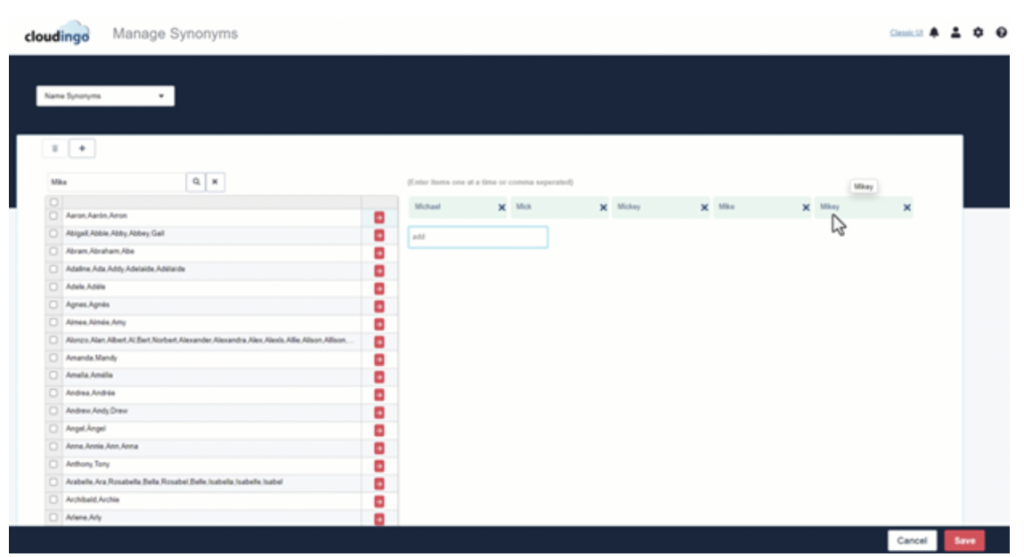 Synonym management Page in Cloudingo
In addition, using Field Analysis helps to systematically detect inconsistencies, missing values, or incorrectly formatted data at the field level.
Step 4: Remove or Archive Inactive Data
Inactive or outdated records bias AI models and increase processing load.
How this is implemented in practice:
The solution allows you to filter records based on inactivity criteria, such as records not updated for a defined period, and take actions such as deletion, export, or reassignment.
Additionally, record update functionality can be used to flag inactive records or prepare them for cleanup actions.
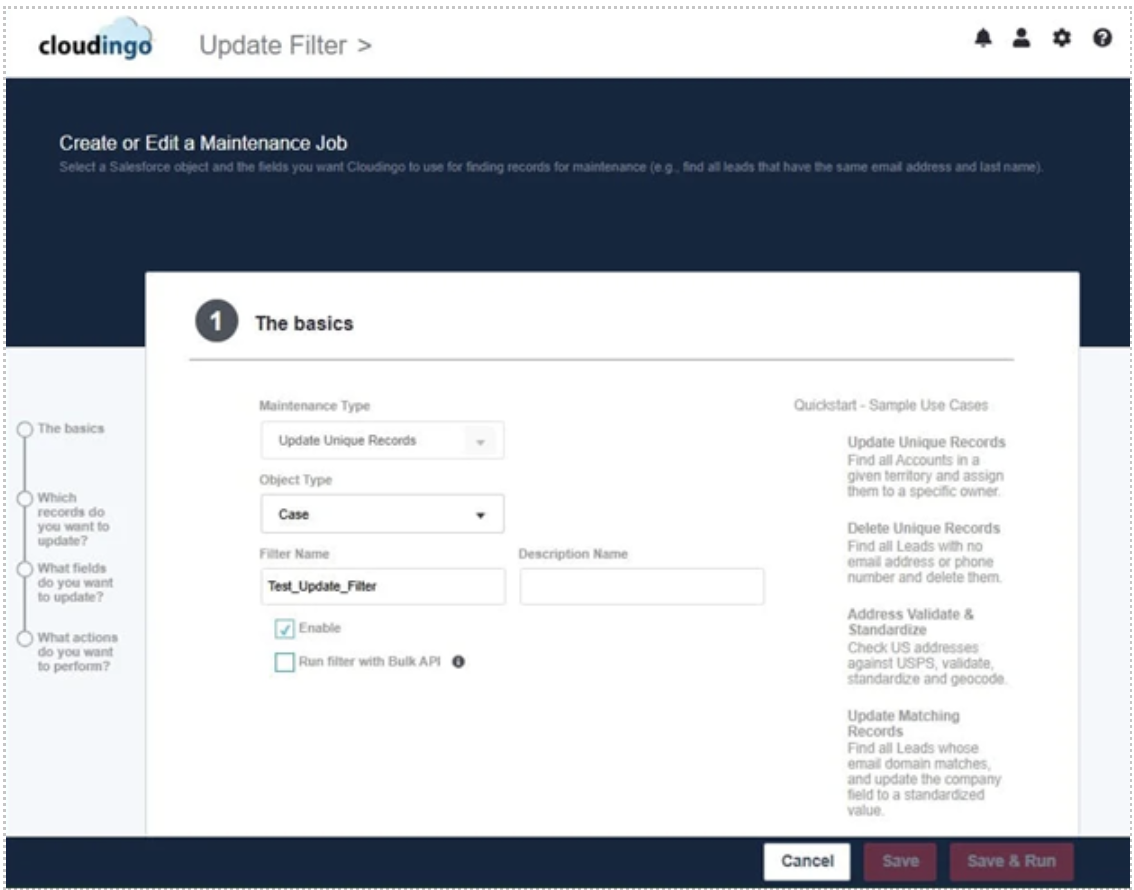
Creating an Update Records Maintenance Job in Cloudingo
Step 5: Automate Cleanup Jobs
Manual cleanup is insufficient for large or dynamic datasets.
How this is implemented in practice:
Filters and deduplication jobs can be scheduled to run automatically on a daily, weekly, or monthly basis. Automatic. real-time merging is also supported for incoming duplicates on key objects. This helps maintain data quality as new records are created.
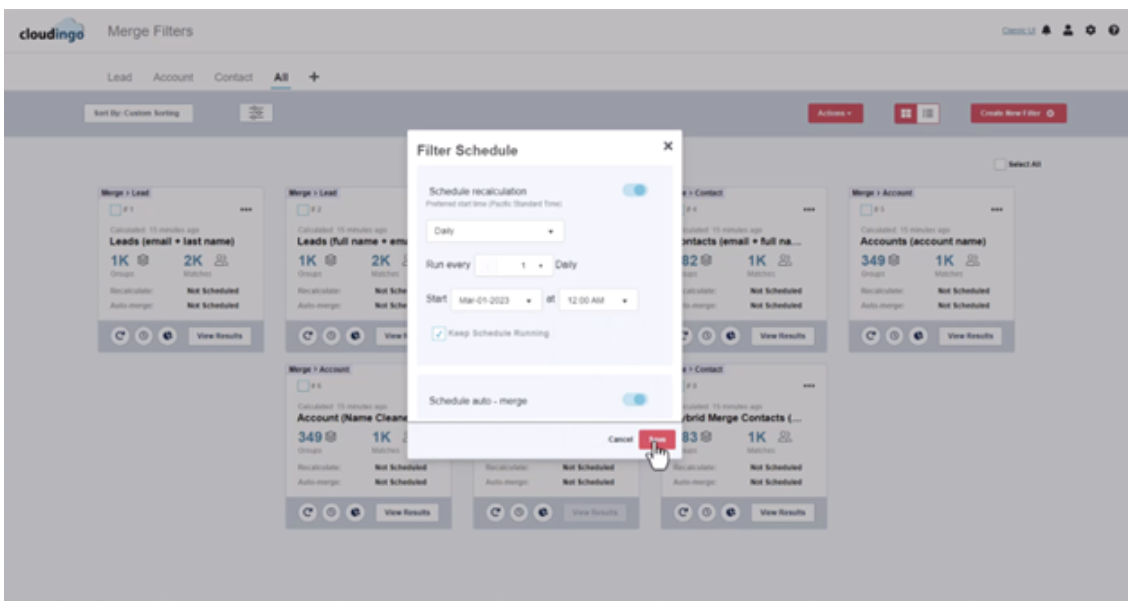
Auto-Merge Filter Scheduling Page in Cloudingo
Step 6: Monitor and Maintain CRM Data Quality
Cleaning CRM data once is not enough. New records are created daily, and data from external systems can introduce duplicates and inconsistencies. Keeping Salesforce data AI-ready requires continuous monitoring and control over incoming data.
How this is implemented in practice:
The Data Quality Dashboard enables continuous tracking of overall data health, while reports and analytics help identify recurring data issues and support proactive cleanup actions.
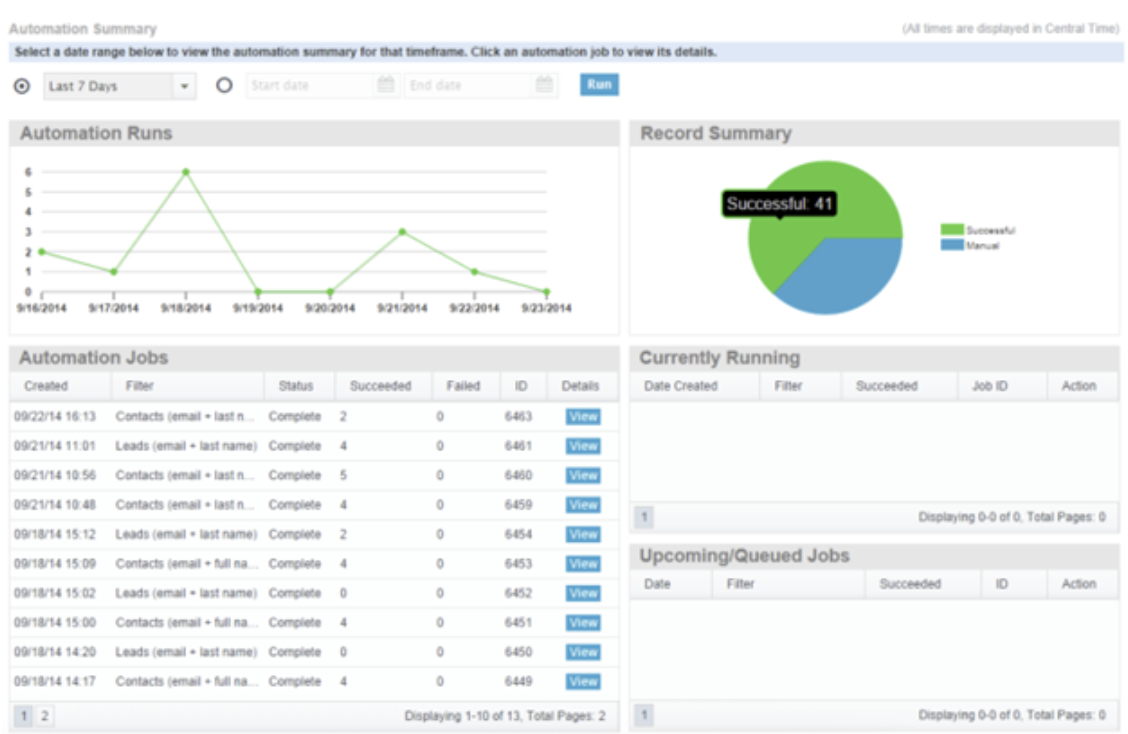
Automation Summary report from Cloudingo
Transparent audit trails provide visibility into specific records that have been merged or converted through a dedupe job for a specified period of time.
In addition, API integrations allow external data to be cleaned and validated before entering Salesforce. The data import tool can apply matching rules during CSV uploads, and features like record checks help prevent duplicates by identifying existing records before import.
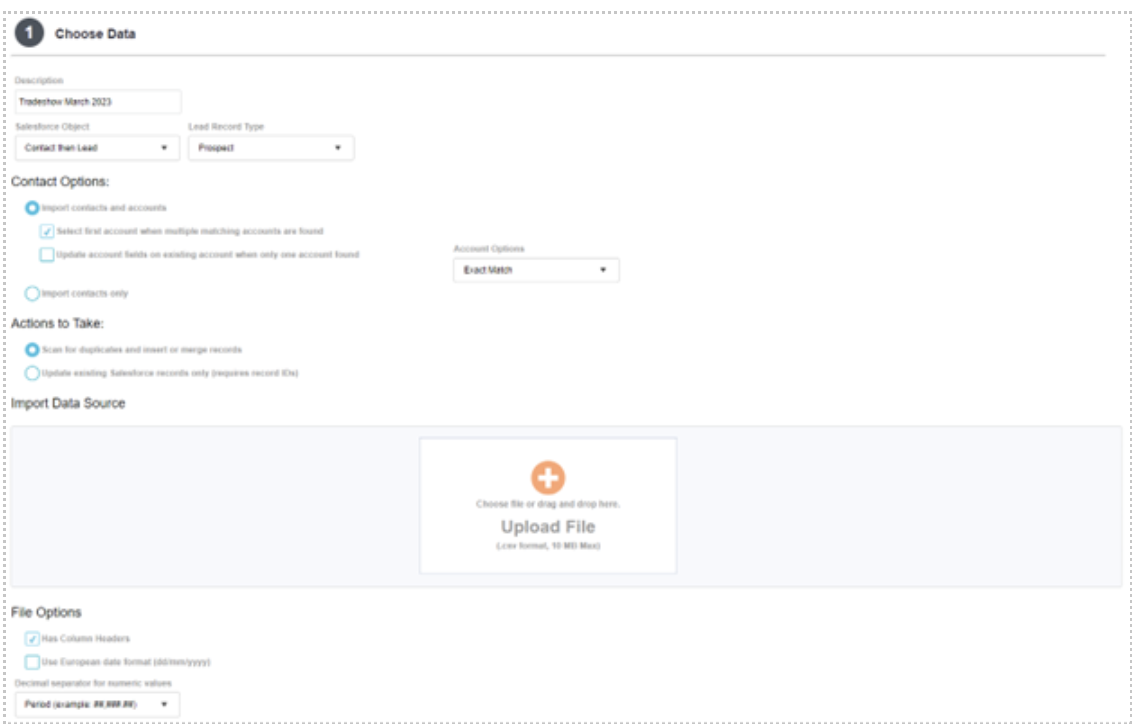
First Step of the data import tool in Cloudingo
Lastly, integrations with other systems (e.g., marketing platforms) further support cross-system data quality.
The following table summarizes how each step contributes to AI data readiness:
| Steps to Improve Salesforce AI Data Readiness | |
| Step | Benefit for AI Systems |
| 1. Audit Your Current Salesforce Data | Helps evaluate the data gaps, errors, and inconsistencies in CRM data that can impact AI accuracy. |
| 2. Deduplicate CRM Records | Reduces fragmentation and helps establish a more reliable data foundation for accurate AI insights. |
| 3. Standardize & Normalize Fields | Helps AI group similar records more accurately for better segmentation and pattern recognition. |
| 4. Remove or Archive Inactive Data | Keeps datasets up to date, ensuring AI models use only relevant information. |
| 5. Automate Cleanup Jobs | Reduces manual data maintenance by automatically keeping datasets clean and relevant for AI use. |
| 6. Monitor and Maintain CRM Data Quality | Enables continuous tracking of data quality to ensure accuracy and consistency as new data is added. |
In Summary: Data Quality as a Prerequisite for Reliable AI
In the race to adopt AI, many businesses often overlook a critical prerequisite: data quality.
AI tools can initially deliver impressive results: automated agents, predictions, and recommendations. But over time, issues may appear, such as inaccurate forecasts or irrelevant suggestions. These problems usually come not from the AI itself, but from a poor CRM data foundation.
Research shows that 92% of analytics and IT leaders say trustworthy data is needed more than ever. AI does not verify data accuracy. It works with the information it is given. If that data contains duplicates, missing fields, or outdated information, AI outputs will reflect those flaws.
Solutions designed specifically for Salesforce data quality management can help address those problems. Tools such as Cloudingo allow organizations to identify duplicate records, standardize field values, automate cleanup processes, and maintain consistent CRM data.
When data quality is improved, businesses can ensure that their AI learns from accurate, structured information and delivers real business value.
Author

Mykhailo Radchenko is a certified Salesforce Developer and Writer.