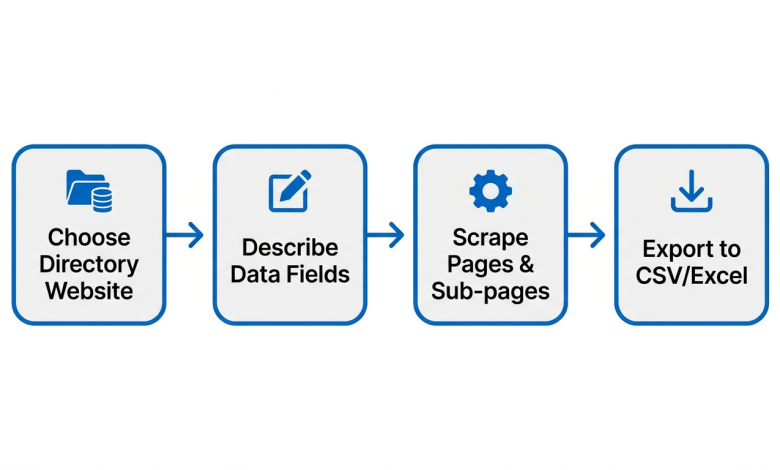
Most business data you need already exists online: in directories, job boards, and company websites. The real problem isn’t finding it, but it’s extracting it. Manually copying names, phones, and addresses takes forever. Hiring developers is expensive. Buying stale lead lists from brokers gets you what everyone else has.
AI web scrapers solve this. Describe what you need in plain language, and they pull structured data straight into a spreadsheet. No code. No CSS selectors. No maintenance. This guide shows you how, with step-by-step tutorials on real directories, you can try today.
Why Traditional Scrapers Break and How AI Web Scrapers Fix It
A quick distinction first: a web crawler navigates pages (following links, handling pagination), while a web scraper extracts structured data from those pages. Lead generation needs both. Most AI scraping tools, including Chat4data, an emerging AI web scraper Chrome extension, handle both in one workflow.
Traditional scrapers require you to pinpoint each data field in the HTML: CSS selectors, XPath expressions, and template builders. It works until the website changes its layout. Then your scraper breaks. Job boards and directories update their HTML regularly, so you’re constantly reconfiguring.
AI web scrapers skip this entirely. You describe the data in natural language, such as “extract the business name, phone number, and website from each listing.” The AI locates the fields regardless of the underlying HTML structure. When the site changes, the AI adapts. You don’t touch anything.
Use Case 1: Scraping Yellow Pages for Local Business Leads
Scenario:
You sell to local businesses. Maybe you’re a commercial cleaning company, a POS vendor, or a marketing agency targeting restaurants. You need a list of every restaurant in a specific city with its contact details.
Yellow Pages (yellowpages.com) is the most widely used public business directory in the US. Its structure is clean: search results listing businesses, each linking to a detail page with full contact info. This is the industry-standard demo site because its structure is straightforward and reliable.
Step 1 — Search Yellow Pages.
Go to yellowpages.com with the Chat4data Chrome extension open. Search for your target: for example, “Restaurants near New York, NY.” Copy that URL.
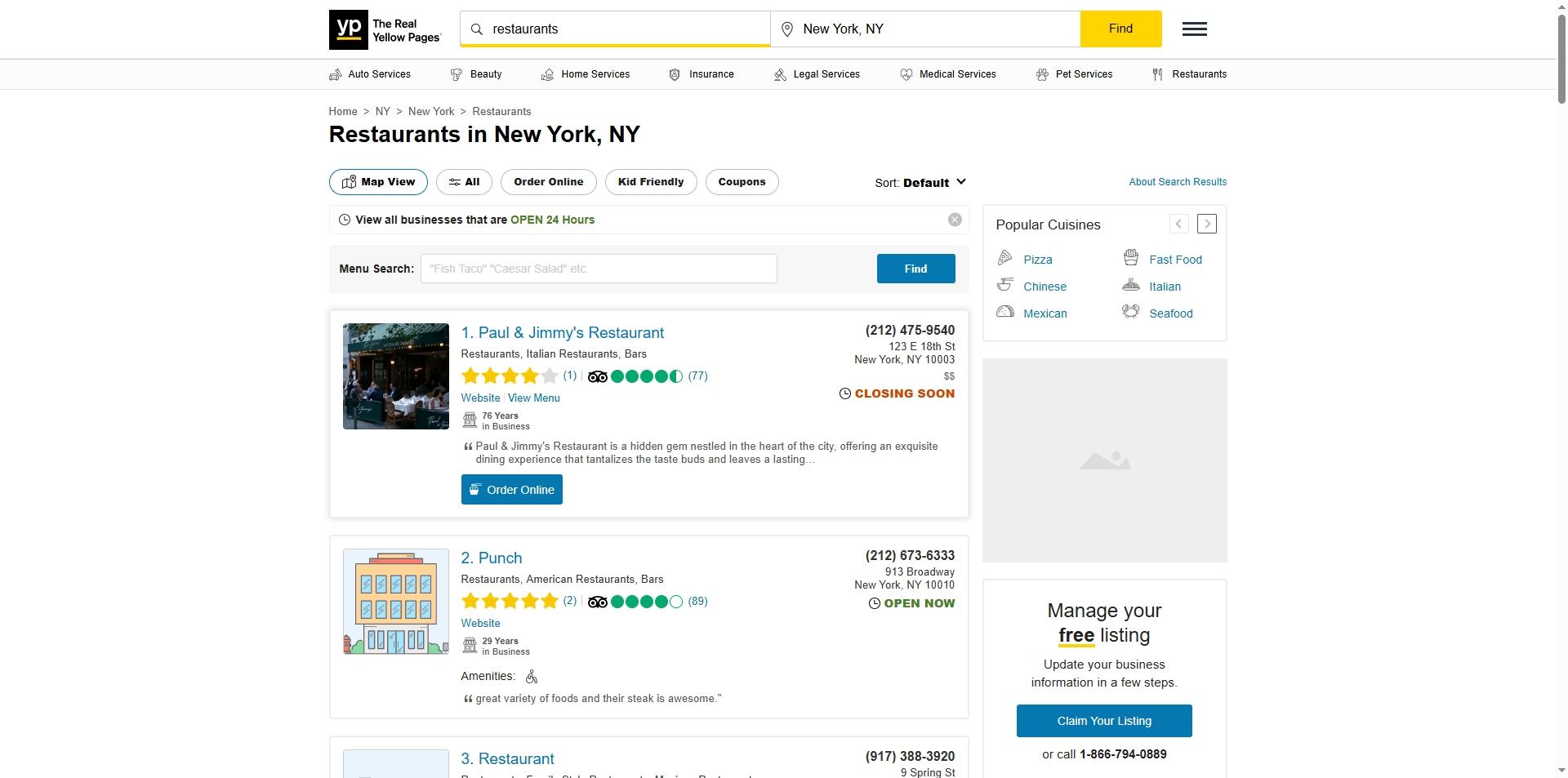
Step 2 — Paste the URL into Chat4data and describe your fields.
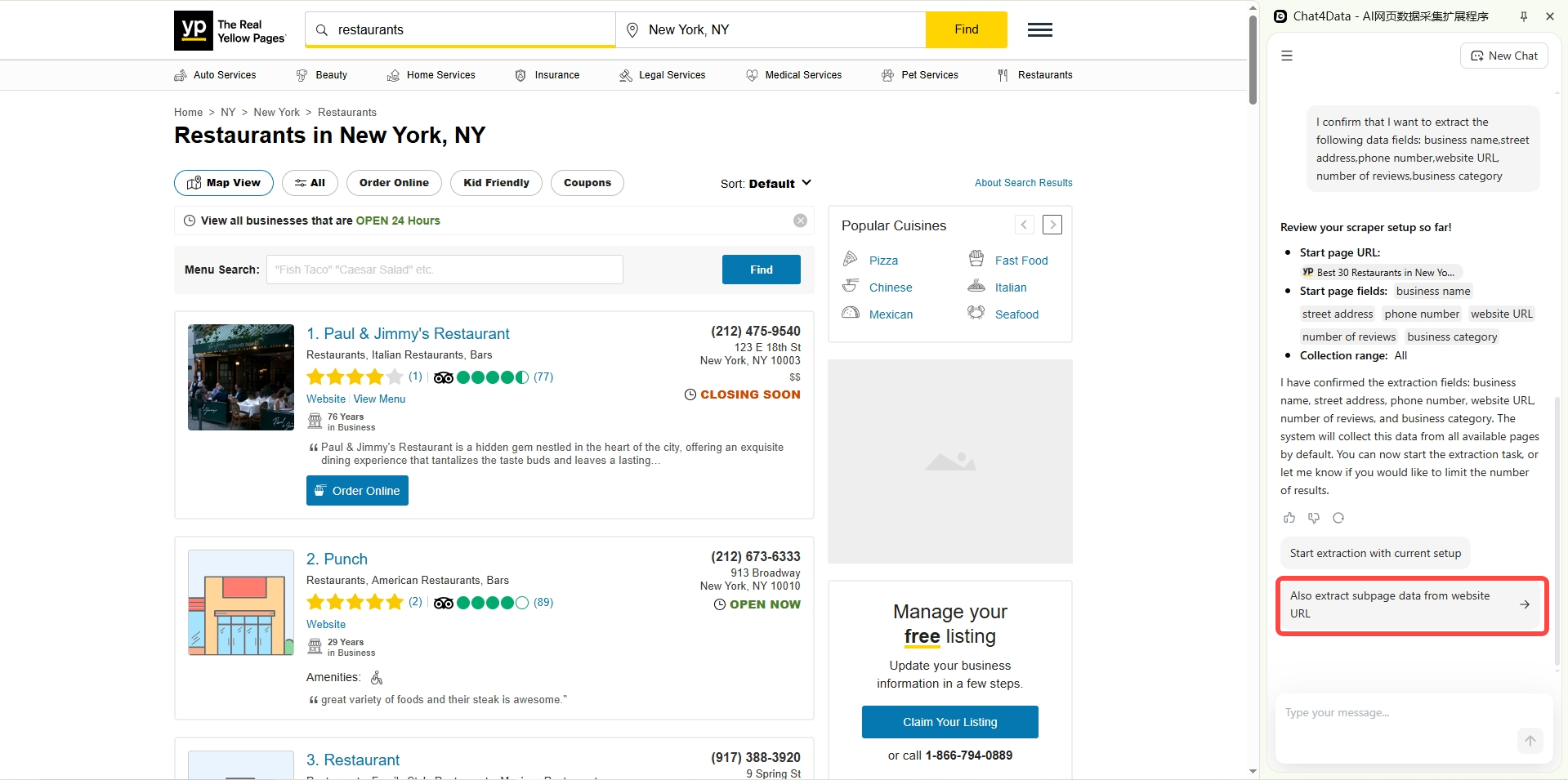
Copy the search results URL and paste it into Chat4data. Then type exactly what you need:
“From each business listing, grab: business name, street address, phone number, website URL, star rating, number of reviews, and business category.”
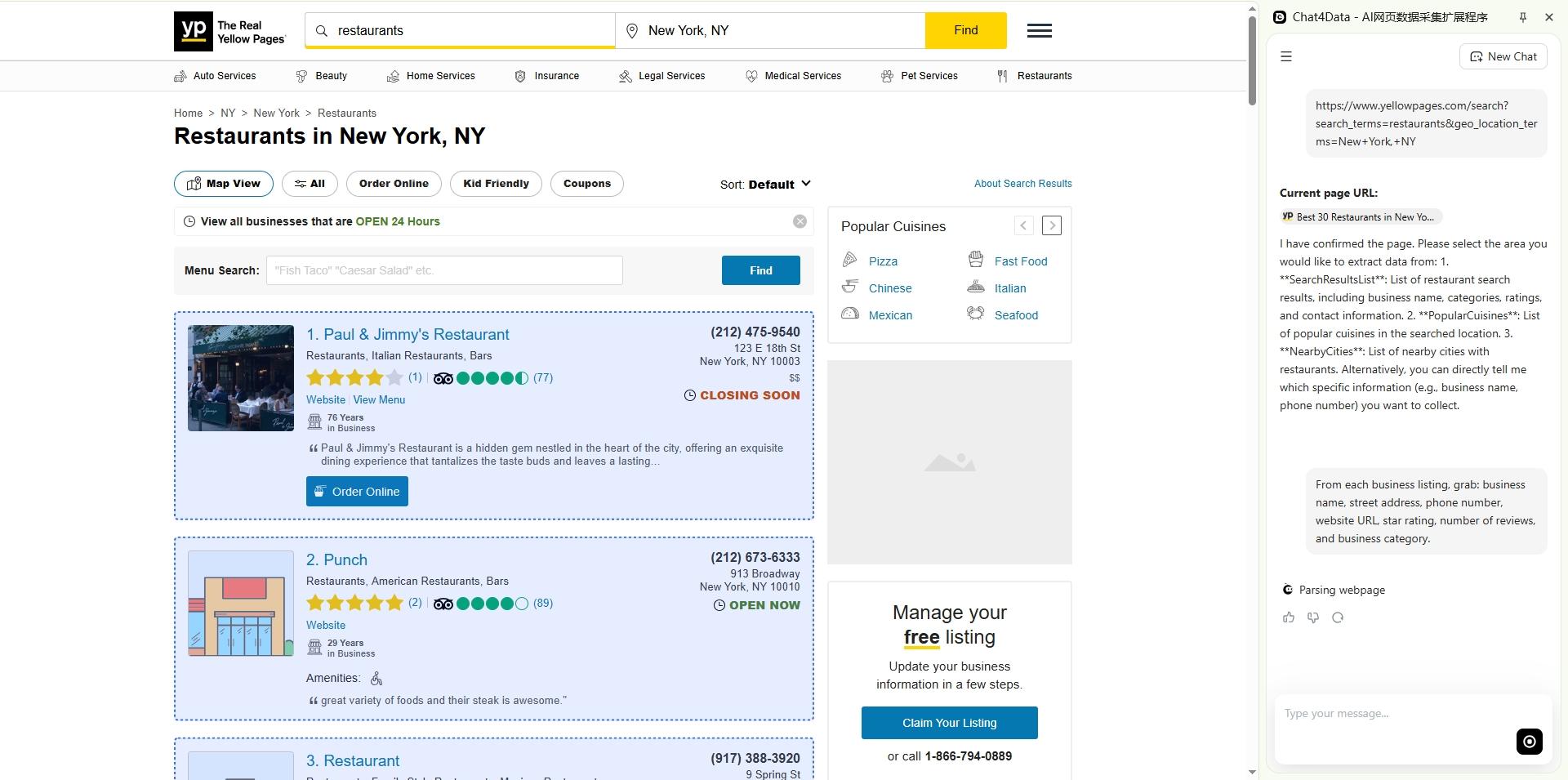
Step 3 — Enable sub-page crawling.
The listing cards show basic info. But full details? Those live on each business’s detail page. Chat4data finds these links automatically and asks if you want to follow them. Confirm, and it’ll traverse every detail page on its own.

Step 4 — Confirmation and Export.
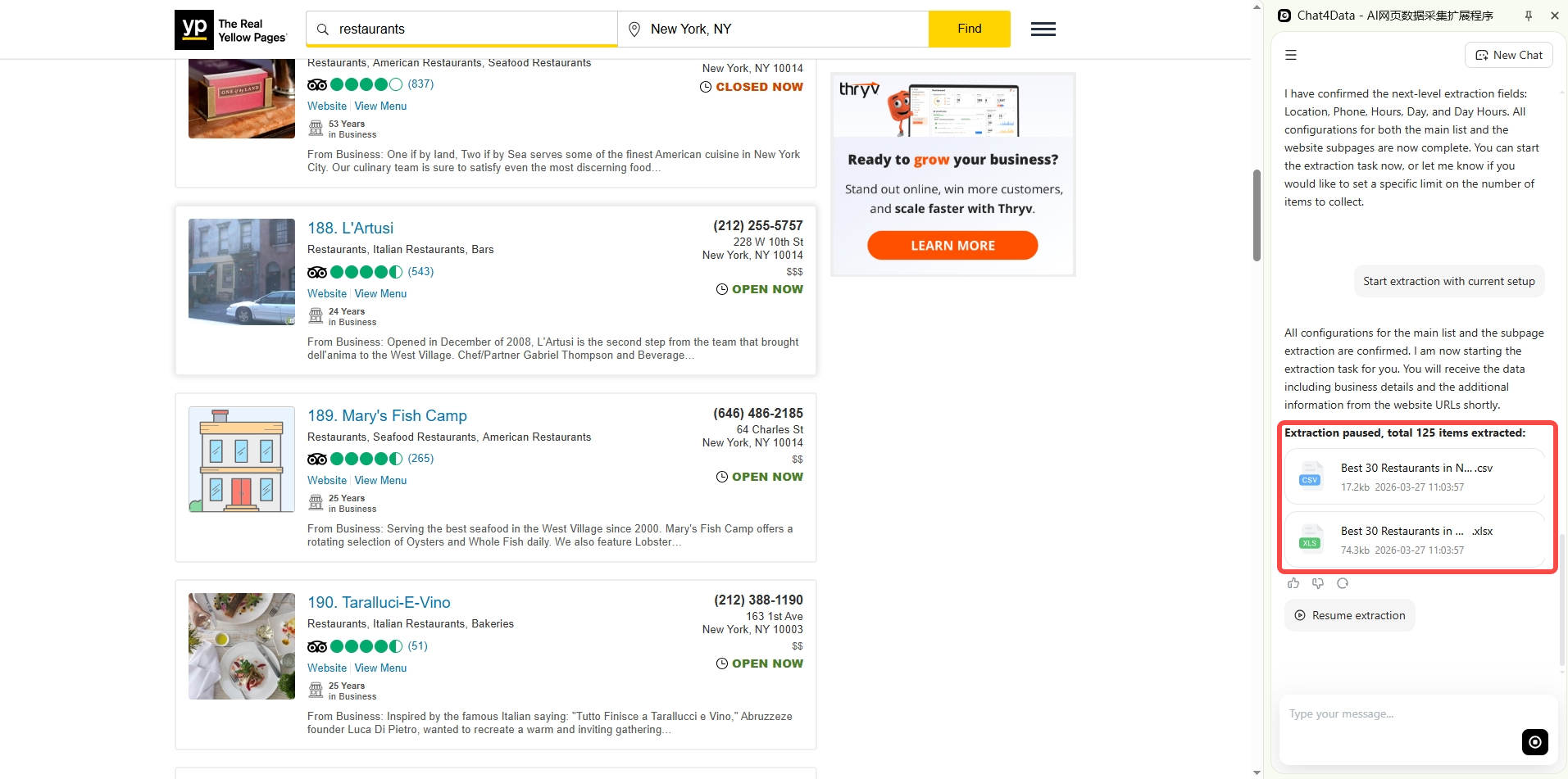
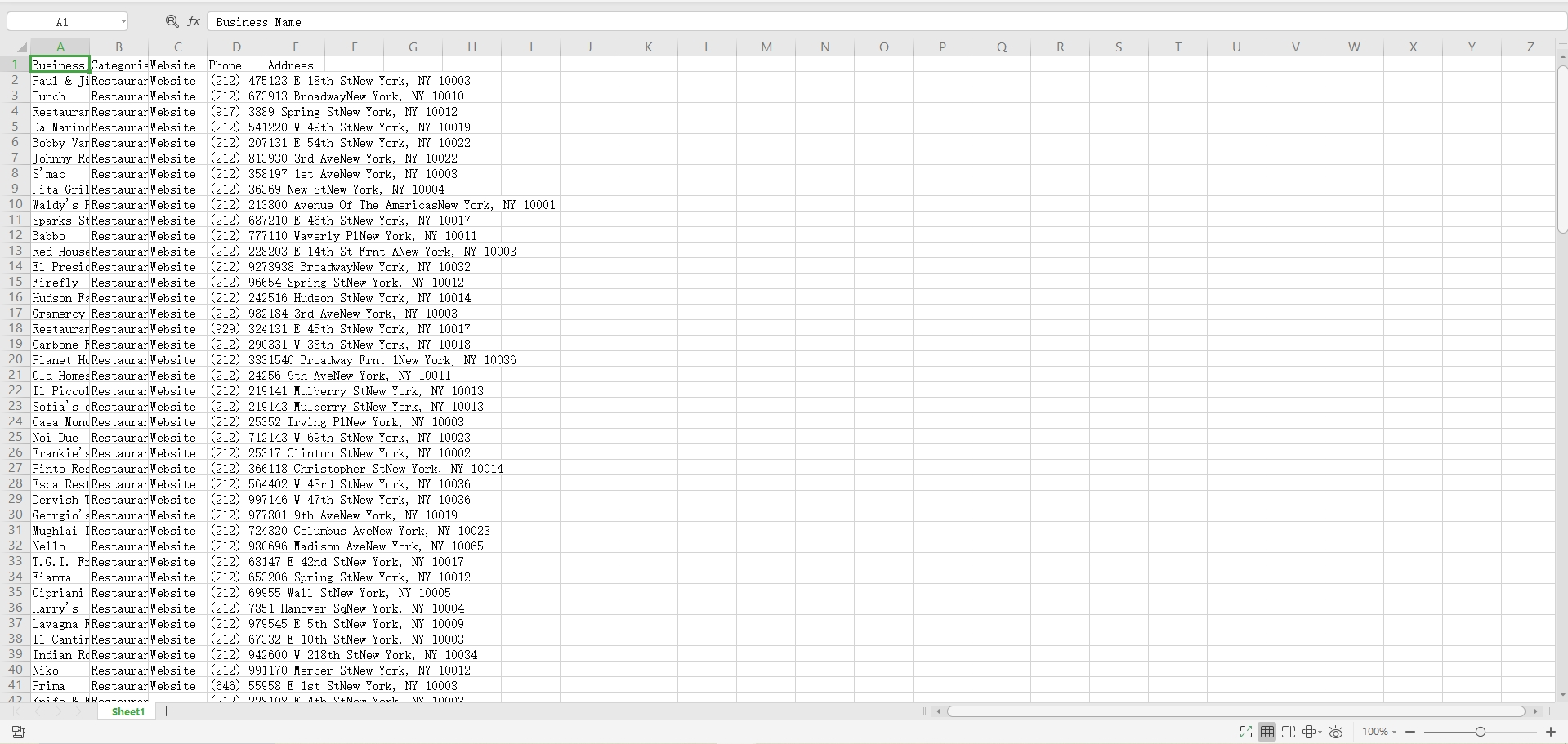
You can toggle on the confirmation option, with no configuration needed. Once finished, the data was ready to drop into my equipment in seconds, and with only a click, I could download the data file.
Use Case 2: Scraping Clutch.co for B2B Prospect Data
Scenario:
You run a B2B company and want to find potential clients or partners in a specific market: companies of a certain size, industry, and budget range.
Scraping B2B directories like Clutch.co is perfect for this. Clutch lists over 280,000+ service providers across 1,500+ categories. Unlike Yellow Pages, Clutch profiles include hourly rates, minimum project sizes, employee counts, and verified client reviews. You get more than just contact info: real qualifying data about budget, team size, and expertise.
Step 1 — Browse to your target category on Clutch.
For example, “Marketing Agencies in New York.”
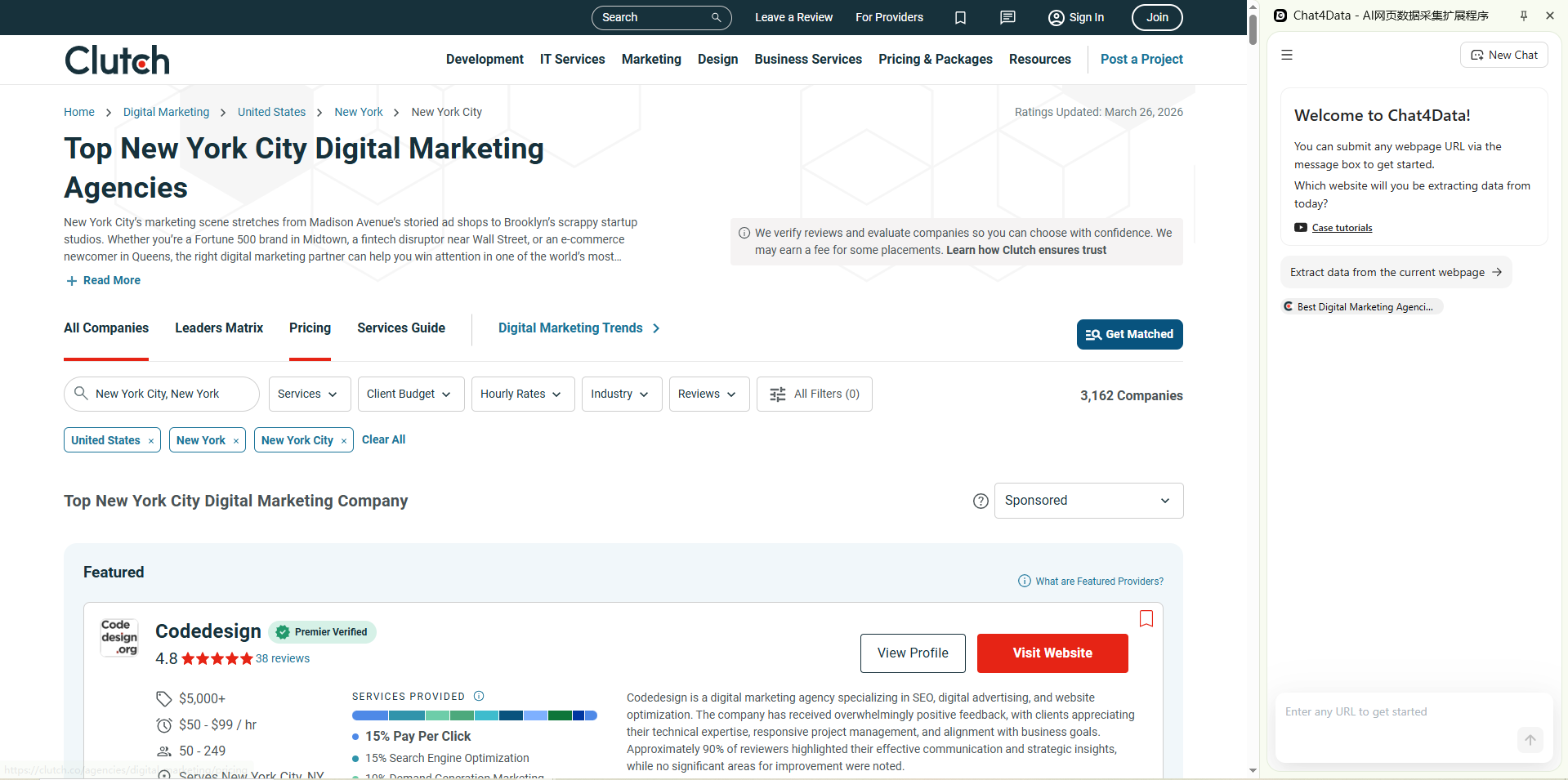
Step 2 — Paste the URL into Chat4data and describe the fields.
Follow the guide within the plugin interface, and you don’t even need to type the field names you need; you only need to delete those field names you don’t need.
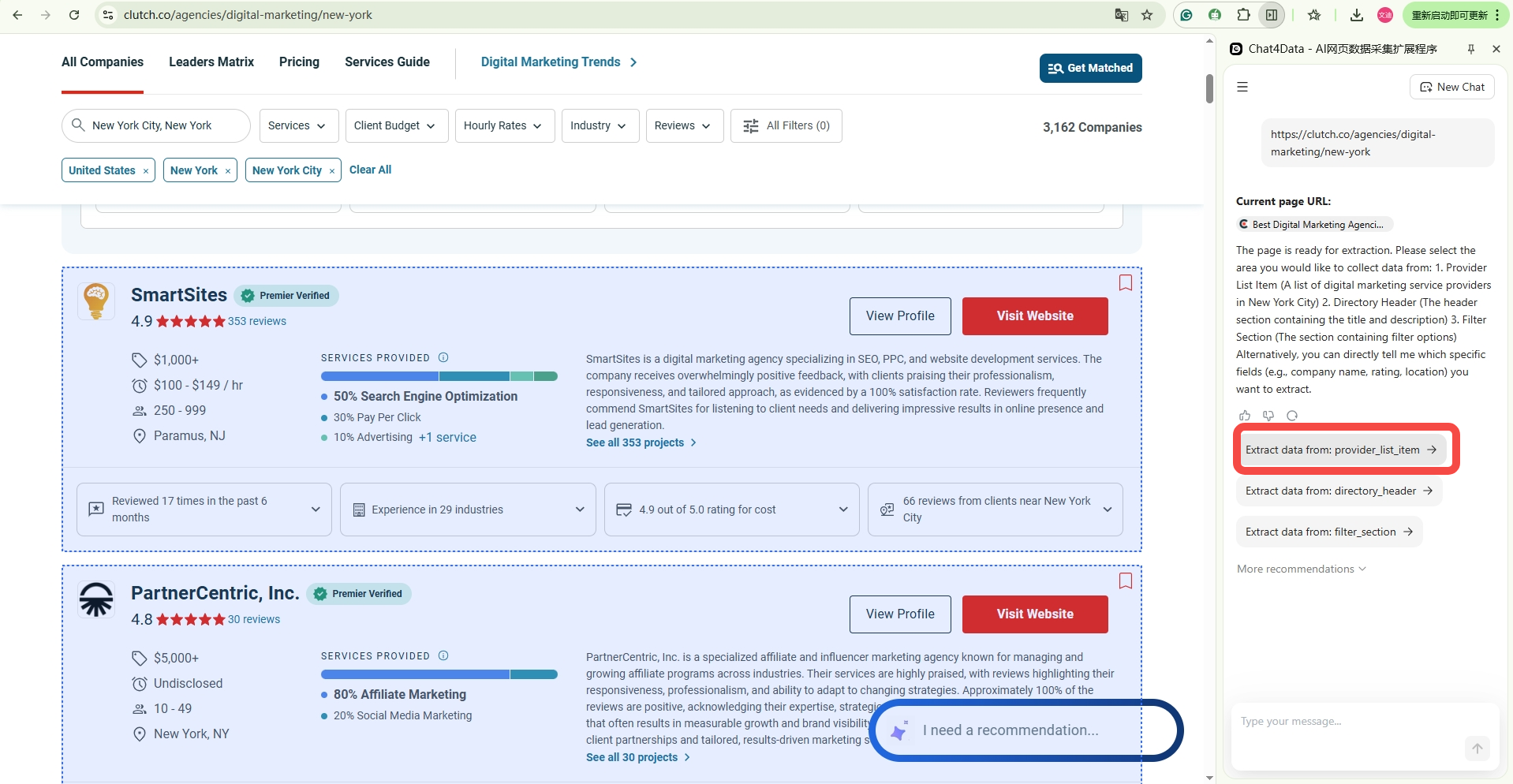
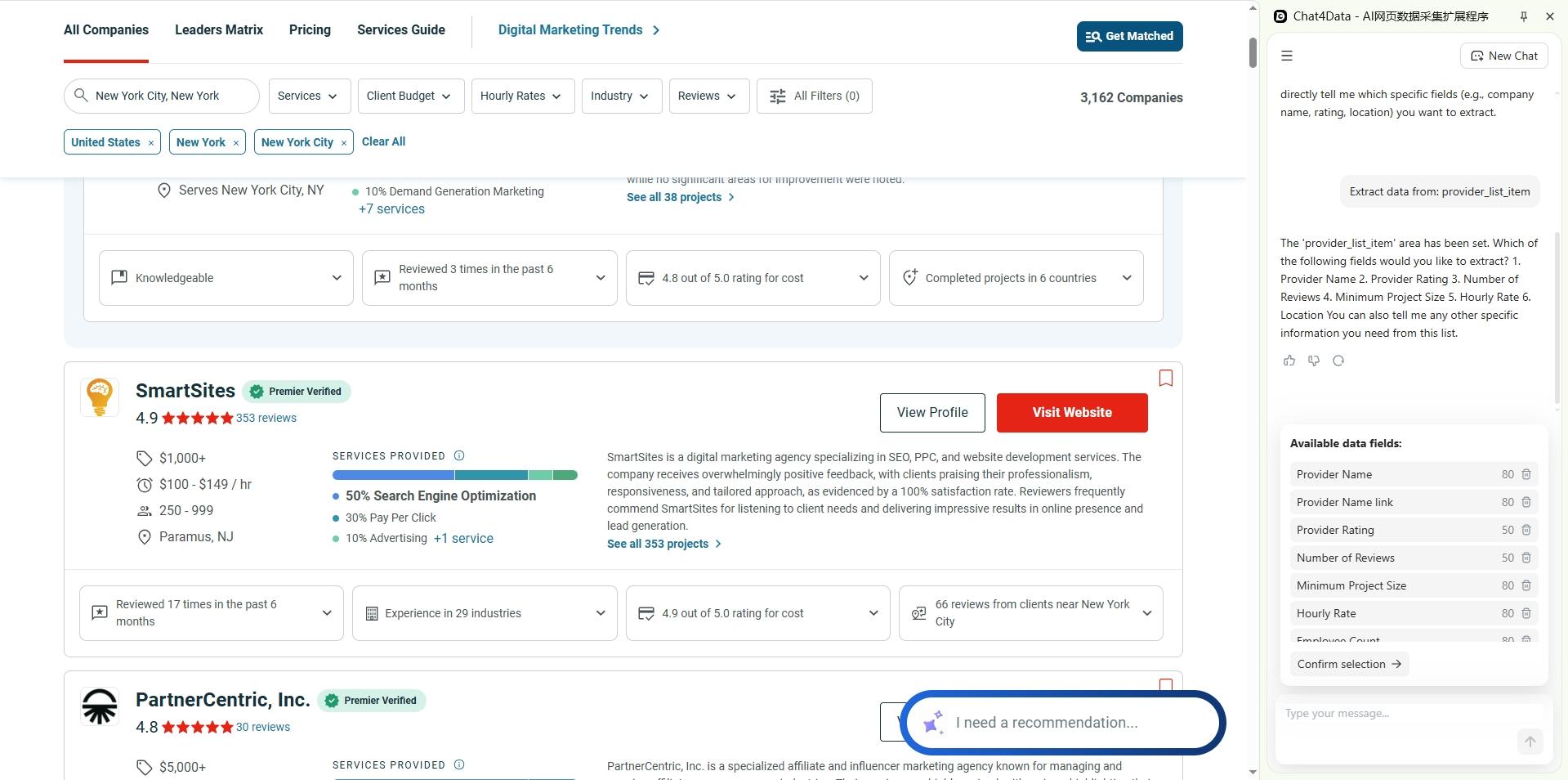
Step 3 — Enable sub-page crawling and pagination.
Clutch company profiles contain much richer detail than the listing cards. Let Chat4data visit each profile and crawl all results pages.
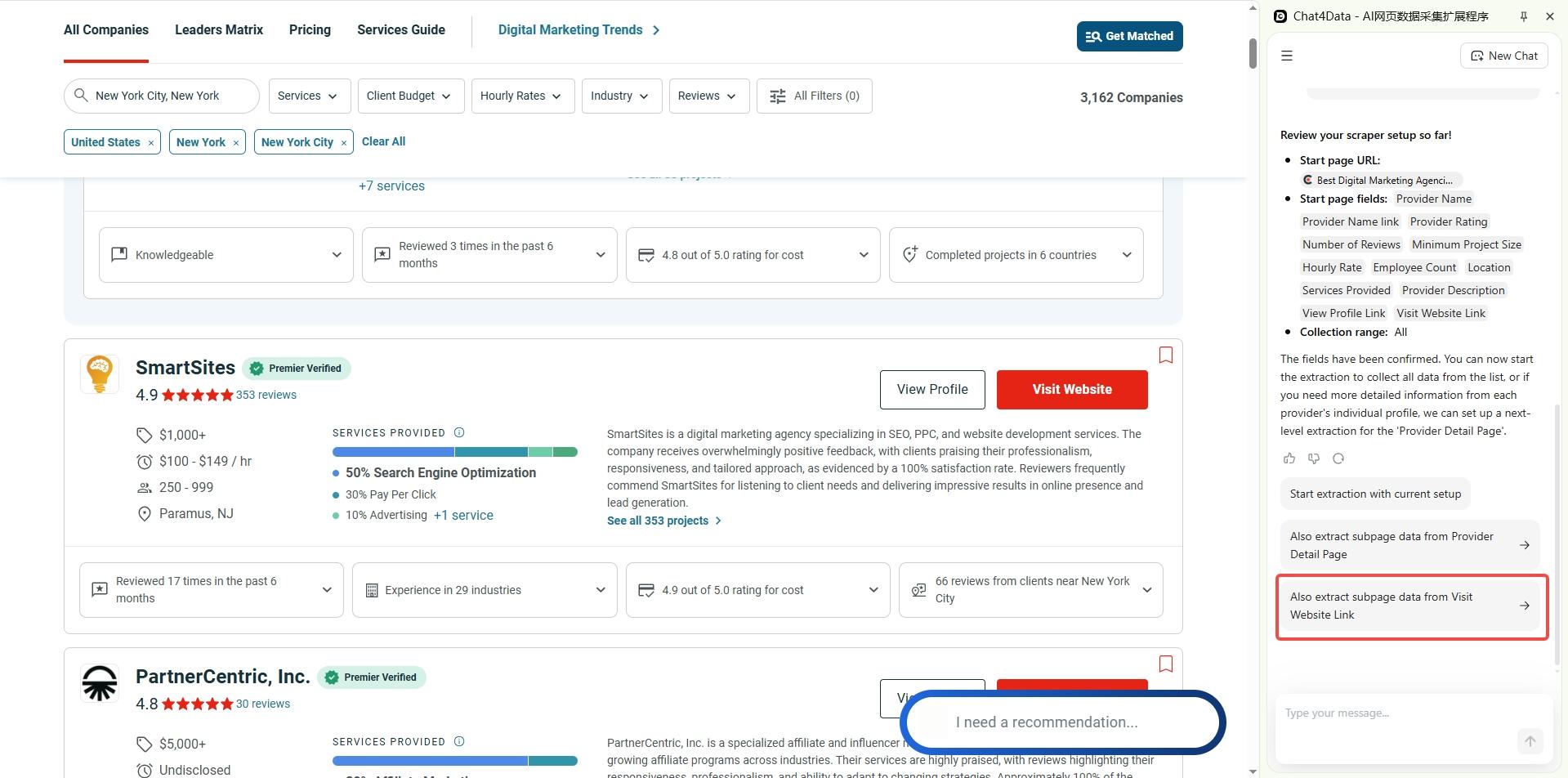
Step 4 — Export and qualify.
You now have a spreadsheet you can filter. For example, companies with 50–249 employees and a minimum project size of under $25K.
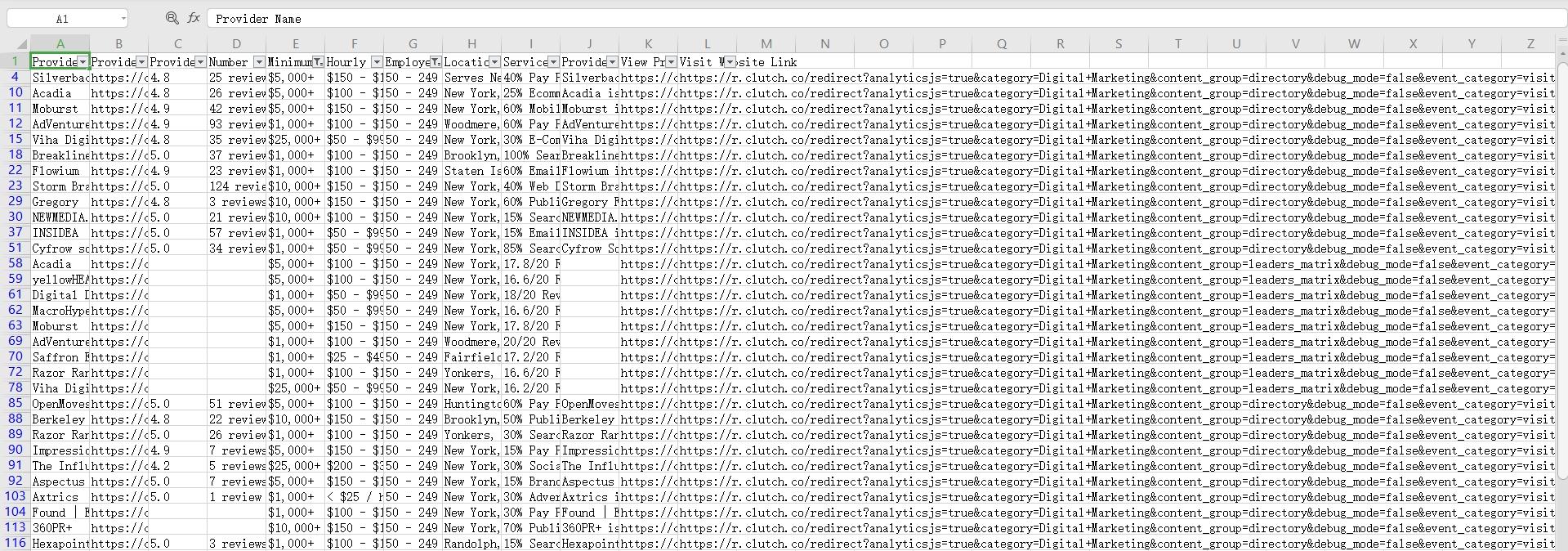
Why this matters for B2B:
Clutch gives you budget ranges, team sizes, and specializations. You can build a highly targeted list without any manual research on top.
Use Case 3: Scraping Indeed for Competitive Hiring Intelligence
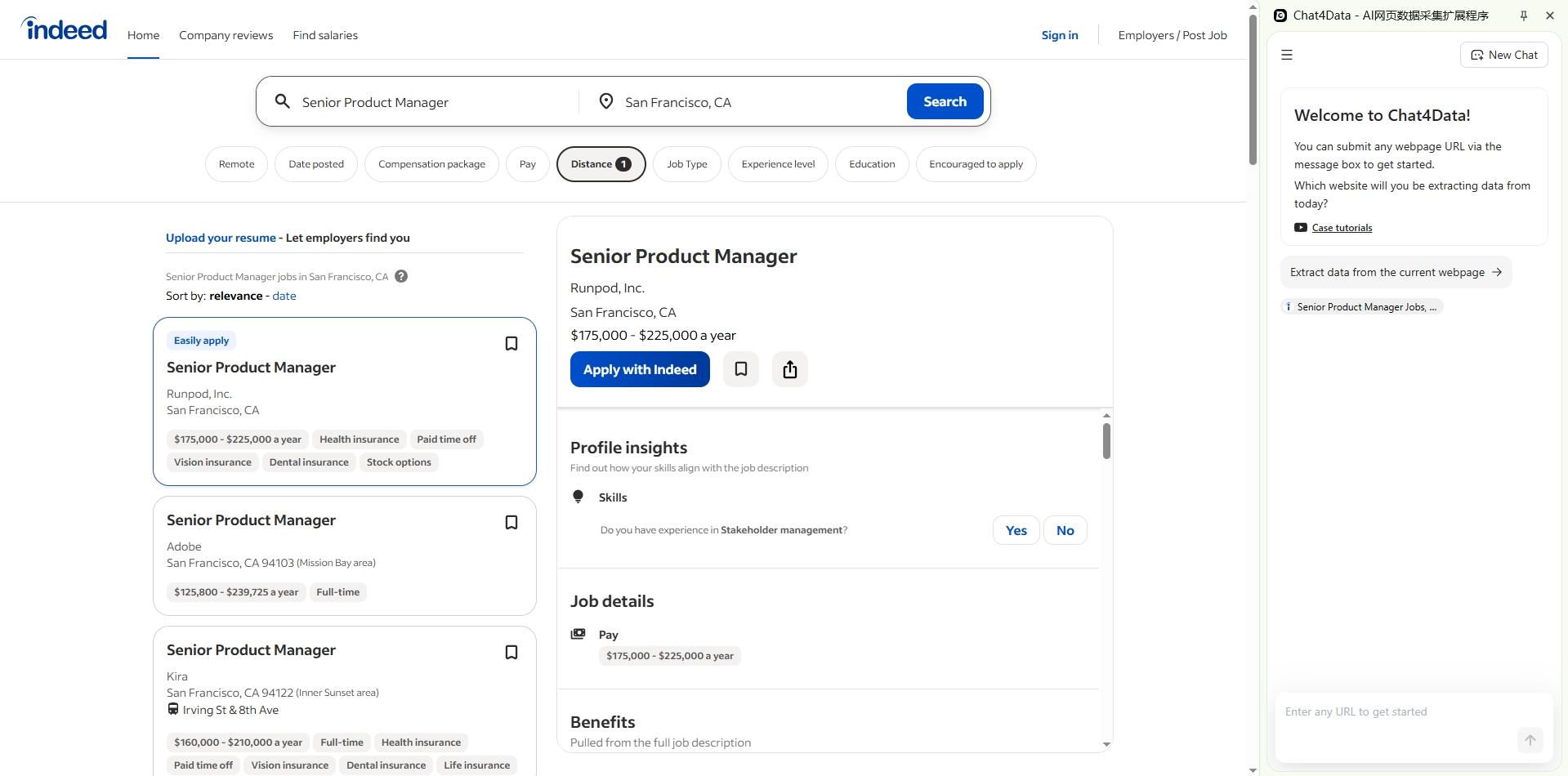
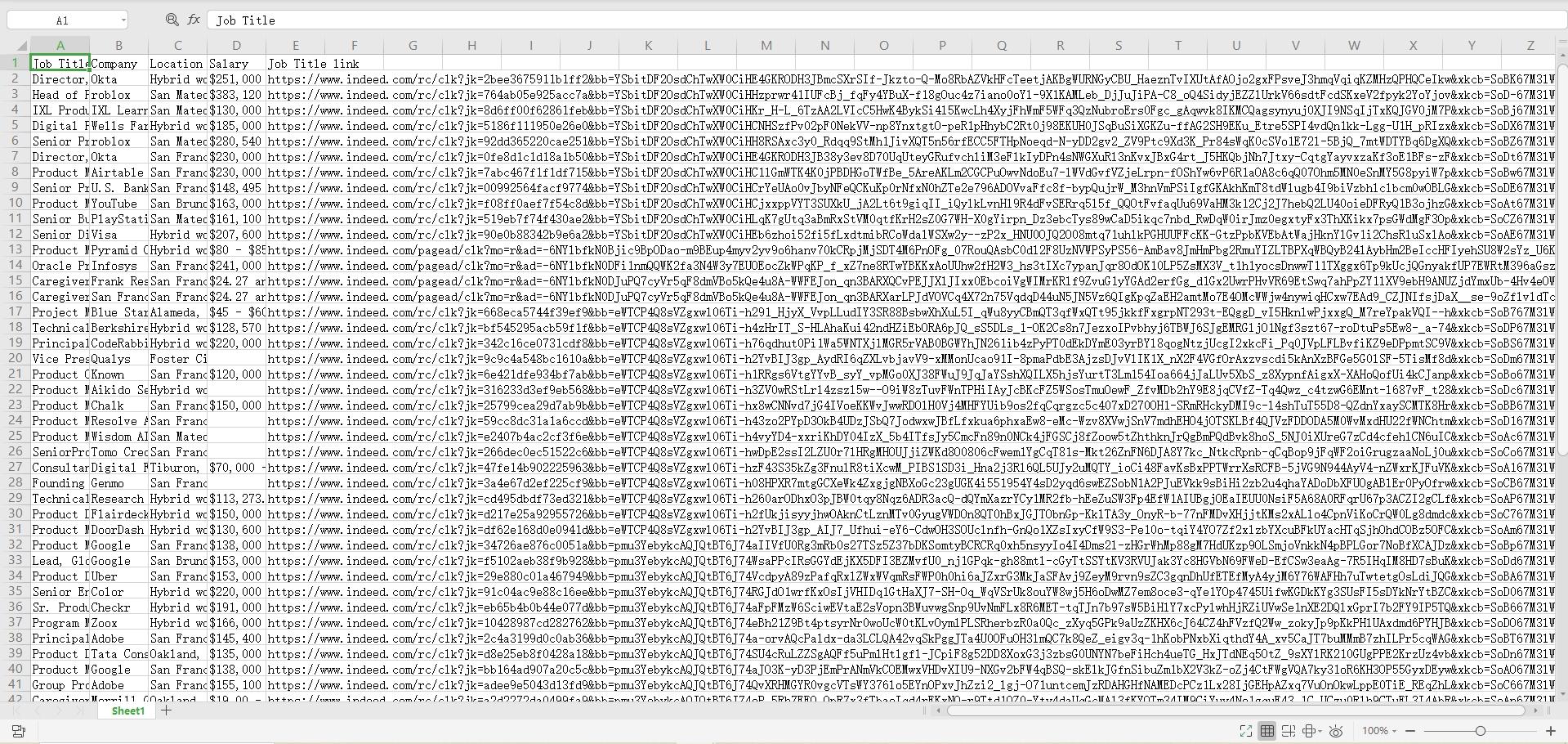
The same workflow applies to job boards. Search Indeed for a role and location, such as “Senior Product Manager, San Francisco.” Paste the URL into Chat4data and pull job title, company, location, salary range, and date posted. Enable pagination, export, and you have a comp benchmarking dataset.
Pricing & How Chat4data Compares
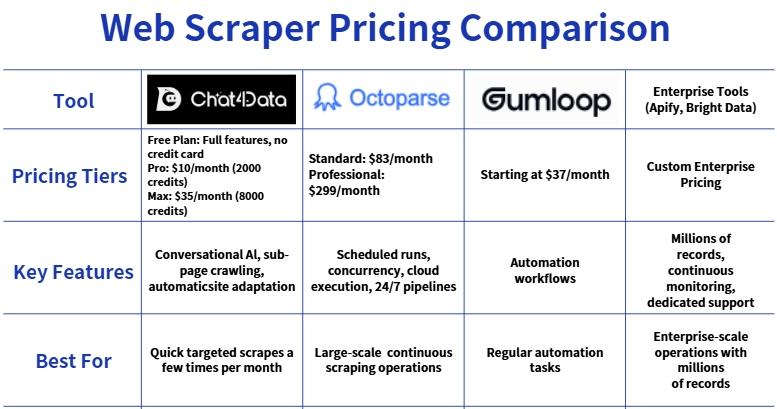
Chat4data is priced for how lead generation actually works: you run a scraping project a few times a month, not every day. See how Chat4data stacks up:
A fair caveat:
Those higher-priced tools earn their price for different use cases. Octoparse offers scheduled runs, enterprise-grade concurrency, and cloud execution. If you need 24/7 large-scale pipelines, they’re worth evaluating. But for targeted scrapes a few times a month, you’re paying for capability you won’t use.
What Chat4data is not for:
Chat4data isn’t built for enterprise-scale scraping. If you need millions of records scraped continuously across dozens of platforms, use an enterprise tool such as Apify or Bright Data. If you need pre-built verified databases with intent signals, try ZoomInfo or Apollo. Chat4data fills the gap these don’t cover: quick, accurate scrapes from niche directories without the enterprise price tag.
FAQs
Is it legal to scrape business data from online directories?
It depends on the platform, data type, and jurisdiction. Publicly listed business information on Yellow Pages, Yelp, or Clutch.co is generally treated differently from personal data behind login walls. Key rules: don’t bypass authentication, respect GDPR/CCPA when collecting personal contacts, and always check the platform’s Terms of Service.
This is not legal advice. Consult your legal team before scraping at scale.
How to Scrape Emails from Websites for B2B Outreach?
Yes. If an email is publicly displayed on a web page, Chat4data extracts it like any other field. But collecting emails at scale carries compliance obligations under CAN-SPAM, GDPR, and CASL.
Best practice: use scraped emails for personalized, one-to-one outreach, not bulk blasts. Always include an opt-out, and verify emails before sending.
Can an AI web scraper pull data from LinkedIn or other social platforms?
LinkedIn’s Terms of Service explicitly prohibit automated scraping. Companies have faced legal action for doing so. Twitter/X and Instagram also restrict automated access, with enforcement increasing. For lead generation, stick to public business directories. The data is meant to be found and contacted. Use official APIs or authorized partners for social platform data.
Can I use Chat4data to scrape Google search results?
It can extract titles, URLs, and snippets from Google results. This is useful for small, targeted prospect searches. However, Google rate-limits automated access quickly, so this works for a few pages of results, not bulk extraction. For large-scale SERP scraping, use a dedicated API such as SerpApi.
What’s the best AI web scraper for niche industry directories?
Chat4data handles niche directories well because these sites tend to have consistent structures. The conversational interface lets you describe fields once and collect across the entire directory, with sub-page crawling capturing both index and detail-page data in one run. For scraping many different sites simultaneously at enterprise scale, Apify or Bright Data offer more infrastructure.
Lessons from Running 50+ Scrapes
I’ve tested this workflow on niche directories across multiple industries. The biggest scrape was 2,000+ Clutch company profiles. Mid-run, I hit a character encoding issue. In a traditional code-based scraper, this would kill the whole job. But Chat4data’s error message was specific enough that I adjusted the prompt and fixed it in one try. No technical background needed. The interface just explained what went wrong.
This flexibility is the real advantage. You’re not locked into brittle code. You can adapt on the fly.
The Bottom Line
The data you need for lead generation is already sitting in public directories. The bottleneck has always been extraction: getting it off web pages and into a format you can work with.
Pick a directory from the tutorials above. Run a real scrape with Chat4data’s free plan. If the output fits your workflow, Pro at $10/month covers regular lead generation without the enterprise pricing you don’t need.
Disclaimer: Always check the Terms of Service of any website before scraping. Comply with applicable data protection regulations (GDPR, CCPA, CAN-SPAM) when collecting and using contact information. This guide is for educational purposes and does not constitute legal advice.