The air inside your AI data center is usually worse than the air outside. Studies show indoor air can be two to five times more polluted on average. Sometimes higher.
You can’t see it. You can’t smell it. But it’s there.
Modern data centers are built tight to save cooling energy. That means less fresh air gets in. Everything you add to the air just stays there.
Servers release particles from cooling fans. Cleaning products used on floors and racks release chemicals. New server racks off-gas from materials and adhesives. Even people working in the facility raise CO2 levels.
It builds up slowly. You don’t notice until something feels off. Unexplained hardware errors. Thermal throttling. Fan speeds running higher than normal. Equipment failure rates are creeping up.
An air quality monitor shows you what’s actually floating around. No guessing. Just numbers that tell you whether your data center environment needs fixing.
What Is an Air Quality Monitor?
Think of it as a little device that just sits there sniffing the air constantly. Pulls samples past its sensors and gives you numbers. Different models catch different stuff.
Here’s what matters most for AI hardware:
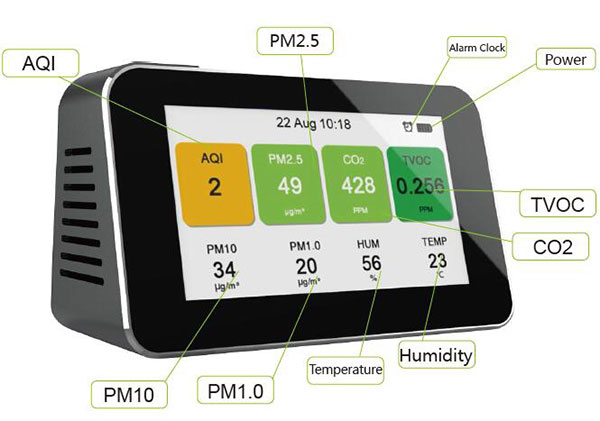
- PM2.5. Microscopic particles that come off cooling fans, dust from server intake, even off-gassing from materials inside racks. Small enough to get into fan bearings, coat circuit boards, and accumulate on heat sinks. Over time, that buildup reduces cooling efficiency and shortens hardware life.
- Formaldehyde (HCHO) and other VOCs. New server racks, cable insulation, adhesives, and even cleaning products release chemical vapors. These can corrode sensitive connectors over months of exposure. In high concentrations, they affect reliability of dense compute clusters.
- CO2. Rises when people are in the facility. Also rises when HVAC systems recirculate air without enough fresh intake. Not dangerous at data center levels, but persistent high CO2 means your cooling system isn’t bringing in enough outside air — which also means other pollutants aren’t getting flushed out.
- Humidity. Above 60% and corrosion risk climbs. Below 30% and static discharge risk climbs. Both extremes damage sensitive electronics. AI servers running 24/7 are particularly vulnerable to environmental swings.
Why Air Quality Matters for AI Hardware
AI data centers run expensive gear. A single GPU node costs tens of thousands of dollars. A rack of them costs more than most people’s houses. Keeping that gear running reliably means controlling the environment.
- Particle contamination is a real problem. Servers pull massive amounts of air through their chassis. Any particles in that air end up inside the equipment — on circuit boards, in power supplies, between fins on heat sinks. Over time, that dust layer acts like insulation, trapping heat and forcing fans to work harder. Eventually, components fail.
- Chemical off-gassing damages connectors. New racks, new cabling, new flooring materials all release chemicals. In high-density environments, those chemicals accumulate. Gold-plated connectors can corrode. Solder joints can degrade. The failure isn’t immediate — it’s gradual, and by the time you notice, you’ve got a rack of gear with intermittent problems.
- Humidity extremes cause immediate failures. Too dry and static discharge takes out memory modules or controllers. Too wet and you get condensation on cold surfaces inside servers. Both scenarios are preventable with proper monitoring.
- CO2 tells you about ventilation. If CO2 stays high, you’re not bringing in enough outside air. That means all the other pollutants — particles, chemicals, whatever else — are also recirculating and building up. CO2 is the canary in the coal mine.
Types of Air Quality Monitors for Data Centers
Not all monitors work the same way. What you need depends on your facility and your hardware.
- Particle counters focus on PM2.5 and PM10. They use lasers to count particles in the air. Essential for any facility with air-cooled servers. Good for tracking filter performance and catching contamination events before they affect hardware.
- Gas detectors look for VOCs and formaldehyde. Electrochemical sensors for specific gases. Semiconductor sensors for total VOC load. These matter if you’re adding new racks, new flooring, or new materials to your facility.
- Combination units track everything. Particles, gases, CO2, temperature, humidity. One device gives you the full environmental picture. This is what most data centers should deploy — especially for white space monitoring.
- Some simple air quality monitors for home only check CO2. They’re useful for home offices or bedrooms where you wonder if stale air is making you tired.. Not enough on their own, but a good starting point for smaller facilities.
Pick based on your operation. New facility build-out means focus on VOCs from materials. Existing facilities with high-density compute means focus on particles and humidity. Most AI data centers need a good combination unit that covers all the basics.
How to Use an Air Quality Monitor in a Data Center
Got your monitor? Good. Here’s how to actually use it.
Step 1: Establish a Baseline
Don’t overthink this part.
Put the monitor in whatever area you care about most. The main server room is a good start. Place it at rack intake height, roughly where servers pull air. Keep it away from supply vents or direct airflow from fans.
Now walk away. Leave it running for a full 24 hours before you check anything.
Why? The air changes constantly. Particle counts spike during maintenance activities. CO2 climbs overnight if ventilation drops. VOCs peak after new equipment is installed. A single snapshot tells you nothing about what your servers are breathing day in and day out.
Step 2: Compare to Guidelines
With a full day’s average, measure each reading against these ranges:
| Pollutant | Good Level | Moderate | Action Needed |
| PM2.5 | 0-12 µg/m³ | 13-35 | Above 35 |
| HCHO | 0-0.08 ppm | 0.08-0.1 | Above 0.1 |
| TVOC | 0-220 ppb | 220-660 | Above 660 |
| CO2 | 400-800 ppm | 800-1200 | Above 1200 |
| Humidity | 30-50% | 50-60% | Above 60% or below 30% |
Green means the environment is okay for AI gear. Yellow means you should keep an eye on it. Red means you need to do something before hardware starts showing problems.
Step 3: Test Individual Zones
The main server room readings won’t tell you much about the networking area, the storage zone, or the edge cabinet. Each area has its own air quality profile.
- Server intake zones. Test at the front of racks where servers pull air. This is what your hardware actually breathes. If particles are high here, your filters aren’t catching enough.
- Return air plenums. Test where warm air leaves racks. This tells you what’s coming out of servers. Often shows higher VOC levels from off-gassing inside equipment.
- New equipment staging areas. If you’re rolling in new racks, test the area during and after deployment. VOC spikes during unpacking can be dramatic. Knowing this helps you plan air purging before gear goes into production.
- Cooling unit supply vents. Test air coming directly from cooling units. This tells you whether your HVAC is adding or removing contamination.
Step 4: Test at Different Times
Location shows you where the problem is. Timing shows you what’s producing it.
- During maintenance. Watch particle counts while working in the facility. Opening panels, moving equipment, even walking through raises dust. If readings stay high for hours after work stops, your filtration isn’t keeping up.
- After new equipment is installed. Check VOC readings in the hours and days after new racks arrive. The off-gassing peak usually hits in the first 24-48 hours. Plan to run extra ventilation during that window.
- During normal operations. Baseline readings during steady-state conditions tell you what your servers breathe 90% of the time. This is the number to trend over weeks and months.
- During filter change cycles. Test right after filter changes, then again when filters are due for replacement. The difference tells you whether your replacement schedule is appropriate for your actual load.
Step 5: Take Action on Problem Readings
For high PM2.5:
- Check filter condition and seal integrity
- Consider higher MERV-rated filters if particle counts persist
- Reduce foot traffic during sensitive operations
- Use HEPA-filtered vacuums for cleaning, not compressed air
For high HCHO and VOC:
- Increase fresh air ventilation temporarily
- Run carbon filtration if available
- Allow new equipment to off-gas in staging areas before deployment
- Check material specifications for new racks and cabling
For high CO2:
- Verify outside air dampers are operating correctly
- Check occupancy schedules against ventilation settings
- Consider demand-controlled ventilation if occupancy varies
For humidity problems:
- Above 55%: check cooling coil operation and dehumidification
- Below 35%: check humidifiers if installed, consider adding them
- Look for leaks or condensation sources
When to Test Regularly
- A quick check every month or two helps. Just run the monitor in your main server area for a day and see what changed. You won’t notice slow shifts in real time — but you’ll spot them when you have last month’s numbers to compare.
- After any big change, test before and after. New racks. New flooring. Major maintenance. Without the comparison you’re just guessing whether things got better or worse.
- Test in different seasons too. Summer and winter run the HVAC differently, and the air quality will reflect that. Having readings from both seasons gives you a realistic picture of what’s normal.
- Also test right after you change filters. It’s the only way to know if the new filters actually helped or if the problem is somewhere else — like air sneaking around the filter frames.
Troubleshooting Your Monitor
- Readings jump around? That’s normal. Air moves. People walk through. HVAC cycles. Small changes throughout the day don’t mean the sensor is broken.
- Numbers look stuck? Take the monitor outside. If it doesn’t show a change after a few minutes of fresh air, the sensors might need cleaning. Check the manual.
- Your PM2.5 numbers don’t match the outdoor readings? They shouldn’t. You’re measuring conditioned indoor air, not the outside air. The gap is normal. If that gap suddenly disappears, something’s wrong with your filtration or building pressure.
- And if the numbers look fine but your hardware is still acting up — air quality is just one piece. Temperature, power quality, workload, all of those matter too. But if you’re not tracking air quality at all, you’re missing something that could be the whole problem.
Summary
Indoor air quality in AI data centers is often worse than most operators realize. Particles accumulate inside servers. VOCs from new equipment corrode connectors. Humidity swings cause static or condensation. CO2 levels reveal inadequate ventilation.
All of these are fixable once you know they exist. An air quality monitor is the tool that makes them visible.
Run a 24-hour baseline in your main computer area. Use the reference table to assess what you’re seeing. Test zone by zone. Track readings during and after maintenance, new equipment installs, and filter changes.
When a reading lands in problem territory, the fix tends to be clear once you’ve identified which pollutant is responsible. Better filtration. More fresh air. Off-gassing time before deployment. Humidity control.
Your AI hardware runs better, lasts longer, and throws fewer errors when the environment is right. An air quality monitor tells you whether your environment is right — or whether you need to fix something before it becomes a bigger problem.