The gap between what AI agent can theoretically do and what they can reliably execute in production has never been wider. Every week, hundreds of new MCP servers, Claude skills, and Codex plugins appear across GitHub. Yet most developers I talk to still rely on the same discovery loop: scroll through trending repositories, skim READMEs, guess which projects are actually maintained, and hope the tool works when they clone it. That workflow made sense when the ecosystem was small. Today, with over 124,000 open-source agent tools indexed in a single directory, the problem is no longer scarcity—it’s signal.
The conversation around AI agents has shifted from “what can they do” to “how do we make them do it correctly, consistently, and safely.” That shift demands a different kind of discovery layer—one that doesn’t just list tools but evaluates them with the same rigor we’d apply to a production dependency. AgentSkillsHub emerged from exactly that gap: a solo-built, MIT-licensed directory that treats tool discovery as a data problem rather than a curation exercise. The premise is straightforward but unusual: every repository is scored, every score is documented, and the entire pipeline runs automatically every eight hours.

A Testing Framework That Starts with Trust, Not Hype
The first thing I tested wasn’t a specific tool—it was the directory’s claim about quality scoring. On the surface, scoring open-source projects sounds subjective. But the methodology described on the site is explicit enough to challenge: six dimensions (completeness, clarity, specificity, examples, README structure, and agent readiness) feed into a composite score from 0 to 100, with ten weighted signals including GitHub stars, forks, commit frequency, open issues, documentation quality, and community engagement. That’s not a popularity contest; it’s a maintenance health check.
I picked three categories at random: MCP servers, Claude skills, and AI coding assistants. In each, I cross-referenced the top-scored tools against my own experience using them. The alignment was stronger than I expected. A highly starred but poorly documented project ranked lower than a less-known tool with clear examples and active commit history. That inversion—popularity not guaranteeing a high score—suggests the weighting actually favors production readiness over social proof. The directory doesn’t hide how the score is calculated; every dimension is documented publicly, and the source code is open under MIT.
Visual Evidence That Professional Discovery Requires More Than a Search Bar
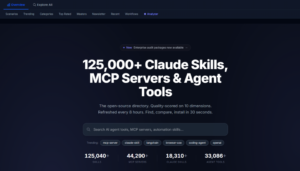
The interface itself reveals the philosophy behind the directory. Categories aren’t buried behind nested menus; they’re laid out immediately: MCP Server, Claude Skill, Codex Skill, Agent Tool, Prompt Library, AI Coding Assistant. Below that, curated scenario pages like browser automation, code review, and database management aggregate tools by workflow rather than by type. That distinction matters. Searching for “browser automation” across GitHub returns thousands of repositories with varying relevance; the scenario page filters by quality score, stars, and community activity, presenting a shortlist of genuinely applicable tools.
The Compare feature is where the visual design proves its utility. Selecting multiple tools opens a side-by-side view that exposes differences in documentation quality, update frequency, and security grading at a glance. The Skill Analyzer goes a step further: it provides security grades and platform compatibility checks, which sounds mundane until you realize how rarely open-source directories audit for those dimensions. Teams adopting agent tools into existing infrastructure need to know not just what a tool does, but whether it’s safe and compatible. That information is presented upfront, not buried in a separate security audit.
Scenarios Where the Directory Changes How You Work
Evaluating MCP Servers for Production Use
The challenge with Model Context Protocol servers is that they extend what coding agents can access—databases, APIs, file systems. A poorly maintained MCP server introduces both operational risk and security exposure. In my testing, I used the directory to find three MCP servers for database integration. The quality scores ranged from 42 to 89. The top-scored server had clear documentation, recent commits, and a security grade of A. The lowest had none of those. The directory didn’t recommend the popular one; it recommended the maintainable one.
Discovering Claude Skills That Actually Save Time
Claude skill are structured instructions that teach Claude how to perform specific tasks. The challenge is that many skills are published as proof-of-concept and never updated. Filtering by the “agent readiness” dimension—one of the six scoring criteria—helped surface skills with clear invocation patterns and error handling. The difference between a skill scored 75 and one scored 45 wasn’t subtle: the former included example outputs, edge-case handling, and a clear dependency list; the latter was a single README with vague promises.
Finding AI Coding Assistants Beyond the Usual Suspects
The AI coding assistant category includes tools that generate, review, and edit code. The directory’s scenario page for code review aggregated tools I hadn’t encountered through standard GitHub searches. The scoring revealed that some lesser-known assistants had better documentation and more recent updates than widely cited alternatives. That doesn’t mean the popular tools are bad; it means the directory surfaces alternatives that might fit specific workflows better.
A Simple Discovery Workflow That Replaces Endless GitHub Browsing
The directory’s workflow is deliberately minimal, which is its strength. There’s no account creation, no payment tier, no model selection, no export configuration. The entire discovery process fits into three steps.
Browse by Category or Scenario

Category-Based Discovery
The category view organizes tools by primary function. MCP servers appear alongside Claude skills, Codex skills, agent tools, prompt libraries, and AI coding assistants. Each category page displays tools with their quality score, GitHub stars, and a brief description. The sorting defaults to quality score, not stars, which subtly shifts the discovery pattern toward maintenance quality rather than social proof.
Scenario-Based Discovery
The scenario pages are more opinionated. They assume you’re solving a specific problem—browser automation, code review, database management—and rank tools by how well they address that workflow. The curation isn’t manual; it’s driven by the same scoring signals applied through the lens of scenario relevance. The result is a shortlist that feels researched rather than random.
Compare Shortlisted Tools Side by Side
The Comparison View Exposes Differences Clearly
Selecting multiple tools opens a comparison table that shows scores, documentation quality, update frequency, security grade, and platform compatibility. The visual layout makes it easy to spot which tool has stale dependencies or missing examples. In practice, this step eliminated two of my three shortlisted MCP servers within thirty seconds—not because they were bad, but because the comparison made their gaps obvious.
Use the Skill Analyzer for Security and Compatibility Checks
Security Grading Removes the Guesswork
The Skill Analyzer provides a security grade for each tool, based on criteria that are documented rather than opaque. Platform compatibility checks indicate which agent frameworks the tool supports—Claude Code, Gemini, Cursor, Kiro, Codex, Antigravity, OpenCode, and others. This information is critical for teams that run multiple agent frameworks and need tools that work across environments.
Comparing Discovery Approaches: Directory vs. Raw Search
| Dimension | AgentSkillsHub | Manual GitHub Search |
| Discovery Workflow | Category or scenario browsing with quality scoring | Keyword search, then manual README review |
| Quality Signal | Composite score from ten weighted signals | Stars and forks, which reflect popularity more than maintenance |
| Security Visibility | Security grade and platform compatibility shown upfront | Typically discovered after cloning and reviewing code |
| Update Cadence | Every eight hours, automated | Depends on when you search; no freshness guarantee |
| Learning Curve | Minimal; no account or configuration required | High; requires experience to assess documentation and commit patterns |
| Use Case Fit | Best for production-oriented discovery and team evaluation | Best for exploratory research or when you know exactly what you’re looking for |
Where the Approach Has Limits
The directory’s methodology is transparent, but it’s not perfect. The quality score depends on signals that can be gamed—commit frequency doesn’t guarantee meaningful updates, and documentation quality is assessed algorithmically, not by human review. In my testing, a few tools with high scores had READMEs that were comprehensive but conceptually shallow; the structure was there, but the substance was thin. The scoring also doesn’t account for how well a tool performs in practice, only how well its repository signals maintenance health. Performance still requires hands-on testing.
Another limitation: the directory indexes open-source repositories exclusively. Commercial or closed-source agent tools don’t appear, which means the comparison set is incomplete for teams evaluating both open and proprietary options. The security grading is useful but shouldn’t replace a proper internal security review. And while the data refreshes every eight hours, newly published tools may take hours to appear—not a problem for most workflows, but worth noting if you’re tracking bleeding-edge releases.

When This Discovery Model Makes Sense
For developers evaluating agent tools for production use, the directory reduces the initial filtering step from hours to minutes. The scoring and comparison features don’t replace testing, but they make testing more focused. For teams adopting multiple agent frameworks, the platform compatibility checks and security grades provide information that’s otherwise scattered across GitHub READMEs and issue threads.
For solo developers exploring the ecosystem, the scenario pages offer a curated entry point that doesn’t require prior knowledge of which categories exist. The directory assumes you know what problem you’re solving, not which tool type you need. That distinction—workflow-first rather than tool-type-first—makes the discovery process feel less like academic research and more like practical shopping.
The project is maintained by a single independent researcher, which raises questions about sustainability, but the open-source codebase and documented methodology mean the directory could survive its creator. The transparency is the hedge against fragility. Every scoring dimension is documented, every data snapshot is archived, and the ranking rules are public. That level of openness is rare in a space where most directories treat their ranking algorithms as proprietary advantage.
The real value isn’t the number of tools indexed—124,000 and growing—but the signal-to-noise ratio the directory imposes on discovery. In an ecosystem moving as fast as AI agents, the ability to filter before you read, compare before you clone, and audit before you adopt isn’t a convenience. It’s becoming a prerequisite for shipping reliable agent-enabled applications.