



Kuaishou released Kling 3.0 on February 5, 2026, and it’s a meaningfully different model from the versions that came before it, not just an incremental bump. Where Kling 2.6 topped out at 10-second clips in 1080p, Kling 3.0 generates natively at 4K, runs up to 60fps, extends to 15 seconds, and can plan out a multi-shot sequence the way a director would rather than producing one continuous take. This piece covers what the model actually does, then walks through calling it via API with a real, working code example.
What Is Kling 3.0?
Kling 3.0 is Kuaishou’s third-generation AI video model, built around what the company calls a unified multimodal architecture. In practice, that means one model handles text, image, audio, and video together, so generation and editing happen in a single workflow instead of chaining separate tools for each step.
The jump from Kling 2.6 is substantial: duration went from a 10-second ceiling to 15 seconds, resolution moved from upscaled 1080p to native 4K (3840×2160), frame rate doubled from roughly 30fps to up to 60fps, and lip-sync support expanded to three additional languages. Kling AI 3.0 first rolled out to Ultra subscribers on Kuaishou’s own platform, with broader access following.
Key Features
AI Director multi-shot storytelling. Kling 3.0 can generate up to six distinct shots within a single clip, each with its own framing, camera movement, and narrative beat, while keeping spatial continuity automatically. A single prompt returns something closer to an edited sequence than a single take.
Native synchronized audio. The model co-generates sound directly with the video, music, sound effects, and environmental audio, along with lip-synced dialogue across five languages (Chinese, English, Japanese, Korean, and Spanish), including multiple dialects and accents and distinct per-character voices.
Native 4K output. Video renders at true 4K rather than being upscaled from a lower resolution, with visibly better handling of physics-heavy details like flowing water, fabric movement, and human anatomy.
Visual chain-of-thought reasoning. Before generating the first frame, the model plans the sequence of events across the clip, which is part of why multi-shot outputs hold together instead of drifting between shots.
Subject consistency and text preservation. Kling 3.0 can lock a character’s appearance and voice from a reference image or short video clip, carrying identity across shots and scene changes. It also keeps logos, signage, and on-screen text sharp and legible, a detail that matters a lot for product and branded content.
How to Access the Kling 3.0 API
Kling 3.0 is new enough (released in February 2026) that direct access still runs primarily through Kuaishou’s own Kling AI platform, gated initially to Ultra subscribers. For developers who want to call the model programmatically without building a native Kuaishou integration, the Kling 3.0 API on Apiframe exposes it as a standard REST endpoint, fully documented and testable, with no separate Kuaishou account required.
Apiframe wraps Kling 3.0 into the same API key and billing used for every other model on the platform (Flux, Veo, Seedance, and so on), so it’s not a Kling-specific integration; it’s one integration that happens to include Kling 3.0. Requests are asynchronous; submit a job, then poll for the result or receive it via webhook, and no separate Kuaishou account is required.
Step-by-Step: Your First Kling 3.0 API Call
1. Submit a generation request
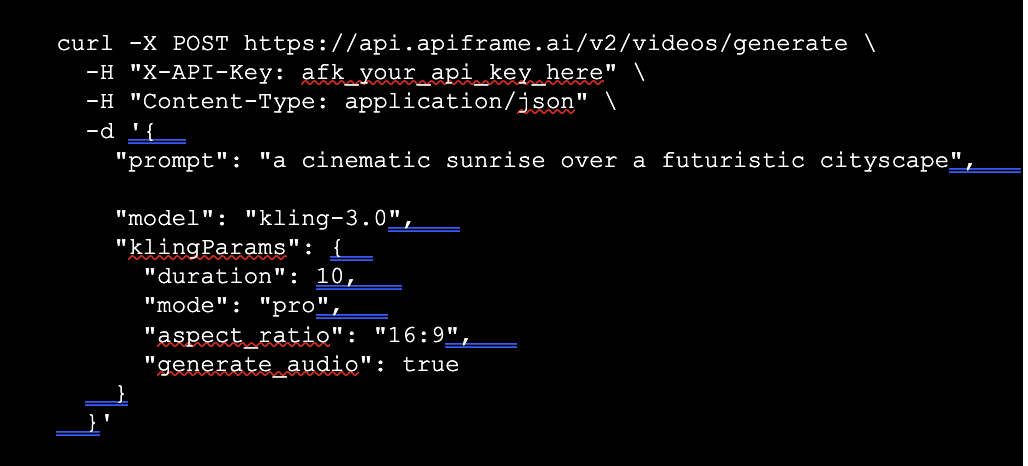
The same call in Python:
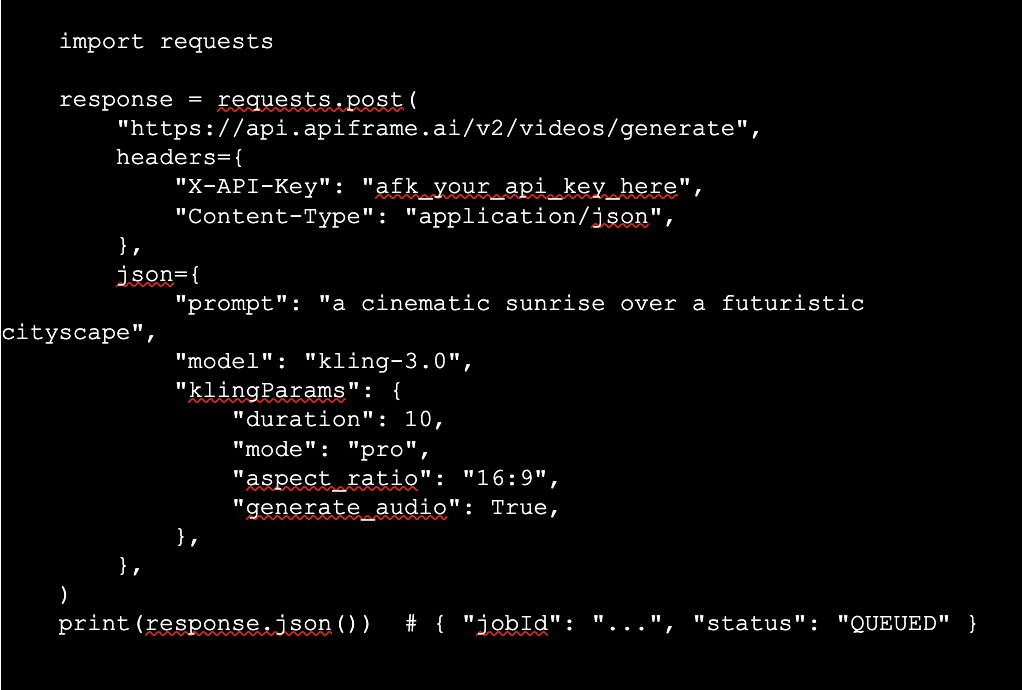
The available klingParams fields: duration (3 to 15 seconds), mode (standard or pro), aspect_ratio (e.g. “16:9”), start_image and end_image (URLs to control the first and last frame), negative_prompt, generate_audio (defaults to true), and multi_prompt (a JSON array for timeline-based, multi-shot control).
2. Poll for the result
The submission returns a 202 with a jobId. Poll GET /v2/jobs/{id} until the status is COMPLETED:
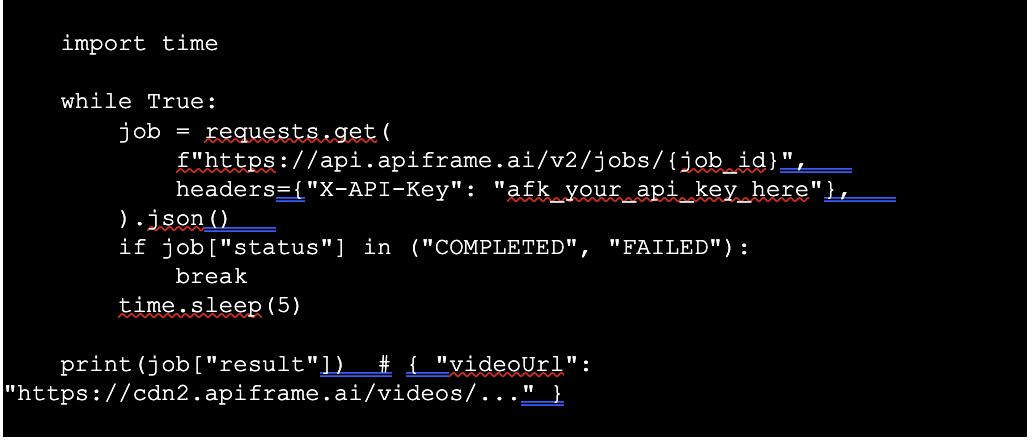
A webhook URL can be supplied instead of polling, useful for production workloads where you don’t want to hold a connection open for the roughly 150-second average completion time.
Pricing
Apiframe bills Kling 3.0 per second of output, with the rate depending on mode and whether audio is included:
| Variant | Credits per second |
| Standard | 29 |
| Standard + audio | 43 |
| Pro | 39 |
| Pro + audio | 58 |
Credits are priced at $0.01 each on paid plans, so a 5-second pro clip with audio costs 290 credits, about $2.90, and a 15-second pro clip with audio costs 870 credits, about $8.70. A 10-second standard clip without audio also runs 290 credits, roughly $2.90. Exact plan pricing and included credit grants are on Apiframe’s pricing page, since per-second cost is only part of the picture, plan choice also affects concurrency and monthly credit allowance.
Use Cases
Multi-shot ad creative. The AI Director feature can produce a short sequence, a wide establishing shot, a product close-up, and a closing frame from a single prompt, rather than stitching together separate generations.
Product demos with consistent branding. Text and logo preservation across shots means product names and packaging stay legible through camera moves and scene changes.
Dialogue-driven short-form content. Native multilingual lip-sync makes two-character dialogue scenes viable without a separate audio pipeline.
Localization. The same clip can be regenerated with lip-sync in a different supported language for regional variants of the same creative.
FAQ
Is there an official Kling 3.0 API directly from Kuaishou?
Kling AI offers its own app and API, currently rolling out first to Ultra subscribers. Unified API platforms like Apiframe offer an alternative route that doesn’t require a direct Kuaishou account.
What’s different between Kling 3.0 and Kling 2.6?
Kling 3.0 extends max duration from 10 to 15 seconds, moves from upscaled 1080p to native 4K, doubles frame rate to up to 60fps, adds native synchronized audio and multi-shot generation, and expands lip-sync language support.
Does Kling 3.0 generate audio?
Yes. It co-generates music, sound effects, ambient audio, and lip-synced dialogue directly with the video, no separate audio generation step required.
How long can Kling 3.0 clips be?
Anywhere from 3 to 15 seconds, set via the duration parameter.
Do I need a Kling AI account to use the API?
Not if you access it through a third-party unified API platform. Going directly through Kuaishou’s own Kling AI Ultra tier is a separate route with its own account requirements.