



Video sits at the center of online growth. It stops thumbs, sparks clicks, and—when hosted right—drives revenue. Yet most WordPress sites still paste a YouTube or Vimeo iframe and call it a day.
That “free” player isn’t free. One YouTube embed pulls in up to 2.6 MB of extra scripts and more than 20 network requests before anyone presses play, crushing Core Web Vitals. Vimeo looks sleeker but stunned creators in 2022 with a 2 TB-per-month bandwidth cap and surprise surcharges.
If speed, control, and revenue matter, you need a host built for WordPress. We tested dozens and surfaced five ad-free services that stream faster, lock down content, and keep visitors on your site.
Want deeper privacy tactics? Check our Essential Guide to Private Video Hosting.
Let’s get rolling—fast, secure, and distraction-free.
Why Free Platforms Cost You More Than You Think
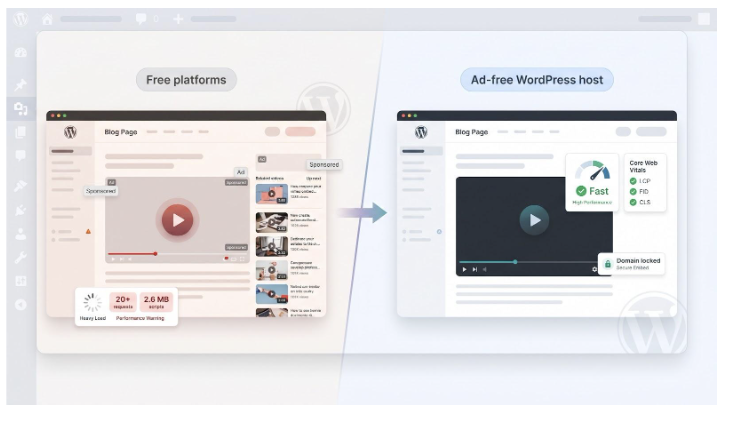
YouTube looks effortless: paste a link, get a player. That convenience pulls in up to 2.6 MB of extra scripts and more than 20 network calls before anyone presses play. The added weight slows Largest Contentful Paint and chips away at your Core Web Vitals score.
The bill extends to attention. End screens, suggested clips, and autoplay prompts send viewers off-site the second a video ends, and you have no control over which “related” videos appear. One stray click can break your funnel.
Vimeo felt safer until 2022, when it set a 2 TB-per-month bandwidth ceiling and told high-traffic accounts to buy costly custom plans or leave. Non-profits, educators, and indie course builders suddenly faced unplanned fees and possible takedowns.
Both platforms offer thin protection for member-only content. Anyone with the URL can share or download the file with common browser add-ons, letting paid material leak for free.
Put those hits together and “free” hosting often means slower pages, lost visitors, brand dilution, and surprise costs. Purpose-built, ad-free hosts avoid those pitfalls and keep viewers and revenue inside your WordPress site.
Spotlightr: Private Video Hosting With Built-In Marketing Muscle
Every file passes through multi-bitrate encoding and streams from more than 200 edge nodes, so viewers press play and see motion, not buffering wheels.
Choosing a private host goes beyond quick starts. Spotlightr’s in-depth Essential Guide To The Best Private Video Hosting Platforms For Secure Sharing shows why HLS encryption, domain restrictions, and CRM-ready analytics are the minimum for creators who sell premium content and refuse to leak revenue.
This ensures a seamless viewing experience, regardless of the user’s location or device. The platform’s robust infrastructure supports a wide range of video formats and resolutions, catering to diverse audience needs.
What Spotlightr Is
Spotlightr began as an alternative to “upload and hope” tools. Today it serves instructors, membership sites, and marketers who refuse to lose leads to YouTube pop-ups. You get an ad-free player you can brand with your colors and logo, HLS-encrypted delivery that frustrates browser downloaders, and a WordPress plugin that drops videos into Gutenberg or any major LMS in seconds.

Spotlightr private video hosting WordPress player and analytics screenshot
Every file passes through multi-bitrate encoding and streams from more than 200 edge nodes, so viewers press play and see motion, not buffering wheels. In-player email gates, clickable calls to action, and heat-map analytics reveal exactly where attention spikes or fades. Entry pricing stays closer to a SaaS note than an enterprise invoice, while every engagement feature stays unlocked from day one, making Spotlightr both budget-friendly and conversion-ready.
Wistia: Analytics-Obsessed Video Built for Marketing Teams
What Makes Wistia Different
Wistia treats every view as data you can monetize. Drop the embed in WordPress and watch heat maps, play-rate graphs, and viewer timelines populate a dashboard that feels more like Mixpanel than a media library. Connect HubSpot or Salesforce, and the stats follow each contact so sales can see when a prospect re-watched the pricing segment.
Wistia video analytics dashboard and heatmap for WordPress marketing teams
Brand Control From Thumbnail to Thank-You Screen
Choose the player color, change the play-button shape, and remove Wistia’s logo. Turnstile gates collect an email before, during, or after playback, while end-frame calls to action lead visitors to a signup page, keeping them on your site.
Performance and Polish
Videos encode to multiple resolutions up to 4K and stream from top-tier CDNs, so load times stay fast even on mobile data. SEO embeds add JSON-LD markup and an indexable transcript, giving Google crawlable content without sending traffic to YouTube.
Pricing Reality Check
The free tier covers 25 GB of storage. Serious use starts at $79 per month for the Business plan, which includes 250 GB and three users. Extra users and marketing-automation add-ons raise the cost, so larger teams need budget headroom. If you value best-in-class analytics and seamless CRM links, Wistia justifies its premium.
Jetpack VideoPress: WordPress-Native Hosting on a Coffee-Money Budget
VideoPress lives inside the Jetpack plugin, so you upload videos where you already write posts instead of managing another dashboard. Drag a file into the block editor, click publish, and WordPress handles the rest. No iframes, no code—just a clean, responsive player that inherits your theme’s style.
Jetpack VideoPress block editor workflow inside WordPress screenshot
The cost is simple: $5 per month buys 1 TB of storage and unlimited streaming on WordPress.com’s global CDN. For most blogs and small businesses that covers hundreds of HD clips before storage becomes a concern.
Because the service runs inside Jetpack Performance, videos transcode to multiple resolutions and lazy-load below the fold. Pages stay light, Core Web Vitals remain green, and visitors stay on your site.
Privacy tools are straightforward. You can mark a video private, add a password, or lock embeds to your domain—enough for client demos or member-only teasers, though not the full DRM envelope a course platform might need.
If you need deep analytics or in-player lead forms, VideoPress falls short. What it delivers is friction-free workflow and a friendly price. For WordPress owners who want reliable, ad-free playback without extra logins, it’s an easy win.
Bunny.net Stream: Pay-As-You-Go Speed for Tech-Savvy Sites
Bunny is a global CDN first and a video host second, and that order shows. Upload a file, grab the library ID, and the platform streams adaptive HLS from more than 100 edge locations at about $0.01 per gigabyte. No monthly tiers, no caps—just usage billing similar to S3, only cheaper.
Bunny.net Stream CDN-based video hosting and edge locations screenshot
Developers appreciate the freedom. Want your own player skin? Drop the raw MP4 link into Plyr or Video.js. Need locked-down access? Sign each URL with an expiring token or enable Widevine and FairPlay DRM. You can also geo-block regions or restrict playback to logged-in users with a few API calls.
Because pricing is pure consumption, small blogs often pay less than a latte each month, while viral spikes still stay below the cost of many “unlimited” plans that throttle after hidden limits. The trade-off is convenience: there is no official WordPress plugin, and the dashboard assumes you are comfortable pasting code. If copying an iframe feels daunting, choose a plug-and-play host. For performance-focused builders who already offload images to a CDN, Bunny lets video ride the same fast lane without straining the budget.
SproutVideo: Security-Forward Hosting With Concierge Support
SproutVideo sits between plug-and-play ease and enterprise depth. Upload a file and you get a crisp, ad-free player. Enable password gates, IP whitelists, or dynamic watermarks that follow screen recorders across the frame.

SproutVideo secure video hosting dashboard with watermarks and login protection
WordPress integration is straightforward: copy the embed code or use a helper block, then style the player from SproutVideo’s dashboard. Need a branded video gallery? The platform can create a mini-site under your domain with playlists and search.
Marketers gain lead-capture forms and post-video calls to action on every plan, plus real-time analytics that map each viewer’s journey. You can go live for a product launch and archive the stream to the same library without a second toolset.
Pricing starts at $10 per month for 100 GB of combined storage and bandwidth. Higher tiers add login protection, signed embeds, and multi-user collaboration. Overage fees are incremental, with no penalties or throttling.
Support is the standout. Reviews highlight instant chat replies from experts who understand WordPress quirks and CDN details. If rapid, knowledgeable help ranks alongside technical features for you, SproutVideo feels like having a video-savvy teammate on call.
Choosing the Right Host for Your WordPress Goals
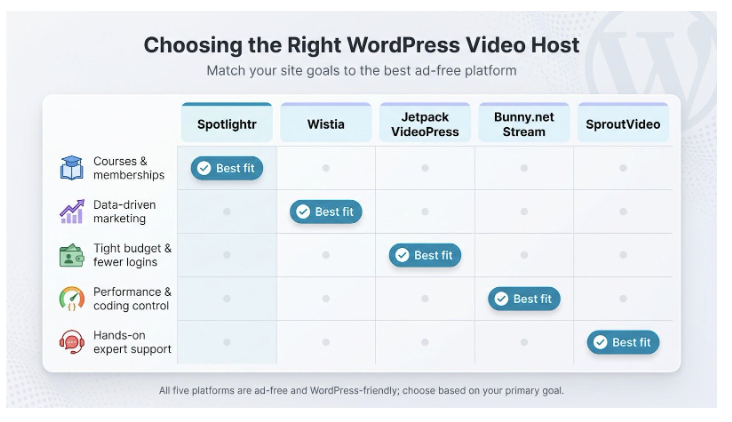
- Course or membership site? Spotlightr’s HLS encryption and domain locks keep lessons away from download tools while its in-player email gates guide viewers to the next module.
- Data-driven marketing? Wistia feeds view heat maps straight into HubSpot and Salesforce, so sales can see when a prospect re-watched pricing.
- Tight budget and no extra logins? Jetpack VideoPress lives inside WordPress and costs $5 per month for 1 TB of storage and unlimited streaming.
- Performance focus and coding skills? Bunny.net Stream serves video from more than 100 edge locations at about $0.01 per GB and lets you attach your own player.
- Need rapid, expert help? SproutVideo pairs granular security (IP locks, login gates, watermarks) with live chat support that users praise for quick, knowledgeable replies.
A final reality check: one YouTube embed still drags in up to 2.6 MB of script weight and more than 20 extra requests, while Vimeo’s 2 TB monthly cap surprised many creators. A purpose-built host prevents those headaches and keeps visitors—and revenue—on your WordPress pages.
Quick FAQs for WordPress Video Hosting
Can I just upload videos to my own server?
You can, but performance suffers. WordPress sends the full MP4 to every visitor with no adaptive quality, no global CDN, and limited theft protection. Pages slow down, hosting costs rise, and backups take longer.
Will an external host hurt my SEO?
No. Removing YouTube’s 2.6 MB of extra scripts often improves Core Web Vitals, which sends better ranking signals to Google.
Why not stay on Vimeo’s paid plans?
Vimeo works for public portfolios, but its 2022 shift to a 2 TB monthly bandwidth cap and sudden surcharge warnings showed that costs can change without notice.
How big is “one terabyte” in VideoPress terms?
About 150 hours of 1080p footage at standard web bitrates. At $5 per month, most small sites have years of headroom.
Can I mix platforms?
Yes. Many brands keep teaser clips on YouTube for discovery and host gated lessons on Spotlightr or SproutVideo for control. If you embed YouTube, lazy-load the iframe so it does not undo your speed gains.
What if a video goes viral?
Usage-based hosts such as Bunny scale automatically; you pay for the spike instead of hitting a hard cap. Fixed-tier plans like VideoPress and Wistia include large buffers but review their overage notes so you know the limits.
Conclusion
Ready to test? Each service here offers a free trial or forever-free tier. Upload one clip, embed it on a staging page, and run PageSpeed Insights before and after. Seeing the load-time drop—and the lack of pre-roll ads—usually settles the debate.