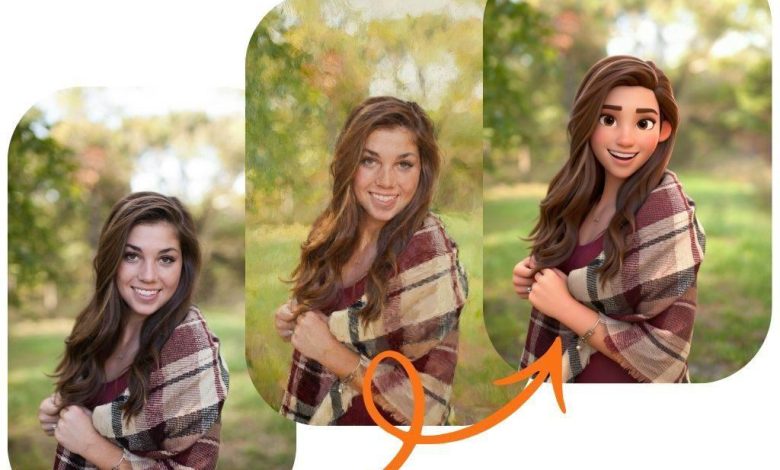
Have you ever wondered what your photo would look like as a fantasy painting or a sleek cartoon character? You can stop wondering and start creating. Thanks to powerful new technology, you can completely transform your pictures with just a few clicks. It’s a fun way to unlock new creative possibilities without needing complex software or artistic skills. The best part is that you can get started right away with a Free AI Image Generator Online.
This guide will walk you through everything you need to know about turning your simple photos into stunning works of art. We’ll cover how these tools work, practical steps to get amazing results, and creative ideas to inspire your next project.
What Is an Image to Image Generator?
An image-to-image generator is a tool that uses artificial intelligence to create a new image based on a picture you provide. Think of it as a creative partner. You give the AI a starting point (your image) and a direction (a text prompt), and it generates a completely new version that blends both inputs. This process, often called “img2img,” lets you reimagine your photos in countless ways.
Unlike traditional photo editing, which involves manual adjustments like changing brightness or applying filters, AI does the heavy lifting. The technology analyzes the composition, colors, and shapes of your original picture. Then, it uses your text description to guide the transformation. A high-quality free image to image generator allows you to control the entire creative process, from subtle style changes to complete visual overhauls.
How Does This AI Technology Work?
The magic behind image-to-image generation comes from a type of AI called a diffusion model. Here’s a simple breakdown of the process:
- Noise Addition: The AI starts by gradually adding “noise” (random visual static) to your uploaded image until it’s completely distorted. This helps the model learn the core structure of the original picture.
- Text Guidance: At the same time, the AI processes your text prompt. It understands concepts like “Van Gogh painting,” “cyberpunk city,” or “watercolor sketch” by learning from millions of images and their descriptions.
- Denoising and Creation: The AI then reverses the process. It starts removing the noise, but instead of going back to the original photo, it uses your text prompt as a guide. It reconstructs the image to match the new style you described while keeping the basic composition of your uploaded picture.
The result is a unique piece of art that respects your original photo’s layout but has a brand-new aesthetic.
How to Transform Your Images: A Step-by-Step Guide
Getting started is easier than you think. You don’t need any technical expertise to begin creating incredible images. Follow these simple steps to make your first AI-powered transformation.
Step 1: Choose Your Starting Image
Select a photo you want to transform. For the best results, choose an image with a clear subject and good lighting. Simple backgrounds often work well, as they allow the AI to focus on the main elements you want to change. You could use a portrait, a landscape, a picture of your pet, or even a simple doodle.
Step 2: Upload Your Picture
Navigate to the image-to-image generator tool and upload your chosen photo. You’ll usually find an upload button that lets you select a file directly from your computer or phone. The interface is designed to be user-friendly, making this step quick and straightforward.
Step 3: Write a Descriptive Text Prompt
This is where your creativity comes into play. Write a clear and concise text prompt that tells the AI what you want to create. The more specific your prompt, the better the AI can understand your vision.
Think about the style, mood, and details you want to see in the final image. Instead of just writing “make it a painting,” try something more descriptive like, “A portrait of a woman, impressionist oil painting, vibrant brushstrokes, warm sunset lighting.”
Prompt Writing Tips:
* Be Specific: Mention the art style (e.g., “anime,” “photorealistic,” “Art Deco”).
* Include Details: Describe colors, lighting, and textures (e.g., “glowing neon lights,” “soft pastel colors,” “rough charcoal sketch”).
* Mention Artists: You can even reference the style of famous artists (e.g., “in the style of Leonardo da Vinci”).
* Combine Ideas: Don’t be afraid to mix and match concepts like “a cat dressed as an astronaut, digital art.”
Step 4: Adjust the Settings
Most tools offer settings that give you more control over the output. One of the most important is the “strength” or “influence” slider. This setting determines how much the AI should stick to your original image versus how much it should follow your text prompt.
* Low Strength: The generated image will look very similar to your original photo, with only minor stylistic changes.
* High Strength: The AI will take more creative liberties based on your prompt, potentially changing the composition and details more significantly.
Experiment with different strength levels to find the perfect balance for your project.
Step 5: Generate and Refine
Once you’re happy with your prompt and settings, hit the “Generate” button. The AI will process your request and create a new image in just a few moments.
Don’t worry if the first result isn’t perfect. AI art is an iterative process. You can refine your prompt, tweak the settings, or even use the generated image as a new input for another round of changes. Keep experimenting until you create something you love.
Creative Ideas for Your Image Transformations
Now that you know how it works, what can you actually create? The possibilities are nearly endless. Here are some popular and creative ways to use an image-to-image generator.
Turn Portraits into Art
Transform your selfies or photos of friends and family into stunning works of art.
* Cartoon You: Give a portrait a fun, animated look by using prompts like “Pixar style character,” “anime portrait,” or “2D cartoon.”
* Classic Paintings: See yourself as a classical masterpiece with prompts like “Renaissance oil portrait” or “baroque painting.”
* Fantasy Avatars: Create a unique profile picture for gaming or social media. Try prompts like “elf warrior, fantasy concept art” or “cyberpunk android, neon lighting.”
Reimagine Your Landscape Photos
Breathe new life into your travel and nature photography.
* Change the Season: Take a sunny beach photo and transform it into a snowy winter wonderland.
* Create a Fantasy World: Turn a simple forest picture into an enchanted wood with glowing mushrooms and mystical creatures.
* Apply Artistic Styles: See what your favorite landscape looks like as a watercolor painting, a pencil sketch, or a futuristic cityscape.
Redesign Your Living Space
Image-to-image generators are great for interior design inspiration.
* Visualize New Styles: Upload a photo of your living room and use a prompt like “minimalist Scandinavian interior design” or “cozy bohemian living room with plants” to see how it could look.
* Test Paint Colors: While not perfectly accurate, you can get a general idea of how a room might look with a different color scheme. Try prompts like “living room with a dark green accent wall.”
Generate Unique Product Mockups
If you’re a small business owner or designer, you can use this technology to create compelling visuals.
* Create Themed Backgrounds: Place your product in a new environment. Upload a picture of your product on a plain background and use a prompt to add a scenic or stylized setting.
* Apply New Textures: Transform a photo of a plain t-shirt or coffee mug by applying interesting patterns or textures described in your prompt.
Why Use a Free AI Image Generator?
These tools offer a host of benefits for everyone, from professional artists to casual hobbyists.
* Accessibility: You don’t need to buy expensive software or have years of training. These tools are often web-based and free to use, making them accessible to anyone with an internet connection.
* Speed and Efficiency: Creating art from scratch can take hours or even days. An AI generator can produce dozens of ideas and variations in minutes, speeding up the creative process significantly.
* Endless Inspiration: Sometimes, all you need is a spark to get your creative juices flowing. AI can help you overcome creative blocks by presenting unexpected and exciting visual interpretations of your ideas.
* Personalization: Create truly one-of-a-kind images for personal projects, gifts, or social media content. The combination of your photo and a unique prompt ensures that no one else will have the same picture.
Start turning your photos into something extraordinary today. With a little imagination and the right tool, you can explore new artistic styles and bring your most creative ideas to life.