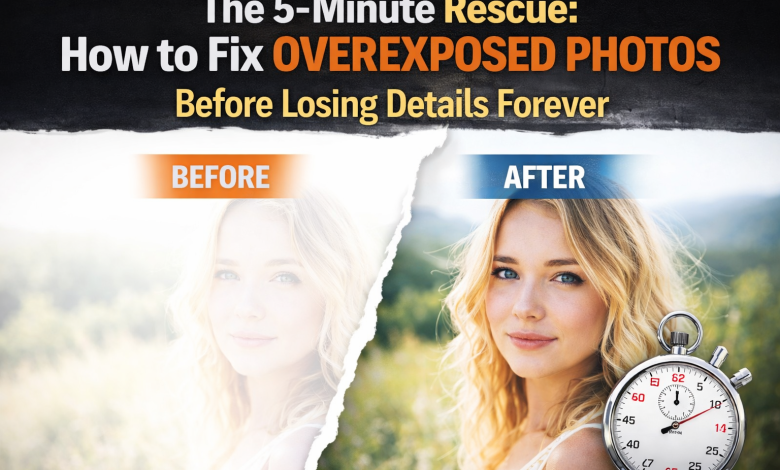
You know the feeling. You’re scrolling through vacation photos, reliving the moment until your heart sinks. The mountain view you waited hours for is ruined by a completely white sky. A family portrait that should’ve been perfect now has faces glowing like blown-out lightbulbs. In that instant, panic sets in: Did I just lose these photos forever? And you must know how to fix overexposed photos for such scenarios.
Overexposure isn’t just about a photo being “too bright.” When highlights are blown out, parts of the image may contain no usable data at all. That’s why so many people ask, ” Can overexposed photos be fixed? The answer is: sometimes, and often more than you expect, if you act fast and use the right tools.
This guide walks you through a 5-minute rescue plan for how to fix overexposed photos, starting with quick fixes and escalating to AI-powered recovery when standard edits fail. If you’ve ever searched for fixing overexposed photos, this is the clear, no-nonsense answer you’ve been looking for.
Phase 1: The 60-Second Triage (Quick On-Device Fixes)
Before using advanced tools to fix overexposed photos, always start with the device in your hand. These quick adjustments work surprisingly often, but only if the data still exists.
For iPhone Users: How to Fix Overexposed Photos on iPhone
Open the Photos app, select the image, and tap Edit. Ignore filters. Go straight to the adjustment sliders.
Start with Highlights. Slide it left slowly. This is the single most important control for overexposure because it specifically targets the brightest parts of the image. Next, slightly reduce Exposure and Brightness to rebalance the frame.
If clouds reappear in the sky or facial features regain shape, you’re in luck. That means the data was compressed but not destroyed.
Warning sign:
If dragging Highlights all the way left only turns white areas into dull gray, with no texture, no detail, no depth, the highlights are likely clipped. At that point, the iPhone editor has hit its limit.
For Everyone: Basic Software Fixes
Google Photos, Snapseed, Windows Photos, and macOS Preview offer similar sliders. Again, prioritize Highlights, then fine-tune Exposure and Contrast. These tools are excellent for mild overexposure.
The Triage Result
If detail comes back, congratulations, you’re done in under a minute. If not, you’re dealing with a more severe case. This is where most people get stuck, assuming the photo is ruined. It isn’t. This is where the real rescue begins.
Phase 2: The AI-Powered Recovery – When Quick Fixes Fail
Traditional editors can only adjust what’s already there. When highlights are pure white, there’s nothing left to pull back. That’s why sliders stop working.
Beyond the Sliders: Using AI to Reconstruct Lost Details
AI changes the equation. Modern tools designed to fix overexposed photo AI don’t just darken pixels. They analyze the image context, recognizing skies, skin tones, fabrics, landscapes, and reconstruct possible details based on trained visual models. This is exactly how an ai fix overexposed photo solution works.
When you’re searching for how to fix an extremely overexposed photo, this is the category of tool you need. 4DDiG Photo Enhancer is positioned as a specialist, not a general editor. It’s built for cases where basic fixes fail. Here is how the rescue works in a simple process.
Upload & AI Analysis
You import the photo, and the software automatically detects overexposed regions with no manual masking required.
Smart Detail Reconstruction
Instead of flattening highlights, the AI rebuilds structure: cloud layers in white skies, texture in clothing, and realistic facial contours where features were blown out.
Natural Results
Good AI doesn’t scream “edited.” The goal is restoration, not exaggeration. The output looks like the photo you meant to take.
Batch Processing
If an entire shoot was overexposed, weddings, vacations, events, you can fix multiple images at once instead of rescuing them one by one.
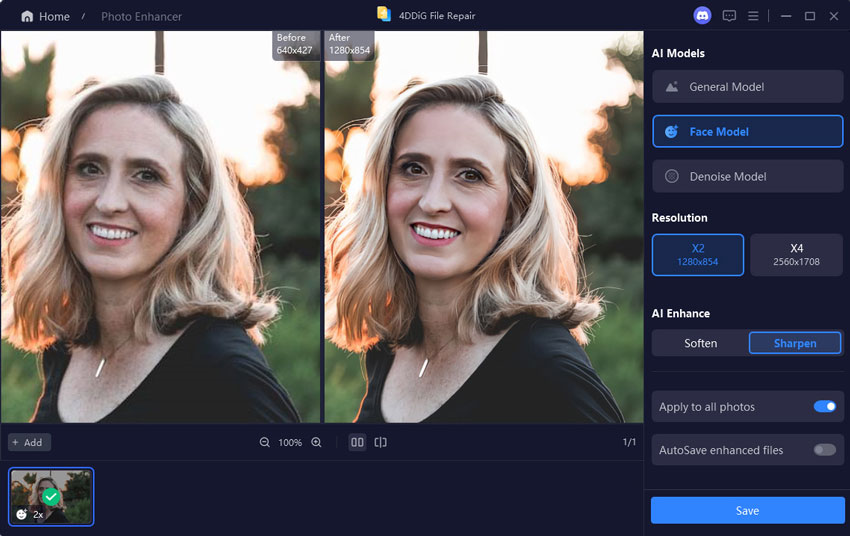
For anyone asking, can overexposed photos be fixed? This is where the answer becomes a confident yes very often.
“Free Online AI” vs. Dedicated Software: A Critical Consideration
Many users search for a free online AI solution, and that’s understandable. These tools offer convenience and zero installation.
The Upside
- Fast access
- No software download
- Simple interfaces
The Trade-Offs
- File size and resolution limits
- Watermarks on exports
- Credit systems or queues
- Privacy concerns when uploading personal photos
- Less advanced AI models for severe overexposure
For mildly overexposed images, online tools can help. But when highlights are fully blown, they often fall short.
Why Dedicated Software Wins Here
4DDiG Photo Enhancer runs locally on your computer. That means:
- Full-resolution files
- Better privacy
- More powerful algorithms
- More consistent results on difficult photos
Its free trial lets you test recovery potential without risk, making it a stronger option than most “free” online tools that limit output quality.
The Step-by-Step Rescue Plan & Final Call to Action
If you also come across such a situation, you can try the Highlights and Exposure sliders on your phone or computer. If the details don’t return, open or download 4DDiG Photo Enhancer. Upload the photo, let the AI process it, preview the result, and save the recovered image.
Stop staring at a washed-out photo. Download 4DDiG Photo Enhancer now and use its free trial to see if your “lost” details can be brought back in minutes. Rescue your memories before they’re gone for good.
FAQ
Can overexposed photos be fixed if they’re really bad?
It depends on the original file. JPEGs permanently lose data, while RAW files retain more. AI can achieve near-miracles on moderate overexposure and meaningful recovery even in severe cases. The only way to know is to try.
What’s the best way to fix an overexposed photo on my computer?
After basic edits fail, a dedicated AI photo enhancer like 4DDiG is the fastest and most effective option for non-experts.
Is there a truly good AI fix for an overexposed photo as an online free service?
Free tools exist, but they often limit resolution, add watermarks, or underperform in extreme cases. A local tool with a free trial offers better quality and privacy.
Meta Description:
Overexposed photos ruining your memories? Learn how to fix overexposed photos fast using AI tools that recover lost detail in minutes.