We all have that one box. It’s tucked away in the attic, the basement, or the back of a closet. Inside, it smells of old paper and dust. It is filled with the visual history of your family: sepia-toned weddings from the 1920s, black-and-white snapshots of grandparents you never met, and faded Polaroids from childhood vacations.
These photos are priceless artifacts. But they are also fragile. Time is a cruel enemy to physical media. Paper yellows, ink fades, and moisture creates spots. Moreover, the cameras of the past were not the precision instruments we carry in our pockets today. Focus was manual, shutter speeds were slow, and lenses were soft.
As a result, many of our most cherished links to the past are blurry, grainy, or damaged. When you look at the photo of your great-grandfather, you might see a smudge where his eyes should be. You feel a disconnect. You want to see him clearly, but the technology of 1940 failed to capture the moment perfectly.
But the technology of 2024 can fix it.
We have entered a golden age of digital preservation. With the help of advanced AI tools designed to unblur image data, we can peel back the layers of time. We can sharpen faces, remove grain, and resurrect details that we thought were lost forever. Here is how you can use this technology to reclaim your family legacy.
The Science of “Memory Restoration”
Why do old photos look so blurry? It’s usually a combination of three factors:
- Technical Limitations: Old film had high “grain” (noise), and cameras lacked image stabilization.
- Physical Degradation: As the chemicals in the photo paper break down, the sharp edges of the image bleed into each other, creating a “soft” look.
- Scanning Issues: Even if the original photo is okay, scanning it on a cheap home printer often results in a low-resolution digital file.
Traditional restoration involves a skilled artist manually painting over the image in Photoshop. It costs hundreds of dollars per photo and takes days.
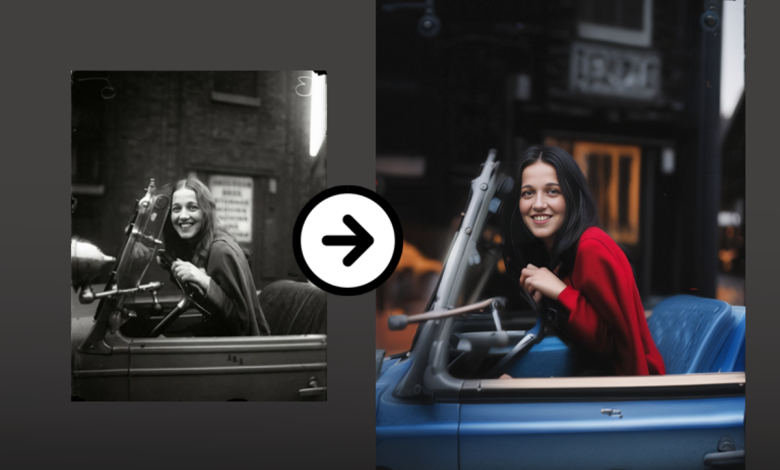
AI restoration works differently. It uses a neural network trained on millions of human faces. When you upload a faded portrait to unblur image, the AI recognizes the geometry of the face. It knows what a human eye looks like; it knows the texture of skin. It essentially “re-imagines” the missing details based on the blurry data provided. It doesn’t just sharpen the noise; it reconstructs the features.
The result is often startling. The “fog” lifts. The eyes sparkle. The person in the photo stops being a distant historical figure and becomes a living, breathing human being again.
Step-by-Step: From Shoebox to Frame
Revitalizing your family archive is easier than you think. You don’t need to send your originals away in the mail. You can do it from home.
Step 1: Digitize with Care
Before you can fix the photo, you need a digital copy. If you have a scanner, scan at the highest DPI (dots per inch) possible—at least 600 DPI. If you don’t have a scanner, use a scanning app on your phone (like Google PhotoScan) to reduce glare.
Step 2: The AI Restoration
Upload your digital file to unblurimage.ai. This is where the magic happens.
- Face Enhancement: The tool’s primary strength is facial reconstruction. It will identify the faces in the group shot and apply a specific algorithm to unblur image features specifically.
- Scratch and Dust Removal: Many AI models also treat white specks (dust) and cracks as “noise” and smooth them out automatically.
Step 3: Upscaling for Print
Old photos are often small—wallet size or 4×6. If you try to blow them up for a funeral memorial or a framed anniversary gift, they become pixelated. The AI tool automatically upscales the resolution as it sharpens, giving you a file large enough to print on an 8×10 or even a canvas.
 Don’t Forget the Home Movies: The VHS Dilemma
 Don’t Forget the Home Movies: The VHS Dilemma
While photos capture a moment, videos capture a personality. The way your father walked, the sound of your grandmother’s laugh, the chaos of a Christmas morning in 1995.
Most of us have these memories trapped on VHS tapes, Hi8, or Super 8 film. If you have digitized them, you know the disappointment. On a modern 4K TV, a VHS tape looks terrible. It is a soup of static, tracking lines, and extreme blur.
This is where you need to pivot from photo tools to a video enhancer.
Just as AI can reconstruct a face in a photo, a video enhancer can reconstruct frames in a movie.
- Stabilization: Old camcorders were heavy and lacked stabilization. AI can smooth out the shaky “handheld” look.
- De-interlacing: Old TV signals used “interlaced” lines (that comb-tooth effect you see on fast motion). AI converts this to progressive, smooth video.
- Resolution Boost: It can take that blurry 480p footage and upscale it to 720p or 1080p, making it watchable on modern screens without the headache-inducing blur.
If you are undertaking a family history project, do not ignore the moving pictures. Using a video enhancer on your parents’ wedding video is perhaps the most emotionally impactful gift you can give them.
Creative Ways to Use Restored Images
Once you have used the tool to unblur image archives, what do you do with them?
- The “Then and Now” Recreation
This is a popular social media trend. Take a sharp, restored photo of your parents from 30 years ago, and recreate the pose today. The impact only works if the original photo is clear enough to see the details. - Ancestry and Genealogy Profiles
Websites like Ancestry.com or MyHeritage rely on photos to build connections. A blurry silhouette is forgettable. A sharp, restored portrait invites engagement from distant relatives who might recognize the person and share more information with you. - Memorial Services
When a loved one passes, we scramble to find photos for the slideshow or the program. Often, the only photos we have are small, blurry crops from group shots. By running these through an AI restorer, you can create a dignified, high-quality portrait that honors their memory properly.
The Ethics of Restoration
A common question arises: “Is this real?”
When AI reconstructs a face, is it accurate?
In 99% of cases, yes. The AI uses the existing bone structure and shadows to guide the restoration. However, it is an interpretation of the reality.
For historical accuracy, it is always best practice to keep the original file untouched and save the restored version as a copy. Label it as “digitally enhanced.” This preserves the original artifact while allowing you to enjoy the clarity of the modern version.
Conclusion: The Ultimate Gift is Clarity
We take more photos in a month than our ancestors took in a lifetime. That scarcity makes every old photo precious. They are the only evidence we have of the lives that paved the way for ours.
Leaving these photos in a state of blur and decay is a disservice to the memories they hold. You have the power to wipe away the fog of time. Whether you are using a video enhancer to save a childhood birthday party or looking to unblur image details of a great-grandparent, the technology is here, and it is accessible.
Don’t let your history fade away. Visit unblurimage.ai today, open that shoebox, and bring your past into the sharp focus of the present. It is more than just editing; it is preserving a legacy.