One-Prompt Photo Editing: How to Edit Images by Describing the Change
You need the product shot in blue by this afternoon, the banner sky brightened before the campaign review, the background of the team photo replaced and every one of those edits means either waiting for a designer or wrestling with selection tools yourself. For small marketing teams and solo sellers, the cost of these “tiny” edits adds up faster than almost any other creative task.
You can collapse that whole workflow into a sentence with Wondershare Repairit One-Prompt Edit lets you type the change you want and the AI makes it. Its convenient online version means you can quick-fix an image in your browser without installing anything. This guide explains how text-prompt editing works and shows you the three-step workflow.
Part 1. The Hidden Cost of Manual Photo Editing
Why Traditional Editing Slows You Down
Four costs never show up on an invoice, but you pay them anyway:
- Learning Curve: layer masks, selection feathers and blend modes take months to master — knowledge you use a handful of times a month.
- Back-and-Forth Delays: even with a designer on call, every revision travels through a briefing, a queue and a review.
- Version Chaos: files named “final_v2_final” are a real tax on your team’s focus and filing.
- Repetitive Small Changes: swapping a color, cleaning a background or removing a stranger from the corner is an hour of manual work each time.
What Is One-Prompt Photo Editing?
Wondershare Repairit is an advanced, AI-powered data repair tool that fixes corrupted videos, photos and files, and restores damaged media. Its One-Prompt Edit feature is built for the workflow: you upload an image, type what should change, “make the jacket navy”, “put this model in a sunlit kitchen” — and the AI edits the picture to match, preserving everything you did not mention.
Key Features
- Natural-Language Instructions: you describe the edit in plain words; there are no tools, layers or masks to learn.
- Targeted, Contained Changes: the AI alters only what you asked for and keeps the rest of the frame faithful.
- Multi-Turn Refinement: not perfect on the first try? Type a follow-up instruction instead of starting over.
- Cross-Platform Availability: Windows and Mac desktop tools, plus an online edition for quick browser-based edits.
- Batch-Friendly Workflow: repeat the same instruction across a product set without re-describing it.
Part 2. How to Edit a Photo with One Prompt
The whole workflow takes three steps.
Step 1. Open One-Prompt Edit and Upload Your Image
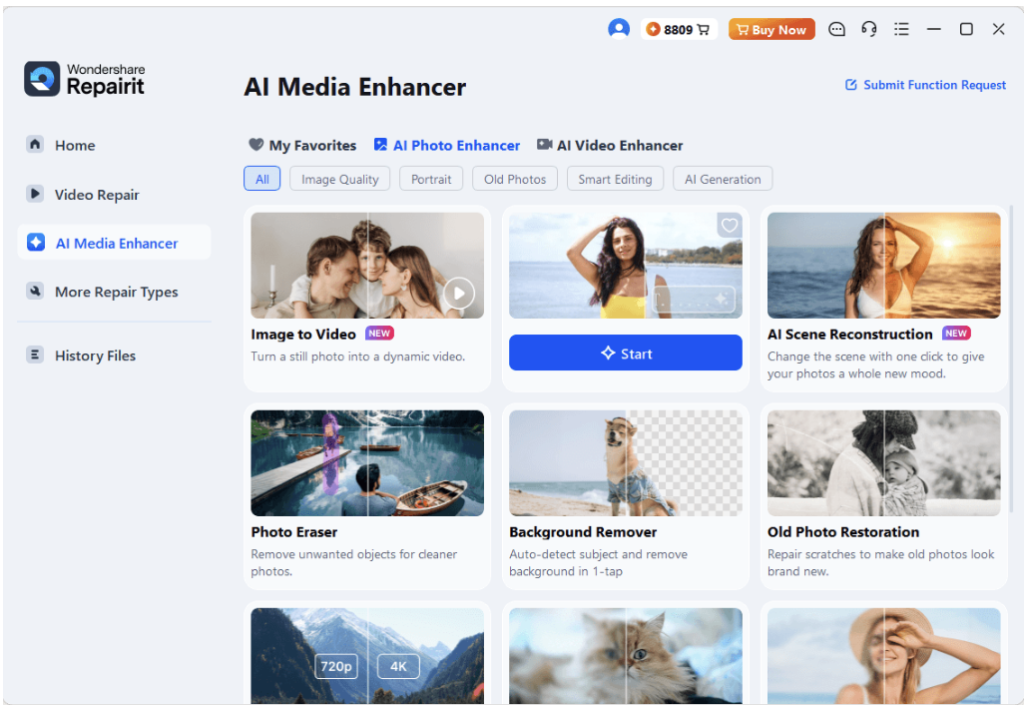
Launch Wondershare Repairit on your Windows or Mac, click the “One-Prompt Edit” section, then press “+ Add” or drag the image in. On Windows, the launch screen looks like this:
Step 2. Type the Change You Want
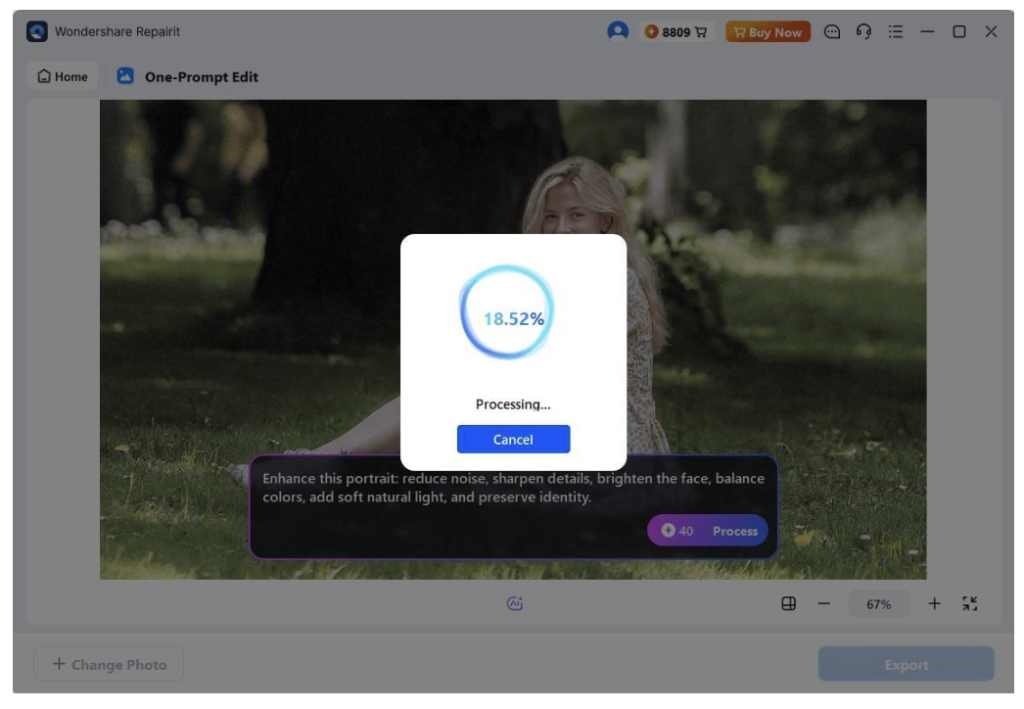
Write the instruction as if briefing a colleague, “change the background to a clean white studio” or “make the sky golden hour”, and press Enter. The AI applies the edit while leaving the rest of your image untouched.
Step 3. Review the AI Edit and Export
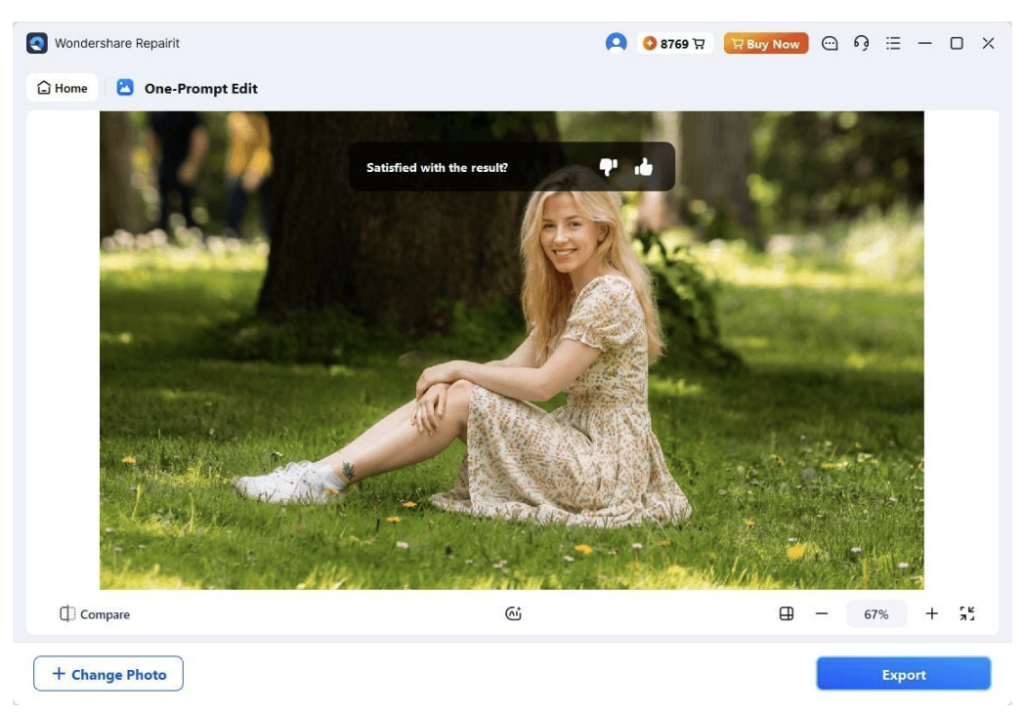
Compare the result with your original, refine with a follow-up prompt if needed, then export the finished image and put it to work.
Key Technical Advantages
Why this beats adding another editor to the team’s toolkit:
- Instruction Accuracy: the model interprets intent, not just pixels — “warmer” lands as a full color grade, not a single slider.
- Zero Learning Curve: your whole team already knows how to type a sentence; onboarding is zero minutes.
- Fast Iteration: each revision is a new sentence, so exploring five directions takes minutes, not days.
- Online Convenience: for a quick one-off edit between meetings, open Repairit Online in your browser — upload, describe, download — with nothing to install.
Part 3. Everyday Use Cases for Your Business
Teams get the most from prompt-based editing in repeatable situations:
- Product Variants: one photoshoot becomes every colorway — describe each variant and export the set.
- Seasonal Campaigns: refresh the same hero image for autumn, winter and sale periods with one sentence each.
- Localized Ads: swap backgrounds and props to match each market without re-shooting.
- Go Further with Scene Changes: when an edit needs a whole new environment rather than a tweak — a different location, sky or lighting — pair your prompts with the AI Scene Retake tool, which rebuilds the full scene around your subject.
Conclusion
Photo editing no longer has to route through a designer’s queue for the small stuff. With One-Prompt Edit in Wondershare Repairit you type the change you want, review it and export — three steps from brief to finished image, with the online version covering quick fixes in your browser. Try it on the next edit you would normally have delegated; you will type it faster than you can brief it.