While many AI video models promise cinematic results, the reality is that most teams simply need a tool that can turn prompts or images into usable draft footage without a complicated setup. The Kling 2.6 API sits in this middle ground: not a breakthrough model, but a serviceable option for generating short clips with synchronized audio when absolute quality is not the primary goal. Developers who want predictable outputs and a lightweight workflow tend to look for APIs that “just work,” and this is largely where Kling 2.6 positions itself.
Through platforms like Kie.ai, the Kling Video 2.6 API offer an accessible way to prototype video ideas or power simple generative features inside applications. Instead of managing heavy models, teams can focus on iterating quickly and keeping costs under control—making Kling 2.6 API a practical consideration for creators and developers who value convenience.
What is Kling 2.6 API: Features and Technical Capabilities
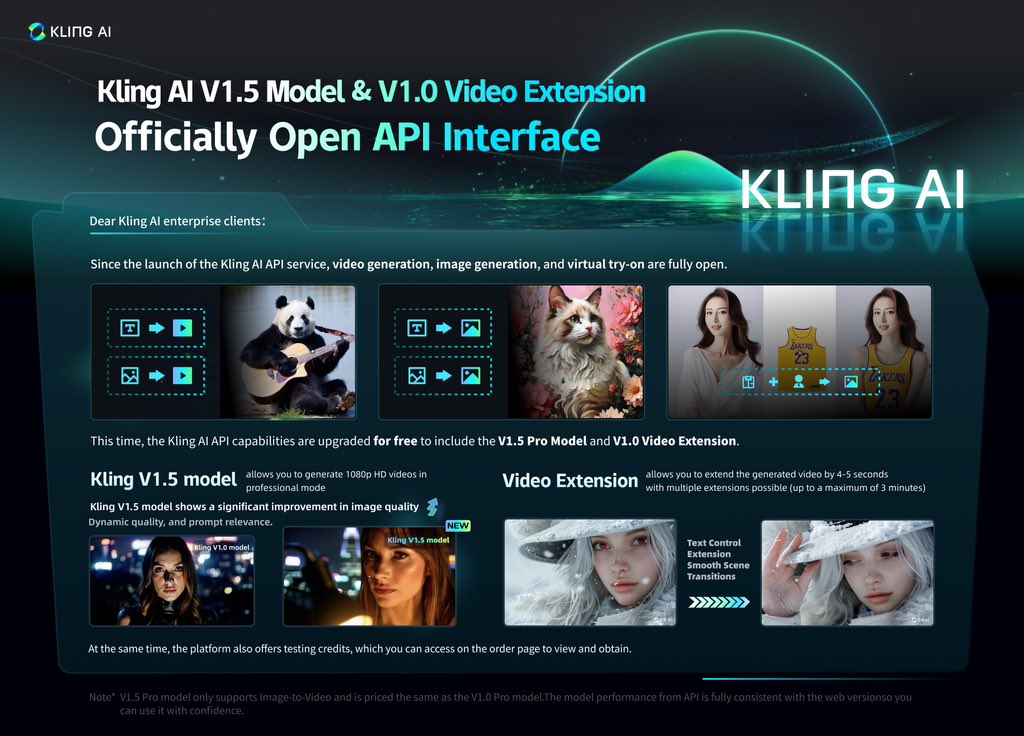
Native Audio Generation Integrated into the Kling Video 2.6 API
One of the most practical aspects of the Kling Video 2.6 API is its support for “native audio,” meaning the API generates visuals and audio tracks in the same request. Instead of stitching sound in post-processing, developers receive a clip that already includes voices, ambient noise and basic sound effects. This reduces workflow complexity and is particularly useful for lightweight content tools where synchronized audio is a requirement.
Controllable Voices, Speech Content and Emotional Tone
Unlike many text-to-video systems that treat audio as an afterthought, the Kling 2.6 API allows developers to guide who speaks, what they say and the emotional style of the delivery. The API can also produce ambient sound and small effect cues, giving teams enough flexibility to adjust pacing and mood without relying on a separate sound design pipeline. English and Chinese speech are supported; other languages are automatically translated into english for speech output.
Text-to-Video or Image-to-Video Generation
Both the Kling Text to Video API and Kling Image to Video API are built around a low-friction workflow. Developers submit either a prompt or an image reference, and the system handles scene construction, motion, voice generation and audio mixing. This focus on simplicity makes Kling 2.6 suitable for prototypes, content automation tools and interfaces where rapid generation matters more than fine-grained frame control.
Multi-Layered Audio Quality and More Realistic Mixing
The Kling 2.6 API produces vocal tracks, ambient textures and sound effects as separate conceptual layers, resulting in clearer audio and more structured mixes compared with earlier versions. While it is not intended to replace professional production tools, the output is sufficiently detailed for early drafts, concept previews and everyday consumer-facing applications.
Improved Semantic Understanding for Prompts and Narratives
The Kling AI API benefits from the model’s stronger semantic parsing, allowing it to interpret descriptive prompts, spoken-style instructions and simple narrative structures with greater consistency. This leads to outputs that more accurately reflect the creator’s intent, particularly in scenes where spoken lines, character actions and environmental cues need to align.
How to Use the Kling 2.6 API: A Straightforward Developer Workflow
Obtain Your Kling 2.6 API Key and Choose the Model Endpoint
Integration begins with obtaining an API key and selecting the model variant you intend to use. Each corresponds to a different generation mode, so choosing the correct model name—for example, “kling-2.6/image-to-video”—is essential before creating tasks. The Kling 2.6 API documentation outlines all available endpoints and helps ensure that your request structure matches the model’s capabilities.
Structure a Create-Task Request
To generate a video, you send a JSON request to the createTask endpoint containing the selected model, a prompt, optional image URLs and basic parameters. The Kling 2.6 API handles visual and audio generation internally, so the developer’s responsibility is simply to supply descriptive text and, if relevant, an image reference. Duration is fixed at 5 or 10 seconds, which keeps output behavior predictable and simplifies handling on the client side.
Register a Callback URL for Automatic Task Completion Updates
If your application requires asynchronous handling, you can pass a callBackUrl in the request. When the model completes processing, Kie.ai sends a POST notification with the result status, timing and output URLs. For teams building automated pipelines, this callback mechanism reduces polling and helps synchronize downstream steps such as storing the file, triggering edits or updating user-facing components.
Retrieve and Handle the Generated Video Output
Once the task is complete—via callback or manual query—you receive a structured response containing a taskId, generation metadata and the final result URLs. The output includes both video and audio when sound is enabled, reflecting the model’s native audio capability. At this stage, applications typically save the file, return it to users or trigger additional processing. Since the Kling 2.6 API abstracts away model execution, your integration work remains focused on handling results rather than managing inference.
Affordable Kling 2.6 API Price on Kie.ai
On Kie.ai, the Kling 2.6 API uses a credit-based, pay-as-you-go pricing model — no subscription required. A 5-second video without audio costs US $0.28, and a 10-second no-audio clip costs US $0.55. With audio enabled, pricing shifts to US $0.55 for 5 seconds and around US $1.10 for 10 seconds. These rates are roughly 20% lower than the official pricing, giving developers a more cost-efficient way to experiment with the Kling Video 2.6 API and other generation endpoints.
This flexible credit system lets teams start with as little as US $5 in credits, with additional discounts for higher-volume purchases. For many developers, this structure makes the Kling 2.6 API a practical option for small-scale video generation or gradual integration into existing products—without the commitment of a monthly subscription.
Practical Use Cases for the Kling Video 2.6 API
Rapid Concept Prototyping for Creative Tools
For teams building lightweight creative or storytelling tools, the Kling Video 2.6 API offers a fast way to prototype short scenes using only text. The model’s integrated audio generation means developers can produce clips with voices, ambient sound and simple effects without adding separate sound-design components. This makes the Kling 2.6 API especially practical for testing narrative ideas, interactive prompts or early-stage content flows inside consumer applications.
Turning Static Designs into Animated Drafts
Design and content apps often need to transform static visuals into motion for previews or user-generated content features. The Kling Image to Video API can animate uploaded images into 5- or 10-second clips, automatically generating synchronized audio when enabled. This helps teams offer “instant motion drafts” for moodboards, templates or mobile editing tools—without the complexity of maintaining a custom animation pipeline.
Automated Short-Form Content for Marketing and Social Apps
Some applications rely on quick promotional snippets, onboarding visuals or explainer-style micro-content. By combining text prompts with automatic audio narration, the Kling Text to Video API enables the generation of simple, coherent clips that fit these use cases. While not intended for professional production, it provides enough structure and clarity for everyday marketing workflows that depend on speed and low overhead.
Voice-Guided Educational Clips and Instructional Micro-Lessons
Platforms that generate short educational or instructional content can use the Kling 2.6 API to produce segments with clear, controlled voice output. Developers can specify what the speaker says and the emotional tone, allowing the system to create concise explanations or demonstrations paired with basic visuals. This reduces the need for manual recording and helps learning products scale their content libraries more efficiently.
The Role of the Kling 2.6 API in Today’s Video Generation Landscape
The Kling 2.6 API sits in a practical space within the current ecosystem of text-to-video and image-to-video tools. It is not positioned to replace advanced production workflows, but it offers a straightforward way to generate short clips with synchronized audio, predictable timing and minimal setup. For developers who need lightweight generation capabilities—whether for prototyping, content tools or small-scale automation—the Kling Video 2.6 API provides a workable balance of functionality and simplicity.
As demand grows for accessible AI video features, services like Kling 2.6 demonstrate how fixed-duration outputs, native audio generation and clear API structures can reduce friction for everyday use cases. Rather than aiming for cinematic results, the model focuses on delivering results that are consistent enough for real applications. In that sense, the Kling 2.6 API contributes to a broader shift toward practical, developer-friendly video generation tools that prioritize reliability over spectacle.