Image generation APIs are increasingly being used in real applications, from e-commerce platforms to content tools and media systems. Instead of manually creating every visual asset, teams can now generate and edit images directly within their workflows.
Nano Banana 2 API provides developers with a structured way to integrate image generation into their products. Built on Gemini 3.1 Flash, it supports features such as consistent multi-object rendering, structured text placement, and real-time grounding. This article walks through how the Nano Banana 2 API works in practice and what developers should consider when integrating it into production environments.
What Makes Nano Banana 2 API Stand Out in Image Generation
Advanced World Knowledge: Real-Time Information for More Accurate Image Rendering
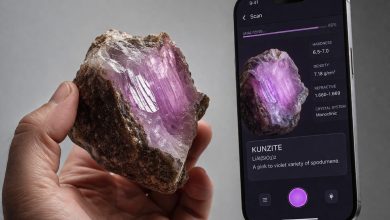
Nano Banana 2 API leverages real-time web search to integrate up-to-date information, enhancing the accuracy and relevance of the images it generates. By accessing the latest data on specific topics, Nano Banana 2 API ensures that the images reflect the most current trends and facts. This is particularly useful for applications requiring infographics, data visualizations, or subject-specific content. With advanced world knowledge, developers can generate images that are not only visually appealing but also contextually accurate and informative, giving businesses a significant edge in content creation.
Precise Text Rendering and Translation for Multilingual Content
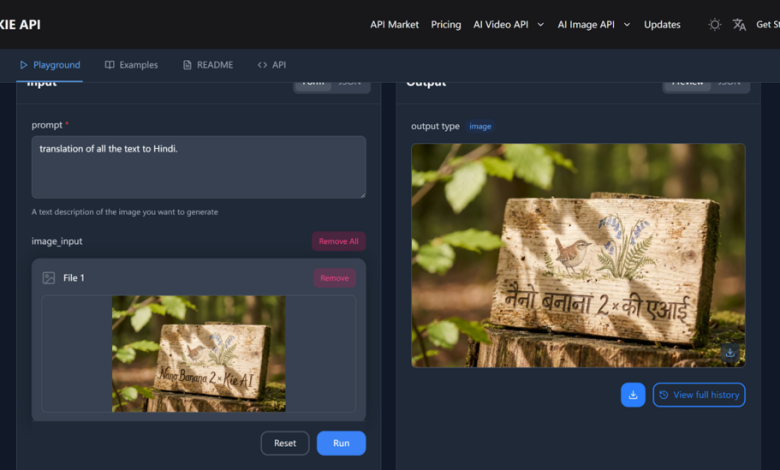
One of the standout features of Nano Banana 2 API is its ability to perform precise text rendering and accurate translation within images. Whether you are creating multilingual content for global audiences or transforming text-heavy visuals, Nano Banana 2 API ensures that text is rendered clearly, and translations are accurately applied. This feature is invaluable for businesses operating across multiple regions, allowing them to generate images that are both visually appealing and linguistically appropriate, improving communication and engagement in diverse markets.
Consistency: Maintaining Similarity Across Up to 5 Characters and Realism Across 14 Objects
Nano Banana 2 API excels in maintaining image consistency, a crucial feature when dealing with complex images or scenes. It ensures that up to 5 characters maintain visual similarity and up to 14 objects retain their realism within a single workflow. This ability is particularly important for businesses in the gaming, entertainment, or e-commerce sectors, where cohesive visual storytelling and realistic product representation are essential. By maintaining consistent elements, Nano Banana 2 API delivers high-quality images that are professional, coherent, and aligned with the intended narrative or branding.
New 512px Resolution and Enhanced Aspect Ratio Support
Nano Banana 2 API now supports 512px resolution, expanding the flexibility of image generation for various use cases. In addition to the enhanced resolution, the API also supports a wider range of aspect ratios, providing more customization options for developers. Whether you need images for mobile apps, web design, or e-commerce platforms, the added resolution and aspect ratio options allow for optimal image quality across all devices and formats. This new feature helps businesses create sharp, visually appealing images that look great on any screen size, from smartphones to desktop monitors.
Gemini 3.1 Flash Image API Pricing Comparison
Google’s official pricing for Gemini 3.1 Flash Image includes separate input and output charges. Input is billed at $0.25, while output pricing scales by resolution:
$0.067 per 1K image, $0.101 per 2K, and $0.151 per 4K. Web search grounding includes 5,000 free monthly requests, then $14 per 1,000 requests.
Kie.ai offers Gemini 3.1 Flash Image API under a credit-based, pay-as-you-go model with output-only pricing:
$0.04 per 1K image, $0.06 per 2K, and $0.09 per 4K. With no separate input fee and a low minimum purchase threshold, this structure may provide more predictable costs for teams managing generation volume.
How to Integrate Nano Banana 2 API into Your Development Workflow
Integrating Kie.ai’s Nano Banana 2 API into your development workflow is a seamless process that allows you to leverage advanced image optimization and generation capabilities.
Obtain Your Nano Banana 2 API Key
The first step is to register on Kie.ai and obtain your unique API key. This key is essential for authenticating your API requests, ensuring secure and authorized access to the API’s powerful features. After registering, you’ll receive your API key, which must be included in your requests to authenticate and enable interaction with the Nano Banana 2 API.
Set Up the API in Your Development Environment
Once you have your API key, the next step is setting up the Nano Banana 2 API in your development environment. Depending on your project, you may need to configure the required libraries or dependencies for smooth integration. Ensure that your environment is ready to handle requests securely and efficiently, facilitating seamless communication with Nano Banana 2 API.
Create a New Image Generation Task
After setting up the environment, the next step is to create a new image generation task. To do this, you will need to send a request to the appropriate Nano Banana 2 API endpoint, providing key parameters such as the model name and input details like the image description, resolution, and aspect ratio. If needed, you can also include a callback URL to receive updates once the task is complete. These parameters guide Nano Banana 2 API in processing the image as per your specifications.
Monitor Task Status and Retrieve Results
Once you’ve submitted your task, it’s important to monitor the status of your image generation process. You can easily track the task’s progress and check whether it’s still being processed or has been completed. Upon completion, you can retrieve the final image output and integrate it into your application or platform. This allows you to use the generated image seamlessly within your project.
Important Considerations When Integrating Nano Banana 2 API
While integrating Kie.ai’s Nano Banana 2 API into your development workflow is straightforward, there are several important considerations to ensure smooth and efficient integration. Here are key points to keep in mind:
API Key Management
When working with Nano Banana 2 API, it’s crucial to manage your API key securely. Ensure that your API key is stored safely and not exposed publicly, as it grants access to your API. Consider using environment variables or a secure secrets management system to store your key. Unauthorized access to your API key could result in misuse or unexpected costs, so it’s essential to implement proper security measures.
Rate Limiting and Quotas
Kie.ai’s Nano Banana 2 API operates with specific rate limits and quotas. Be sure to understand the API’s rate limits to avoid hitting thresholds that might lead to throttled requests or service interruptions. Depending on your usage volume, consider monitoring your requests and adjusting your integration to ensure smooth processing, particularly if you are handling a high number of requests in a short time.
Handling Callback Notifications
If you decide to use the callback URL option, it’s important to ensure that your system is configured to handle callback notifications appropriately. When the image generation task is complete, the API will send a POST request to your specified callback URL. Your server should be capable of receiving and processing these notifications to ensure you can act upon the results promptly. Ensure that your server can handle error responses as well, such as task failures, to avoid delays in your workflow.
Input Parameters and Data Handling
The success of Nano Banana 2 API heavily depends on the correct input parameters you provide. Ensure that all required fields, such as prompt, resolution, and aspect ratio, are correctly formatted. For optimal performance, double-check that any input images (if applicable) adhere to the file size and format requirements. Incorrect inputs could lead to errors or subpar output. It’s also important to monitor the size and complexity of the images to avoid performance issues.
Image Output Formats and Optimization
Nano Banana 2 API supports various output formats like JPEG and PNG, so ensure you choose the correct format based on your application needs. Keep in mind that higher resolution images (like 2K or 4K) will take longer to generate, so be mindful of the trade-off between image quality and processing speed. Consider optimizing the images post-generation if necessary to improve load times or performance in your app or website.
Error Handling and Debugging
While Nano Banana 2 API is robust, it’s important to implement proper error handling and logging mechanisms. Ensure your system can handle common API errors, such as rate limits, server errors, or bad requests. Having comprehensive logging in place will make it easier to debug issues and track any discrepancies in image generation results, allowing you to fix them quickly.
Integrating Nano Banana 2 API into Scalable AI Image Generation Systems
As image generation becomes part of core product infrastructure, selecting and integrating the right API requires more than evaluating visual quality alone. Factors such as pricing structure, task orchestration, resolution control, and consistency handling all influence how well an image generation system performs in production.
Nano Banana 2 API provides a structured approach to AI image generation and editing within modern development workflows. By understanding its capabilities, cost model, and integration considerations, teams can make informed decisions about how to incorporate AI image generation into scalable applications without adding unnecessary complexity.