A confusing merge, a sudden stop, or a parking‑lot bump can leave you stressed because you know what you saw—but you can’t prove it. You might also worry about distractions during routine trips, or about leaving your vehicle unattended where a hit‑and‑run or break‑in could occur without witnesses. A dash cam doesn’t prevent every incident, but today’s in‑car cameras increasingly pair video with AI‑driven automation—helping you capture the right moments, reduce ambiguity, and turn raw footage into clearer answers when things go wrong.
AI matters here because driving is fast, messy, and unpredictable. A camera records everything, but AI‑style features such as intelligent event detection, scene analysis, and automated clip tagging help you find what matters and respond safely—without turning your drive into a tech project.
Choosing a Reliable System
A credible manufacturer should clearly explain what the camera records, how video is stored, and how parking features work in real‑world conditions. That transparency becomes even more important as a dash cam add AI‑connected capabilities like intelligent motion detection, voice control, and assisted safety alerts.
Use one standard when comparing brands: clear specs, plain‑language guidance, and realistic limits. “AI features” are only helpful if you understand what triggers them, what they save, and how easily you can retrieve the right clip later.
In‑Car Camera Adoption
Everyday Accountability, Now Reinforced by Data
When you know your drive is recorded, you often self‑correct. You may maintain a greater following distance, slow earlier for traffic lights, and avoid squeezing into a gap.
Modern dash cams can also make self‑review practical. Instead of watching hours of video, AI‑style tagging can surface key moments—hard braking, sudden swerves, near misses, or impacts—so you can notice patterns like rushed turns or late lane changes without obsessing over every minute.
If you want results without overthinking it, use your dash cam like a mirror: pick one focus for the week and review only a few minutes of flagged footage when you’re safely parked.
Recording Supports Safer Choices
Multi‑Angle Coverage That Reduces Ambiguity
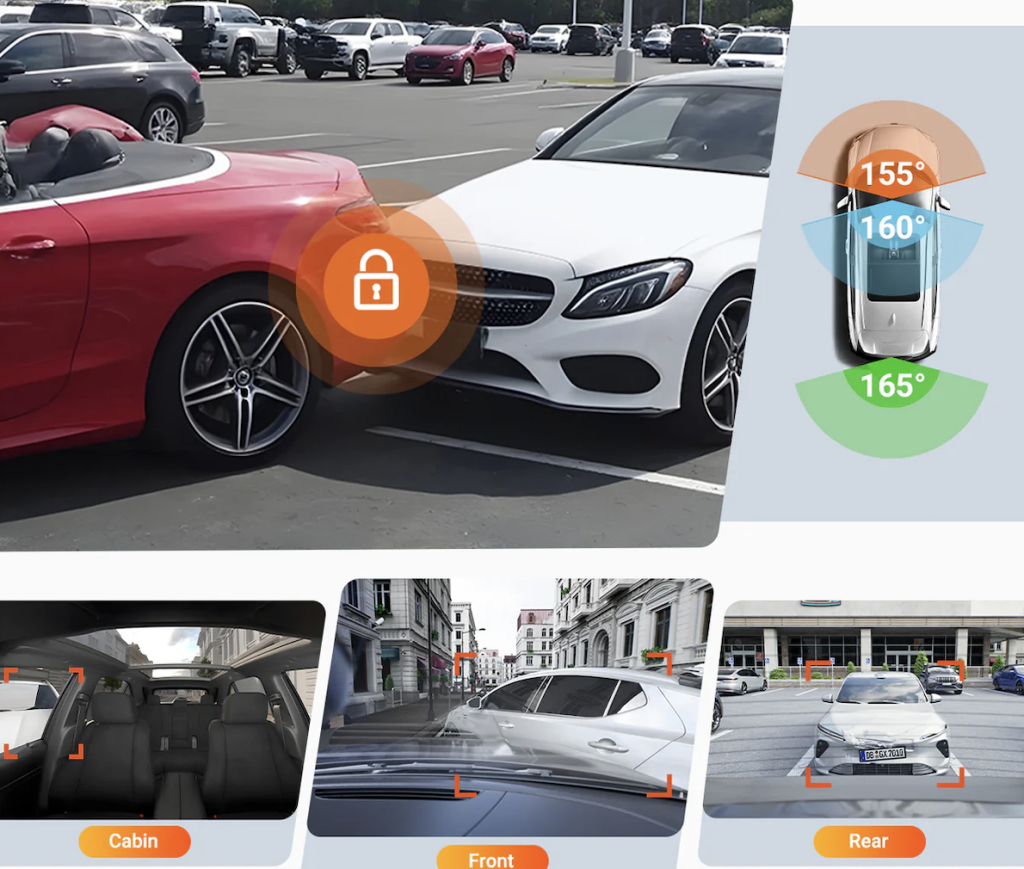
A dash cam with front and rear views can reduce ambiguity after an incident by capturing what happened in both directions. If you drive rideshare or want cabin context, a multi‑channel setup can add an interior view without changing how you drive.
Where AI connects: multiple angles give computer‑vision features more context. That can support better event detection—activity near doors, abrupt stops, risky merges—and can help some systems provide assisted warnings that encourage earlier attention to potential hazards.
Clear Video in Low Light (So “Smart” Analysis Has Something to Work With)
Many incidents occur at dawn, dusk, or in rain, when glare and contrast obscure details. Look for features that balance bright headlights with darker shadows. If windshield reflections are a problem, glare‑reducing filters can help during the day, but you should remove them if they reduce night clarity.
This isn’t only about “pretty footage.” AI features are only as good as the input. If critical details are washed out, automation may miss what matters.
Minimal Distraction Setup
Hands‑Free Use, Assisted by Voice and Stable Mounting
Mount the camera high near your rear‑view mirror so it sits outside your main sightline. Confirm the angle once and leave it. Use a stable mount that won’t shift under heat or vibration, and route cables so they don’t interfere with your view.
As cameras add “smart” controls—like voice commands on some models—the goal should still be the same: set it and forget it while driving. Any feature that tempts you to tap a screen mid‑drive is moving in the wrong direction.
Safe Footage Access (AI Helps, But Rules Still Matter)
Wireless transfer can help you save an important clip before loop recording overwrites it. Set one rule: if the car is moving, you do not review or manage video. Pull over, park, and then export what you need.
The most practical “AI” is sometimes simple automation: quick clip saving, easy tagging, and fast retrieval—without requiring you to touch anything while driving.
Reviewing Habits with Data (Turning Video Into Feedback)
Trip Context You Can Actually Use
GPS logging, whether built‑in or added through an accessory, can attach time, location, and speed to your footage. That context can reveal patterns—speeding on familiar roads, recurring risky lane changes, or hard braking in the same intersections.
Think of this as entry‑level driver analytics: not to judge yourself, but to identify repeatable moments where a small change (earlier braking, more following distance, fewer rushed merges) reduces risk.
Capturing Key Details with Automated Event Tagging
Many cameras use sensors to mark clips around sudden changes, which can help you locate a hard brake, a bump, or a collision. If your camera “locks” files too often on rough roads, lower the sensitivity so true incidents stand out.
AI connection: whether it’s basic sensor‑based tagging or more advanced scene‑based detection, the purpose is the same—reduce manual sorting so you can find the important moment faster.
Safer Habits Beyond Driving
Parking Protection That Watches When You Can’t
Parking mode systems can record via motion detection, impact detection, or time‑lapse, which compresses hours into a shorter video you can scan.
AI‑style motion detection matters most here: it prioritizes activity near your vehicle so you’re not forced to review empty footage. Some systems also support remote access, turning your dash cam into a lightweight security layer when you’re away.
For consistent parking monitoring, power matters. A hardwire kit can provide steady power from the fuse box and include protection that stops recording before the battery drops too far.
For theft deterrence, keep valuables out of view, choose well‑lit areas, and treat the camera as one layer of protection alongside basic security habits.
Reliability and Storage (The Unsexy Part That Makes “Smart” Actually Work)
Continuous recording is demanding on storage. Use a high‑endurance memory card designed for frequent rewrites, format it in the camera on a schedule, and replace it if you notice errors or missing files. Re‑check your mount after a few days, since adhesives can settle.
If you’re comparing models, treat the spec sheet as a translation exercise: which features help you record clearly, identify key moments quickly, and monitor the car when you’re away—without creating distraction.
Conclusion
A camera doesn’t replace good judgment, but it can reinforce it—especially when AI‑like automation reduces friction through smarter event tagging, more useful parking detection, and optional assisted alerts that help you notice risk sooner.
When you choose dependable power, reliable storage, and a setup you don’t touch while driving, you make it easier to stay focused and handle disputes with less stress. Review key moments only when parked, adjust one habit at a time, and keep your system maintained so it’s ready when you need it.